
Can Air Purifier Damage Electronics? Essential Safety Guide

The concern that air purifiers might damage electronics is understandable, but with proper placement and understanding, this risk is minimal. This guide will clarify how to safely operate air purifiers near your valuable devices.
Air purifiers are fantastic for improving indoor air quality, but a common question arises: can air purifiers damage electronics? Many people worry about the potential effects of the air circulation, ions, or ozone that some purifiers might produce. If you’re concerned about your sensitive computer equipment, home theater systems, or other electronic gadgets, you’re in the right place. I’ll break down the science behind air purifiers and electronics, explain potential risks, and most importantly, provide clear, actionable steps to ensure your devices remain safe and sound. Let’s demystify this common concern and ensure you can enjoy cleaner air without any electronic mishaps.
Understanding Air Purifier Technology and Electronics
Air purifiers work by circulating air through various filters to remove pollutants. This process involves fans, motors, and sometimes, additional technologies like UV-C light or ionization. Electronics, on the other hand, rely on precise electrical currents and components that can be sensitive to environmental factors like static electricity, extreme temperatures, or electromagnetic interference. Understanding how these two technologies interact is key to preventing any potential issues.
How Air Purifiers Clean the Air
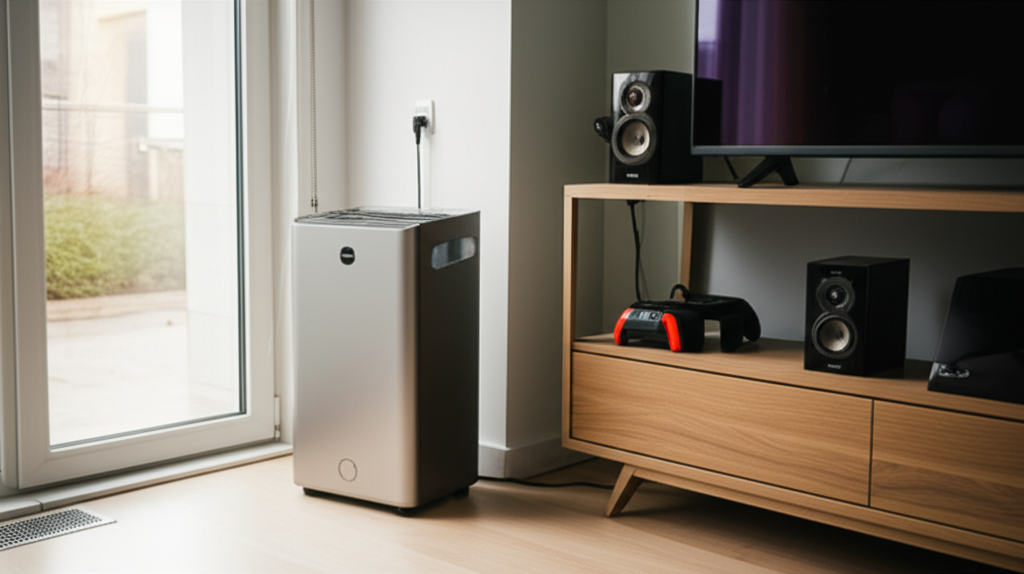
Most air purifiers utilize a multi-stage filtration system. This typically includes a pre-filter for larger particles, a HEPA filter for fine particles like dust and allergens, and an activated carbon filter for odors and VOCs. Some models incorporate additional features such as UV-C germicidal lamps or ionizers to further purify the air. The core function remains consistent: drawing in air and expelling cleaner air back into the room.
What Makes Electronics Vulnerable
Electronics are built with intricate circuits and delicate components. These can be affected by factors such as electrostatic discharge (ESD), which can zap sensitive microchips, or excessive heat, which can degrade components over time. Fluctuations in power or electromagnetic interference (EMI) can also disrupt their normal operation. Therefore, maintaining a stable and clean environment is crucial for their longevity.
Potential Risks of Air Purifiers and Electronics
While the direct damage from a well-functioning air purifier is rare, certain operational aspects or specific types of purifiers could theoretically pose risks. These are typically linked to indirect effects rather than direct harm from the air purification process itself. It’s important to be aware of these possibilities to take preventative measures.
Electrostatic Discharge (ESD) and Air Purifiers
Some air purifiers use ionizers, which release negatively charged ions into the air. These ions attach to airborne particles, causing them to become negatively charged and then attracted to positively charged surfaces, like your electronics. While the intent is to remove particles from the air, a poorly designed or malfunctioning ionizer could potentially create an environment where static electricity builds up, leading to ESD.
Ozone Production: A Hidden Danger
Certain types of air purifiers, particularly older ozone generators or some ionizers, can produce ozone as a byproduct. Ozone is a highly reactive gas that can damage sensitive electronic components over prolonged exposure. It can also degrade rubber and plastic parts found in many electronic devices. This is why choosing ozone-free certified air purifiers is paramount for safeguarding your electronics.
Airflow and Dust Accumulation
The fans in air purifiers move a significant amount of air. While this is essential for filtration, the concentrated airflow could potentially blow dust onto electronics if the purifier is placed too close. This dust can then accumulate inside the vents of your devices, leading to overheating and reduced performance. Proper placement can mitigate this risk effectively.
Heat Generation and Electronics
Most modern air purifiers operate at relatively low temperatures. However, any electrical device generates some heat. If an air purifier is placed directly next to sensitive electronics, especially in an enclosed space, the ambient temperature around those electronics could slightly increase. While usually not a significant issue, it’s a factor to consider for devices that are already prone to overheating.
Essential Safety Measures for Placement
The good news is that by following a few simple placement guidelines, you can virtually eliminate any risk of your air purifier negatively impacting your electronics. It’s all about creating a healthy distance and ensuring optimal operation for both devices. Think of it as giving each device its own comfortable space to work in.
Maintain Adequate Distance
A general rule of thumb is to keep your air purifier at least 3 to 6 feet away from your electronic devices. This distance helps to dissipate any potential static charge, minimize airflow disruption, and prevent heat buildup. It also ensures that neither device is directly affecting the operational environment of the other.
Avoid Direct Airflow Paths
Position your air purifier so that its output vent is not directly blowing air onto your computers, TVs, or other electronics. If dust is a concern, orienting the purifier to draw air away from your devices or circulating air in a different direction can be highly effective. This prevents dust from being directly propelled onto sensitive components.
Consider Room Layout and Ventilation
Think about the overall airflow in your room. Ideally, your air purifier should be placed in a location that promotes general air circulation, rather than concentrating airflow in one specific area. Ensure your electronics also have adequate space around them for ventilation, regardless of the air purifier’s placement. Good ventilation is key for all electronic devices.
Use Air Purifiers with Proven Safety Certifications
Look for air purifiers that are certified by reputable organizations like Energy Star or the California Air Resources Board (CARB). CARB certification, in particular, often includes stringent limits on ozone emissions, ensuring you’re choosing a product that prioritizes safety and health. These certifications offer peace of mind.
Choosing the Right Air Purifier for Your Space
Not all air purifiers are created equal, and some are inherently safer for use around electronics than others. Opting for the right technology and features can preemptively address potential concerns. Researching and selecting a unit designed for quiet operation and minimal byproducts is a wise investment.
Ionizer-Free and Ozone-Free Models
The safest bet for electronic-rich environments is to choose air purifiers that do not use ionization or ozone-generating technologies. Many high-quality HEPA and activated carbon purifiers effectively clean the air without these features. Always check the product specifications to confirm it’s explicitly stated as ozone-free.
HEPA and Activated Carbon Filtration
Air purifiers that rely solely on mechanical filtration, like True HEPA filters, and activated carbon filters are generally the safest options. These systems capture particles without introducing any electrical charges or chemical byproducts into the air, making them ideal companions for your sensitive electronics. They offer robust purification without the associated risks.
Consider Low-Noise and Low-Heat Models
When selecting an air purifier, pay attention to its noise level and heat output specifications. Many manufacturers offer models designed for quiet operation, which often correlates with more efficient and less heat-generating components. This can be beneficial for maintaining a stable environment for your electronics, especially in smaller rooms or offices.
Air Purifier Placement: Dos and Don’ts
To summarize the key placement strategies, here’s a quick guide to help you position your air purifier for optimal air quality and electronic safety. Following these simple rules will ensure you get the best of both worlds.
| Do | Don’t |
| :——————————————————- | :—————————————————————– |
| Place at least 3-6 feet away from electronics. | Place directly next to or behind sensitive electronic equipment. |
| Ensure adequate space around electronics for ventilation. | Block air vents on either the air purifier or your electronics. |
| Orient for general room air circulation. | Point the air purifier’s output directly at electronic devices. |
| Choose ozone-free and ionizer-free models when possible. | Use ozone-generating air purifiers near valuable electronics. |
| Keep filters clean for efficient operation. | Operate with clogged filters, which can strain the motor. |
Testing for Potential Issues
If you’re still concerned or have experienced odd behavior from your electronics after introducing an air purifier, a simple testing process can help identify the cause. Observing your devices before and after turning on the purifier can reveal any immediate correlations.
Observe Electronic Behavior
Before turning on your air purifier, ensure all your electronic devices are functioning normally. Then, turn on the air purifier and observe your electronics closely. Listen for any unusual noises, check for screen flickering, or note any unexpected shutdowns or performance issues.
Isolate the Air Purifier
If you notice any problems, try turning off the air purifier for a period and see if the electronic devices return to normal. If the issues resolve when the purifier is off and reappear when it’s on, it strongly suggests the air purifier is the source of the problem. This isolation step is crucial for diagnosis.
Check Air Purifier Settings
Some air purifiers have adjustable settings, including ionizer intensity or fan speed. If your model has these options, try adjusting them to see if the electronic behavior changes. Lowering ionizer output or fan speed might resolve the issue if it’s related to static or airflow.
Understanding Static Electricity and Ionizers
Static electricity is a natural phenomenon, but ionizers in air purifiers are designed to manage it. Understanding how they work, and the potential pitfalls, is key to ensuring they don’t inadvertently harm your electronics.
How Ionizers Work
Ionizers release ions (charged particles) into the air. These ions attach themselves to airborne particles like dust, pollen, and smoke, giving them an electrical charge. This charged dust then tends to stick to surfaces, including the collection plates within the purifier itself or other grounded objects.
The Risk of Over-Ionization
While beneficial for particle capture, excessive ion generation can lead to a buildup of static charge in the surrounding environment. If the air purifier is too close to electronics, or if the ions are particularly potent, this static charge could potentially discharge onto sensitive electronic components, causing damage. This is more of a concern with older or less sophisticated ionizer designs.
Grounding and Static Dissipation
Proper grounding is essential for managing static electricity. Electronics are typically grounded through their power cords. If an air purifier is creating a significant static field, and your electronics are not adequately grounded or are placed too close, a discharge can occur. Ensuring your home’s electrical system is properly grounded is a good practice for all electronic equipment.
Maintaining Your Air Purifier for Optimal Performance and Safety
Regular maintenance of your air purifier is not just about ensuring it cleans your air effectively; it’s also crucial for its safe operation around electronics. Clean filters and well-maintained components reduce the strain on the unit and minimize potential issues.
Filter Replacement Schedule
Follow the manufacturer’s recommended schedule for replacing your air purifier filters. Clogged filters can reduce airflow, cause the motor to work harder (generating more heat), and decrease the overall efficiency of the unit. This can indirectly impact the environment around your electronics.
Cleaning the Unit
Periodically clean the exterior and interior of your air purifier, especially any collection plates if your model has them. Dust buildup on the unit itself can interfere with its operation and potentially be blown around. Use a soft cloth and vacuum cleaner attachments for cleaning.
Checking for Malfunctions
Listen for any unusual noises from the fan or motor. If the unit starts making grinding sounds or vibrating excessively, it could indicate a mechanical issue. Operating a malfunctioning unit near sensitive electronics is not advisable, as it could lead to unexpected behavior or damage.
Frequently Asked Questions (FAQ)
Can an air purifier emit harmful radiation?
No, standard air purifiers do not emit harmful radiation. They use filters, fans, and sometimes UV-C light for purification, none of which produce harmful radiation. UV-C lamps are enclosed and designed to kill germs within the unit.
Will an air purifier affect my Wi-Fi signal?
Generally, no. Air purifiers do not typically interfere with Wi-Fi signals. Wi-Fi operates on radio frequencies, and air purifiers are not designed to emit signals that would disrupt these frequencies.
Can the ozone from an air purifier damage my computer screen?
Yes, ozone can degrade plastics and rubber over time, which are components in computer screens and their cables. Choosing ozone-free air purifiers is crucial to prevent this potential damage.
Is it safe to have an air purifier in a server room?
It can be, provided you choose an ozone-free, HEPA-based unit and maintain proper placement. Server rooms require stable environments, so an air purifier that doesn’t introduce ozone or excessive static is essential.
Can air purifiers cause static shock when touching electronics?
If an air purifier is producing excess static electricity, or if it’s placed too close to electronics, you might experience static shocks when touching those devices. This is usually a sign of improper placement or a unit that generates too much ozone/static.
What is the safest type of air purifier for a home office with many electronics?
The safest type is a True HEPA filter air purifier with an activated carbon filter that explicitly states it is ozone-free and does not use an ionizer. These units clean the air effectively without introducing potentially harmful byproducts.
Conclusion: Enjoying Cleaner Air Safely
In conclusion, the question “can air purifiers damage electronics?” generally has a reassuring answer: not if used correctly. By understanding the technology behind air purifiers and the sensitivities of electronic devices, you can easily avoid any potential pitfalls. The key lies in mindful placement, choosing the right type of air purifier, and performing regular maintenance. Opting for ozone-free, HEPA-based models and keeping a safe distance will ensure your valuable electronics remain protected while you breathe easier with cleaner air. Embrace the benefits of air purification with confidence, knowing that a few simple precautions are all it takes.
