
Why Is My Vacuum Overheating?

Quick Answer
Your vacuum is usually overheating because airflow is restricted, the dust bin or bag is full, a filter is clogged, or the brush roll is struggling against tangled debris. Turn the vacuum off, disconnect its power, let it cool, then check these areas before restarting it. Consumer Reports also identifies full containers and clogs as common causes when a vacuum gets hot enough to trigger an overload shutoff.
Most common causes of vacuum overheating
- Full bin or bag: Packed debris can restrict the airflow the motor needs.
- Dirty filters: Dust-loaded filters can reduce airflow through the vacuum.
- Hidden clog: Hair, paper, lint, or larger debris may block the hose, wand, or floor head.
- Tangled brush roll: Hair and thread can make the brush harder to turn.
- Battery problem: Abnormal heat around a cordless vacuum battery needs extra caution.
- Motor or electrical fault: Burning smells, smoke, sparks, or melting require professional attention.
Stop using the vacuum immediately if
- You notice smoke, sparking, melting plastic, battery swelling, or a strong electrical burning smell.
I treat an unusually hot vacuum as a warning, not something to push through until the room is finished. Most household overheating problems can be traced through the airflow path without opening the motor housing.
This guide explains why vacuum cleaners overheat, how to find the cause, what you can safely fix, and when you should stop troubleshooting.
In This Guide
Why Does a Vacuum Cleaner Overheat?
A vacuum usually overheats when it cannot move air normally or when a moving component creates excessive resistance. Battery, motor, wiring, and electronic faults can also produce abnormal heat.
Definition: A vacuum overheating problem is excessive heat buildup during operation or charging that causes abnormal temperatures, reduced performance, shutdowns, odors, or other warning signs.
Restricted airflow is one of the first things to check
A vacuum motor depends on moving air through an intake, dirt container, filters, and exhaust path. A blockage anywhere in that route can interfere with normal operation.
- Full dust bin: Debris may cover an inlet or pack tightly around the cyclone area.
- Full vacuum bag: A packed bag may restrict airflow before the air reaches the motor system.
- Dirty pre-motor filter: Fine dust can coat the filter and reduce airflow.
- Blocked hose or wand: Pet hair, paper, socks, or other debris can form a hidden plug.
- Blocked floor head: Lint and carpet fibers may collect around narrow intake passages.
A tangled brush roll can create extra resistance
Hair, string, and thread can wrap tightly around a powered brush roll. The brush may then turn slowly, make unusual noise, or stop completely.
When I troubleshoot overheating, I check the brush from both ends instead of looking only at the visible bristles. Hair often collects close to the end caps where it is easy to miss.
- Disconnect the vacuum from power.
- Turn the floor head over.
- Inspect the full length of the roller.
- Check both ends for tightly wrapped fibers.
- Follow the manual before removing the brush or belt cover.
Normal warmth and dangerous heat are different
Warm exhaust air does not automatically mean the vacuum is failing. Motors, electronics, and batteries naturally generate some heat while working.
Rapid temperature increases, repeated shutdowns, smoke, melting, or a strong electrical odor deserve more attention. As of 2026, the U.S. Consumer Product Safety Commission lists vacuum cleaner recalls and safety warnings, including cordless models affected by battery overheating hazards.
Expert Alert: Stop using a vacuum that produces smoke, sparks, melting, or a persistent electrical burning smell. Do not open its motor, wiring, charger, or battery pack yourself.
Section Takeaway: Airflow restrictions and brush resistance are sensible first checks. Electrical or battery warning signs require a more cautious response.
What Should You Do When a Vacuum Starts Overheating?
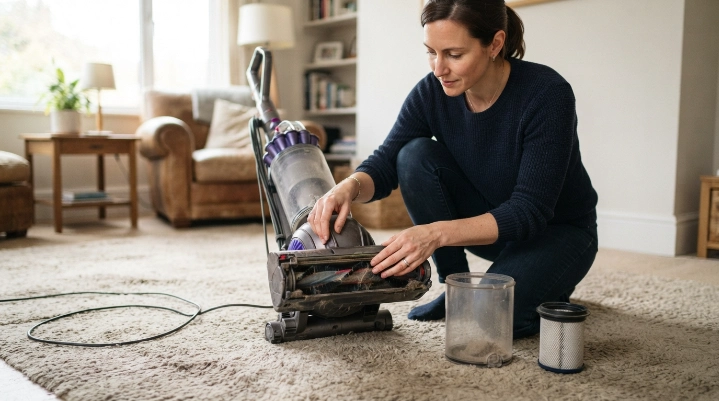
Switch the vacuum off and disconnect it from its power source. Do not keep restarting it every few minutes just to finish cleaning.
Once it has cooled, inspect the parts you can access without dismantling electrical components.
- Stop vacuuming. Turn off the machine as soon as abnormal heat or odor appears.
- Disconnect power. Unplug a corded vacuum or turn off a cordless model.
- Let it cool. Follow the manufacturer’s manual if it gives a specific reset procedure.
- Empty the dirt container. Empty the bin or replace a full bag.
- Inspect the filters. Look for heavy dust buildup or incorrect installation.
- Check the airway. Inspect the hose, wand, inlet, and floor head for clogs.
- Check the brush roll. Remove accessible hair and fibers after disconnecting power.
- Test cautiously. Restart only after all parts are correctly installed and no serious warning signs remain.
Do not assume cooling has fixed the problem
A thermal shutdown can stop a machine temporarily, but it does not tell you what caused the heat. Restarting without finding the restriction may bring the problem straight back.
If the vacuum repeatedly shuts down after the airflow path is clean, check the manufacturer’s troubleshooting instructions. Persistent overheating may point to a failing component.
Be more cautious with cordless batteries
Battery heat deserves special attention because lithium-ion battery failures can create fire hazards. The U.S. Fire Administration advises people to stop using lithium-ion batteries showing warning signs such as excessive heat, odor, leaking, shape changes, or unusual noises.
Follow its broader lithium-ion battery safety guidance if your cordless vacuum becomes abnormally hot while running or charging.
Expert Alert: Do not puncture, open, rebuild, or attempt a DIY repair on a lithium-ion battery pack. Contact the manufacturer or a qualified repair facility.
How Can You Find What Is Making Your Vacuum Overheat?
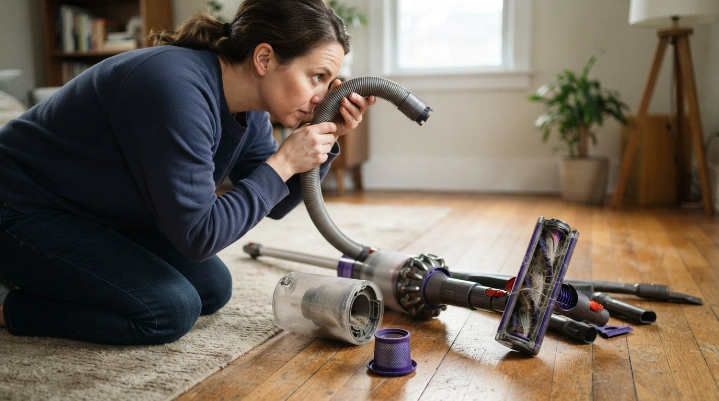
Use the symptoms that appear with the heat. Suction loss, brush noise, shutdowns, and battery temperature can narrow the problem quickly.
| What You Notice | Area to Check First | Safe First Action |
|---|---|---|
| Hot vacuum plus weak suction | Bin, bag, filters, hose, wand | Empty debris and inspect the airflow path |
| Heat plus loud or stalled brush | Brush roll and accessible drive area | Disconnect power and remove wrapped hair |
| Runs, gets hot, then shuts off | Airflow restrictions and thermal protection | Cool the machine and inspect for clogs |
| Cordless battery gets unusually hot | Battery and charger | Stop using it and check manufacturer safety guidance |
| Smoke, sparks, melting, electrical smell | Electrical system | Leave it disconnected and arrange qualified repair |
Check suction before assuming the motor is bad
Weak suction and overheating together often justify inspecting the airflow route first. Start at the floor head and work toward the exhaust.
- Look through removable hoses under good light.
- Inspect narrow bends in wands and floor heads.
- Check around the bin inlet.
- Make sure filters sit correctly in their housings.
- Look for torn seals or parts that were reinstalled incorrectly.
Consumer Reports recommends regular attention to bags, bins, and filters as part of basic vacuum maintenance. Your owner’s manual remains the best source for model-specific filter care.
How Do You Fix the Most Common Causes?
Most homeowner-safe fixes involve restoring airflow and removing resistance from accessible moving parts. You should not need to open the motor housing.
Empty the dust bin or replace the bag
Empty a bagless bin when debris reaches the manufacturer’s fill line. Don’t press more dirt into an already packed container just to delay emptying it.
For a bagged model, install the correct replacement bag and make sure it seats properly. Check the inlet behind the bag for accumulated debris.
Clean the filters correctly
First determine whether your filter is washable. Washing a filter that must stay dry can damage it.
- Remove loose surface dust gently.
- Wash only filters specifically labeled washable.
- Use the cleaning method listed in your owner’s manual.
- Let washable filters dry completely before reinstalling them.
- Replace damaged, distorted, or permanently clogged filters.
HEPA means high-efficiency particulate air. The EPA describes a HEPA filter as a type of pleated mechanical air filter, but vacuum filter designs still vary by manufacturer.
Clear hose and wand blockages
Detach removable sections only as the manual permits. Look through each section and remove loose debris without puncturing or tearing the hose.
A clog may hide at a bend even when both hose openings look clear. Check the floor-head neck and bin inlet too.
Remove hair from the brush roll
Cut away accessible hair and thread while the vacuum is disconnected from power. Avoid cutting belts, wiring, or brush material.
- Rotate the roller by hand only if the manufacturer allows it.
- Inspect both ends for tightly wrapped hair.
- Check for trapped carpet fibers.
- Reinstall covers and guards before testing.
Know when the repair has gone beyond routine maintenance
Repeated overheating with a clean airflow path may indicate a motor, bearing, control board, switch, charger, or battery problem. Those faults are not good candidates for casual DIY repair.
Expert Alert: Electrical diagnosis, motor disassembly, rewiring, battery repair, and bypassing thermal protection should be handled by a qualified technician.
Section Takeaway: The safest DIY fixes are simple—empty, clean, unclog, and untangle. Stop when troubleshooting requires access to electrical or battery components.
How Can You Prevent Your Vacuum From Overheating Again?
Preventing overheating mostly comes down to maintaining airflow and noticing changes early. A vacuum that suddenly sounds different or loses suction deserves attention before the next long cleaning session.
Use a simple maintenance routine
- Empty on time: Follow the bin fill line or bag guidance in your manual.
- Check filters: Clean or replace them at the interval specified for your model.
- Remove brush hair: Check more often in homes with long hair or shedding pets.
- Inspect hoses: Look for buildup when suction begins dropping.
- Watch the exhaust: A sudden change in airflow or smell can be an early warning.
- Use the correct charger: Follow the manufacturer’s instructions for cordless models.
Avoid vacuuming materials your machine was not designed to handle
Large objects can lodge in hoses, while fine construction dust may overwhelm filters in a household vacuum. Wet material can also damage machines that are designed only for dry pickup.
Check your model’s manual before vacuuming ash, liquids, fine renovation dust, or unusual debris. A wet-dry vacuum and a normal household vacuum are not interchangeable.
Check recalls when heat seems abnormal
Maintenance cannot correct a defective battery or recalled electrical component. Check the model number against current safety information if overheating seems unusual or begins suddenly.
This matters most when heat comes from a cordless battery rather than the normal exhaust area. Stop using the machine until you understand what is happening.
Section Takeaway: Clear airflow, clean filters, a free-moving brush, correct charging, and early troubleshooting can prevent many repeat overheating problems.
Vacuum Overheating FAQ
Why does my vacuum get hot after only a few minutes?
A vacuum that becomes unusually hot within minutes may have restricted airflow, a clogged filter, a blocked hose, or a struggling brush roll. Turn it off, disconnect power, let it cool, and inspect those areas before trying it again.
Can a dirty filter make a vacuum overheat?
Yes. Heavy dust buildup can restrict airflow through a vacuum. Clean or replace the filter only according to your manufacturer’s instructions because some filters are washable while others must remain dry.
Why does my vacuum shut off when it gets hot?
Some vacuums use thermal or overload protection that stops operation when internal temperatures become excessive. Letting the machine cool may reset it, but you should still check for a full bin, full bag, clogged filter, blocked hose, or brush problem.
Can a full vacuum bag cause overheating?
A packed bag can reduce airflow in a bagged vacuum and contribute to poor performance or excess heat. Replace the bag according to your model’s fill guidance, then check the hose and filters if overheating continues.
Why is my cordless vacuum overheating?
A cordless vacuum can become warm during heavy use, but abnormal battery heat can signal a charging, battery, airflow, or electronic problem. Stop using it if you notice excessive heat, swelling, leaking, smoke, unusual smells, or other battery warning signs.
How long should I let an overheated vacuum cool?
There is no safe universal cooling time for every vacuum. Follow the reset or cooling instructions in your owner’s manual rather than relying on a generic number, and investigate why the vacuum overheated before restarting it.
Should I replace a vacuum that keeps overheating?
Not automatically. First rule out normal maintenance problems such as clogs, dirty filters, packed bins, and tangled brushes. If overheating continues after those checks, professional repair or replacement may make more sense, especially when a motor, battery, or electrical fault is suspected.
Final takeaway: If your vacuum is overheating, start with airflow. Empty the dirt container, inspect the filters, clear clogs, and free the brush roll before using the machine again.
Stop troubleshooting if you find smoke, melting, sparks, battery damage, or a persistent electrical smell. In those situations, protecting your home matters more than finishing the floor.
