
Why Is My Vacuum Cleaner Making a Grinding Noise?

Quick Answer
A vacuum cleaner making a grinding noise may have hair or debris trapped in the brush roll, a jammed floorhead, a damaged belt, or a worn internal component. Switch it off and disconnect the power before inspecting it. If the noise is severe, comes from the motor housing, or accompanies a burning smell or overheating, stop using the vacuum and arrange an appropriate repair.
A sudden grinding sound is different from the normal hum of a vacuum cleaner. It can indicate that something is obstructing a moving part, rubbing against the floorhead, or wearing out inside the machine.
The location of the sound is a useful clue. Grinding near the floor usually points toward the brush roll or cleaner head, while a harsh noise coming from the main body may indicate a problem that needs professional attention. These clues are not definitive diagnoses, but they can help you choose the safest next step.
1. What usually causes a vacuum cleaner to grind?
The most useful first checks are the brush roll, its end caps, the floorhead opening, and any accessible drive belt. If those areas are clear and the noise persists, consider less accessible mechanical or motor-related faults.
- Hair and string: Wrapped fibers can restrict the brush roll or interfere with its end bearings.
- Trapped hard objects: Small stones, clips, screws, or other debris can scrape against the rotating brush or housing.
- Damaged or slipping belt: Belt-driven models can grind, squeal, or vibrate when the belt is worn or incorrectly seated.
- Worn roller bearings: A damaged or obstructed bearing can make the brush roll difficult to rotate smoothly.
- Loose or damaged parts: A displaced brush, cracked cover, or loose attachment may vibrate or rub against another component.
- Internal motor or fan damage: A persistent grinding sound from the main body may indicate a fault beyond routine cleaning.
The sound alone cannot confirm which component has failed. For example, a jammed brush and a damaged roller bearing can produce similar symptoms, but only the first may be resolved by removing debris.
2. How can you check the vacuum safely?
Start with simple, accessible checks rather than dismantling the machine. Always switch the vacuum off, unplug a corded model, or remove its battery when the design permits before touching the brush roll or opening a serviceable compartment.
- Disconnect the power. Wait until every moving part has stopped. Never reach into a running floorhead or attempt to remove debris while the brush is moving.
- Check the floorhead opening. Look for pebbles, string, paper clips, carpet fibers, or other objects that could be scraping against the housing.
- Inspect the brush roll. Remove accessible hair, thread, and fibers. Check both ends of the roller, where tightly wrapped material can be easy to miss.
- Check the roller’s movement. If your manual permits it, rotate the removed brush roll by hand. It should move without unusual binding or scraping. Do not force a roller that feels stuck.
- Inspect accessible covers and belts. Look for a displaced cover, damaged roller, or visibly worn belt, but only open compartments identified as user-serviceable.
- Reassemble carefully. Refit every cover, filter, brush roll, and attachment according to the manual. Never operate the vacuum with a safety cover removed.
These steps follow the general approach used in official troubleshooting guidance, including the Dyson vacuum grinding-noise troubleshooting guide, which directs users to investigate brush-bar obstructions when appropriate.
If you cannot safely access the suspected component, stop at the external inspection stage. A sealed motor housing is not a routine cleaning compartment.
3. What if the grinding noise comes from the brush roll?
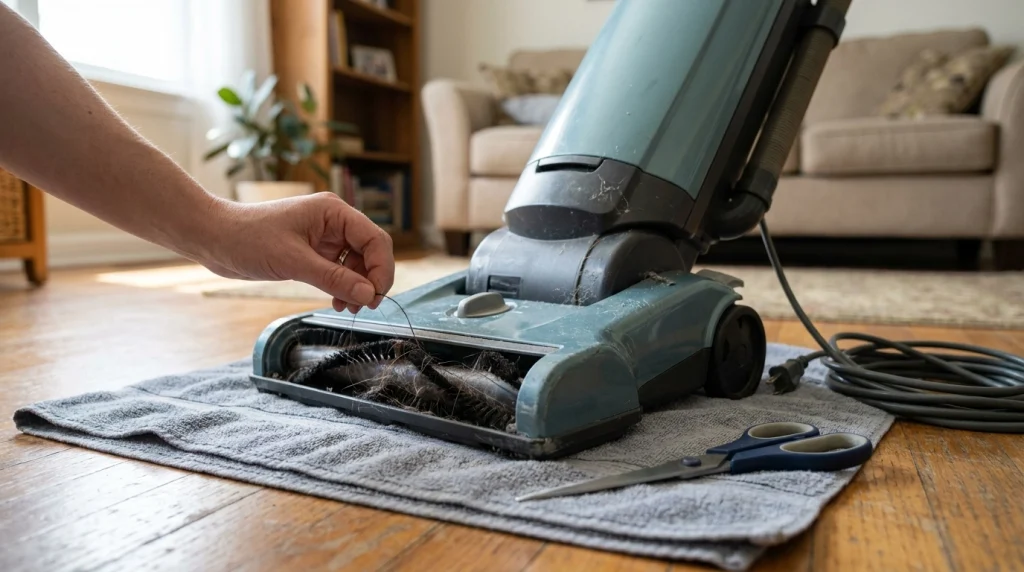
A grinding noise near the floorhead often suggests that the rotating brush is obstructed, rubbing against its housing, or struggling to turn. This is especially plausible if the sound began after vacuuming long hair, thick carpet, pet fur, or debris.
Remove tangled hair and fibers
Cut wrapped hair carefully using a suitable tool, keeping the cutting edge away from bristles, belts, wires, and plastic parts. Pull the loosened material away without damaging the roller. If the brush roll is removable, follow the manufacturer’s instructions to clean its ends as well as the center.
After cleaning, check whether the roller turns freely as described in the manual. If it still binds, makes a scraping sound, or has visible damage, do not assume that removing the hair has solved the problem.
Look for a displaced roller or damaged belt
Some vacuums use a belt to drive the brush roll, while others use a separate brush motor. A belt-driven vacuum may make an unusual noise if the belt has slipped, stretched, cracked, or become damaged. A motorized floorhead can develop different faults, so belt replacement is not a universal solution.
Use only the replacement part specified for your exact model. If the belt looks intact but the brush still catches, the problem may involve a roller end cap, bearing, drive mechanism, or motor.
For a more focused repair sequence, see our guide on how to fix a vacuum brush roll. If the brush is jammed rather than simply noisy, our article on why a vacuum roller brush gets jammed covers the related checks.
4. What if the noise comes from the motor or main body?
A harsh grinding noise from the vacuum’s main housing deserves more caution, particularly if it continues after you have checked the accessible floorhead and airflow path. Possible causes include worn internal bearings, a damaged fan, or another mechanical fault.
These parts are generally not suitable for casual inspection because reaching them may require opening the motor housing. A fan can also be damaged by hard debris that has entered the airflow path, but the sound alone cannot establish that this has happened.
Stop using the vacuum if the noise is persistent or severe, the body becomes unusually hot, you notice a burning smell, or the machine produces smoke or sparks. Disconnect power if it is safe to do so. Do not restart the machine repeatedly to see whether the noise disappears.
If the vacuum is under warranty, check the manufacturer’s service instructions before attempting repairs that could affect coverage. Otherwise, ask a qualified repair technician to assess the fault, especially when the sound appears to originate inside the motor assembly.
5. Could a blockage or dirty filter cause grinding?
A blocked hose, clogged intake, full dust container, or dirty filter can restrict airflow and affect vacuum performance. Manufacturers commonly associate airflow restrictions with whistling or changes in motor sound, rather than treating them as proof of a mechanical grinding fault.
That distinction matters: a blockage is worth checking, but it should not be assumed to explain a harsh scraping or metal-like grinding noise.
- Switch off and disconnect the vacuum.
- Empty the dust container or replace the bag if needed.
- Inspect the hose, wand, intake, and floorhead for accessible obstructions.
- Check the filters and clean or replace them according to the manual.
- Ensure washable components are completely dry before reinstalling them.
Never push a sharp object into a hose or use water on components that are not designed to be washed. If airflow returns to normal but the grinding remains, investigate the moving parts or arrange service instead of repeatedly cleaning the filters.
6. How can the sound help narrow down the problem?
The following comparison helps distinguish useful clues. These are possibilities, not guaranteed diagnoses.
| What you notice | Possible explanation | What to do |
|---|---|---|
| Grinding near the floor | Brush obstruction or rubbing floorhead part | Inspect the brush and housing with power disconnected. |
| Rattling or clicking | Loose part or hard object | Check accessible openings and attachments. |
| High-pitched whistle | Airflow restriction or air leak | Check the hose, bin, filters, and seals. |
| Grinding from the main body | Possible internal mechanical fault | Stop using it if persistent and arrange service. |
| Grinding with a burning smell | Possible overheating or friction-related damage | Stop immediately and disconnect power safely. |
A sound that changes when the floorhead is raised or the brush setting is switched off may help isolate the source on models designed for that test. Only use a manufacturer-approved diagnostic procedure; do not run the vacuum with exposed moving parts or removed safety covers.
7. When should you repair the vacuum or replace a part?
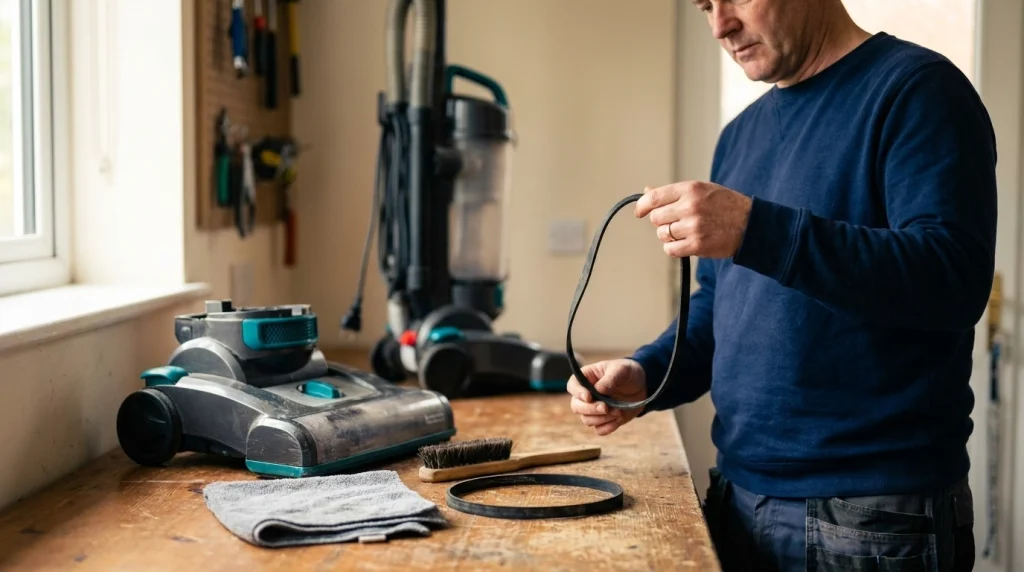
Choose the next step based on what you can safely confirm, rather than replacing parts based on sound alone.
- Clean it yourself when you find accessible hair, fibers, or a loose object and the manual permits removal.
- Replace a part when it is visibly broken or worn and the manufacturer identifies it as replaceable. Confirm the model and compatible part before ordering.
- Arrange professional repair when grinding continues after basic checks, a roller remains stiff, or the noise appears to come from the motor or internal drive.
- Stop using it immediately if there is smoke, sparking, a burning odor, unusual overheating, or severe mechanical noise.
Repair may be straightforward when the problem is a replaceable brush roll or belt. An internal motor or fan fault can be more involved, so the cost and availability of compatible parts may affect whether repair makes sense.
For maintenance that can help prevent future problems, follow our monthly vacuum maintenance checklist. Regularly checking the brush roll, dust container, filters, and accessible airflow path can help you spot developing obstructions before they become more serious.
Frequently Asked Questions
Can I keep using my vacuum if it makes a grinding noise?
It is safer to stop and inspect it first. A minor obstruction may be removable, but persistent grinding can indicate damage to a moving component. Never continue operating it when the sound is severe or accompanied by burning smells, smoke, sparks, or overheating.
Why does my vacuum grind only on carpet?
Carpet can increase resistance on a rotating brush, especially if the pile is thick or fibers are tangled around the roller. Check the brush for obstructions and use the correct floor setting. If the grinding continues, stop using the machine until the cause is identified.
Can a broken vacuum belt cause a grinding sound?
Yes, a damaged, displaced, or slipping belt can create unusual friction or vibration in belt-driven models. However, not every vacuum uses a belt. Check your model’s design before attempting a replacement.
Why is my vacuum grinding even after I clean the brush roll?
Hair may remain around an end cap, or the problem may involve a worn bearing, damaged roller, loose component, or internal drive fault. If the accessible areas are clear and the roller still binds or the noise persists, arrange appropriate service.
Can a clogged filter make a vacuum sound louder?
A clogged filter can restrict airflow and change the sound or performance of a vacuum. It does not necessarily explain a grinding noise. Check the filter and other airflow passages, following the manufacturer’s cleaning instructions, and investigate mechanical causes if grinding continues.
How do I know whether the vacuum motor is damaged?
You cannot reliably confirm motor damage from sound alone. Persistent grinding from the main body, unusual heat, burning smells, or repeated shutdowns warrant stopping use and arranging an inspection rather than opening the motor housing yourself.
Conclusion
A grinding vacuum cleaner often needs an inspection of its brush roll, floorhead, or another moving component, but the noise alone cannot identify the exact fault. Switch off and disconnect the machine before checking for trapped debris, tangled fibers, or visibly damaged parts.
If cleaning the accessible components does not resolve the sound, avoid repeatedly restarting the vacuum or dismantling sealed components. Persistent grinding, unusual heat, burning smells, smoke, or sparks are reasons to stop using the machine and seek appropriate repair. A careful inspection is safer than guessing which part needs replacing.
