
How Do You Care for a Cordless Vacuum Battery?

Quick Answer
Care for a cordless vacuum battery by using the correct charger, keeping the battery near room temperature, clearing clogs that make the vacuum work harder, and following the manufacturer’s charging and storage instructions. The EPA’s lithium-ion battery guidance also recommends avoiding prolonged exposure to extreme heat or cold.
Quick Battery-Care Steps
- Use the right charger: Stick with the charger or charging dock approved for your exact vacuum.
- Control the temperature: Charge and store the vacuum in a normal indoor environment.
- Keep airflow clear: Empty the bin and clean approved filters so the motor does not work harder than necessary.
- Clear the brush roll: Remove wrapped hair and thread that can increase resistance.
- Use boost mode wisely: Save maximum-power settings for dirt that needs them.
- Inspect the battery: Stop using a pack that swells, cracks, leaks, smells unusual, or becomes abnormally hot.
One Rule I Follow
- When the manual gives battery-specific instructions, I follow those instead of generic charging advice.
Cordless vacuum battery care is a small part of home hygiene, but it has a big effect on how convenient your cleaner feels. I have found that good vacuum maintenance often prevents problems that look like battery failure.
This guide explains charging, temperature, storage, cleaning habits, warning signs, and replacement in simple terms.
In This Guide
- What Does Cordless Vacuum Battery Care Mean?
- How Should You Charge a Cordless Vacuum Battery?
- How Do Heat, Cold, and Storage Affect the Battery?
- Can Vacuum Maintenance Help Protect Battery Life?
- What Cordless Vacuum Battery Mistakes Should You Avoid?
- How Do You Know When a Vacuum Battery Needs Replacing?
- Frequently Asked Questions
What Does Cordless Vacuum Battery Care Mean?
Cordless vacuum battery care means charging, using, storing, and inspecting the battery in ways that avoid unnecessary stress or damage.
Definition: A cordless vacuum battery is a rechargeable power pack that supplies electricity to the vacuum’s motor, brush system, electronics, and accessories.
Most modern cordless stick vacuums use lithium-ion batteries. Exact battery design, charging controls, and temperature limits vary between manufacturers.
Why battery care matters
A cordless vacuum can only perform while its battery supplies enough usable power. As the battery ages, you may notice shorter cleaning sessions or more frequent charging.
Battery health is not the only factor, though. A clogged filter, blocked wand, or tangled brush can also make a vacuum seem weaker.
- Battery condition: Affects usable runtime and whether the machine can deliver power consistently.
- Airflow condition: Affects how efficiently the vacuum can move air and pick up dirt.
- Brush resistance: Tangled hair can make a powered floorhead work harder.
- Power mode: High-output modes normally consume energy much faster than lower settings.
I keep these factors separate when troubleshooting. That prevents me from blaming the battery before checking the rest of the machine.
How Should You Charge a Cordless Vacuum Battery?
Charge your cordless vacuum with the manufacturer-approved charger and follow the charging instructions for your model. Avoid treating every cordless vacuum as if its charging system works the same way.
Use the supplied or approved charger
The charger and battery are designed to work together. Voltage, current, connectors, and battery-management electronics can differ even between similar-looking machines.
I do not substitute a random charger simply because the plug fits. A compatible physical connector does not prove electrical compatibility.
Can you recharge before the battery is completely empty?
With a modern lithium-ion vacuum, you generally do not need to deliberately drain the battery completely before every recharge. I normally recharge when cleaning is finished or when the vacuum indicates a low charge.
The owner’s manual remains the final authority. Some brands also give model-specific instructions for first use, storage, removable batteries, or charging docks.
Should you leave a cordless vacuum on its charging dock?
This depends on the vacuum. Many current models are designed around a dock or wall-mounted charger, but that does not make continuous charging universal advice.
Check the manual for phrases such as “leave on charge,” “disconnect after charging,” or long-term storage instructions.
- Dock-designed model: Follow the manufacturer’s normal docking procedure.
- Removable pack: Use the specified battery charger and storage method.
- Long storage period: Follow the brand’s storage-charge instructions rather than guessing.
- Unusual heat: Stop charging and investigate instead of assuming it is normal.
Let an unusually warm battery cool
A battery may become warm during demanding cleaning. If mine feels unusually hot after extended high-power use, I let the machine return toward normal room temperature before charging.
Some products control this automatically. Still, persistent or excessive heat deserves attention.
Section Takeaway: Correct charging is mostly about compatibility, temperature, and following the instructions designed for your specific battery.
How Do Heat, Cold, and Storage Affect the Battery?
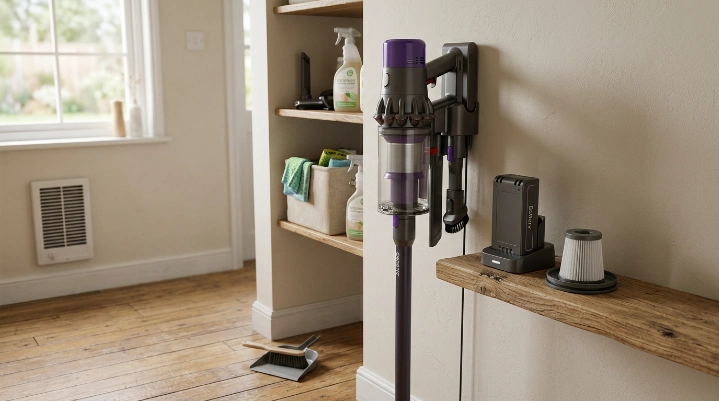
Extreme temperatures can damage lithium-ion batteries. For normal household storage, a cool, dry indoor location is safer than a hot vehicle, direct sunlight, or a freezing shed.
The EPA specifically recommends storing lithium-ion batteries around room temperature and avoiding long periods of extreme heat or cold.
Avoid hot storage areas
Heat is one condition I take seriously with any rechargeable cleaning appliance. I would not store my cordless vacuum next to a radiator, heating vent, or sun-facing window that becomes hot.
A parked vehicle can also become much hotter than a normal room. That makes it a poor long-term storage location for a cordless vacuum battery.
Do not refrigerate the battery
Trying to keep a battery “extra cool” by putting it in a refrigerator is unnecessary. The EPA recommends normal room-temperature storage instead.
Moisture and condensation are also bad companions for electrical contacts. Keep the vacuum and charger in a dry location.
What about long-term storage?
If you will not use the vacuum for weeks or months, first check its manual. Manufacturers may specify a particular charging level, battery-removal procedure, or recharge interval.
- Clean the vacuum: Empty the bin and remove trapped debris before storage.
- Dry washed parts: Never store the machine with a damp washable filter installed.
- Protect the battery: Keep it away from heat, moisture, impacts, and metal objects that could contact exposed terminals.
- Check the manual: Follow model-specific instructions for long periods without use.
Section Takeaway: Think “normal indoor conditions.” Extreme heat, freezing conditions, moisture, and careless storage are unnecessary risks.
Can Vacuum Maintenance Help Protect Battery Life?
Yes. Keeping the vacuum clean helps it work as intended and prevents airflow restrictions or brush resistance from being mistaken for battery problems.
I once had a stick vacuum that seemed to lose runtime suddenly. The battery looked guilty, but the brush roll was packed with hair and the filter needed cleaning.
Empty the dust bin before it becomes packed
A full bin can interfere with normal airflow on many bagless vacuums. I empty mine before debris reaches the manufacturer’s fill line.
This also makes it easier to spot a clog before it becomes a larger problem.
Keep filters clean
Check your vacuum’s filter-maintenance instructions. Wash only filters clearly labeled as washable.
If you wash one, let it dry completely for the time specified by the manufacturer before reinstalling it.
Remove hair from the brush roll
Long hair, pet fur, thread, and carpet fibers can wrap tightly around a powered brush. That creates resistance and can affect cleaning performance.
- Turn the vacuum off before working near the brush.
- Remove the battery first if the manual recommends it.
- Cut wrapped fibers carefully without damaging bristles or wiring.
- Check the brush ends and bearings for trapped debris.
Use maximum power only when you need it
Maximum or boost settings can be useful for stubborn debris, but they consume the available charge much faster. I use normal power for routine hard-floor cleaning and increase power when the surface needs it.
Consumer Reports also notes that high cleaning power can provide much shorter runtime than lower modes on cordless stick vacuums.
This is important when diagnosing battery health. A ten-minute session on boost mode cannot be compared fairly with a longer session using an energy-saving mode.
What Cordless Vacuum Battery Mistakes Should You Avoid?
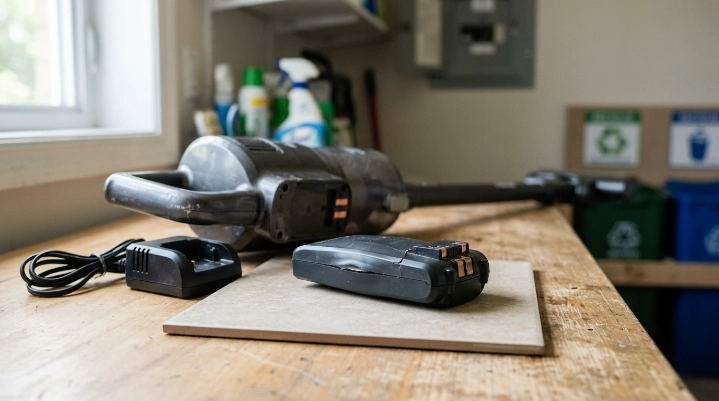
The biggest mistakes involve incompatible chargers, extreme temperatures, physical damage, liquids, and unsafe attempts to repair sealed battery packs.
Do not use a damaged battery
Stop using a battery that is swollen, cracked, leaking, badly dented, giving off an unusual smell, or becoming abnormally hot.
The U.S. Consumer Product Safety Commission tracks fire hazards associated with high-energy-density rechargeable batteries and chargers.
Expert Alert: Do not open, rebuild, puncture, or attempt an electrical repair on a damaged lithium-ion vacuum battery. Contact the manufacturer or a qualified repair professional.
Do not get battery contacts wet
Never rinse a battery pack or charger unless the manufacturer explicitly designed it for that treatment. Keep cleaning sprays away from battery contacts and charging ports.
When I wipe a vacuum body, I apply any permitted cleaner to the cloth rather than spraying toward electrical components.
Do not ignore repeated charging errors
A charger light that repeatedly reports an error deserves investigation. The problem may involve the battery, charger, electrical contacts, temperature, or charging electronics.
Clean contacts only as the manual allows. If the fault remains, contact the manufacturer instead of experimenting with unapproved chargers.
Do not throw lithium-ion batteries into household recycling
When a battery reaches the end of its useful life, it needs proper handling. The EPA’s household battery guidance says rechargeable lithium-ion batteries should not go into household trash or municipal recycling bins.
EPA guidance recommends dedicated battery recycling or household hazardous-waste collection. It also recommends protecting exposed terminals during transport.
How Do You Know When a Vacuum Battery Needs Replacing?
A battery may need replacement when usable runtime drops substantially, charging becomes unreliable, or the vacuum shuts down despite normal airflow and a clean brush system.
Do not diagnose by runtime alone. First compare the symptoms with other common vacuum problems.
| Symptom | Could Be Battery Related | Check This First |
|---|---|---|
| Runtime is much shorter than before | Yes | Power mode, filter, brush roll, and battery age |
| Vacuum shuts off during heavy cleaning | Possibly | Clogs, overheating, brush jams, and charge level |
| Battery will not charge | Possibly | Outlet, approved charger, contacts, and error lights |
| Weak pickup but normal runtime | Less likely | Filter, blockage, seals, floorhead, and brush roll |
| Battery is swollen or physically damaged | Yes—stop using it | Manufacturer safety and disposal instructions |
Battery aging is normal
Rechargeable batteries do not maintain their original capacity forever. Gradual runtime loss over years of use is different from a sudden failure after a clog or charging problem.
Battery problems are also common enough to deserve attention. Consumer Reports’ vacuum reliability survey found battery-life deterioration and complete battery failure among common cordless-stick-vacuum complaints.
Replace the battery or the whole vacuum?
A replacement battery often makes sense when the vacuum body, motor, floorhead, and charger are still in good condition. Check whether your exact model has an official user-replaceable battery.
If the pack is sealed inside the vacuum, follow the manufacturer’s service process. Do not pry apart the housing unless the product documentation specifically provides a user-service procedure.
- Replace the battery: The machine is otherwise healthy and an approved replacement is available.
- Seek service: The battery is internal or the charging system may be faulty.
- Consider replacing the vacuum: Several expensive components are failing at the same time.
Frequently Asked Questions
Should I charge my cordless vacuum after every use?
It depends on the model and how much charge you used. Many cordless vacuums are designed for regular recharging, but follow your manual rather than using a universal schedule. I usually recharge when needed so the vacuum is ready for the next cleaning session.
Is it bad to leave a cordless vacuum plugged in all the time?
Not necessarily. Some models are specifically designed to remain on a charging dock between uses. Others have different instructions. Check the manufacturer’s manual for your exact model, especially if you plan to leave the vacuum unused for an extended period.
Should I completely drain a cordless vacuum battery before charging?
You normally do not need to deliberately drain a modern lithium-ion battery before every recharge. Use the vacuum normally and follow its charging indicators. If the manufacturer provides a calibration or storage procedure, follow those model-specific instructions instead.
Where should I store my cordless vacuum?
Store it in a dry indoor area near normal room temperature. Avoid direct sunlight, hot cars, heaters, damp basements, and prolonged freezing conditions. Make sure the vacuum and any washed filters are completely dry before long-term storage.
Why does my cordless vacuum battery die so quickly?
High-power mode, battery aging, cold or hot conditions, a clogged filter, a blocked air path, or a tangled powered brush can all contribute. Clean the vacuum first and compare runtime in the same power mode before deciding the battery has failed.
What should I do with an old cordless vacuum battery?
Do not place a lithium-ion battery in household trash or curbside recycling. Take it to a suitable battery recycler or household hazardous-waste collection location. Follow local requirements and the manufacturer’s handling instructions for damaged batteries.
Can I repair a cordless vacuum battery myself?
I would not open or rebuild a sealed lithium-ion battery pack. Internal cells can retain dangerous energy even when the vacuum no longer works. For internal batteries, damaged packs, or electrical charging faults, use manufacturer service or a qualified repair professional.
What Is the Best Cordless Vacuum Battery-Care Routine?
The best routine is simple: use the correct charger, keep the vacuum at normal indoor temperatures, maintain clean airflow, clear the brush roll, and inspect the battery whenever performance changes.
- After cleaning: Empty the bin and check for obvious brush tangles.
- When needed: Recharge using the approved charging system.
- Regularly: Maintain filters and check the airflow path.
- During storage: Keep the battery dry and away from temperature extremes.
- When performance drops: Troubleshoot the entire vacuum before replacing the battery.
- When damage appears: Stop using the battery and follow professional or manufacturer guidance.
As of 2026, lithium-ion batteries remain common in cordless cleaning appliances, but battery-management systems vary widely. That is why I treat the manufacturer’s instructions as part of routine vacuum care, not something to read only after a problem appears.
A little battery care can keep your cordless vacuum dependable and ready for everyday cleaning. If runtime starts changing, check the simple maintenance items first before assuming the battery has reached the end of its life.
“`
