
Why Is My Robot Vacuum Missing Spots? Causes and Fixes

Quick Answer
A robot vacuum usually misses spots because something blocks its route, its saved map is inaccurate, its sensors are dirty, or a cleaning cycle ends before full coverage. Start by clearing the floor, checking the cleaning map, cleaning the sensors as your manual directs, and running a full-home cycle from the dock. Proper robot vacuum setup can also prevent many coverage problems.
Check These First
- Blocked access: Cords, shoes, chairs, closed doors, and rug edges can stop the robot reaching part of a room.
- Dirty sensors: Dust on wall, cliff, tracking, camera, or navigation sensors can affect positioning and movement.
- Bad map: Incorrect room dividers or an outdated map can cause repeated gaps.
- Cleaning settings: Fast, room-only, zone, or restricted modes may intentionally reduce coverage.
- Interrupted run: A low battery, navigation error, jam, or stuck wheel can end cleaning early.
- Physical limits: Tight corners, narrow gaps, high thresholds, and some rugs may remain difficult to reach.
Fastest Way to Confirm the Cause
- Run one full cleaning cycle after clearing temporary obstacles, then compare the finished cleaning map with the spots left dirty.
I know how frustrating it is to see a robot vacuum finish its run while a strip of crumbs or dust is still sitting untouched. The pattern of those missed areas usually tells you more than the dirt itself.
As of 2026, robot vacuums range from simple navigation models to machines using cameras, LiDAR, saved maps, virtual boundaries, and targeted cleaning. This guide shows you how to narrow down the cause before resetting everything or assuming the vacuum is defective.
In This Guide
- Why Does My Robot Vacuum Keep Missing the Same Spots?
- How Do I Tell What Is Causing the Missed Areas?
- How Do I Fix a Robot Vacuum That Keeps Missing Spots?
- Why Does My Robot Miss Edges, Corners, Rugs, or Dark Floors?
- Does Navigation Type Affect Cleaning Coverage?
- When Should I Remap, Reset, or Contact Support?
- Frequently Asked Questions
Why Does My Robot Vacuum Keep Missing the Same Spots?
If your robot repeatedly skips the same place, there is usually a repeatable cause. Look first at access, navigation, sensors, map settings, and the shape of the missed area.
A missed spot is an area inside the intended cleaning zone that the robot does not travel over or does not clean effectively during its normal cycle.
Furniture or clutter is blocking the route
A robot cannot clean a floor area it cannot physically reach. Chair legs, pet bowls, cables, shoes, curtains, lightweight mats, and storage baskets can turn an open route into a dead end.
- Narrow gaps: The robot may decide there is not enough clearance to enter.
- Closed doors: A mapped room can still be unreachable during that particular run.
- Loose cables: Obstacle avoidance may send the robot around a larger area than expected.
- Furniture changes: A layout that differs from the saved map can alter the cleaning route.
The saved map is wrong
Mapping robots use their stored understanding of the home to plan cleaning. A misplaced room divider, incorrect boundary, or corrupted map can therefore create the same missed area on multiple runs.
Some mapped robots also depend on the dock as a reference point. Moving the base after mapping can create localization problems on certain models.
Its sensors cannot read the area correctly
Navigation sensors work only when they can read their surroundings properly. Dust, hair, fingerprints, or film on accessible sensor windows can interfere with that job.
iRobot’s troubleshooting guidance specifically tells owners to check access, lighting on applicable camera-based models, and tracking sensors when a Roomba misses parts of a home. You can review its coverage troubleshooting guidance for a manufacturer-specific example.
- Cliff sensors: Help robots detect stairs and drop-offs.
- Wall sensors: Help some models follow room edges.
- Tracking sensors: Help estimate movement across the floor.
- Cameras or LiDAR: Help compatible models understand position and surrounding geometry.
The cycle ended before coverage was complete
A robot may leave an area unfinished after a jam, navigation error, low battery, blocked wheel, or other interruption. Check the app’s cleaning history before assuming the route was completed normally.
How Do I Tell What Is Causing the Missed Areas?
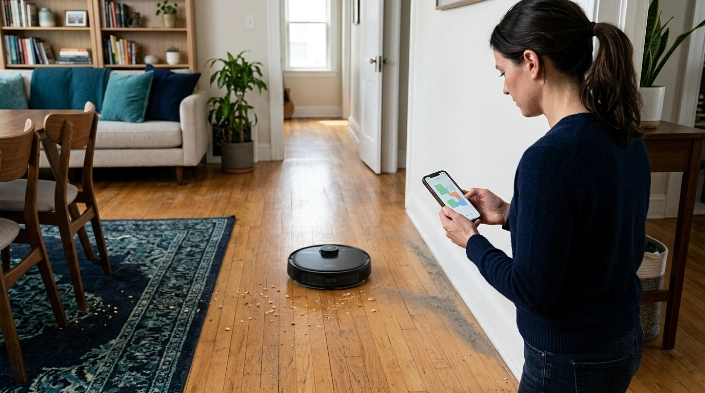
Start with the shape and location of the problem. A repeated rectangular gap suggests something different from random crumbs scattered across a room.
| What You Notice | Likely Area to Check | Quick Test |
|---|---|---|
| Same zone skipped every run | Map, boundary, access, sensor | Clear the area and run a full clean |
| Random areas skipped | Navigation or interrupted cycle | Compare two complete runs |
| Edges consistently dirty | Side brush, wall tracking, body shape | Inspect and clean the side brush |
| Robot enters area but leaves debris | Brushes, bin, filter, suction path | Inspect the cleaning hardware |
| Room missing from map | Mapping setup or blocked doorway | Open the door and perform a mapping run |
| Robot stops near a dark rug | Cliff detection on some models | Check your manufacturer’s guidance |
Check whether it traveled over the spot
This distinction matters. If the robot never entered the area, focus on mapping, obstacles, boundaries, and navigation.
If it traveled over the spot but left dirt behind, inspect the brush roll, side brush, dustbin, filter, and suction inlet instead.
Use the cleaning history
Mapped models often show where a robot traveled during a completed job. This can help separate a navigation problem from weak debris pickup.
Consumer Reports also treats cleaning coverage, obstacle avoidance, entrapment, and multiroom movement as distinct parts of robot-vacuum navigation testing. Their vacuum testing explanation is useful context for why coverage and pickup should be evaluated separately.
How Do I Fix a Robot Vacuum That Keeps Missing Spots?
Use a simple troubleshooting order before deleting maps or resetting the machine. Change one major variable at a time so you can tell what fixed the problem.
- Clear the missed area. Remove shoes, cords, clothing, lightweight mats, and temporary clutter.
- Open needed doors. Make sure the robot has a wide, unobstructed path into every intended room.
- Check virtual boundaries. Look for misplaced no-go zones, keep-out zones, room dividers, or invisible walls.
- Inspect the cleaning map. Compare the map with your current furniture and room layout.
- Clean accessible sensors. Follow the exact method in your model’s manual and avoid spraying liquid directly into openings.
- Check brushes and wheels. Remove wrapped hair, thread, and packed debris that may restrict movement.
- Empty the dustbin. Make sure the intake and filter area are not packed with debris.
- Run a full-home cycle. Start from the normal dock position and let the robot finish without carrying it elsewhere.
- Review the completed map. Check whether the formerly missed area now shows normal coverage.
Pay special attention to wall and cliff sensors
Roborock’s support guidance says obstacles can prevent access to missed areas. It also identifies dirty wall sensors as a possible cause of abnormal cleaning paths on applicable models.
You can compare your symptoms with Roborock’s official missed-area troubleshooting instructions. Always follow the cleaning method specified for your own model.
Do not carry the robot halfway through a mapped job
Some robots use their starting position and surrounding landmarks to maintain localization. Picking one up and placing it somewhere else can confuse that process.
If you must move it, check your manual for the correct way to resume. Starting a fresh run from the dock is often a cleaner diagnostic test.
Why Does My Robot Miss Edges, Corners, Rugs, or Dark Floors?
Not every missed spot means the robot is malfunctioning. Physical design and floor conditions create areas that are naturally harder for autonomous cleaners.
Corners and baseboards
A round robot body cannot physically fill a sharp 90-degree corner. The side brush has to reach beyond the body and sweep debris toward the suction path.
A bent, tangled, or worn side brush may therefore leave more material along walls. Clean it and replace it according to your manufacturer’s maintenance schedule.
Narrow furniture gaps
A robot may fit under a table but still fail to pass between closely spaced chair legs. The navigation system can also avoid an opening when it judges the route too tight.
- Move lightweight chairs before a diagnostic cleaning run.
- Keep hanging cables away from the floor.
- Move pet bowls temporarily if they block an important route.
- Check whether curtains or bed skirts trigger obstacle avoidance.
Rugs, thresholds, and floor transitions
High thresholds, thick rugs, curled rug corners, and loose fringe can interfere with movement. The robot may turn away, get stuck, or spend enough time struggling that another area goes unfinished.
Dark surfaces
Some robot models can react unexpectedly to dark flooring because of the way their cliff-sensing or camera-based navigation systems work. This behavior varies by model, so avoid covering or disabling safety sensors as a DIY fix.
Expert Alert: If a robot repeatedly falls, reports sensor faults after proper cleaning, has damaged wiring, overheats, or shows battery damage, stop using it and contact the manufacturer or a qualified repair professional.
Does Navigation Type Affect Cleaning Coverage?
Yes, navigation design affects how a robot plans and records its route. However, a more advanced navigation system does not guarantee that every physical spot will be reachable.
Simple or semi-random navigation
Some older or basic robots rely heavily on bump sensors and repeated movement patterns. They may cover a room well over time without producing a precise, predictable path on every single run.
Mapped navigation
Mapping models can plan routes and may let you divide rooms, create zones, or target a specific area. This makes a repeated missed spot easier to diagnose because you can compare the physical floor with the stored map.
- Map looks correct: Check access, sensors, wheels, and cleaning hardware.
- Map shows wrong boundaries: Correct the room divisions if your app allows it.
- Map has shifted: Check whether the dock or major furniture moved.
- Area is excluded: Inspect no-go zones and other restrictions.
Cleaning mode matters too
Do not assume every mode follows the same route. For example, Roborock documents that a fast cleaning route on certain models skips room boundaries and may miss some spots because it uses a quicker zig-zag pattern.
That means a coverage gap can sometimes be a setting choice rather than a hardware failure. When troubleshooting, select a normal full-clean mode instead of the fastest option available.
When Should I Remap, Reset, or Contact Support?
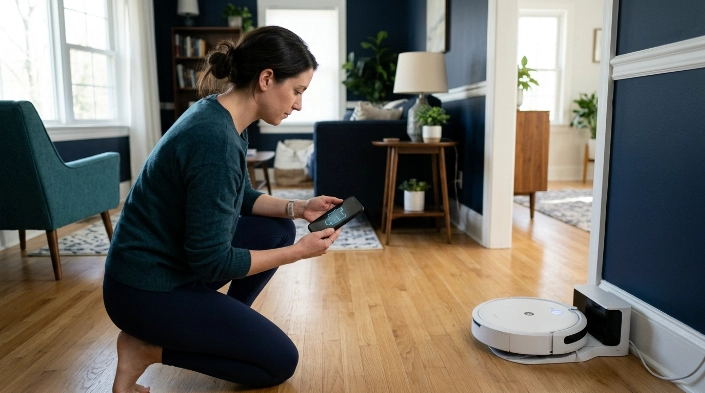
Remapping should not be your first fix. Do it after you have ruled out blocked access, dirty sensors, accidental restrictions, and an interrupted cleaning job.
Remap when the stored layout is clearly wrong
A fresh map makes sense after major furniture changes, moving the dock, changing room access, or seeing persistent map distortion. Give the robot the clearest possible environment during the new mapping run.
- Put the dock in its permanent location.
- Open the doors to rooms you want included.
- Remove temporary obstacles from doorways and main routes.
- Start the mapping process as your manufacturer directs.
- Do not move the dock during the run.
- Let the robot complete the process normally.
- Review room divisions and restrictions afterward.
Restore an older map if your app supports it
Deleting a good map can create unnecessary work. Some systems let you restore or update a saved map using a previous successful cleaning report.
For example, iRobot provides instructions for reverting a Smart Map to a previous version on compatible products.
Contact support when the problem survives a clean setup
A recurring missed area becomes more suspicious when it appears with a correct map, open floor, clean sensors, unrestricted wheels, and a normal full cleaning mode.
- Repeated localization or navigation errors
- A wheel that does not rotate normally
- A bumper that stays stuck
- Sensor errors that return after approved cleaning
- The robot stopping at the same place with no visible obstacle
- Unexpected shutdowns during otherwise normal cleaning
Record the model number, software version, error message, and a screenshot of the cleaning map before contacting support. Those details make the pattern much easier to explain.
Frequently Asked Questions
Why does my robot vacuum miss one room completely?
The room may be blocked by a closed door, narrow entrance, threshold, obstacle, or map restriction. Check whether the room appears on the saved map and whether the robot has a clear route into it.
Why does my robot vacuum miss random spots?
Random missed areas can result from the navigation pattern, temporary obstacles, an interrupted run, or positioning errors. Compare two full cleaning cycles before deciding the problem is permanent.
Should I delete the map if my robot keeps missing spots?
Not immediately. First check obstacles, virtual boundaries, sensors, the dock position, cleaning mode, and the completed cleaning history.
Delete and rebuild the map only when it is clearly inaccurate or your manufacturer recommends doing so.
Can dirty sensors make a robot vacuum skip areas?
Yes. Manufacturers including iRobot and Roborock document dirty navigation-related sensors as possible causes of abnormal movement or missed areas on applicable models.
Clean only the sensors your manual identifies, using the recommended method.
Why does my robot leave dirt even though the map says it cleaned there?
That points more toward a pickup problem than a navigation problem. Inspect the main brush, side brush, dustbin, filter, suction opening, and wheels for hair or packed debris.
Can no-go zones accidentally cause missed areas?
Yes. A no-go zone, keep-out zone, virtual wall, or incorrect room boundary can exclude more floor than you intended.
Open the map editor and compare every restricted area with the actual room.
Will running my robot vacuum twice fix missed spots?
A second run may improve coverage when the robot uses a variable cleaning path. However, repeatedly missing the same exact area points more strongly to access, mapping, sensors, settings, or physical limitations.
How Do I Stop My Robot Vacuum From Missing Spots?
The best fix is to identify whether the robot is failing to reach the area or reaching it without cleaning it properly. That one distinction quickly narrows the problem to navigation or cleaning hardware.
- Clear cords, clutter, and narrow pathways.
- Check the finished cleaning map.
- Review virtual boundaries and room divisions.
- Clean sensors according to the manufacturer’s instructions.
- Remove hair from brushes and wheels.
- Use a normal full-clean mode for testing.
- Remap only after simpler fixes fail.
I would always try one clean, uninterrupted full-home run before changing several settings at once. If the same patch remains untouched afterward, you now have a much clearer clue about what to inspect next.
