
Why Isn’t My Vacuum Picking Up Dirt? 9 Causes and Fixes

Quick Answer
If your vacuum isn’t picking up dirt, first empty the bin or check the bag, inspect the filters, and look for clogs in the hose or floorhead. A tangled brush roll, wrong floor setting, air leak, or worn cleaning-head part can also cause poor pickup. Regular cleaning also matters for controlling household dust, as explained in EPA indoor particulate matter guidance.
Check these first
- Full bin or bag: Empty or replace it before packed debris interferes with normal airflow.
- Dirty filter: Clean or replace filters only as your vacuum’s manual directs.
- Hidden clog: Check the floorhead, wand, hose, and accessible intake passages.
- Tangled brush roll: Remove hair, thread, and fibers that stop normal rotation.
- Wrong setting: Match the brush, suction, or height setting to your floor.
- Air leak: Check loose hoses, cracked tubes, seals, and an incorrectly seated bin.
Fast diagnosis
- Test a small patch: If dirt barely moves, investigate airflow. If it moves but stays on the floor, inspect the cleaning head and brush roll.
Few cleaning problems are more annoying than watching a vacuum pass directly over crumbs without collecting them. I prefer to diagnose poor pickup systematically instead of assuming the motor has failed.
This 2026 guide follows the dirt path from the floorhead to the collection chamber. You’ll learn what each symptom means, what you can safely fix, and when the machine needs professional attention.
In This Guide
Why Isn’t My Vacuum Picking Up Dirt?
A vacuum usually stops picking up dirt because airflow is restricted, the cleaning head cannot loosen debris, or suction is escaping through a leak. The motor can still sound normal while one of these problems reduces actual floor pickup.
Definition: Vacuum pickup performance is the machine’s ability to loosen debris from a surface, move it through the airflow path, and retain it inside the bag or dustbin.
That distinction helps because suction and pickup aren’t exactly the same thing. A machine can have suction at the hose while performing poorly through its main floorhead.
The most common causes include:
- An overfilled bin or bag that restricts the normal dirt and airflow path.
- A dirty filter that makes it harder for air to pass through the machine.
- A clogged hose or wand containing hair, paper, lint, or compacted debris.
- A blocked floorhead that prevents debris from reaching the hose.
- A tangled brush roll that cannot agitate carpet normally.
- An incorrect floor setting that creates poor contact with the surface.
- A worn belt or brush on models that use those components.
- An air leak around a hose, bin, seal, cover, or connector.
- An internal mechanical problem when routine checks reveal nothing wrong.
Watch what the dirt does during one slow pass. That small observation can tell you where to look next.
| What you see | Most useful first check | Likely problem area |
|---|---|---|
| Dirt barely moves | Check suction and airflow | Bin, filter, hose, or clog |
| Debris moves but stays down | Inspect the cleaning head | Brush roll, belt, or intake |
| Crumbs scatter sideways | Check hard-floor mode | Brush speed or floorhead setting |
| Hose works but floorhead doesn’t | Check brush and nozzle | Main cleaning head |
| Suction pulses or changes | Look for restrictions | Filter or airflow path |
How Do I Troubleshoot a Vacuum That Won’t Pick Up Dirt?
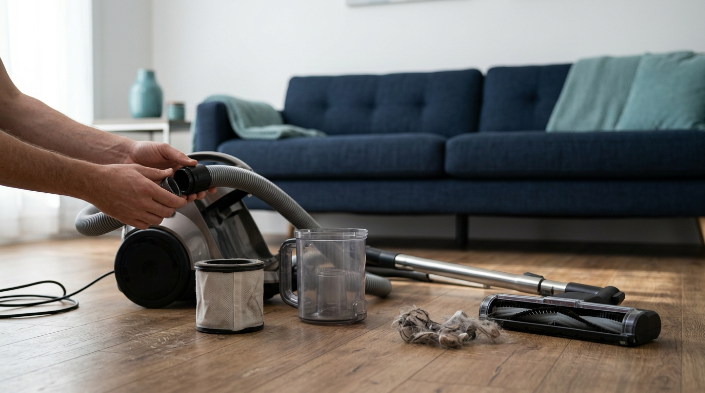
Start with the simplest airflow checks and move toward the floorhead. This prevents unnecessary dismantling and helps isolate the fault quickly.
1. Disconnect the vacuum from power
Unplug a corded vacuum before checking the floorhead, brush roll, or hose. For cordless models, switch the machine off and remove the battery when the manual allows it.
2. Empty the dustbin or inspect the bag
Empty a bagless bin when debris reaches the manufacturer’s fill line. If your vacuum uses disposable bags, replace the bag when its indicator or instructions say it’s full.
Reinstall the container carefully. A bin or bag compartment that doesn’t seal correctly can create an air leak.
3. Check every filter
A filter can become dust-loaded even when the bin isn’t full. Follow your exact model’s instructions for cleaning or replacement.
Don’t assume a removable filter is washable. If washing is permitted, let it dry completely before putting it back into the vacuum.
4. Inspect the hose and wand
Detach removable sections and look through them where possible. Pay special attention to bends, joints, and narrow passages where debris can collect.
- Hair and pet fur
- Paper scraps
- Small toys
- Fabric fibers
- Dense lint
- Compacted dust
Official Shark vacuum maintenance guidance also directs users with low suction to check the dust cup, filters, hose, wand, nozzle, and other airflow passages for blockages.
5. Inspect the floorhead
Turn the vacuum over only after disconnecting power. Look at the intake opening, brush area, wheels, and any accessible channels leading toward the wand.
Remove visible hair and debris without damaging bristles or electrical components. Don’t dismantle a sealed motorized head unless the manufacturer specifically allows it.
6. Test the machine again
I like a small patch of visible, dry household crumbs for this test. Make one or two slow passes and watch whether the debris disappears, moves around, or remains untouched.
Section Takeaway: Trace the entire dirt path in order. A full bin, restricted filter, hidden clog, or blocked floorhead can all create the same frustrating symptom.
Is Weak Suction or the Brush Roll Causing the Problem?
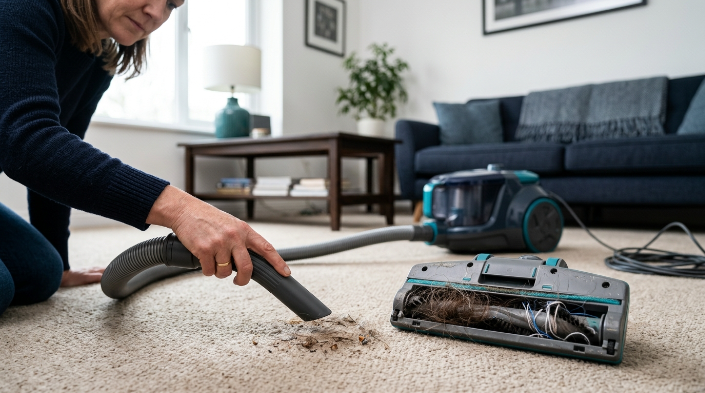
Weak suction and poor brush-roll performance can both leave dirt behind, but they usually behave differently. Comparing hose pickup with floorhead pickup is one of the easiest ways to separate them.
Signs of an airflow or suction problem
- The detachable hose also feels weak.
- The vacuum sounds strained or different from normal.
- Pickup has dropped across several attachments.
- The filter becomes heavily coated with dust.
- Suction changes after emptying the bin or moving the hose.
Look again for restricted airflow or leaks when several tools are affected. Check whether hoses, covers, filters, and bins are properly seated.
Signs of a brush-roll or floorhead problem
- The hose picks up well but the main floorhead does not.
- Hair and thread are wrapped tightly around the roller.
- The brush roll doesn’t rotate when it should.
- Carpet debris remains after repeated passes.
- The floorhead pushes larger crumbs instead of collecting them.
Manufacturer troubleshooting supports this distinction. Dyson’s pickup troubleshooting, for example, separately checks suction strength, cleaner-head condition, and brush-bar operation.
Some vacuums use a drive belt to turn the roller. A stretched, slipping, or broken belt can reduce agitation even when airflow remains normal.
*Expert Alert:* If the brush motor, internal wiring, power connection, or sealed motor housing appears damaged, stop troubleshooting and use a qualified appliance technician.
Why Does My Vacuum Struggle on Certain Floors?
A vacuum that works well in one room but poorly in another may not be broken. Floorhead design, brush settings, height adjustment, and debris size can change pickup dramatically.
Hard floors
A rapidly spinning brush can sometimes push larger crumbs forward or scatter lightweight debris. Use the hard-floor setting or compatible hard-floor attachment when your vacuum provides one.
- Turn off the brush roll when the manufacturer recommends it.
- Reduce excessive suction on lightweight rugs if your model has suction control.
- Check that the front edge of the floorhead can admit the debris you’re cleaning.
- Use slower passes instead of repeatedly pushing crumbs around.
Carpet and rugs
Carpet usually needs both airflow and agitation. A stalled brush roll, incorrect height setting, or tangled roller can leave embedded debris behind.
On adjustable uprights, a floorhead set too high may not agitate carpet effectively. A setting that’s too low can make the vacuum difficult to move and may interfere with normal airflow on some carpets.
Fine dust versus large debris
Fine household dust behaves differently from cereal pieces, leaves, or larger crumbs. A floorhead designed for fine carpet dust may struggle to admit bulky debris through a low front opening.
The EPA notes that indoor dust can contain soil, pollen, mold spores, pet dander, dust-mite material, and other particles. Its guidance recommends frequent cleaning and says a HEPA-filtered vacuum can help keep some collected dust from escaping back into indoor air.
How Can I Prevent Poor Vacuum Pickup?
Most gradual pickup problems are easier to prevent than repair. A short maintenance routine keeps the airflow path and cleaning head ready for the next job.
Use this simple maintenance routine
- Before cleaning: Check the bin or bag and inspect the floorhead for obvious debris.
- After heavy cleaning: Remove wrapped hair and fibers from the brush roll.
- Regularly: Inspect the hose, wand, connectors, and accessible air passages.
- As directed: Clean or replace filters according to the owner’s manual.
- When performance changes: Stop and diagnose the cause instead of making repeated passes.
Avoid vacuuming objects your machine wasn’t designed to handle. Large pieces can wedge into bends, while some fine construction dusts require specialized equipment.
Filtration matters after dirt reaches the vacuum too. The Asthma and Allergy Foundation of America’s indoor-air guidance recommends regular cleaning routines to reduce dust and common household allergens.
As of 2026, HEPA filtration is common across many household vacuum categories. However, a HEPA filter doesn’t fix a blocked hose, tangled brush, leaking seal, or poorly designed airflow path.
Effective pickup and effective filtration are related but separate jobs. You want the machine to collect dirt and keep captured particles inside.
When Does a Vacuum Need Repair Instead?
Routine maintenance should solve problems caused by dirt, hair, filters, and accessible clogs. Persistent poor pickup after those checks may indicate a worn or damaged component.
Contact the manufacturer or a qualified repair technician when you notice:
- Smoke or sparks
- A burning electrical smell
- A damaged power cord or exposed wiring
- A motor that repeatedly overheats
- A motorized brush that won’t operate after clearing debris
- Cracked internal housings or inaccessible air leaks
- Weak suction despite a completely clear accessible airflow path
*Expert Alert:* Stop using a vacuum that smokes, sparks, smells electrically burnt, or has exposed wiring. Don’t open sealed electrical or motor assemblies for DIY testing.
| Situation | Reasonable next step |
|---|---|
| Full bin, clog, or tangled roller | Routine household maintenance |
| Damaged user-replaceable hose or belt | Check the manual and replacement-part cost |
| Vacuum still under warranty | Contact manufacturer support first |
| Smoke, sparks, or electrical damage | Stop use and seek qualified repair |
| Expensive major repair on an old vacuum | Compare repair cost with replacement |
Frequently Asked Questions
Why does my vacuum have suction but still not pick up dirt?
The problem may be in the cleaning head rather than the motor. Check the brush roll, floorhead intake, belt, floor setting, and roller movement. Strong hose suction combined with poor floor pickup is a useful clue that the main cleaning head needs attention.
Why does my vacuum push dirt instead of picking it up?
The front of the floorhead may be too low for larger debris, or a spinning brush may scatter lightweight crumbs. Try the correct hard-floor mode, adjust the floorhead if your model allows it, and use slower passes.
Can a dirty filter stop a vacuum from picking up dirt?
Yes. A dust-loaded filter can restrict airflow and reduce pickup performance. Clean or replace each filter according to the manufacturer’s instructions, because not every vacuum filter is washable and reusable.
Why is my vacuum picking up dirt only through the hose?
Strong hose pickup with weak floorhead pickup usually points toward the nozzle, brush roll, belt, or a blockage near the cleaning head. Disconnect power, inspect those areas, and follow the manufacturer’s procedure for your model.
Why does my vacuum stop picking up after a few minutes?
A restriction may become more noticeable as debris accumulates, or the vacuum may be overheating. Check the bin, filters, hose, and floorhead. If the machine becomes unusually hot or repeatedly shuts down, stop using it and follow manufacturer support guidance.
Does a HEPA filter make a vacuum pick up more dirt?
Not necessarily. HEPA describes high-efficiency particle filtration, not floor pickup power. A HEPA-equipped vacuum can still perform poorly if its bin is full, filter is clogged, hose is blocked, brush roll is tangled, or seals are leaking.
Should I replace my vacuum if it isn’t picking up dirt?
Not before performing basic maintenance. Many pickup problems come from accessible clogs, dirty filters, tangled brushes, incorrect settings, or replaceable parts. Replacement becomes more reasonable when a major repair is costly, unsafe, or impractical for an older machine.
Final takeaway: When your vacuum isn’t picking up dirt, don’t start by blaming the motor. Check the collection chamber, filters, airflow path, brush roll, floorhead, settings, and seals in that order.
A five-minute inspection can often reveal the problem. If those checks don’t restore normal pickup, use your model’s official troubleshooting instructions or contact a qualified repair professional.