
Why Is My Vacuum Leaving Dirt Behind? Causes and Fixes

Quick Answer
If your vacuum is leaving dirt behind, start by checking the bin or bag, filters, hose, floorhead, and brush roll. Restricted airflow, a clog, tangled hair, the wrong floor setting, or an air leak can all reduce pickup; basic vacuum maintenance often solves the problem before repair is needed.
What to check first
- Full bin or bag: Empty or replace it before packed debris restricts normal airflow.
- Dirty filter: Clean or replace it only according to your vacuum’s manual.
- Hidden clog: Inspect the floorhead, wand, hose, and accessible air passages.
- Tangled brush roll: Remove hair, thread, and fibers that prevent normal rotation.
- Wrong floor setting: Adjust the height, suction, or brush setting for the surface you’re cleaning.
- Air leak: Check for a loose bin, disconnected hose, cracked tube, or poorly seated filter cover.
Quick test
- Vacuum a small, visible patch of crumbs or dry debris. If suction sounds normal but debris moves without disappearing, inspect the floorhead and brush roll next.
A vacuum that passes over crumbs yet leaves half of them behind is frustrating. I’ve also found that poor pickup often looks like a dying motor when the cause is much simpler.
This 2026 guide works through the entire dirt path, from the floorhead to the exhaust. You’ll learn what to check, what different symptoms mean, and when it’s safer to stop troubleshooting.
In This Guide
- Why is my vacuum leaving dirt behind?
- Is weak suction causing the dirt to stay on the floor?
- Can the brush roll or floorhead cause poor pickup?
- Why does my vacuum scatter debris on hard floors?
- How do I troubleshoot a vacuum that leaves dirt behind?
- When does poor pickup mean the vacuum needs repair?
- Frequently asked questions
Why Is My Vacuum Leaving Dirt Behind?
Your vacuum usually leaves dirt behind because it cannot move debris efficiently from the floor into the collection chamber. The problem may involve airflow, agitation, the floorhead, or a leak in the dirt path.
Definition: Vacuum pickup performance is the machine’s ability to loosen debris from a surface, move it into the airflow, and retain it inside the bin or bag.
That distinction matters. Strong motor noise does not prove the machine is collecting dirt properly.
The most common causes I would check are:
- A full bin or bag restricting normal airflow.
- A dust-loaded filter making air harder to move through the machine.
- A clogged hose, wand, or intake blocking the debris path.
- A tangled or stalled brush roll failing to lift dirt from carpet.
- An unsuitable floorhead setting preventing proper contact with the surface.
- A loose connection or damaged hose allowing suction to escape.
- A worn belt or brush reducing agitation on applicable models.
I like to separate suction from pickup before doing anything complicated. Place a few visible crumbs on a test area and watch exactly what happens during one slow pass.
| What you see | Most useful first check | Likely area |
|---|---|---|
| Debris barely moves | Check airflow and suction | Bin, filters, hose, clog |
| Debris moves but stays down | Inspect brush roll and floorhead | Roller, belt, floor setting |
| Debris shoots sideways | Check brush speed and head design | Hard-floor setup |
| Pickup improves with hose tool | Inspect main cleaning head | Floorhead or brush system |
| Suction pulses or changes | Look for restrictions | Filter or airflow path |
Section Takeaway: Dirt left behind does not automatically mean a bad motor. First determine whether the machine lacks airflow, agitation, or correct floorhead contact.
Is Weak Suction Causing the Dirt to Stay on the Floor?
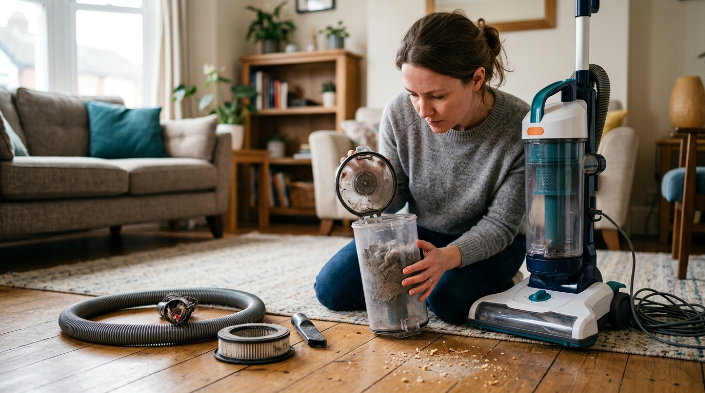
Weak suction is one of the most common reasons a vacuum stops picking up well. Start with the parts you can safely inspect without opening the motor housing.
Check the bin or vacuum bag
A packed dustbin gives incoming dirt less room and may interfere with airflow. Empty it at the manufacturer’s fill line rather than compacting more debris inside.
Bagged vacuums need similar attention. Replace the bag when the indicator or owner instructions say it’s time.
- Empty a bagless bin.
- Check whether a disposable bag is full or poorly seated.
- Reinstall the bin securely.
- Make sure lids and access doors latch completely.
Inspect the filters
Fine dust can load filter material long before a filter looks completely blocked. That restriction can make the vacuum feel weak at the floorhead.
Never assume every removable filter is washable. Rinse one only when the manufacturer specifically permits it.
A washable filter also needs to dry completely before reinstallation. Putting damp material into a dry vacuum can create new problems.
Look for hidden clogs
A partial blockage may still let some air through, making it easy to miss. Hair, paper, lint, small toys, and packed dust commonly become lodged in hoses or bends.
- Check the floorhead intake.
- Disconnect and inspect removable wands.
- Look through accessible hose sections.
- Inspect attachment openings.
- Check bends where debris changes direction.
Consumer guidance also treats hose clogs as a common troubleshooting point when suction falls. A clear airflow path should come before assumptions about internal motor failure.
Section Takeaway: If suction has changed, work through the entire airflow path. A clean filter cannot compensate for a packed bin or blocked hose.
Can the Brush Roll or Floorhead Cause Poor Pickup?
Yes. A vacuum can have usable suction and still leave dirt behind when the cleaning head cannot loosen or guide debris into the intake.
Look for hair around the brush roll
Hair, thread, yarn, and carpet fibers can wrap tightly around a rotating brush. Heavy tangles may slow the roller or prevent parts of the bristles from reaching the floor.
I’ve seen this create a misleading symptom: the vacuum sounds normal, yet a strip of carpet remains gritty after several passes. Turning the machine over reveals a roller covered in a dense layer of hair.
- Switch the vacuum off.
- Unplug a corded model before servicing accessible moving parts.
- Disconnect a removable battery when the manufacturer instructs you to do so.
- Remove wrapped debris using the method in the owner’s manual.
- Check that the roller turns normally before reassembly.
Check the belt on applicable vacuums
Some uprights use a belt to drive the brush roll. A stretched, damaged, or broken belt can leave the motor running while the roller turns poorly or not at all.
Belt access differs widely between models. Don’t disassemble sealed sections unless your manual identifies them as user-serviceable.
Use the correct height or floor setting
An upright set too high may barely contact carpet. Set too low, some machines can become difficult to move or may not maintain ideal airflow.
Other vacuums automatically adjust. Check your manual before assuming a control should be present.
- Carpet: Use the manufacturer-recommended brush and height setting.
- Hard floor: Use a hard-floor mode or suitable cleaner head when available.
- Delicate rugs: Follow both the rug maker’s and vacuum maker’s cleaning guidance.
- Large debris: Use an intake or head designed to admit the debris size.
Section Takeaway: Suction alone cannot clean every surface. The brush roll and floorhead must also contact, loosen, and channel debris correctly.
Why Does My Vacuum Scatter Debris on Hard Floors?
A vacuum may scatter crumbs when a fast brush roll strikes lightweight debris before the intake captures it. The floorhead design and selected mode both affect this behavior.
This problem is especially obvious with dry cereal, rice-sized particles, cat litter, and similar debris. Fine dust may disappear while larger pieces shoot forward or sideways.
Turn off the brush roll when appropriate
If your vacuum provides a hard-floor mode that stops the rotating brush, try it. Some machines are specifically designed to clean bare floors this way.
Don’t force a setting your model doesn’t support. Follow the control descriptions in its manual.
Check the front opening of the floorhead
A low front edge may push larger debris rather than admit it. Some heads include gates, channels, or soft rollers designed to handle larger particles.
- Inspect the intake for packed dirt.
- Check whether wheels turn freely.
- Remove debris trapped around the head.
- Confirm that adjustable gates or vents are set correctly.
- Try a compatible hard-floor attachment if your vacuum includes one.
Slow your cleaning passes
Fast passes can move dirt before the vacuum captures it. A slower forward pass gives the floorhead more opportunity to guide debris into the intake.
EPA guidance notes that household dust can include soil, pollen, mold spores, pet dander, dust-mite material, and other particles. It recommends regular cleaning and says a HEPA-filtered vacuum can help reduce dust buildup.
For allergy-sensitive households, filtration matters after debris enters the machine too. Pickup and particle retention are separate parts of effective cleaning.
How Do I Troubleshoot a Vacuum That Leaves Dirt Behind?
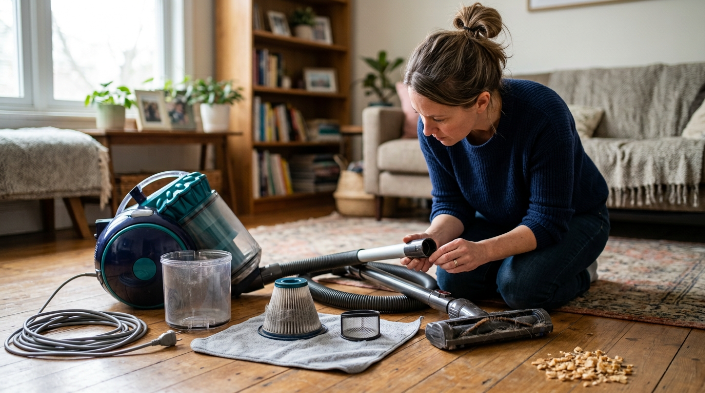
Use a fixed order so you don’t waste time dismantling unrelated components. I start at the dirt container, trace the airflow toward the floor, and test again after each correction.
- Turn off the vacuum. Unplug it or follow your cordless model’s safe shutdown instructions.
- Empty the bin or inspect the bag. Reinstall every collection component securely.
- Check the filters. Service them only as the manufacturer directs.
- Inspect the hose and wand. Look for accessible clogs, packed dust, or damaged connections.
- Inspect the floorhead. Clear debris from the intake and wheels.
- Check the brush roll. Remove hair and confirm normal movement where user inspection is permitted.
- Select the correct floor mode. Match carpet, hard-floor, brush, or height settings to your surface.
- Check for visible leaks. Look for loose hoses, cracked tubes, open covers, and poorly seated bins.
- Run a small test patch. Use visible dry debris and make one or two slow passes.
Use the hose test to narrow the problem
If your vacuum has a detachable hose, compare hose pickup with floorhead pickup. Strong hose suction paired with weak floor pickup points your attention toward the cleaning head.
Weak suction at both locations suggests a broader airflow restriction or another machine-level problem. Avoid reaching into powered components while the vacuum is connected to power.
Think about the dirt you’re trying to collect
Household vacuums aren’t designed for every material. Large construction debris, wet material, ash, and hazardous dust can require specialized equipment.
Expert Alert: Don’t use an ordinary household vacuum for hazardous renovation dust or materials such as suspected asbestos or lead-contaminated debris. Use the appropriate professional cleanup method and equipment instead.
Remember filtration after pickup
The CDC’s asthma guidance recommends regular vacuuming with a HEPA-equipped vacuum as one measure for reducing exposure to dust-mite triggers. HEPA means high-efficiency particulate air.
The Asthma and Allergy Foundation of America also describes vacuuming as part of broader indoor-allergen control. It notes that vacuuming isn’t the only step needed for allergen management.
Section Takeaway: Troubleshoot in a repeatable order rather than replacing random parts. Collection, filtration, airflow, brush action, and floor settings cover the most useful household checks.
When Does Poor Pickup Mean the Vacuum Needs Repair?
Consider professional diagnosis when basic maintenance does not restore pickup and the accessible airflow path is clear. Internal electrical, motor, battery, or sealed mechanical faults are not good DIY experiments.
Stop using the vacuum immediately if you notice:
- Smoke or visible sparking.
- A persistent burning or electrical smell.
- A damaged power cord or plug.
- Abnormal heat that returns after basic airflow checks.
- A swollen, leaking, or physically damaged battery.
- Grinding from an inaccessible internal component.
- Repeated shutdowns after the machine has cooled and been cleared.
Expert Alert: Electrical diagnosis, motor repair, internal battery work, and disassembly beyond the owner’s manual should go to the manufacturer or a qualified appliance technician.
Repair versus replacement
A replaceable hose, belt, brush roll, filter, or floorhead can make repair practical. A costly motor or electronic failure on an older low-value vacuum may change the calculation.
Before replacing the whole machine, price the correct part and check warranty coverage. Also confirm that the problem isn’t simply a missing seal or incorrectly installed component.
| Situation | Reasonable next move |
|---|---|
| Clog, full bin, tangled roller | Routine household maintenance |
| Damaged user-replaceable hose or belt | Check replacement-part cost and manual |
| Problem occurs within warranty | Contact manufacturer support first |
| Smoke, sparks, damaged wiring | Stop use and seek qualified repair |
| Major repair on an old machine | Compare repair cost with replacement |
Section Takeaway: Most pickup problems deserve basic troubleshooting first. Electrical faults, battery damage, smoke, and inaccessible mechanical failures belong with a qualified professional.
Frequently Asked Questions
Why does my vacuum leave crumbs behind even though it has suction?
The floorhead may be the problem rather than the suction motor. Check for a tangled brush roll, blocked intake, wrong floor setting, worn brush, or a design that pushes larger debris instead of letting it enter the head.
Why does my vacuum pick up dirt only when I pull it backward?
The front edge of the cleaner head may be pushing debris during the forward pass. Check the intake, floor setting, brush-roll operation, and any adjustable vents or debris gates specified in your manual.
Can a dirty filter make my vacuum leave dirt behind?
Yes. A heavily loaded filter can restrict airflow and reduce pickup. Clean or replace the filter according to your model’s instructions, and never wash a filter unless the manufacturer says it is washable.
Why is my vacuum spitting dirt back out?
A clog, incorrectly installed dirt container, full bin, blocked floorhead, or airflow problem may cause debris to fall or blow back out. Turn the vacuum off and inspect the complete accessible dirt path before using it again.
Does a HEPA filter make a vacuum pick up more dirt?
Not necessarily. HEPA describes particle filtration rather than floor pickup power. Good pickup also depends on airflow, cleaner-head design, brush action, seals, maintenance, and correct use on the floor surface.
How often should I clean my vacuum filter?
There is no universal schedule that fits every model. Inspect it regularly, then follow the manufacturer’s cleaning and replacement instructions because washable, non-washable, pre-motor, and exhaust filters have different requirements.
Should I replace a vacuum that still leaves dirt after cleaning it?
Not immediately. First check the bin or bag, filters, clogs, hose connections, brush roll, floorhead, and settings. If those areas are correct and pickup remains poor, manufacturer support or professional diagnosis can help identify an internal fault.
When my vacuum starts missing visible dirt, I don’t begin by blaming the motor. I work through the airflow and cleaning head first, because those checks are faster, safer, and often reveal the real problem.
Start with one small test area today. Once your vacuum picks up that patch cleanly again, you can return to the rest of the room with confidence.