
Why Is My Vacuum Blowing Dust Back Out?

Quick Answer
If your vacuum is blowing dust back out, start by checking the filters, dustbin or bag, hose, seals, and brush roll. A clogged, damaged, missing, or incorrectly installed filter is a common culprit, and Consumer Reports also warns that neglected vacuum filters can let dust escape back into the air.
Check these first
- Dirty filter: Heavy dust buildup can restrict airflow and interfere with normal filtration.
- Damaged filter: Tears, cracks, warping, or a poor fit can let fine dust bypass the filter.
- Full bin or bag: An overloaded dirt container can reduce airflow and make dust control worse.
- Airflow blockage: A clog in the hose, wand, floorhead, or inlet can disrupt normal suction.
- Leaking seal: Loose connections or worn seals may let dusty air escape before filtration.
- Brush-roll scatter: A fast brush roll can throw loose debris ahead of the cleaner instead of sucking it up.
Fast verification tip
- Watch where the dust appears. Dust from the exhaust suggests filtration or sealing trouble, while debris shooting from the floorhead points more toward airflow or brush-roll problems.
Seeing a dusty cloud after vacuuming is frustrating because the machine should improve your home hygiene, not make the room look dirtier. I usually diagnose this problem by finding exactly where the dust is escaping before taking anything apart.
That distinction saves time. Dust from the exhaust, floorhead, bin, and hose connections can each point to a different problem.
In This Guide
What Does It Mean When a Vacuum Blows Dust Out?
A vacuum blowing dust back out means collected debris or disturbed floor dust is returning to the room instead of staying contained. The problem can happen inside the filtration system or outside it at the cleaner head.
A vacuum cleaner uses airflow to pull debris into a bag or dustbin. Air then passes through one or more filters before leaving through the exhaust.
Vacuum dust blowback is the visible or noticeable release of dust during that process. It is different from ordinary exhaust airflow, which every conventional vacuum needs to move air through the machine.
- Dust from the exhaust: Check filters, filter fit, seals, and internal dirt containment.
- Dust from the floorhead: Check suction, blockages, brush rotation, and floor settings.
- Dust around the bin: Check whether the bin is seated, closed, cracked, or overfilled.
- Dust near hose joints: Check connections, gaskets, cuffs, and visible hose damage.
One simple test I use is shining a flashlight across the vacuum while it runs over a small dusty area. Side lighting makes the dust plume easier to trace without deliberately creating extra dust.
Do not open the machine while it is running. Disconnect power before removing filters, hoses, or access panels.
Why Is My Vacuum Blowing Dust Back Out?
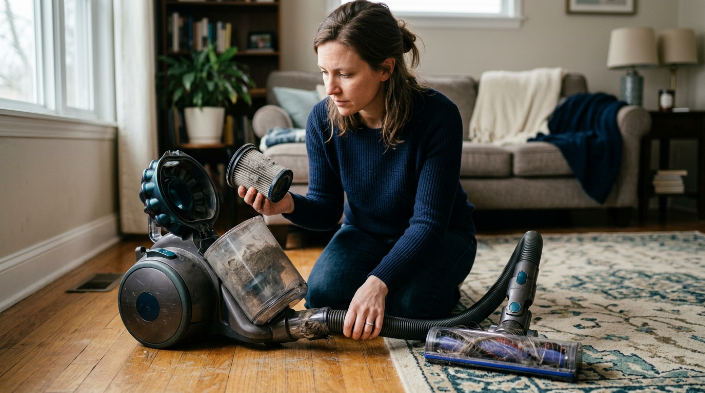
The most common causes are filter problems, restricted airflow, an overloaded dirt container, air leaks, or debris scattering at the floorhead. Start with the easiest checks because many blowback problems do not require a major repair.
1. The filter is clogged
A filter loaded with fine dust can restrict airflow. That often reduces suction and may worsen how well the machine contains newly collected debris.
Consumer Reports specifically notes that neglected vacuum filters can contribute to suction loss and dust being spewed back into the air. Filter maintenance differs by model, so the owner’s manual should control your cleaning schedule.
2. The filter is missing, damaged, or installed incorrectly
A filter cannot do its job if air can bypass it. Check for tears, warped edges, gaps, incorrect orientation, and a filter that is not fully seated.
The EPA defines a true HEPA vacuum as a machine designed so its intake air passes through the HEPA filter without leaking around it. That illustrates why both the filter and the vacuum’s sealing design matter.
3. The bag or dustbin is too full
A packed bag or overfilled bin can restrict the normal airflow path. Empty or replace it before assuming the motor has failed.
Also inspect the bin inlet. A compressed wad of hair can block that small opening even when the container itself looks half empty.
4. There is a clog somewhere in the airflow path
Clogs commonly hide in bends and narrow transitions. A vacuum can still make plenty of noise while moving too little air at the cleaner head.
- Floorhead inlet
- Brush-roll chamber
- Extension wand
- Flexible hose
- Hose elbow
- Bin or bag inlet
5. A seal or connection is leaking
Vacuum bodies use doors, gaskets, hose cuffs, filter covers, and bin seals to control airflow. A loose or damaged connection can give dusty air another route out.
Look for cracked plastic and flattened rubber seals. Do not glue or modify sealed filtration parts unless the manufacturer provides that repair method.
6. The brush roll is throwing debris
Sometimes the vacuum is not blowing collected dust through its exhaust at all. The rotating brush may simply be launching crumbs, litter, or grit before weak suction can capture them.
This is especially noticeable on hard floors. Use the manufacturer-recommended floor mode and disable the brush roll when your vacuum provides that option.
Section Takeaway: Trace where the dust appears before replacing parts. Exhaust dust points toward filtration or sealing, while floor-level scatter usually points toward suction, airflow, or brush action.
How Do I Stop My Vacuum From Blowing Dust?
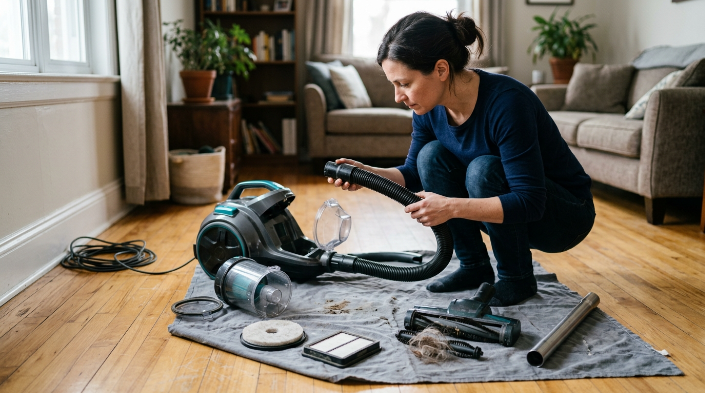
Work from the dirt container toward the exhaust. This gives you a logical troubleshooting path and reduces unnecessary disassembly.
- Switch off and disconnect power. Unplug a corded vacuum or remove the battery when your model allows it.
- Empty the dustbin or replace the bag. Make sure the replacement bag fits correctly around its inlet collar.
- Inspect every required filter. Check pre-motor, post-motor, exhaust, foam, and HEPA filters used by your model.
- Clean only washable filters. Never assume a pleated HEPA filter can be rinsed just because it looks dirty.
- Let washed parts dry completely. Reinstall them only after they are fully dry according to the manual.
- Clear the airflow path. Check the floorhead, wand, hose, elbows, and inlet openings.
- Inspect seals and covers. Confirm the bin, filter door, hose, and bag compartment close securely.
- Clean the brush roll. Remove wrapped hair, thread, and fibers that can restrict its movement or airflow.
- Test on a small clean area. Watch the exhaust and cleaner head separately to see whether the problem remains.
If your vacuum uses a HEPA filter, remember that HEPA describes particle-filtration performance rather than washability. The EPA’s HEPA filter explanation describes the filtration standard, but your manufacturer decides how that specific vacuum filter should be maintained.
That distinction matters. Some Dyson, Shark, and other vacuum models use washable filters, while other filters require replacement, so always follow the instructions for your exact model.
Expert Alert: Stop troubleshooting and use a qualified appliance technician if you notice smoke, electrical arcing, a damaged power cord, a strong burning smell, or internal electrical damage.
Which Vacuum Problem Matches the Dust I See?
The location and timing of the dust often reveal more than the amount. Use this comparison before buying a new filter or assuming the motor has failed.
| What you notice | Likely area to check | First action |
|---|---|---|
| Fine dust coming from the exhaust | Exhaust filter, HEPA filter, filter seal | Inspect filter condition and installation |
| Crumbs shoot forward on hard flooring | Brush roll, suction, floor setting | Check airflow and hard-floor mode |
| Dust leaks around the bin | Bin seal, latch, cracks, overfilling | Empty and reseat the container |
| Weak suction plus dusty exhaust | Clogged filter or airflow blockage | Check filters, hose, wand, and inlet |
| Dust appears at a hose joint | Hose cuff, gasket, connection | Reconnect and inspect for damage |
| Dust problem started after filter cleaning | Incorrect fit, wet filter, damaged media | Recheck the manual and filter installation |
If suction sounds normal but a visible cloud appears at the exhaust, I would inspect filtration before chasing a hidden hose clog. If debris only jumps around the floor, I would reverse that order.
Can Vacuuming Make the Air Dustier?
Yes. Vacuuming can temporarily stir settled dust into the air, even when the vacuum itself is functioning normally.
The EPA’s indoor particulate matter guidance says cleaning and vacuuming can re-suspend household dust. That dust may contain pollen, mold spores, pet dander, dust-mite material, skin flakes, and other particles.
- Use effective filtration: EPA guidance suggests considering a vacuum with a HEPA filter to help keep some captured dust from escaping.
- Dust with a damp cloth: Damp wiping helps keep settled material from immediately returning to the air.
- Vacuum regularly: Removing accumulated dust reduces the reservoir available for later disturbance.
- Protect sensitive occupants: People with asthma or allergies may want to leave the room during vacuuming, consistent with EPA guidance.
HEPA stands for high-efficiency particulate air. The EPA states that a HEPA filter can theoretically capture at least 99.97% of particles measuring 0.3 microns under the HEPA test definition.
That number describes the filter media under its defined test conditions. It does not mean every vacuum carrying the word “HEPA” has identical whole-machine sealing or performance.
For households concerned about dust mites, the National Institute of Environmental Health Sciences also recommends a double-layer microfilter bag or HEPA filter as part of its dust-mite prevention guidance.
When Should I Repair or Replace the Vacuum?
Do not replace a vacuum just because it blows dust once. Filters, clogs, an overfilled bin, or a poorly seated component are cheaper and easier to address first.
Repair becomes more reasonable when basic maintenance does not solve the problem. Replacement may make sense when several major components are worn at once.
- Consider maintenance first: Dirty filters, clogged hoses, tangled brush rolls, and full bags are routine service issues.
- Consider a replacement part: Damaged hoses, seals, filters, bins, and brush rolls may be replaceable on many models.
- Consider professional service: Persistent overheating, abnormal motor noises, electrical problems, or inaccessible internal leaks need more expertise.
- Consider replacing the machine: Extensive housing damage, unavailable parts, or repeated costly failures can make replacement more practical.
As of 2026, there are upright, canister, stick, robot, and shop vacuums with very different filter layouts. A troubleshooting step that works on one design may be wrong for another.
Keep the model number handy when checking the manual or ordering parts. Never substitute a filter simply because its dimensions look close.
Expert Alert: Do not open a motor housing or attempt electrical repairs unless you are qualified to work safely on that appliance.
Vacuum Blowing Dust FAQs
Why is my bagless vacuum blowing dust out?
A bagless vacuum may blow dust out when its filter is clogged, damaged, wet, missing, or installed incorrectly. An overfilled bin, cracked container, loose seal, or blocked airflow path can also contribute, so empty the bin and inspect the complete filtration path.
Why is dust coming out of my vacuum’s exhaust?
Dust at the exhaust usually makes the filtration system the first place to inspect. Check whether the exhaust or HEPA filter is present, correctly seated, undamaged, and maintained according to the manufacturer’s instructions.
Can a dirty vacuum filter cause dust to blow back out?
Yes. A heavily loaded filter can restrict airflow and reduce vacuum performance, while damaged or poorly fitted filtration can allow dust to escape. Consumer Reports specifically notes that neglected vacuum filters can lead to suction loss or dust being spewed back into the air.
Why does my vacuum blow dirt around on hardwood floors?
The brush roll may be scattering lightweight dirt faster than the vacuum can capture it. Check for a clog or weak suction, then use the recommended hard-floor setting and switch off the rotating brush when your model allows it.
Should I wash my vacuum’s HEPA filter?
Wash it only when the manufacturer says that exact filter is washable. HEPA describes filtration performance, not whether the media tolerates water, so an unapproved rinse can damage some filters or prevent them from working as intended.
Does a HEPA vacuum stop all dust from escaping?
No vacuum should be assumed to stop every particle in every real-world condition. Effective HEPA filtration helps capture fine particles, but whole-machine sealing, correct filter installation, maintenance, and the way floor dust gets disturbed also matter.
Why did my vacuum start blowing dust after I cleaned the filter?
Recheck the filter installation. The filter may be seated incorrectly, still damp, damaged during cleaning, or not designed to be washed, and a filter cover or gasket may also have been left loose during reassembly.
Bottom line: When a vacuum blows dust back out, follow the dust to its source before replacing the machine. Filters, airflow restrictions, dirt-container problems, leaks, and brush-roll scatter explain many cases.
Start with a clean bin or bag, correctly installed filters, and a clear airflow path. If dust still escapes after those checks, inspect seals and consider model-specific service.