
How Do You Maintain a Vacuum Used Daily?

Quick Answer
To maintain a vacuum used daily, check the bin or bag after every cleaning session, remove obvious hair from the brush roll, and watch for blocked airflow. Inspect the filters and deeper airflow path regularly, but clean or replace parts only as your manufacturer directs; the EPA’s indoor air quality guidance also emphasizes maintaining filtration equipment according to manufacturer directions.
Daily-Use Vacuum Maintenance Steps
- Check the bin: Empty it before debris becomes tightly packed or reaches the manufacturer’s fill limit.
- Inspect the roller: Remove visible hair, string, and thread before they restrict brush movement.
- Watch airflow: Investigate sudden suction loss rather than continuing to vacuum with a possible clog.
- Check filters: Inspect them frequently, but wash only filters specifically labeled or documented as washable.
- Look for damage: Check the cord, plug, battery, floorhead, hose, and seals for unusual wear.
- Keep parts dry: Never reinstall a washable filter or bin until it is completely dry.
Most Important Rule
- Daily use increases debris and airflow through the machine, so inspect high-wear areas more often instead of relying on one universal maintenance schedule.
If you use a vacuum every day, small maintenance jobs matter more than occasional deep cleaning. I have found that checking a machine while emptying it catches most problems before they become frustrating.
This 2026 guide covers bins, bags, filters, brush rolls, clogs, batteries, odors, and warning signs. It applies to everyday household upright, canister, stick, cordless, and robot vacuums.
In This Guide
Why Does a Daily-Use Vacuum Need More Maintenance?
A vacuum used daily moves more dirt, hair, lint, and air through its internal parts. That can fill the bin faster and load filters or brush rolls sooner.
Daily vacuum maintenance means routinely checking the parts that collect debris, move air, or contact the floor. It does not mean dismantling the entire vacuum every day.
Daily use changes maintenance by workload
Think in terms of workload rather than calendar dates. A vacuum running 30 minutes every day experiences different conditions from one used for 20 minutes each weekend.
- Pet hair can wrap around rollers and small wheels quickly.
- Long human hair can tighten around brush-roll axles.
- Carpet fibers may collect around rotating components.
- Fine household dust may load filters faster than larger crumbs.
- Busy entryways can introduce sand and gritty debris.
Daily use can also make gradual performance loss harder to notice. Suction may decline slowly enough that you compensate by making extra passes.
I use a simple test. If a vacuum suddenly needs several passes for debris it normally collects in one, I check the airflow path before blaming the motor.
The EPA describes filtration as one part of improving indoor air quality and notes that long-term performance depends on correct maintenance. Vacuum filtration should therefore be treated as one part of broader household dust control, not a guaranteed health solution.
Section Takeaway: A daily-use vacuum does not need a complete teardown every day. It needs frequent small checks that prevent debris, hair, and airflow restrictions from building unnoticed.
What Should You Do After Every Use?
After daily vacuuming, focus on the areas where debris collects fastest. This routine should take only a few minutes on most household machines.
1. Check the dustbin or vacuum bag
Look at the bin before putting the vacuum away. Empty it when needed rather than letting debris become heavily packed.
For a bagged vacuum, check the bag indicator or bag condition according to the owner’s manual. Do not wait for obvious suction loss if the manufacturer recommends earlier replacement.
2. Look at the brush roll
Turn the machine off and disconnect power before touching a powered floorhead. Look for visible hair, thread, string, or fibers.
A few loose hairs may not require a full cleaning. A tight band around the roller deserves attention before the next long cleaning session.
- Remove loose debris by hand when safe.
- Use the manufacturer’s approved roller-removal method.
- Avoid cutting near belts, electrical wires, or delicate bristles.
- Confirm the brush rotates freely after cleaning.
3. Check the intake opening
Large objects can lodge where the floorhead meets the wand or air channel. Look for paper, leaves, clumps of hair, or other visible obstructions.
Do not push sharp tools blindly into a hose. They can puncture flexible material or damage internal wiring on some powered systems.
4. Inspect the cord or battery
For corded vacuums, look for damaged insulation, a bent plug, or unusual heat. Stop using the appliance if electrical damage appears.
For cordless vacuums, watch for battery swelling, physical damage, unusual odor, or abnormal heat. Use only the charging equipment recommended for your model.
Expert Alert: Stop using a vacuum with exposed wiring, a damaged plug, battery swelling, smoke, sparking, or a persistent burning smell. Electrical and battery faults should be handled by a qualified repair professional or the manufacturer.
What Maintenance Should You Do Weekly and Monthly?
A daily-use vacuum benefits from a layered schedule. Quick checks happen frequently, while deeper inspections happen less often.
| Maintenance Task | Practical Starting Point | Check Sooner When |
|---|---|---|
| Bin or bag | During or after daily use | Debris packs tightly or airflow falls |
| Brush roll | About weekly | Pets, long hair, thread, or string are common |
| Filter inspection | About monthly | Fine dust, odors, alerts, or suction changes appear |
| Hose and wand | About monthly | Suction suddenly drops |
| Wheels and attachments | Monthly inspection | Hair, lint, or sticky debris accumulates |
| Filter cleaning or replacement | Manufacturer schedule | The manual or maintenance alert requires it |
These intervals are inspection reminders, not universal manufacturer specifications. Your exact vacuum manual should override a generic schedule.
Check the complete airflow path monthly
Start at the floorhead and move toward the dust container. Inspect each removable connection where debris can become trapped.
- Floorhead intake
- Wand or extension tube
- Flexible hose
- Dustbin inlet
- Accessible cyclone or separator areas
- Manufacturer-accessible air passages
Do not open sealed motor housings or electrical assemblies for routine cleaning. Those areas are not normal household maintenance points.
Section Takeaway: Use frequent visual checks for high-debris components and a monthly deeper inspection as a practical starting point. Your manufacturer’s instructions always take priority.
How Should You Maintain the Filters?
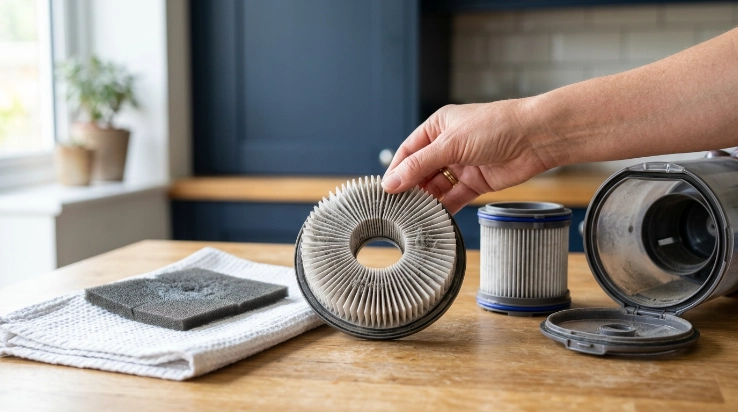
Filter care is one of the easiest maintenance jobs to get wrong. Never assume a filter is washable because it looks similar to one you have washed before.
A vacuum may use a pre-motor filter, post-motor filter, foam layer, felt layer, cartridge, or HEPA filter. Different models can require completely different care.
Inspect first, clean second
Look for visible dust loading, damage, poor seating, or maintenance alerts. Then check the manual before using water.
- Washable filter: Clean it only using the approved method.
- Non-washable filter: Keep it dry and replace it when required.
- HEPA filter: Follow the exact model instructions because HEPA does not automatically mean washable.
- Damaged filter: Replace it rather than trying to repair torn media.
If you wash an approved filter, let it air-dry completely before reinstallation. Thick foam or pleated materials may remain damp inside after the surface feels dry.
Never run a typical household vacuum without a required filter installed. Filters can help protect internal components and support the machine’s intended filtration system.
Do not treat vacuuming as complete allergen control
Household cleaning and filtration can help manage dust, but they are only part of indoor environmental control. The Asthma and Allergy Foundation of America provides broader information about indoor allergens and allergy management.
The EPA indoor air quality program also discusses source control, ventilation, and filtration. These approaches work together rather than replacing one another.
Does Maintenance Change by Vacuum Type?
Yes. The core principles stay similar, but different vacuum designs have extra components that need attention.
Upright and canister vacuums
- Check bags or bins regularly.
- Inspect hoses for clogs.
- Remove hair from powered brush rolls.
- Check belts only when your model makes them user-serviceable.
- Inspect the power cord before regular use.
Cordless stick vacuums
Cordless machines often have smaller bins, so daily users may empty them frequently. Their compact floorheads can also collect hair quickly.
- Keep charging contacts clean and dry.
- Protect the battery from excessive heat.
- Use the correct charger.
- Stop using a visibly damaged or swollen battery.
Robot vacuums
A robot may run every day even when you are not actively handling it. That makes its small collection and navigation components easy to overlook.
- Empty the small bin as needed.
- Remove hair from the main roller.
- Inspect side brushes.
- Wipe sensors using the approved method.
- Check wheels for wrapped hair.
- Maintain the filter according to the manufacturer schedule.
Robot docks with automatic dirt collection also need maintenance. Follow the dock’s instructions for bags, filters, seals, and debris channels.
Section Takeaway: Daily-use maintenance follows the same basic principle across vacuum types: protect airflow, remove wrapped debris, maintain filtration correctly, and inspect the components unique to your machine.
What Warning Signs Should You Never Ignore?
A vacuum often gives you clues before a minor maintenance problem becomes a larger one. Changes in suction, sound, heat, smell, or debris pickup deserve investigation.
Weak suction
Start with simple causes. Check the bin or bag, filter condition, floorhead, hose, wand, and accessible airflow passages.
If airflow stays weak after routine maintenance, stop guessing. The problem may involve a seal, motor, electrical component, or another internal part.
A burning or electrical smell
Switch the vacuum off immediately if you smell burning insulation or see smoke. Disconnect it safely when possible.
Do not continue running it to “see if the smell clears.” Heat-related faults can require professional diagnosis.
Repeated overheating or shutdowns
A restricted airflow path can be one possible cause of excessive heat. However, repeated shutdowns can also signal a mechanical or electrical problem.
- Empty the collection system.
- Check accessible clogs.
- Inspect approved filters.
- Allow the machine to cool as directed.
- Seek service if the problem returns.
Unusual rattling, grinding, or changing motor sound
A trapped object can make a new noise, but moving components can also wear or fail. Turn the vacuum off before inspecting accessible parts.
Expert Alert: Persistent grinding, sparking, burning odors, damaged wiring, battery swelling, or repeated overheating should be evaluated by the manufacturer or a qualified appliance-repair professional.
Daily-Use Vacuum Maintenance FAQ
Should I empty my vacuum after every use?
You do not always need to empty every vacuum after every session. Check the bin or bag during regular use and empty or replace it before it becomes overloaded, following the fill line, indicator, and instructions for your model.
How often should I clean the brush roll if I vacuum daily?
A weekly inspection is a practical starting point for a daily-use vacuum. Check it sooner when pets, long hair, string, or carpet fibers wrap around the roller quickly.
How often should I clean a vacuum filter?
There is no universal filter-cleaning interval. Inspect the filter regularly, then follow your manufacturer’s exact schedule for cleaning or replacement because washable, disposable, pre-motor, and HEPA filters can require different care.
Can I wash a HEPA vacuum filter?
Only wash a HEPA filter when the manufacturer specifically says that exact filter is washable. Some HEPA filters can be cleaned with water, while others must remain dry and eventually be replaced.
Why does my daily-use vacuum lose suction so quickly?
Common causes include an overloaded bin or bag, a dirty filter, a blocked hose, debris in the floorhead, or a restricted brush roll. If routine checks do not restore performance, the machine may need professional service.
Is daily vacuuming bad for the vacuum cleaner?
Daily use is not automatically harmful when the vacuum is designed for normal household cleaning and maintained correctly. Heavy use simply means you should inspect debris collection, filters, rollers, airflow paths, cords, and batteries more frequently.
How can I make a vacuum used every day last longer?
Keep its airflow clear, avoid overfilling the collection system, maintain filters correctly, remove hair before it becomes tightly wrapped, and respond early to unusual heat or noise. Use the machine only for debris and surfaces allowed by its manufacturer.
The Best Routine Is Small and Consistent
Maintaining a vacuum used daily is mostly about preventing buildup. Check the collection system, brush roll, and obvious airflow problems frequently instead of waiting for performance to collapse.
Then give filters, hoses, attachments, wheels, and other accessible parts a deeper inspection on a regular schedule. Your owner’s manual remains the final authority for washing, replacement, battery care, and service intervals.
I have found this approach much easier than rescuing a vacuum after weeks of ignored hair and packed debris. A few minutes of preventive care keeps daily cleaning simpler and makes changes in performance easier to spot.