
How Do You Maintain a Commercial Vacuum?

Quick Answer
To maintain a commercial vacuum, empty or replace its collection bag regularly, inspect filters, clear the brush roll, remove hose blockages, and check belts, cords, wheels, and seals for wear. Heavy-use machines need more frequent inspections than typical household vacuums, and the manufacturer’s maintenance instructions should always take priority. The EPA’s indoor particulate matter guidance also notes that HEPA-filter vacuums can help keep some collected dust from escaping back into indoor air.
Commercial Vacuum Maintenance Checklist
- Empty collected dirt: Don’t let a bag or bin become overloaded enough to restrict airflow.
- Inspect filters: Clean or replace filters only as your particular machine’s manual allows.
- Clear the brush: Remove hair, thread, fibers, and debris wrapped around the brush roll.
- Check airflow: Inspect hoses, wands, floorheads, and intake openings for partial or complete clogs.
- Inspect wear parts: Look at belts, wheels, seals, power cords, plugs, and attachments regularly.
- Stop for warning signs: Unusual heat, burning odors, sparks, or abnormal noises require immediate attention.
Best Rule to Follow
- Use a written maintenance schedule, but let your vacuum’s manual and actual workload determine the final intervals.
Commercial vacuums work harder than most machines used around a normal home. Long cleaning shifts, large floor areas, fine dust, hair, and constant movement can expose small maintenance problems quickly.
I’ve found that the easiest approach is preventive care. A five-minute inspection after a demanding job can be much easier than troubleshooting a vacuum after airflow suddenly disappears.
In This Guide
- What does commercial vacuum maintenance include?
- What should you do after every use?
- How do you maintain filters, brush rolls, and airflow?
- How often should a commercial vacuum be maintained?
- When does a commercial vacuum need professional service?
- Frequently asked questions
- Final maintenance takeaway
What Does Commercial Vacuum Maintenance Include?
Commercial vacuum maintenance means inspecting, cleaning, and replacing accessible components that affect collection, airflow, filtration, floor agitation, mobility, and safe operation. It isn’t limited to emptying the dust bag.
A commercial machine may run far longer each week than a household vacuum. That makes small airflow restrictions and worn parts more important to catch early.
Routine maintenance versus repair
Routine maintenance covers work an operator can safely perform without opening electrical or motor housings. The owner’s manual should identify which components are user-serviceable.
- Dirt collection: Empty bins or change bags before excessive loading restricts normal airflow.
- Filters: Inspect, clean, or replace them according to the manufacturer’s instructions.
- Brush roll: Remove wrapped hair, string, carpet fibers, and other debris.
- Air passages: Inspect the hose, wand, floorhead, and intake for blockages.
- Attachments: Remove packed debris from crevice tools, upholstery heads, and extension tubes.
- Moving parts: Inspect wheels, casters, brush bearings, and accessible rollers.
- Electrical exterior: Look for visible damage to the cord, plug, switches, or battery housing.
Repairs go further. Motor faults, damaged wiring, internal electrical connections, and inaccessible mechanical problems should normally be handled by a qualified technician.
Expert Alert: Stop using a commercial vacuum with exposed wiring, sparking, repeated electrical shutdowns, or a persistent burning smell. Have a qualified appliance or electrical service professional inspect it.
Why airflow deserves special attention
A vacuum works by moving air through a controlled path. Dirt collection, filters, hoses, seals, and exhaust passages all influence that flow.
A packed bag or dirty filter can interfere with normal airflow. The same is true of a rag, paper fragment, or clump of hair stuck inside a hose.
Consumer Reports recommends keeping vacuum bags or bins from becoming overloaded and maintaining filters as the manufacturer directs. It also identifies tangled roller brushes as a common vacuum problem.
See the Consumer Reports vacuum testing overview for more information about common vacuum performance factors.
Section Takeaway: Commercial vacuum maintenance is a complete system check. Dirt collection, filtration, airflow, brush movement, mobility, and visible electrical condition all matter.
What Should You Do After Every Use?
After each cleaning shift, check the components most likely to collect debris or suffer visible damage. Heavy jobs may justify checks during the shift as well.
I prefer doing this before storing the machine. Problems are easier to remember while the last cleaning job is still fresh.
1. Disconnect the power
Switch the machine off and unplug it before removing a floorhead, brush guard, bag, filter, or hose. For battery-powered equipment, follow the manufacturer’s shutdown procedure.
2. Check the bag or collection bin
Commercial machines can collect surprising amounts of debris during one shift. Don’t assume yesterday’s empty bag still has enough usable capacity.
- Check the bag-fill indicator if the machine has one.
- Look for compacted dirt in bagless containers.
- Make sure disposable bags are seated correctly.
- Inspect the bag compartment for escaped debris.
- Check accessible seals for dust buildup or damage.
Never force an oversized or incorrect replacement bag into the housing. Use a bag specified for the machine.
3. Inspect the floorhead and brush roll
Hair, thread, plastic strips, carpet fibers, and packing material can wind tightly around a rotating brush. Commercial environments often produce more of this debris than a home does.
Cut away wrapping carefully when your manual permits brush-roll access. Avoid damaging bristles, belts, wiring, or the roller itself.
4. Check the hose and attachments
Look through removable hoses and wands when possible. A partial obstruction may reduce pickup even though some suction remains.
- Remove paper, lint, hair, and other loose blockages.
- Check hose cuffs for splits or loose connections.
- Inspect extension tubes for lodged objects.
- Remove debris from upholstery and crevice tools.
Avoid pushing sharp objects blindly through flexible hoses. You can puncture the hose and create an air leak.
5. Wipe the machine exterior
Dust around vents, handles, wheels, switches, and cord-storage areas can hide damage. A quick wipe also makes the next inspection easier.
Keep liquids away from electrical openings. Never hose down a dry commercial vacuum unless the manufacturer specifically designed it for that cleaning method.
Section Takeaway: A good post-shift routine focuses on dirt capacity, brush movement, clear airflow, attachments, and visible damage before the machine returns to storage.
How Do You Maintain Filters, Brush Rolls, and Airflow?
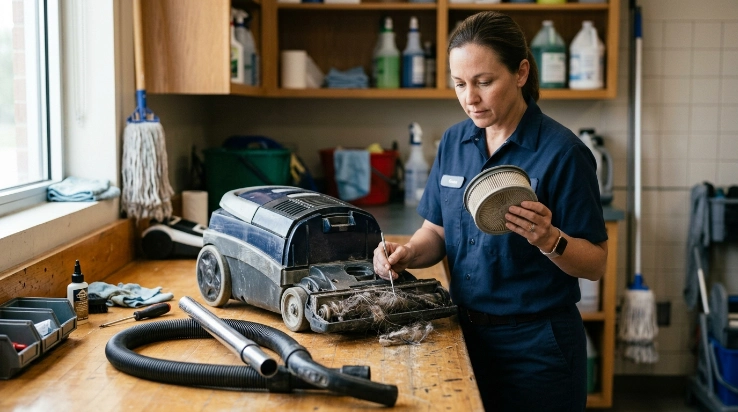
Filters, rotating brushes, and air passages usually deserve the closest attention because all three directly affect how the machine handles collected material. Each component needs a different maintenance method.
How should commercial vacuum filters be maintained?
First identify the exact filter type. A pre-motor filter, foam filter, cartridge filter, exhaust filter, and HEPA filter may have completely different care instructions.
Never assume a filter is washable. Some filters can be rinsed, while others need dry cleaning or replacement.
- Check the manual: Confirm whether each filter is reusable, washable, or disposable.
- Inspect regularly: Look for heavy dust loading, tears, damaged seals, or deformation.
- Clean correctly: Follow the manufacturer-approved method rather than using soap or compressed air automatically.
- Dry fully: Never reinstall a washable filter while moisture remains inside it.
- Replace damaged filters: A torn or poorly sealed filter shouldn’t be treated as usable because it still looks clean.
The EPA notes that HEPA filtration in a vacuum can help keep some collected dust from escaping back into indoor air. That makes proper filter installation important in environments where fine particulate control matters.
You can review broader filtration information through the EPA indoor air quality resource center.
How do you maintain the brush roll?
Start by disconnecting power. Then examine the roller for wrapped fibers and check whether it turns as intended when the manufacturer allows manual inspection.
- Cut away hair and thread carefully.
- Remove debris near the roller ends.
- Inspect bristles for obvious wear.
- Look for damage around accessible bearings or end caps.
- Check the belt when your vacuum gives safe user access.
A brush that can’t rotate freely may produce poor carpet agitation. It can also place extra load on components that drive the roller.
How should you check the airflow path?
Work from the floorhead toward the collection chamber. This keeps the troubleshooting process organized.
- Check the intake opening.
- Inspect the floorhead passage.
- Disconnect and inspect the wand.
- Check the flexible hose.
- Inspect the bag or collection chamber inlet.
- Confirm filters are installed correctly.
- Check accessible exhaust vents for obvious obstruction.
If suction drops suddenly, look for a blockage before assuming the motor has failed. Clogs are common and often occur where a hose changes direction.
What about HEPA-equipped commercial vacuums?
HEPA means high-efficiency particulate air. However, seeing “HEPA” on a filter doesn’t tell you how the entire vacuum is sealed or how your exact model should be maintained.
Always use the specified replacement filter and make sure seals sit correctly. Running a vacuum without a required filter can expose the motor or allow collected material to bypass the intended filtration path.
For broader allergen information, the Asthma and Allergy Foundation of America provides household allergen and indoor-environment resources.
Section Takeaway: Don’t treat every filter or brush assembly alike. Identify the component, follow the model-specific instructions, and keep the complete airflow path clear.
How Often Should a Commercial Vacuum Be Maintained?
There is no universal schedule for every commercial vacuum. Workload, debris type, floor area, vacuum design, and manufacturer instructions all change the maintenance frequency.
As of 2026, I use the schedule below as an inspection framework. It doesn’t replace the manufacturer’s specified intervals.
| Component | After Each Shift | Weekly Check | Periodic / As Needed |
|---|---|---|---|
| Bag or bin | Check capacity and empty or replace when needed | Inspect compartment and seals | Replace damaged seals or collection parts |
| Brush roll | Remove obvious wrapping | Inspect bristles, ends, and rotation | Replace worn parts per manufacturer guidance |
| Hose and wand | Check when pickup changes | Inspect for partial clogs or damage | Replace cracked or leaking components |
| Filters | Monitor performance in dusty jobs | Inspect if workload is heavy | Clean or replace on the manufacturer’s schedule |
| Cord and plug | Look for visible damage before use | Inspect entire accessible cord | Professional repair if damaged |
| Wheels and casters | Remove obvious debris | Check movement and trapped fibers | Service or replace damaged parts |
High-use environments need shorter inspection intervals
A vacuum used for several hours daily should not follow the same routine as a machine used twice a week. Frequency should rise with workload.
Inspect sooner when the vacuum handles any of these conditions:
- High-traffic carpeted areas
- Hotels or lodging facilities
- Restaurants and food-service spaces
- Schools or daycare facilities
- Pet hair or long human hair
- Fine dry particulate matter
- Large floor areas
- Multiple operators sharing one machine
Keep a maintenance log
A written log becomes useful when several people operate the same equipment. One worker may notice a problem that another worker would otherwise miss.
- Date of inspection
- Bag or bin condition
- Filter inspection or replacement
- Brush-roll cleaning
- Clogs removed
- Belt or wear-part changes
- Unusual noise or odor
- Repair or technician visit
A simple log also helps prevent repeated guesswork. You’ll know when a filter was changed rather than relying on memory.
Section Takeaway: Use frequency as a flexible inspection schedule. Heavy commercial workloads deserve more frequent checks, while the manufacturer’s manual remains the final authority.
When Does a Commercial Vacuum Need Professional Service?
Call for professional service when routine maintenance doesn’t solve the problem or when the fault involves electrical or inaccessible mechanical components. Continuing to use a damaged machine can turn a small problem into a larger one.
Stop using the vacuum for these warning signs
- Burning smell: Stop immediately if an electrical or persistent burning odor develops.
- Sparking: Disconnect the machine and don’t operate it again until inspected.
- Damaged cord: Cuts, exposed conductors, melted insulation, or damaged plugs need professional attention.
- Repeated shutdowns: A vacuum that repeatedly stops after airflow checks may have an internal problem.
- Abnormal noise: Grinding, scraping, or persistent high-pitched sounds can indicate mechanical damage.
- Severe overheating: Unusual heat that continues after clearing filters and blockages needs diagnosis.
- Persistent weak suction: Internal leaks or motor problems may exist when the accessible airflow path is clear.
Expert Alert: Don’t open a motor housing or repair mains wiring unless you’re qualified to work on the equipment. Commercial electrical appliances should be repaired by an appropriately trained technician.
When repair may be better than replacement
Replacement isn’t automatically necessary because one belt, hose, wheel, switch, or brush assembly fails. Availability and repair cost matter.
Consider these factors before deciding:
- Machine age and overall condition
- Cost of replacement parts
- Labor cost
- Availability of manufacturer support
- Motor condition
- Frequency of previous breakdowns
- Downtime caused by repairs
- Cost of an equivalent replacement vacuum
Commercial equipment can also justify keeping common wear parts in stock. That may reduce downtime when the manufacturer supports user replacement.
The Consumer Reports vacuum resource center offers broader information about vacuum types, performance, and reliability considerations.
Section Takeaway: Routine cleaning can solve many vacuum problems, but electrical faults, persistent overheating, and internal mechanical failures belong with a qualified technician.
Frequently Asked Questions
How often should you empty a commercial vacuum?
Check the bag or bin during regular use and after demanding shifts. Empty or replace it before debris becomes overloaded enough to restrict normal airflow. Follow any fill line or bag indicator provided by the manufacturer.
How often should commercial vacuum filters be changed?
There is no universal replacement interval. Filter type, machine design, workload, and manufacturer instructions determine the correct schedule. Inspect filters regularly and replace disposable or damaged filters according to the manual.
Can you wash a commercial vacuum HEPA filter?
Only if the manufacturer specifically identifies that exact HEPA filter as washable. Some HEPA filters must remain dry and be replaced instead. Never rinse a filter simply because another vacuum uses a washable version.
Why does my commercial vacuum keep losing suction?
Start with the simple causes: a full bag or bin, dirty filter, clogged hose, blocked floorhead, or poor seal. If the accessible airflow path is clear and suction remains weak, the machine may need professional diagnosis.
How do you keep a commercial vacuum from smelling bad?
Remove collected debris promptly, keep filters maintained, clear the brush and hose, and avoid storing damp washable components. Persistent burning, electrical, or strong unusual odors should be treated as warning signs rather than covered with fragrance.
Should commercial vacuums be serviced every year?
Not every machine needs the same annual service schedule. Follow the manufacturer’s requirements and consider workload, condition, performance changes, and your organization’s equipment policy. High-use machines may justify scheduled professional inspections.
Can one maintenance schedule work for every commercial vacuum?
No. Upright, backpack, canister, cordless, wet/dry, and specialty commercial vacuums can use different filters, brush systems, bags, motors, and maintenance procedures. The machine’s manual should always override a generic schedule.
Final Maintenance Takeaway
The best way to maintain a commercial vacuum is to prevent small restrictions and wear problems from building up. Keep dirt capacity, filters, brush rolls, hoses, attachments, wheels, cords, and visible seals on a regular inspection schedule.
I’ve found that consistency matters more than complicated servicing routines. A brief check after every demanding shift, backed by scheduled deeper inspections, makes problems much easier to spot.
- Disconnect power before maintenance.
- Keep the bag or bin from becoming overloaded.
- Maintain filters exactly as directed.
- Clear hair and fibers from the brush roll.
- Check hoses and air passages for clogs.
- Watch belts, wheels, seals, cords, and plugs for wear.
- Record maintenance when several operators share the machine.
- Call a professional for electrical or persistent internal faults.
Most importantly, keep the owner’s manual available for the exact commercial vacuum you use. Model-specific instructions should always take priority over a general maintenance guide.
“`