
How Do You Keep a Vacuum From Overheating?

Quick Answer
To keep a vacuum from overheating, protect its airflow, empty the bin or replace the bag before it becomes packed, maintain the filters correctly, and remove hair from the brush roll. Stop immediately if the vacuum smells burnt, smokes, or repeatedly shuts down; vacuum filter and maintenance guidance also emphasizes periodic filter care.
Quick overheating-prevention steps
- Empty debris early: Do not let a dust bin, cyclone chamber, or disposable bag become tightly packed.
- Keep filters clear: Clean or replace each filter according to the instructions for your exact vacuum.
- Remove brush tangles: Cut away hair, thread, and fibers before they restrict brush-roll movement.
- Check the air path: Inspect the cleaner head, hose, wand, intake, and exhaust openings for blockages.
- Avoid excessive load: Use the correct floor setting and do not vacuum debris the machine was not designed to collect.
- React to heat early: Stop using the vacuum when heat, smell, sound, or suction changes noticeably.
Most important safety rule
- Do not repeatedly restart a vacuum that smells electrically burnt, smokes, has damaged wiring, or has an abnormally hot or swollen battery.
A hot vacuum does not always mean the motor is failing. In many household machines, overheating starts with restricted airflow, a clogged filter, or a brush roll fighting through wrapped hair.
My rule is simple: when heat increases while suction falls, I check the airflow path before assuming the motor is bad. This guide explains how to prevent the problem and when to stop troubleshooting yourself.
In This Guide
What Causes a Vacuum Cleaner to Overheat?
A vacuum usually overheats when heat builds faster than the machine can release it. Restricted airflow, brush-roll resistance, heavy operating load, battery problems, and internal faults can all contribute.
Definition: Vacuum overheating is abnormal heat buildup in the motor, battery, electrical system, or airflow path during operation.
Restricted airflow is one of the first things to check
A vacuum depends on a continuous stream of air. Dirt enters through the cleaner head and moves through the hose, filters, dust container, and exhaust system.
When that route becomes restricted, performance can fall and the machine may run hotter. Several common maintenance problems can reduce airflow.
- Full dust bin: Debris may cover an inlet or crowd the cyclone chamber.
- Overfilled bag: A packed bag can make normal airflow harder to maintain.
- Dirty pre-filter: Fine dust can form a dense layer over the filter media.
- Loaded exhaust filter: Air may struggle to leave the machine normally.
- Blocked hose: Hair, paper, lint, or larger debris can create a partial or complete clog.
- Blocked floor head: Pet fur and carpet fibers often collect in narrow intake passages.
The U.S. Environmental Protection Agency notes that household dust can contain pollen, pet dander, mold spores, dust-mite material, and other particles. Its indoor particulate matter guidance also recommends regular vacuuming as part of dust control.
A tangled brush roll can increase mechanical resistance
Long hair and thread can wind tightly around a rotating brush. The buildup may be hidden near the roller ends even when the middle looks fairly clean.
- Inspect the entire brush-roll length.
- Check both end caps for tightly wound fibers.
- Remove string from belt or drive areas carefully.
- Confirm the roller moves as your manufacturer specifies.
A roller that cannot rotate normally may place extra strain on its drive components. Stop using the floor head if it makes grinding, squealing, or other new mechanical noises.
Filters can become an overlooked restriction
Vacuum filters trap particles that would otherwise travel farther through the appliance or leave through the exhaust. Over time, collected material can reduce airflow.
HEPA means high-efficiency particulate air. The EPA’s HEPA filter explanation describes the filtration standard, but the HEPA label does not tell you whether a particular vacuum filter is washable.
Never wash a filter unless your vacuum’s manufacturer says that exact filter can be washed. Reinstalling a damp filter can also create new problems.
Some heat problems are not maintenance problems
A failing motor, damaged wiring, defective switch, worn bearing, or battery problem may also produce excessive heat. These issues should not be treated like ordinary clogs.
Expert Alert: If you smell burning insulation, see smoke, notice damaged wiring, or suspect an internal electrical fault, unplug the vacuum and arrange qualified appliance service.
Section Takeaway: Most homeowner checks should begin with airflow, filters, the dust container, and the brush roll. Electrical or battery symptoms require a more cautious response.
How Do You Keep a Vacuum From Overheating?
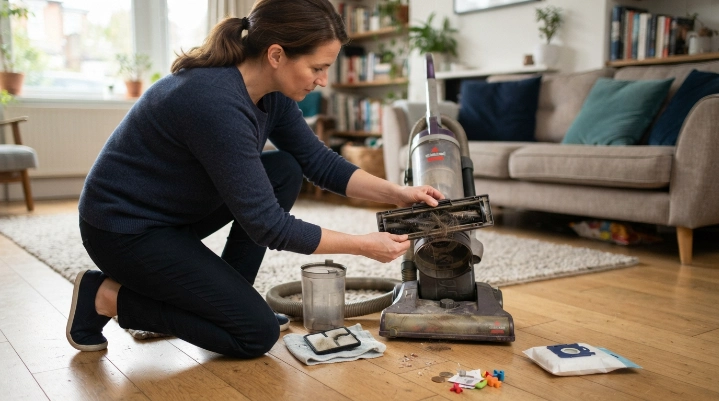
Prevent overheating by keeping air passages open and avoiding unnecessary mechanical load. A short routine is usually more useful than waiting for an automatic thermal shutdown.
1. Empty the bin before debris becomes packed
Do not judge a bagless vacuum only by the amount of empty space at the top. Fine dust and pet hair can pack around screens, shrouds, or inlet openings.
Use the maximum-fill line when your vacuum has one. Empty the container sooner when you collect a large amount of fine dust or pet fur.
2. Replace bags before they become overloaded
A bagged vacuum needs room for air to move through the collection system. A bag that feels dense or causes noticeable suction loss deserves attention.
Follow your model’s replacement guidance instead of using one universal percentage. Bag materials and vacuum designs differ.
3. Maintain every filter correctly
Some vacuums use a foam pre-filter, felt layer, pleated cartridge, post-motor filter, or several stages together. Treat each component according to its own instructions.
- Wash only filters labeled as washable.
- Replace disposable filters instead of rinsing them.
- Remove loose dust without damaging pleats.
- Let washable filters dry completely before installation.
- Check seals and filter orientation during reassembly.
Do not operate a normal household vacuum without a required filter installed. The filter may protect both airflow quality and internal components.
4. Keep the hose and wand open
A partial clog can be harder to notice than a complete blockage. The vacuum may still pick up debris while airflow slowly declines.
Disconnect the machine from power before checking removable air passages. Use the manufacturer’s approved method rather than poking sharp objects into a flexible hose.
5. Remove hair before the brush roll becomes jammed
Pet hair, long human hair, carpet fiber, and sewing thread can tighten around a roller as it spins. Check the ends as carefully as the center.
Do not cut toward wiring, belts, soft roller material, or your fingers. Remove the brush roll only when your model is designed for user removal.
6. Use the correct setting for the surface
A cleaner head that digs too aggressively into thick carpet can be harder to move. Some models provide carpet-height, suction, or brush settings for this reason.
Use the setting recommended for your flooring. Do not force a stalled cleaner head across a surface.
7. Avoid debris the vacuum was not designed to collect
Ordinary household vacuums are not automatically suitable for liquids, fireplace ash, construction debris, large objects, or sharp fragments. These materials can clog or damage the appliance.
- Pick up coins and toy pieces by hand.
- Remove socks, paper scraps, and large debris before vacuuming.
- Use a suitable wet/dry vacuum for approved liquid pickup.
- Follow specialist guidance for hazardous renovation dust.
Section Takeaway: Prevention comes down to airflow, free-moving parts, correct filters, and suitable use. Small checks performed early can prevent a minor restriction from becoming a shutdown.
How Often Should You Maintain a Vacuum to Prevent Overheating?
There is no single maintenance interval that works for every vacuum. Your owner’s manual should override a generic schedule because filter materials, bins, bags, batteries, and brush systems vary.
As of 2026, I use the following schedule as an inspection framework rather than a manufacturer replacement schedule.
| Area | Practical Check Point | Why It Matters for Heat |
|---|---|---|
| Dust bin or bag | During regular cleaning and whenever suction changes | Packed debris may restrict the normal air path |
| Brush roll | Frequently in homes with pets or long hair | Hair and thread can increase resistance or stop rotation |
| Hose, wand, and intake | When suction drops or pickup becomes uneven | A partial clog can reduce airflow before the path closes completely |
| Washable filter | On the exact schedule in your model’s manual | Heavy dust loading may restrict airflow |
| Cord, plug, or battery housing | Before use when damage or abnormal heat is suspected | Physical damage or unusual heat can signal a safety problem |
Heavy shedding, long hair, fine dust, and frequent vacuuming can justify more frequent inspections. A lightly used machine may need less debris removal.
The most useful trigger is often a change in behavior. Check the machine promptly when suction, sound, smell, brush movement, runtime, or heat changes.
What Should You Do If Your Vacuum Is Already Hot?
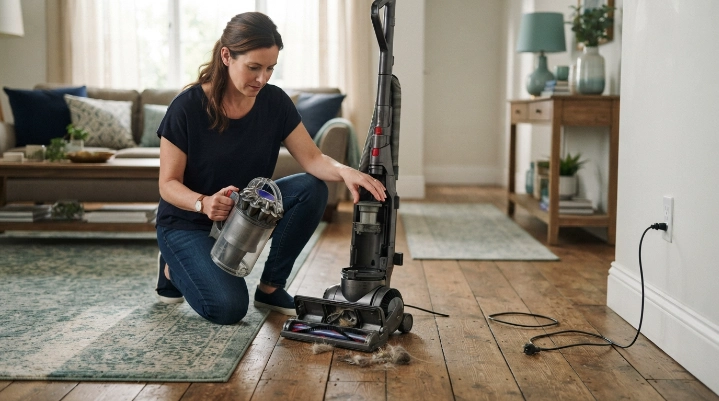
Stop using an unusually hot vacuum instead of trying to finish the room. Cooling the machine is only the first step because you still need to identify why it became hot.
- Switch it off: Stop cleaning as soon as heat becomes abnormal.
- Disconnect power: Unplug a corded model or shut down a cordless model as directed.
- Place it safely: Keep it on a stable, open surface without covering vents.
- Let it cool: Use the cooling or thermal-reset period in the owner’s manual.
- Inspect debris collection: Check the bin, bag, filters, hose, wand, cleaner head, and brush roll.
- Reassemble correctly: Make sure every filter and removable component is installed as designed.
- Test cautiously: Stop again if abnormal heat, smell, sound, or shutdown returns.
Do not guess the cooling time
Thermal protection systems differ among vacuum models. One manufacturer’s reset procedure should not be applied automatically to another machine.
Use the manual for your exact model. If the vacuum repeatedly reaches thermal shutdown despite a clear airflow path, further service may be needed.
A burning smell changes the situation
Warm exhaust air and a sharp electrical odor are not the same thing. Melting-plastic smells, smoke, sparking, or visible wiring damage are reasons to stop.
Expert Alert: Do not open the motor housing, bypass a thermal protector, rewire a switch, or repair a lithium-ion battery pack unless you are qualified to perform appliance electrical repairs.
Does Overheating Prevention Change by Vacuum Type?
The basic principles stay the same, but different vacuum designs concentrate debris and heat in different places. Check the parts that match your machine.
Upright vacuum
- Inspect the floor nozzle and lower air passage.
- Check the main hose for dense clogs.
- Keep hair away from the brush-roll ends.
- Monitor the bag or dust bin and all filters.
Canister vacuum
- Check the floor tool and telescoping wand.
- Inspect the long flexible hose carefully.
- Monitor the bag or canister before it becomes overloaded.
- Check the exhaust-filter area for blocked airflow.
Cordless stick vacuum
- Empty the smaller dust bin regularly.
- Check the narrow wand and cleaner-head neck.
- Maintain washable filters exactly as directed.
- Pay attention to abnormal battery heat, odor, swelling, or damage.
Normal battery temperature varies with design and workload. Abnormal swelling, leaking, unusual odor, or extreme heat deserves immediate attention.
Robot vacuum
- Empty the compact bin before it becomes tightly packed.
- Clean the main brush and side brushes.
- Inspect the intake and filter.
- Remove hair from wheels and roller ends.
- Check the charging area and battery condition if heat becomes unusual.
Different machines also suit different workloads. Consumer Reports distinguishes full-sized uprights and canisters from lighter stick, handheld, and robotic machines, so avoid expecting every vacuum type to handle the same cleaning load.
Section Takeaway: The same prevention rule applies across vacuum types: protect airflow and reduce unnecessary strain. The exact components you inspect depend on the machine’s design.
Vacuum Overheating FAQ
Why does my vacuum keep overheating and shutting off?
A repeated shutdown can happen when thermal protection responds to excessive heat. Check the bin or bag, filters, hose, wand, intake, and brush roll, then follow the model’s reset instructions. If shutdowns continue with clear airflow, stop using the machine and consider professional service.
Can a dirty vacuum filter cause overheating?
A heavily loaded filter can restrict normal airflow on some vacuum designs, which may contribute to higher operating temperatures. Clean or replace the filter only as the manufacturer directs, and never assume a filter is washable because another model uses a similar-looking filter.
Can a full vacuum bag make the motor hot?
An overloaded bag can restrict airflow and reduce suction. Replace the bag according to your model’s instructions rather than packing it as full as possible. Check for hose or filter restrictions at the same time if the vacuum has also become unusually hot.
Why does my vacuum smell hot but still work?
A hot smell can come from trapped debris, a struggling brush roll, belt-area friction, or an electrical problem. Stop the machine and inspect user-serviceable areas. Do not keep operating it if the odor resembles burning plastic or electrical insulation.
How long should I let an overheated vacuum cool?
Use the cooling or thermal-reset period specified by the manufacturer of your exact model. There is no universal cooling time for every upright, canister, cordless, stick, or robot vacuum, so the owner’s manual should be your reference.
Why does my cordless vacuum get hot?
A cordless vacuum may become warm during demanding operation, but unusual heat can also accompany restricted airflow, a dirty filter, a jammed head, or a battery issue. Stop using a battery that is swollen, damaged, leaking, or producing an unusual odor.
Should I replace a vacuum that keeps overheating?
Not automatically. Clogs, dirty filters, packed bins, and tangled brush rolls may be correctable. Repeated overheating after normal maintenance, especially with burning smells or electrical symptoms, is a better reason to arrange professional inspection or consider replacement.
Final Takeaway
The best way to keep a vacuum from overheating is to prevent airflow restrictions and unnecessary mechanical strain. Empty debris early, maintain the filters, clear clogs, and keep the brush roll free.
Pay attention before the machine shuts itself down. Falling suction, new noises, unusual smells, or increasing heat are useful warning signs.
- Keep the dust path open.
- Follow the manufacturer’s filter instructions.
- Remove hair and thread from moving parts.
- Use the correct machine and setting for the job.
- Stop immediately when electrical or battery symptoms appear.
Vacuum maintenance also supports the larger home-hygiene goal of controlling household dust. EPA guidance notes that filtration, source control, and cleaning all play roles in managing indoor particles.
A few minutes of inspection is easier than troubleshooting a badly overheated machine. When routine maintenance does not solve repeated overheating, stop restarting the vacuum and have the underlying fault assessed.
“`