
How to Extend Vacuum Lifespan: A Complete Maintenance Guide

Quick Answer
To extend vacuum lifespan, keep airflow clear, empty the bin or replace the bag before it becomes overloaded, maintain filters correctly, remove hair from the brush roll, and deal with unusual heat or noises early. Following your model’s maintenance schedule is more important than using one universal routine, as shown in Shark’s official vacuum maintenance guidance.
Quick steps to help your vacuum last longer
- Protect airflow: Empty the bin, replace full bags, and clear clogged hoses or air passages promptly.
- Maintain filters: Clean only washable filters and let them dry completely before reinstalling them.
- Clean the brush: Cut away hair, thread, and fibers before they restrict the brush roll.
- Watch for heat: Stop if the vacuum overheats, repeatedly shuts off, or develops a burning smell.
- Use it correctly: Avoid liquids, renovation debris, large objects, or fireplace ash unless your machine is designed for them.
- Store it carefully: Prevent crushed hoses, damaged cords, damp filters, and excessive heat around cordless batteries.
I’ve seen vacuums that seemed worn out recover after nothing more dramatic than a filter cleaning and a badly packed hose clog. I’ve also seen small maintenance problems become expensive because they were ignored for months.
This guide explains how to extend vacuum lifespan without unnecessary repairs or complicated tools. It covers upright, canister, stick, cordless, bagged, and bagless household vacuums.
In This Guide
What Shortens a Vacuum Cleaner’s Lifespan?
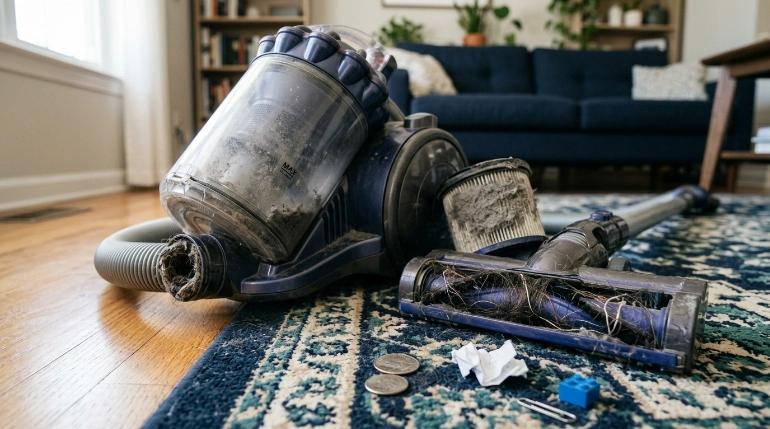
The biggest preventable problems usually involve restricted airflow, overloaded moving parts, moisture, impacts, or neglected wear. These problems make the vacuum work harder or damage components that should move freely.
Vacuum lifespan means the period during which a vacuum remains safe, practical, and effective to use without repairs becoming unreasonable. There isn’t one useful lifespan number that applies to every vacuum type.
Restricted airflow makes the machine work harder
A vacuum depends on a clear path for moving air. A packed bin, full bag, dirty filter, or clogged hose can reduce that airflow.
Loss of suction is often your first warning. Some machines may also run hotter or activate an overheating protection system when airflow becomes severely restricted.
- Check the dust container: Don’t keep cleaning after debris passes the marked maximum line.
- Inspect the hose: Look for compacted hair, paper, lint, socks, or larger debris.
- Check the wand: Narrow wands can hide surprisingly dense clogs.
- Inspect filters: Follow the manual because some are washable while others must stay dry.
- Check the cleaner head: Debris can obstruct the airway before it ever reaches the hose.
A tangled brush roll increases resistance
Long hair, pet fur, thread, carpet fibers, and string can wrap tightly around a rotating brush. They may also collect around the brush-roll ends and bearings.
I check this area whenever a vacuum suddenly sounds harsher or the brush stops moving normally. Waiting until the roller is completely jammed makes the job harder.
Practical tip: Unplug a corded vacuum or disconnect the removable battery before working near a powered brush roll. Check your manual before removing covers, rollers, or belts.
Using a dry vacuum for the wrong debris can cause damage
Standard household vacuums aren’t substitutes for wet/dry shop vacuums. Unless the manufacturer specifically approves it, don’t vacuum liquid or damp material.
Fine construction dust, plaster dust, large shards, hot ash, and bulky objects can also overwhelm equipment not designed for them. Match the machine to the mess.
Section Takeaway: The easiest way to extend vacuum lifespan is to prevent restrictions and jams before they turn into heat, wear, or broken parts.
How Often Should You Maintain a Vacuum?
There is no universal maintenance interval for every vacuum. Your owner’s manual should always take priority because filter materials, bin designs, belts, and brush heads differ.
A useful routine combines frequent visual checks with the model-specific intervals listed by the manufacturer. Heavy pet hair and fine dust usually justify more frequent inspection.
A practical vacuum maintenance routine
- After heavy cleaning: Check the bin or bag and look for visible brush-roll tangles.
- Regularly: Inspect the cleaner head, hose, wand, seals, and air passages.
- On the manufacturer’s schedule: Clean or replace filters and other service items.
- When performance changes: Investigate reduced suction, unusual noises, overheating, odors, or repeated shutoffs immediately.
- Periodically: Check the cord, plug, hose, wheels, attachments, and battery housing for physical damage.
What do manufacturers actually recommend?
Manufacturer instructions show why one generic interval doesn’t work for every machine. The examples below are current guidance for specific product families, not rules for every vacuum.
| Maintenance item | Verified example | What it means for you |
|---|---|---|
| Cordless vacuum filter | Dyson says its cordless filters should be washed at least once a month and dried for at least 24 hours. | Don’t copy that interval blindly. Check whether your own filter is washable and follow its manual. |
| Upright dust cup | Shark’s upright maintenance guidance says to empty the dust cup after each use. | Frequent emptying is a simple way to prevent debris from accumulating around the airflow path. |
| Brush roll | Shark advises cleaning hair and debris from brush rolls and soft rollers. | Pet-owning homes may need to inspect this area much more frequently. |
| Filter drying | Both Dyson and Shark specify complete drying before reinstalling washable filters. | Never reinstall a filter just because its surface feels almost dry. |
You can review Dyson’s official vacuum filter care instructions when comparing this routine with your own manufacturer’s directions. Model-specific instructions remain the deciding factor.
Section Takeaway: Build maintenance around your vacuum’s manual, then increase inspection frequency when you have pets, heavy debris, or frequent cleaning.
How Do You Clean a Vacuum Without Damaging It?

Start by disconnecting power and identifying which components the manufacturer allows you to remove or wash. Water and guesswork are two things I keep away from vacuum motors and electrical connections.
Step 1: Empty the bin or change the bag
For bagless vacuums, remove debris before it crowds the maximum-fill line. Wipe the bin only according to the manufacturer’s directions.
For bagged machines, use the correct replacement bag and install it properly. A poorly fitted bag can interfere with airflow or allow dust into areas where it doesn’t belong.
Step 2: Check every filter before washing anything
Some foam or fabric filters are washable. Other HEPA, pleated, paper, cartridge, or post-motor filters may be replace-only depending on the model.
- Remove the filter according to the manual.
- Check whether it is explicitly labeled washable.
- Remove loose dust using the approved method.
- Wash only if the manufacturer permits it.
- Let a washable filter dry completely.
- Reinstall it only when fully dry and correctly seated.
Dyson, for example, instructs users of its supported cordless models to use water without detergent and allow at least 24 hours for drying. That advice should not be transferred automatically to a different brand or filter material.
Step 3: Clear the brush roll and cleaner head
Remove visible hair and string without cutting the brush bristles. Pay attention to both roller ends because tightly wrapped hair can hide beside the bearings or end caps.
- Look for thread wrapped around the roller.
- Check intake openings for compacted debris.
- Inspect removable rollers for free movement.
- Check wheels for hair that limits rotation.
- Reinstall every cover or latch securely before use.
Step 4: Check the complete airflow path
Disconnect removable hoses and wands if the manual allows it. A partial clog can cause weak pickup long before the airway becomes completely blocked.
EPA guidance also suggests considering a vacuum with a HEPA filter when reducing household dust is important. You can read its broader advice on indoor particulate matter and vacuuming.
Section Takeaway: Never assume a component is washable. Correct cleaning means following the material and maintenance instructions designed for your exact vacuum.
How Do You Protect the Motor, Hose, Belt, Cord, and Battery?
Vacuum longevity depends on more than the filter. The motor, hose, brush drive, electrical cord, seals, wheels, and battery can all become the reason an otherwise usable machine gets replaced.
Protect the motor by protecting airflow
The motor needs the machine’s intended airflow path to remain open. If suction suddenly falls, I investigate the bin, filter, hose, wand, and cleaner head before continuing a long cleaning session.
Some vacuums use thermal protection that shuts the machine down when it becomes too hot. Repeated shutdowns are a symptom to investigate, not a normal operating routine.
Inspect belts and brush drives instead of forcing them
Some upright vacuums use a replaceable belt to drive the brush roll. Others use direct-drive or motorized cleaner heads with different service procedures.
- Stop if the brush roll is jammed.
- Don’t continue running a machine that smells like hot rubber.
- Use the correct replacement belt or brush assembly.
- Follow the manual for tension, routing, and access.
Keep hoses from becoming crushed or permanently kinked
A flexible hose lasts longer when it can rest in its intended storage position. Avoid storing heavy objects on top of it or pulling the vacuum by the hose.
Check attachment joints as well. Cracks, loose seals, and damaged cuffs can create air leaks and make a healthy motor feel weak.
Treat the power cord as a safety component
Unplug corded vacuums by gripping the plug instead of pulling the cable. Don’t repeatedly run the cleaner head over the cord.
Expert Alert: Stop using a vacuum with exposed conductors, a damaged plug, sparking, a persistent burning smell, or suspected internal electrical damage. Electrical and motor repairs should go to a qualified repair professional unless the manufacturer provides a safe user-service procedure.
How can you extend cordless vacuum battery life?
Use the charger specified for your vacuum and protect the battery from physical damage or excessive heat. Follow the manufacturer’s storage and charging instructions because battery management systems differ.
Replace or professionally inspect a battery showing swelling, cracking, leaking, severe overheating, or other physical damage. Don’t open or rebuild a lithium-ion battery pack unless you are properly qualified.
At end of life, lithium-ion batteries require proper handling. The EPA says rechargeable and lithium-ion batteries should not be placed in household trash or municipal recycling bins, and its household battery guidance explains safer disposal and recycling options.
Section Takeaway: Protecting airflow is motor care, while protecting cords, belts, hoses, and batteries prevents smaller wear items from ending the life of the whole vacuum.
What Vacuuming Habits Help a Vacuum Last Longer?
The way you use a vacuum can matter as much as how often you service it. Most good habits are simple because they reduce unnecessary load and prevent unsuitable debris from reaching delicate parts.
Pick up oversized debris first
Coins, screws, toys, stones, large paper scraps, and similar objects should be removed by hand. They can jam airways, strike rotating components, or damage plastic parts.
Use the correct head and setting
Use the floor head, height setting, suction level, or brush mode recommended for the surface. Forcing a powered brush into a surface where it can barely rotate adds unnecessary resistance.
Don’t treat every vacuum like a shop vacuum
Household dry vacuums are designed for normal household debris, not every cleaning problem. Renovation dust, wet material, fireplace debris, and large cleanup jobs may need specialized equipment.
My rule: If I wouldn’t want the material touching the filter or spinning brush, I check the manual before vacuuming it. That takes less time than unclogging an overloaded machine later.
Respond to performance changes early
A vacuum usually gives clues before a serious failure. Reduced suction, pulsing, rattling, grinding, excessive heat, electrical smells, and abnormal brush behavior deserve attention.
- Weak suction: Check bin, bag, filters, clogs, seals, and hose connections.
- Brush not rotating: Check for tangled hair and model-specific brush warnings.
- Repeated shutdown: Stop and investigate overheating or airflow restriction.
- New rattling sound: Check for a foreign object before continuing.
- Burning or electrical smell: Turn the machine off and unplug it.
Store the vacuum clean and dry
Empty dirty-water tanks on wet-capable machines and never store a standard vacuum with damp washable filters installed. Moisture has no place around components designed to remain dry.
Keep attachments where their clips and connectors won’t be stepped on or crushed. For cordless machines, choose a storage location consistent with the battery temperature guidance in the manual.
Repair small service items before replacing the machine
A worn brush roll, cracked hose, filter, belt, wheel, battery, or attachment can sometimes be replaced without discarding the complete vacuum. Parts availability and repair cost should guide that decision.
If the motor, control board, wiring, or structural housing has serious damage, compare professional repair cost with replacement. Safety matters more than keeping an unsafe appliance running.
Section Takeaway: Gentle use isn’t enough. The best habit is noticing changes early and correcting the cause before the vacuum spends weeks operating under unnecessary strain.
Frequently Asked Questions
How long should a vacuum cleaner last?
There isn’t one reliable lifespan that applies to every vacuum. Build quality, vacuum type, usage, available replacement parts, battery condition, cleaning environment, and maintenance all matter, so condition and repairability are more useful than a universal age limit.
Does cleaning the filter make a vacuum last longer?
Correct filter maintenance helps maintain the airflow the vacuum was designed to use. However, only wash a filter when the manufacturer says it is washable, and reinstall it only after it has dried completely.
How often should I clean my vacuum filter?
Follow your model’s instructions rather than a universal schedule. Dyson currently recommends washing filters on supported cordless models at least monthly, while other brands and filter designs may specify different cleaning or replacement intervals.
Can a full vacuum bin damage the motor?
An overloaded dust system can restrict airflow and reduce cleaning performance. Empty the bin before debris exceeds its marked limit, or replace a bag according to your vacuum’s indicator and manufacturer instructions instead of deliberately running it packed full.
Why does my vacuum get hot and shut off?
A blocked airway, dirty filter, full dust container, or other restriction can contribute to overheating in some models. Turn the vacuum off, disconnect power, let it cool, and follow the manufacturer’s troubleshooting process before using it again.
Should I repair an old vacuum or buy a new one?
Repair often makes sense when the fault involves an available service item such as a hose, filter, brush, belt, wheel, or replaceable battery. Replacement becomes more reasonable when several major parts have failed or professional repair approaches the value of a suitable new machine.
Can I put a cordless vacuum battery in household recycling?
Not if it is a lithium-ion or rechargeable battery covered by separate battery-handling requirements. EPA guidance says rechargeable batteries should be taken to appropriate battery recyclers, participating collection points, or household hazardous-waste programs rather than municipal recycling bins.
Final Takeaway: Make Maintenance Easier Than Replacement
You don’t need to dismantle your vacuum every weekend to make it last. Keep the airflow clear, care for filters correctly, remove brush-roll tangles, use the machine only for suitable debris, and react quickly when its behavior changes.
The owner’s manual remains your best maintenance schedule because vacuum designs differ. A few minutes of preventive care can also help you spot a cheap service item before it becomes a much larger repair.
Start with one simple habit today: check your bin, filter, brush roll, and airflow path before the next major cleaning session. Then use your model’s manual to turn those checks into a regular maintenance routine.