
How to Empty a Robot Vacuum Dustbin: Step-by-Step Guide

Quick Answer
To empty a robot vacuum dustbin, pause the vacuum, remove its dustbin, open the bin over a trash can, and gently shake out the debris. Clear dust from the filter area before reinstalling everything. If airborne dust bothers you, follow AAFA’s indoor allergen guidance and avoid creating a dust cloud while emptying the bin.
Quick steps
- Stop the vacuum: Pause cleaning and place the robot on a stable surface.
- Remove the bin: Press the dustbin release button or latch.
- Open the compartment: Hold it directly over a trash can before opening the door.
- Empty the debris: Shake gently and remove trapped hair without damaging the filter.
- Reinstall everything: Close the bin firmly and slide it back until it locks into place.
Emptying a robot vacuum sounds simple, but a few small mistakes can spread dust or reduce cleaning performance. The exact latch and filter layout also vary between models.
This guide shows you the safest practical method, plus what to clean, what not to wash, and how to handle a self-emptying model.
In This Guide
How Do You Empty a Robot Vacuum Dustbin?
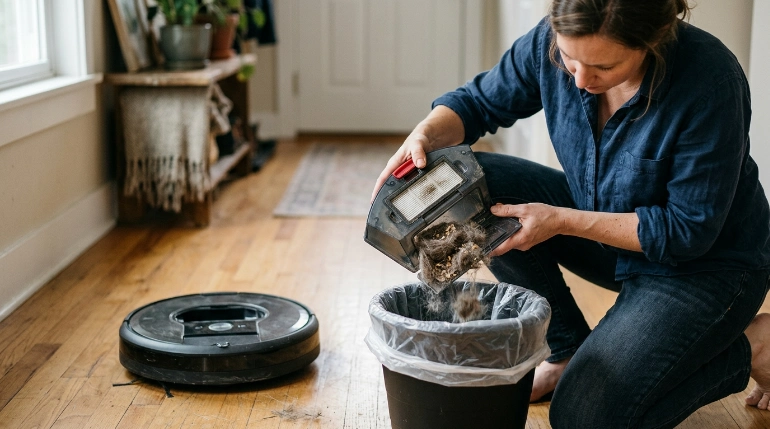
The basic process is to stop the robot, remove the collection bin, dump the debris, check the filter area, and reinstall the bin. Most models take only a minute once you know where the release latch is.
A robot vacuum dustbin is the removable container that holds dirt, hair, crumbs, and other debris collected during cleaning.
1. Stop the robot vacuum
Pause the cleaning cycle before touching the dustbin. I prefer doing this with the robot sitting still rather than trying to remove the bin while it is returning to its dock.
If your manual tells you to power the machine off before maintenance, follow that instruction.
2. Move the vacuum near a trash can
Bring the robot or removable bin close to your trash container. This keeps you from carrying an open bin across the room.
For a bin packed with fine dust, placing it low inside the trash can before opening it can reduce the amount that escapes.
3. Press the dustbin release
Find the release button, tab, or latch and pull the bin out gently. Don’t force it if it feels stuck.
A bin that won’t slide out may still have a locking tab engaged.
4. Open the dustbin door
Hold the container over the trash before opening its debris door. Keep the opening pointed away from your face.
Fine household dust can become airborne when a full container is shaken aggressively.
5. Dump out the contents
Let loose debris fall into the trash. A few gentle taps against your hand are usually enough for dust caught along the sides.
- Hair: Pull away strands wrapped around the bin opening.
- Fine dust: Avoid blowing it out with your mouth or compressed air.
- Large debris: Remove wedged pieces carefully rather than forcing the dust door.
- Filter area: Check for a thick layer of dust before closing the bin.
6. Close and reinstall the dustbin
Make sure the door and filter assembly are seated correctly. Slide the bin back into its compartment until the latch engages.
If the robot reports that its bin is missing, remove it and install it again rather than pushing harder.
Section Takeaway: Empty the bin directly over a trash can, use gentle movements, and make sure every latch closes before restarting the vacuum.
Where Is the Robot Vacuum Dustbin?
The dustbin is usually accessible from the top or rear of the robot. The exact location depends on the manufacturer and model.
As of 2026, there is still no single dustbin design shared by every robot vacuum brand.
Top-access dustbins
Some robots have a top lid that lifts to expose the collection bin. A handle or release tab usually lets you lift the container upward.
Don’t confuse the removable bin with nearby filter covers or water tanks on vacuum-and-mop models.
Rear-access dustbins
Other robots use a container that slides from the back of the machine. These often have a release button near the rear edge.
Support the bin as it comes out, especially when it is full.
Combination dustbin and water tank designs
Some robot vacuum-and-mop models combine several components in one removable module. Check the markings before opening or rinsing anything.
A washable water reservoir does not automatically mean the dust filter or electronics beside it can get wet.
- Look for a bin or trash-can symbol.
- Check the quick-start guide if the release isn’t obvious.
- Never pry a sealed panel open.
- Keep water away from electrical contacts.
Expert Alert: If a latch, sensor, electrical contact, or internal component appears broken, stop forcing the assembly and contact the manufacturer or a qualified appliance technician.
Should You Clean the Dustbin and Filter After Emptying?
Yes, but you don’t need to deep-clean the bin every time. A quick inspection after emptying helps you catch dust buildup, hair, and blocked airflow paths.
The most important rule is simple: never wash a filter unless your manufacturer’s instructions say it is washable.
What to clean each time
- Bin opening: Remove hair or debris preventing the door from closing.
- Bin walls: Wipe loose dust when buildup becomes noticeable.
- Filter surface: Remove loose material using the method approved for your model.
- Seals: Check rubber edges for trapped grit.
If your dustbin is washable, remove the filter and other non-washable parts first. Follow the manual’s drying instructions before putting the bin back into the robot.
Never reinstall a wet component unless the manufacturer specifically designed that component for wet use.
Why the filter needs attention
A filter sits in the airflow path and can collect fine particles that don’t simply fall out when you dump the bin. Heavy buildup can restrict airflow and should not be ignored.
Replace disposable filters according to the robot manufacturer’s schedule rather than relying on a universal replacement interval.
What about homes with dust allergies?
Dust handling deserves extra care if someone in the household is sensitive to airborne allergens. The National Institute of Environmental Health Sciences’ dust-mite guidance notes that vacuuming can disturb dust and allergens.
You can reduce direct exposure by emptying the bin outdoors when practical or by lowering it into a lined trash container before opening it.
For broader household air-quality practices, the EPA’s indoor air quality guidance emphasizes source control, ventilation, and filtration as key approaches.
Manual Dustbin vs. Self-Emptying Robot Vacuum
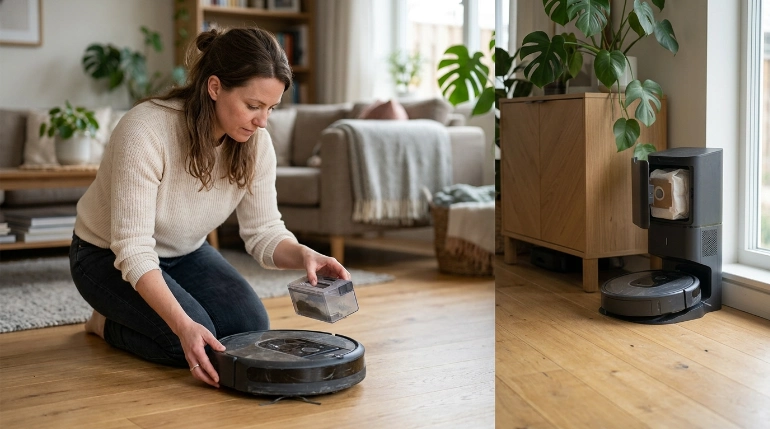
A standard robot requires you to remove and empty its onboard bin yourself. A self-emptying model transfers debris from that bin into a larger container in its dock.
Neither system removes maintenance completely. They simply change how often you handle the collected debris directly.
| Feature | Manual Dustbin | Self-Emptying System |
|---|---|---|
| Debris removal | You open and empty the onboard bin. | The dock pulls debris into a larger bag or container. |
| Hands-on handling | Required whenever the bin needs emptying. | Reduced, but the dock still needs maintenance. |
| Filter checks | Still required. | Still required on the robot and sometimes the dock. |
| Extra consumables | Depends on the filter design. | Some docks use replaceable debris bags. |
| Best fit | People comfortable with regular hands-on maintenance. | People who want less frequent contact with collected debris. |
How do you empty a self-emptying robot vacuum?
Most of the routine transfer happens automatically when the robot docks. You still need to inspect the onboard bin and empty or replace the dock’s debris container as directed by the manufacturer.
If the dock stops emptying the robot properly, check for blockages before assuming the motor has failed.
How Often Should You Empty a Robot Vacuum?
Empty a manual robot vacuum whenever the bin is full or when your manufacturer recommends it. Many households will need more frequent emptying during periods of heavy dirt or pet hair.
There isn’t one correct schedule for every home.
Empty more often when you have:
- Several shedding pets
- Long human hair
- Carpet that releases trapped debris
- Children dropping crumbs
- Construction or renovation dust
- A small-capacity onboard bin
I like checking a new robot’s bin after its first few runs. That quickly shows how fast the specific household fills it.
Once you know the pattern, maintenance becomes much easier to predict.
Don’t depend only on a full-bin alert
Some models can notify you when the bin needs attention, while others cannot. Even with an alert system, visual checks remain useful.
Pet hair can fill usable space quickly without forming the same compact layer as fine dust.
What Mistakes Should You Avoid When Emptying the Dustbin?
The biggest mistakes involve forcing parts, washing the wrong component, and allowing dust to escape back into the room. Most are easy to prevent.
- Don’t blow into the filter: This can send fine dust toward your face and surrounding surfaces.
- Don’t shake aggressively: Hold the bin low over the trash and use gentle taps.
- Don’t wash every filter: Some filters can be damaged by water.
- Don’t reinstall damp parts: Let washable components dry as directed by the manufacturer.
- Don’t force a stuck bin: Look for another release tab or obstruction.
- Don’t forget the dust door: A partially open door can cause debris to spill.
- Don’t ignore seals: Hair or grit around a seal can keep the compartment from closing correctly.
Why won’t my robot recognize the dustbin?
First, remove the bin and reinstall it firmly. Check that the filter, lid, and any removable insert are seated in their normal positions.
Then inspect accessible contacts or sensors for visible dirt, using only the cleaning method recommended in your manual.
Why does debris fall out after I empty it?
The dust door may not be fully latched, or debris may be trapped around its seal. Empty the bin again and inspect the closing edge.
If the latch is cracked or no longer stays closed, replace or service the damaged component rather than taping it shut.
Expert Alert: Stop using the appliance if you notice damaged wiring, burning smells, overheating, melted plastic, or damaged battery components. Those problems require manufacturer support or qualified repair, not routine DIY cleaning.
Section Takeaway: Most dustbin problems come from incorrect reassembly, trapped debris, or maintenance that doesn’t match the manufacturer’s instructions.
Frequently Asked Questions
Do I need to empty my robot vacuum after every use?
Not necessarily. Empty it when the bin reaches its practical capacity or as directed by the manufacturer. Homes with pets, heavy debris, or small robot dustbins may need more frequent emptying than low-dust homes.
Can I wash a robot vacuum dustbin?
Only wash the dustbin if your manufacturer’s instructions identify it as washable. Remove non-washable filters or electronic parts first, and let approved washable components dry completely according to the manual before reinstalling them.
Can I wash the robot vacuum filter?
Don’t assume you can. Some robot vacuum filters are washable, while others must stay dry. Check the manual or manufacturer’s support information for your exact model before putting a filter under water.
Why is my robot vacuum dustbin always full?
Pet hair, carpet fibers, crumbs, and heavy household dust can fill a small onboard bin quickly. Check the bin after several cleaning cycles to learn how fast it fills in your home, then adjust your emptying routine.
Should I empty the robot vacuum inside or outside?
A normal household can usually empty the bin into an indoor trash can. If fine dust bothers you, emptying outdoors or deep inside a lined trash container can help limit the dust released around your living space.
How do I empty a robot vacuum with a self-emptying base?
The dock normally transfers debris from the robot automatically. You eventually empty the dock’s container or replace its debris bag, depending on the design, while still checking the robot’s onboard dustbin and filter for blockages.
What should I do if the dustbin won’t come out?
Stop pulling and check for a release button, locking tab, or obstruction. Consult the model’s manual if the mechanism isn’t clear. Forcing the container can break its latch or housing.
Final Takeaway: Emptying a robot vacuum dustbin is a small maintenance job that has a big effect on day-to-day usability. Keep the process simple: stop the robot, remove the bin, empty it gently, inspect the filter area, and reinstall everything correctly.
Make the bin check part of your normal cleaning routine. Your robot will be easier to maintain, and you’ll spend less time dealing with overflowing debris, stuck lids, and avoidable messes.