
How Often Should You Clean a Robot Vacuum?

Quick Answer
For most homes, I recommend checking a robot vacuum after each cleaning run, removing hair from brushes about weekly, and doing a more complete inspection every few weeks. Exact intervals vary by model, pets, floor type, and dust levels, so your owner’s manual should always take priority; the EPA’s indoor air quality guidance also explains why controlling accumulated household dust matters.
A practical robot vacuum cleaning schedule
- After each run: Check the dustbin, intake, and visible brush area for heavy debris.
- About weekly: Remove hair, thread, and fibers from the main roller and brush ends.
- Every 1–2 weeks: Inspect the filter and clean it only as your manufacturer allows.
- Every 2–4 weeks: Check wheels, side brushes, sensors, and charging contacts.
- As needed: Clean the self-empty dock, mop system, or other model-specific parts.
Clean sooner when needed
- Pets, long hair, heavy carpet use, crumbs, and fine household dust can shorten these intervals.
How often should you clean a robot vacuum? I used to think occasional dustbin emptying was enough, but the hidden buildup around roller ends and wheels changed my routine.
A robot vacuum has several small parts working together. Keeping those parts clear makes daily home hygiene much easier and helps you catch problems before cleaning performance drops.
In This Guide
- How Often Should You Clean a Robot Vacuum?
- How Often Should You Clean Each Robot Vacuum Part?
- How Do You Clean a Robot Vacuum Step by Step?
- When Should You Clean a Robot Vacuum More Often?
- What Happens If You Do Not Clean Your Robot Vacuum?
- Do Self-Emptying Robot Vacuums Need Regular Cleaning?
- Robot Vacuum Cleaning FAQ
How Often Should You Clean a Robot Vacuum?
A practical starting point is to inspect your robot after each run and clean high-debris components every one to four weeks. There is no single cleaning interval that applies to every robot vacuum.
A robot vacuum cleaning schedule is a recurring plan for checking and maintaining the bin, filter, brushes, wheels, sensors, charging contacts, and dock.
I treat the schedule as an inspection routine rather than a rigid calendar. Visible dirt, tangled hair, unusual noises, or weaker pickup can justify cleaning sooner.
- After a cleaning cycle: Check whether the dustbin is full and look for obvious tangles.
- Weekly: Inspect the main brush, side brush, and roller ends.
- Every 1–2 weeks: Inspect the filter and clean it according to its specific instructions.
- Every 2–4 weeks: Inspect wheels, sensors, contacts, and less-visible openings.
- Monthly: Give the complete robot and dock a deliberate maintenance check.
Those intervals are starting points, not manufacturer specifications. Some models call for more frequent filter care, while others label several parts for cleaning only as needed.
As of 2026, that difference remains clear in manufacturer care schedules. This is why I keep the manual or maintenance page for each robot bookmarked rather than relying on one generic number.
Why does cleaning frequency matter?
Robot vacuums work through narrow openings and compact moving parts. A small amount of wrapped hair can matter more on a tiny roller axle than on a full-size upright vacuum.
Indoor dust can contain pollen, pet dander, skin particles, and other material. The Consumer Reports website is also a useful source for independent vacuum-care and appliance guidance.
My biggest maintenance lesson came from checking the ends of the main roller. The center looked clean, yet a tight ring of hair was hidden beneath an end cap.
Section Takeaway: Use a weekly-to-monthly inspection routine as your baseline, but let the robot’s condition and manufacturer instructions decide the exact timing.
How Often Should You Clean Each Robot Vacuum Part?
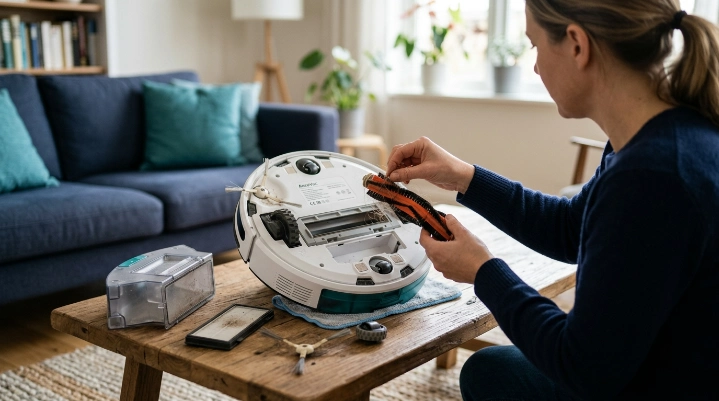
Each component gets dirty at a different rate. The bin may need attention after one busy run, while sensors can stay clean much longer.
The table below shows why one universal robot vacuum maintenance schedule does not work. These manufacturer intervals are model-specific examples rather than rules for every iRobot or Roborock product.
| Component | Practical Check | iRobot Example | Roborock Example |
|---|---|---|---|
| Filter | Every 1–2 weeks | Weekly; twice weekly with pets on one i-series schedule | Every 2 weeks on several washable-filter models |
| Main brush | About weekly | Monthly; twice monthly with pets on one schedule | Every 2 weeks on selected Q-series models |
| Side brush | Every 1–4 weeks | Monthly on one iRobot care schedule | Monthly on selected models |
| Caster wheel | Every 2–4 weeks | Every 2 weeks on one care schedule | As required on selected models |
| Sensors and contacts | Every 2–4 weeks | Monthly on one care schedule | As needed on selected models |
You can compare your own machine with the current care instructions at iRobot Support or Roborock Support. Search using the exact model number.
How often should you empty the dustbin?
Check a manual-empty dustbin after every cleaning cycle until you learn how quickly your home fills it. Empty it whenever it reaches its manufacturer’s fill limit or becomes packed with debris.
A small apartment with hard floors may fill the bin slowly. A home with shedding pets and rugs can fill the same-sized bin much faster.
How often should you clean the filter?
Inspect the filter every one or two weeks as a practical starting point. Follow the exact manual before tapping, brushing, washing, or replacing it.
Some robot filters are washable. Others can be damaged by water.
How often should you clean the brushes?
I inspect the main roller about weekly because wrapped hair is easy to spot early. Long hair, pet fur, thread, and carpet fibers often collect around the roller ends first.
Check side brushes during the same inspection. Bent, cracked, or badly worn brushes may need replacement rather than cleaning.
Section Takeaway: Component schedules vary significantly between models, so use your inspection routine to spot dirt while following the manufacturer for exact cleaning and replacement procedures.
How Do You Clean a Robot Vacuum Step by Step?
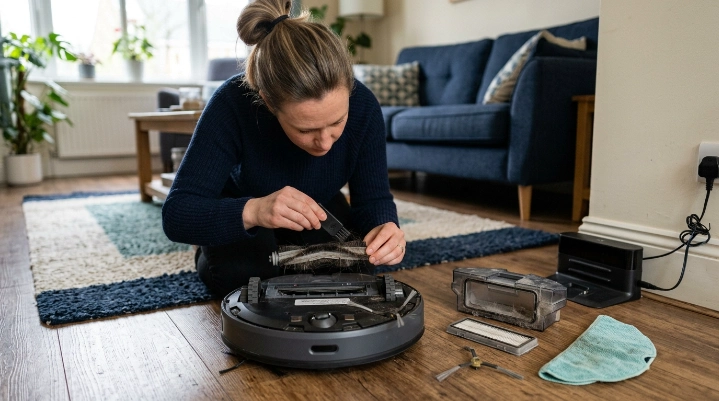
A basic robot vacuum clean should focus on removable debris, brushes, filters, wheels, sensors, and contacts. Turn the machine off before handling removable or moving parts when your manual instructs you to do so.
- Remove it from the dock: Stop the cleaning cycle and place the robot on a stable surface.
- Empty the dustbin: Dump collected dirt without shaking fine dust around the room.
- Inspect the filter: Remove loose debris using only a manufacturer-approved method.
- Clean the main brush: Remove wrapped hair, thread, and fibers from the roller and its ends.
- Check the side brush: Pull away trapped hair and inspect the arms for damage.
- Inspect the wheels: Remove visible debris from the caster and accessible wheel areas.
- Wipe the sensors: Use the cloth and technique specified by your manufacturer.
- Clean charging contacts: Remove dust while keeping liquids away from electrical areas.
- Inspect the dock: Check bags, bins, air passages, and washable dock parts as applicable.
- Reassemble and test: Make sure every dry component is seated properly before a short run.
Should you wash the robot vacuum?
Do not assume a dusty component can be washed. A part should touch water only when the manufacturer specifically identifies it as washable.
If you rinse an approved filter or bin, let it dry for the full period required by the manual. Some Roborock instructions, for example, specify at least 24 hours for certain washable filters.
Do you need disinfectant?
Routine debris removal does not automatically require disinfecting the robot. The CDC’s cleaning and disinfecting guidance distinguishes ordinary cleaning from disinfection and notes that regular cleaning is enough for many household situations.
Do not spray disinfectant into sensors, motors, charging contacts, batteries, or other electronic openings. Chemical cleaners can also damage materials if the manufacturer has not approved them.
Expert Alert: If the robot has a damaged battery, burning smell, exposed wiring, repeated overheating, or liquid inside electrical areas, stop using it and contact the manufacturer or a qualified appliance professional.
Section Takeaway: Clean removable debris first, keep moisture away from electronics, and never wash a filter or component unless your specific manual allows it.
When Should You Clean a Robot Vacuum More Often?
Clean the robot sooner whenever your household produces more debris than average. Calendar dates matter less than what you see inside the machine.
Homes with pets
Pet hair can wrap tightly around roller ends, caster axles, and side-brush hubs. I check those areas more frequently during heavy shedding periods.
Pet dander and fine dust can also load a filter faster. For general information about managing asthma and allergy triggers, use established resources rather than relying on a vacuum alone.
Homes with long human hair
Long hair can wind into surprisingly tight cords around moving parts. Weekly inspection may not be frequent enough if several people have long hair.
I would rather spend two minutes removing a fresh tangle than fight a compacted ring later. It is easier on the brush, too.
Busy kitchens and family rooms
Crumbs, cereal, tracked soil, and small pieces of paper can fill a compact robot bin quickly. Check the bin after high-mess cleaning runs.
- More crumbs: Inspect the bin and intake after runs.
- More hair: Inspect rollers and wheels more often.
- More fine dust: Monitor the filter closely.
- More carpet: Watch for fibers and hair around brush ends.
- More daily runs: Shorten inspection intervals as total operating hours increase.
Renovation or unusually fine dust
Standard robot vacuums are not substitutes for construction-dust equipment. Fine renovation debris can overwhelm filters and enter places that normal household dirt does not.
Expert Alert: Use equipment designed for renovation or hazardous dust instead of sending a normal robot vacuum through an unknown fine-particle cleanup.
What Happens If You Do Not Clean Your Robot Vacuum?
A neglected robot may still move around the house, but that does not mean every part is working well. Maintenance problems often develop gradually.
- Brush tangles: Hair and thread can restrict roller or side-brush movement.
- Reduced pickup: A loaded filter or blocked intake can interfere with airflow.
- Poor navigation: Dust on sensor windows can contribute to model-specific navigation problems.
- Docking trouble: Dirty contacts or dock sensors may interfere with reliable charging or alignment.
- Wheel problems: Hair around axles can restrict free movement.
- Odors: Old debris or damp washable parts can create unpleasant smells.
I usually notice maintenance trouble through a change rather than a complete failure. The robot sounds different, leaves more debris, struggles with a brush, or starts asking for maintenance in the app.
That is the best time to inspect it. Waiting until the robot stops completely makes troubleshooting harder.
Can a dirty robot vacuum affect household dust?
A robot vacuum is only one part of household dust control. The EPA notes that activities such as vacuuming can stir settled particles, while regular cleaning helps reduce dust and allergen buildup.
Keep expectations realistic. A maintained robot supports routine floor cleaning, but it cannot replace ventilation, source control, proper filtration, or other home-hygiene practices.
Do Self-Emptying Robot Vacuums Need Regular Cleaning?
Yes. A self-emptying dock reduces how often you manually empty debris, but it does not make the robot maintenance-free.
The robot still has brushes, filters, wheels, sensors, contacts, and an onboard dust pathway. The dock adds more parts that can collect dust.
What should you check on a self-emptying dock?
- Dust bag or dock bin: Replace or empty it at the model’s specified point.
- Air passage: Check accessible areas for visible blockages.
- Dock contacts: Keep approved contact surfaces clean and dry.
- Dock sensors: Wipe them using the manufacturer-approved method.
- Seals and openings: Look for debris that prevents proper seating or airflow.
If the robot returns to the dock but its onboard bin remains full, inspect the approved airflow path first. A blockage can look like a failed self-emptying motor.
What about robot vacuum and mop combinations?
Vacuum-and-mop robots have another maintenance system. Pads, dirty-water tanks, clean-water tanks, trays, and dock brushes can each have their own schedules.
Never let a generic robot-vacuum timetable override the mop instructions. Standing dirty water and wet components require different care from dry vacuum parts.
Section Takeaway: Self-emptying and mop docks reduce manual chores, but they add components that need their own inspections and manufacturer-specific cleaning routine.
Robot Vacuum Cleaning FAQ
Should I clean my robot vacuum after every use?
You usually do not need to deep clean the entire robot after every use. I recommend checking the bin and visible brush area after runs, especially until you understand how quickly your home produces debris.
How often should I clean robot vacuum brushes?
About once a week is a useful inspection starting point for many homes. Clean them sooner if you see wrapped hair, thread, fibers, restricted movement, or if your manufacturer specifies a different schedule.
How often should I clean a robot vacuum filter?
Inspecting it every one or two weeks is a practical baseline, but follow your specific manual. Some filters are washable, while others must stay dry and may use a different cleaning interval.
How often should robot vacuum sensors be cleaned?
Checking sensors every few weeks is reasonable for routine home use. Manufacturer instructions vary from scheduled monthly care to cleaning as needed, so use the interval provided for your exact model.
Can I wash a robot vacuum filter with water?
Only wash a filter when its manufacturer clearly identifies it as washable. Never assume two similar-looking filters have the same care instructions, and reinstall washed parts only after they are completely dry.
How often should I deep clean my robot vacuum?
A monthly full inspection works well as a practical reminder for many households. During that check, inspect the bin, brushes, roller ends, wheels, filter, sensors, contacts, intake, and dock while following model-specific instructions.
Should I clean my robot vacuum more often if I have pets?
Usually, yes. Shedding fur can accumulate quickly around brushes and wheel axles, and some manufacturers specifically recommend more frequent filter or brush care for homes with pets.
Final takeaway: I use a simple rule: inspect often, clean visible buildup early, and let the owner’s manual make the final decision on exact intervals and washable parts.
Start by checking your robot after its next run. Once you see where your own household debris collects fastest, you can build a maintenance schedule that takes only a few minutes to follow.