
How Do You Maintain a Cordless Vacuum? Complete Care Guide

Quick Answer
To maintain a cordless vacuum, empty the dustbin regularly, clear hair from the brush roll, check the airflow path, and clean approved filters according to the manufacturer’s instructions. You should also protect the battery from excessive heat and follow EPA lithium-ion battery guidance when a rechargeable battery reaches the end of its useful life.
Quick cordless vacuum maintenance steps
- Empty the bin: Remove collected dirt before it becomes tightly packed.
- Check the filter: Clean only filters the manufacturer identifies as washable.
- Clear the brush: Remove hair, thread, and fibers wrapped around the roller.
- Inspect airflow: Check the floorhead, wand, intake, and attachments for blockages.
- Care for the battery: Keep it away from excessive heat and use the correct charger.
- Dry washed parts: Never reinstall filters or washable pieces while damp.
Maintaining a cordless vacuum is easier than repairing one after airflow, runtime, or brush performance has dropped. I prefer a simple routine that catches small problems before they turn into frustrating cleaning issues.
This guide covers the dustbin, filters, brush roll, battery, charging habits, clogs, and warning signs. It applies broadly to cordless stick and handheld vacuums, although your model’s manual always takes priority.
In This Guide
- What Does Cordless Vacuum Maintenance Include?
- How Do You Maintain a Cordless Vacuum Step by Step?
- How Often Should You Maintain a Cordless Vacuum?
- How Do You Maintain a Cordless Vacuum Battery?
- How Do You Keep Filters, Brushes, and Airflow Clean?
- What Are the Signs a Cordless Vacuum Needs Maintenance?
- Cordless Vacuum Maintenance FAQ
What Does Cordless Vacuum Maintenance Include?
Cordless vacuum maintenance is the routine cleaning, inspection, and care that keeps the vacuum’s airflow, moving parts, filtration system, and rechargeable battery working correctly.
It does not mean opening the motor housing or repairing electrical parts yourself. Most useful maintenance happens on components designed for normal user access.
- Dustbin: Empty collected dirt and wipe it when the manufacturer permits.
- Filters: Inspect them for dust buildup and maintain them according to the manual.
- Brush roll: Remove wrapped hair, thread, carpet fibers, and other debris.
- Floorhead: Check intake openings, wheels, and channels for blockages.
- Wand: Look through removable tubes for trapped debris.
- Attachments: Remove lint, hair, and dust from crevice and upholstery tools.
- Battery: Watch for excessive heat, damage, swelling, or major runtime changes.
- Charging system: Keep charging contacts and the correct charger clean and undamaged.
My rule is simple: if performance suddenly changes, I check the easy airflow points before assuming an expensive component has failed. A packed bin or hidden blockage can make a healthy vacuum feel weak.
As of 2026, cordless designs vary widely between brands. Some have washable filters and removable batteries, while others require different care.
Section Takeaway: Maintain only user-serviceable parts unless the manufacturer says otherwise. Your model’s manual should decide what can be washed, removed, or replaced.
How Do You Maintain a Cordless Vacuum Step by Step?
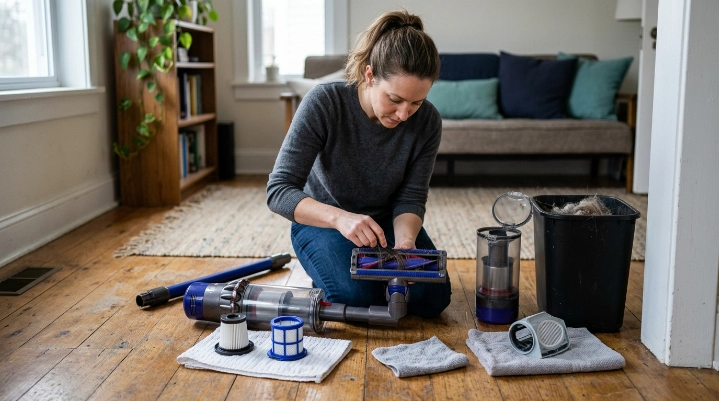
Start with the components that collect the most debris. Then work backward through the airflow path toward the motor.
1. Switch the vacuum off
Turn the vacuum completely off before removing the floorhead, filter, bin, or brush roll. Remove a detachable battery only if your manufacturer recommends doing so for maintenance.
2. Empty the dustbin
Open the bin over a trash container and remove compacted debris carefully. Avoid forcing the release mechanism if dirt is blocking it.
- Check around the cyclone or separator area for trapped hair.
- Inspect seals for dirt that could stop the bin from closing correctly.
- Wash the bin only when your manual identifies it as washable.
- Keep powered or electrical sections away from water.
3. Inspect the filter
Remove the filter according to the manual and inspect it in good light. Fine dust can build up even when the surface does not look badly clogged.
If the filter is washable, rinse it only as directed. Never assume every HEPA-style or pleated filter can get wet.
4. Clean the brush roll
Turn the floorhead over and look for hair around the roller. Pay special attention to the roller ends, where long strands often wind tightly.
- Remove the roller if your model allows it.
- Cut wrapped hair carefully without damaging bristles.
- Pull thread and fibers away from the ends.
- Check that the roller can rotate freely.
- Reinstall it securely before use.
5. Check the wand and floorhead
Separate removable sections and look through them for obstructions. Small objects can lodge at bends or narrow connections.
A blunt, non-damaging tool may help with an accessible blockage. Do not push sharp objects toward wiring or powered parts.
6. Wipe the exterior and attachments
Use a dry or lightly damp cloth on appropriate exterior surfaces. Keep moisture away from the battery, motor, controls, charging contacts, and powered floorhead unless the manual specifically allows cleaning there.
7. Let washed parts dry fully
Moisture inside a filter or airflow path can cause odors and may damage the machine. Reinstall washed pieces only after they are completely dry.
Section Takeaway: Work from the dustbin toward the intake and brush system. Most routine maintenance should be simple, dry, and performed with the vacuum switched off.
How Often Should You Maintain a Cordless Vacuum?
There is no universal maintenance interval for every cordless vacuum. Cleaning frequency depends on debris levels, pet hair, carpet use, and the manufacturer’s design.
I use visual checks rather than waiting for a noticeable loss of suction. Homes with shedding pets or long hair usually need brush and bin attention sooner.
| Component | Practical Check | What to Look For |
|---|---|---|
| Dustbin | After use or when visibly filling | Packed debris, blocked separator, dirty seals |
| Brush roll | Weekly in hair-heavy homes | Hair, thread, restricted rotation |
| Filter | Inspect regularly; service per manual | Fine dust, discoloration, damage |
| Wand and intake | When suction changes | Paper, hair clumps, large debris |
| Battery | During normal charging and use | Damage, swelling, unusual heat, sharp runtime loss |
| Attachments | Monthly or after dirty jobs | Lint, trapped hair, blocked openings |
Do not copy another brand’s filter schedule just because the vacuums look similar. Filter materials and airflow systems can differ.
Section Takeaway: Inspect high-debris components frequently and use your manual for exact service intervals. Heavy-use households need maintenance more often than light-use homes.
How Do You Maintain a Cordless Vacuum Battery?
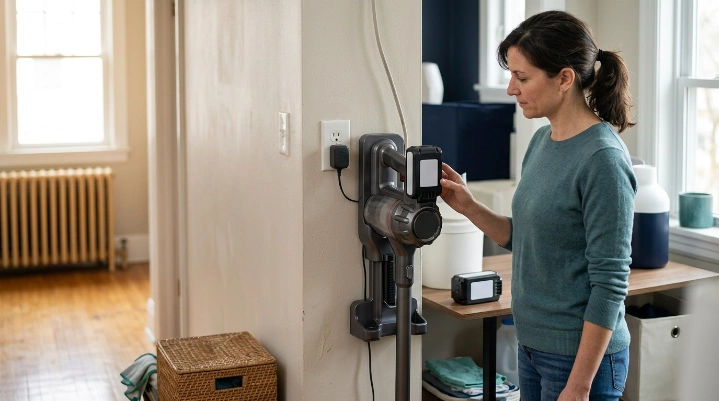
Good battery care means using the approved charging system, avoiding physical damage, and keeping the vacuum away from excessive heat. Rechargeable battery instructions vary by manufacturer.
Use the correct charger
Use the charger or charging dock approved for your model. An incompatible charger may not provide the battery management the vacuum requires.
Avoid excessive heat
Do not store the vacuum beside a heater, inside an extremely hot vehicle, or in another unusually hot location. Heat is hard on lithium-ion battery systems.
Pay attention to unusual changes
- Runtime: A major unexplained drop can indicate battery aging or another performance problem.
- Charging: Repeated failure to charge deserves investigation.
- Heat: Stop using a battery that becomes unusually hot.
- Damage: Cracked, swollen, leaking, or visibly damaged batteries need careful handling.
Do not assume short runtime automatically means battery failure. A clogged filter or jammed brush can increase the workload and make runtime feel worse.
The EPA advises consumers not to place used lithium-ion batteries in household trash or ordinary curbside recycling. Follow local recycling rules and your manufacturer’s battery instructions.
Expert Alert: Do not open a sealed battery pack, motor housing, charger, or electrical control assembly. Contact the manufacturer or a qualified repair professional when electrical components require service.
Section Takeaway: Protect the battery from heat, damage, and incompatible charging equipment. Troubleshoot airflow before blaming every runtime problem on the battery.
How Do You Keep Filters, Brushes, and Airflow Clean?
Airflow is central to vacuum performance. Dust must move through the floorhead, wand, separator, and filtration system without unnecessary restriction.
Clean filters only as directed
A filter traps particles before air leaves or moves through critical sections of the machine. The exact filter design varies between cordless vacuums.
- Never wash a filter unless the manufacturer says it is washable.
- Never reinstall a washed filter while damp.
- Replace damaged filters rather than trying to repair the material.
- Check that filters sit correctly after cleaning.
Household dust can include allergens such as dust-mite debris. The Asthma and Allergy Foundation of America’s dust-mite guidance recommends regular cleaning and notes the role of suitable vacuum filtration in controlling household allergen debris.
Keep the brush roll free
A brush roll works best when it can rotate without being wrapped in hair. Tangled material may reduce cleaning performance and increase mechanical resistance.
Check the end caps as well as the center of the roller. Hair can hide behind edges that are easy to miss.
Trace a suction problem through the air path
If suction suddenly drops, inspect the system in a logical order. Start where debris enters and move toward the bin.
- Check the floorhead opening.
- Inspect the brush channel.
- Look through the wand or tube.
- Empty the dustbin.
- Inspect the separator area.
- Check the filter according to the manual.
Good vacuum maintenance also supports cleaner household practices by keeping collected dust contained. The EPA’s indoor air quality resources explain the broader role of source control, ventilation, and filtration in reducing indoor pollutants.
Section Takeaway: Clean airflow depends on more than suction power. A clear floorhead, wand, bin, and correctly maintained filter work together as one system.
What Are the Signs a Cordless Vacuum Needs Maintenance?
A cordless vacuum often gives warning signs before it stops working. Changes in suction, sound, smell, brush movement, or runtime deserve attention.
- Weak suction: Check the bin, filter, wand, and intake for restrictions.
- Pulsing power: Inspect for airflow restrictions and follow model-specific troubleshooting.
- Brush not spinning: Remove wrapped hair and check for an obstruction.
- Unusual noise: Stop and inspect for trapped objects or damaged moving parts.
- Burning smell: Switch the vacuum off and investigate before using it again.
- Frequent shutdowns: Check for overheating, airflow problems, or manufacturer-listed fault conditions.
- Short runtime: Check both the battery condition and cleaning-system resistance.
- Dust escaping: Confirm the bin, filter, seals, and covers are installed correctly.
When should you stop troubleshooting at home?
Stop using the vacuum if you notice smoke, sparks, melted plastic, battery swelling, exposed wiring, or a strong electrical smell. These problems are beyond normal cleaning maintenance.
Repeated overheating also deserves professional or manufacturer support. Do not bypass safety switches or modify battery connections to keep the vacuum running.
Section Takeaway: Maintenance can solve dirt, hair, and airflow problems. Electrical faults, battery damage, and repeated overheating require a safer repair route.
Cordless Vacuum Maintenance FAQ
Should I empty my cordless vacuum after every use?
You do not always need to empty it after every small cleanup, but checking the bin after use is a good habit. Empty it sooner when debris becomes packed or approaches the manufacturer’s fill limit.
How often should I clean a cordless vacuum filter?
Use the schedule in your vacuum’s manual because filter designs vary. Inspect the filter regularly, especially if suction drops, but wash it only when the manufacturer specifically identifies it as washable.
Can I wash the dustbin of a cordless vacuum?
Some removable bins can be washed, while others have parts that should remain dry. Check the manual first, keep electrical components away from water, and allow any approved washable bin to dry fully before reassembly.
Why does my cordless vacuum lose suction?
Common causes include a full bin, dirty filter, blocked wand, clogged floorhead, or tangled brush roll. Check those areas before assuming the motor or battery has failed.
Does leaving a cordless vacuum on its charger damage the battery?
Charging behavior depends on the vacuum’s battery-management system and manufacturer instructions. Use the approved charger and follow the brand’s storage and charging guidance rather than applying one rule to every cordless vacuum.
How do I know whether my cordless vacuum battery is failing?
Possible signs include substantially shorter runtime, inconsistent charging, unexpected shutdowns, or physical battery damage. First rule out clogged filters, jammed brushes, and blocked airflow because those issues can also reduce usable runtime.
How can I make my cordless vacuum last longer?
Keep airflow clear, empty the bin regularly, remove hair from moving parts, maintain filters correctly, and avoid abusing the battery. Address unusual heat, noises, smells, or performance changes early instead of continuing to use the machine.
Final Takeaway: Maintaining a cordless vacuum is mostly about keeping dust, hair, and blockages away from the parts that need clean airflow and free movement. A few regular checks can prevent many common performance problems.
Use your vacuum’s manual for model-specific instructions, especially for filters, batteries, and washable components. Make routine maintenance part of your cleaning schedule instead of waiting until the vacuum stops working well.