
How Do You Extend the Life of a Vacuum Cleaner?

Quick Answer
You can extend the life of a vacuum cleaner by protecting its airflow, cleaning or replacing filters correctly, clearing hair from the brush roll, preventing clogs, and dealing with unusual heat or noises early. The most important rule is to follow your model’s maintenance instructions rather than assuming every filter or removable part can be washed. Consumer Reports also recommends regular maintenance to help a vacuum last longer.
Quick steps to protect your vacuum
- Empty it early: Don’t let a bag or dustbin become packed beyond its recommended fill level.
- Maintain filters: Clean washable filters and replace non-washable ones according to the owner’s manual.
- Clear the brush: Remove wrapped hair, string, and fibers before they restrict the brush roll.
- Check for clogs: Inspect the hose, wand, floor head, and narrow air passages when suction changes.
- Watch for heat: Stop using a vacuum that overheats, repeatedly shuts off, or develops a burning smell.
- Use it correctly: Keep liquids, ash, construction dust, and oversized debris away unless your machine is designed for them.
One rule matters most
- Check your owner’s manual before washing filters, removing powered parts, servicing belts, or storing a cordless vacuum for long periods.
A vacuum cleaner can last much longer when dirt never gets the chance to choke its airflow or overload its moving parts. I’ve found that small maintenance jobs are far easier than troubleshooting a machine after its suction, sound, or temperature suddenly changes.
This guide covers the habits that matter most for upright, canister, stick, cordless, and robot vacuums. It also explains which warning signs deserve attention before a small problem becomes an expensive repair.
In This Guide
What Shortens the Life of a Vacuum Cleaner?
The biggest threats are restricted airflow, excessive heat, jammed moving parts, incorrect maintenance, and picking up debris the machine wasn’t designed to handle. Most develop gradually rather than causing an instant failure.
Extending vacuum life means reducing unnecessary strain on its motor, fan, brush system, filtration components, battery, hoses, seals, and electrical connections. Good maintenance keeps those systems operating as their manufacturer intended.
Restricted airflow makes the whole machine work harder
A packed dustbin, full bag, clogged filter, or blocked hose reduces the air moving through the vacuum. Poor airflow can also cause noticeable suction loss.
That’s why I treat weak suction as a maintenance signal instead of compensating by making more passes. Check the dirt container and airflow path before assuming the motor itself is failing.
- Bagless vacuum: Empty the bin before debris exceeds its marked maximum line.
- Bagged vacuum: Replace the bag when the indicator or manufacturer guidance says it’s full.
- Hose and wand: Inspect them if suction drops suddenly.
- Filters: Check for visible loading according to the recommended schedule.
Hair and fibers put extra strain on moving parts
Long hair, pet fur, thread, and carpet fibers can wrap tightly around a rotating brush. That buildup may restrict movement and load the brush-drive system.
I inspect the roller before the hair forms a thick layer around it. A two-minute cleanup is easier than dealing with a jammed roller, damaged belt, or overheated powered head.
Dust control also matters for home hygiene
Household dust can contain pollen, pet dander, mold spores, fibers, and other particles. The EPA’s guidance on indoor particulate matter recommends regular cleaning and notes that vacuuming is one way to control accumulated indoor dust.
A well-maintained vacuum is better positioned to collect debris without clogged airflow or neglected filtration. It still needs to be used as part of a wider cleaning routine.
How Do You Extend Vacuum Life Step by Step?
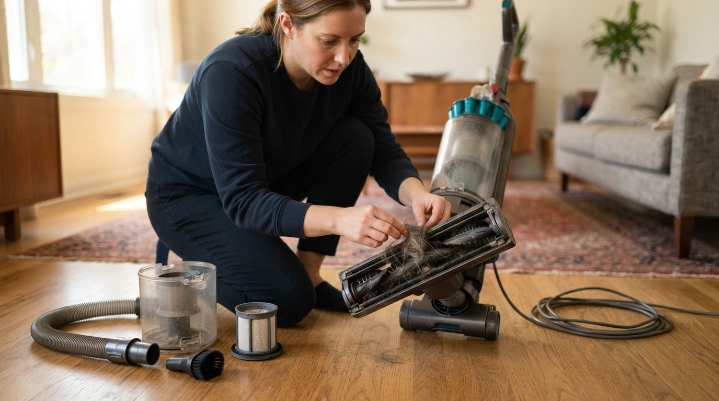
Start with the parts that affect airflow and movement because they usually collect dirt fastest. Then inspect the hose, seals, attachments, cord, battery, and wheels for developing problems.
1. Empty the dustbin or change the bag before it gets packed
Don’t wait until dirt is compressed into every available space. A full collection system can restrict airflow and make emptying messier.
On bagless models, I also check the upper bin and cyclone openings because fine dust often collects where it’s less visible. Wipe removable surfaces only as your manual permits.
2. Maintain every filter correctly
Vacuum filters protect different parts of the airflow system. Some protect the motor, while exhaust filters help control particles leaving the machine.
Never assume a filter is washable. Foam, felt, pleated, cartridge, and HEPA-style filters can have completely different care instructions between models.
- Remove loose dust gently.
- Wash only filters specifically labeled as washable.
- Use water or cleaning methods specified by the manufacturer.
- Let a washed filter dry completely before reinstalling it.
- Replace disposable filters on the model’s recommended schedule.
HEPA means high-efficiency particulate air. The EPA explains HEPA filtration as a defined type of high-efficiency mechanical particle filtration, but a vacuum’s overall dust control also depends on its design and sealing.
3. Remove hair from the brush roll
Switch off and disconnect the vacuum before touching a powered brush. For a cordless model, remove the battery first when the design allows it.
- Turn the floor head over.
- Inspect the roller and its end caps.
- Cut wrapped hair along the roller’s cleaning groove if one is provided.
- Pull loose fibers away from the bristles.
- Check that the roller turns normally before reassembly.
Avoid cutting toward the belt, wiring, bristles, or soft roller material. Follow the manual when the brush must be removed from its housing.
4. Clear clogs before they become solid
Check the floor-head neck, wand, hose, bin inlet, and other narrow passages when suction changes. Large paper scraps, socks, toy pieces, dense hair, and similar debris can create a blockage.
Use a method recommended for your vacuum instead of forcing sharp tools through flexible tubing. A punctured hose creates another airflow problem.
5. Pay attention to heat, smell, and sound
A sudden burning smell, repeated thermal shutdown, grinding, squealing, or unusual vibration deserves immediate attention. Stop the vacuum and disconnect power before inspecting it.
Check the obvious maintenance points first. Persistent electrical odors, sparking, damaged wiring, battery swelling, or internal motor problems require professional service.
Expert Alert: Stop using a vacuum with damaged electrical components, a swollen battery, sparking, smoke, or a persistent burning smell. Have the machine inspected by a qualified appliance technician.
Section Takeaway: Keep airflow open, moving parts clear, and filters maintained exactly as your model requires. Small problems are cheapest to address when you catch them early.
How Often Should You Maintain a Vacuum?
There is no universal schedule for every vacuum. Usage, pets, hair, carpet type, fine dust, and the manufacturer’s design all change how quickly components become dirty.
As of 2026, I still prefer condition-based maintenance over rigid calendar rules. The table below is a practical inspection schedule, not a replacement for your owner’s manual.
| Component | Practical Check | Service Trigger |
|---|---|---|
| Dustbin | Every use | Debris approaches the max line or airflow falls |
| Vacuum bag | Before each major cleaning | Full-bag indicator activates or manufacturer limit is reached |
| Brush roll | Weekly in high-hair homes; every few weeks otherwise | Visible wrapped hair, poor rotation, noise, or weak agitation |
| Filters | About monthly or per manual | Visible loading, airflow loss, replacement interval, or filter indicator |
| Hose and air path | Monthly visual check | Sudden suction loss, whistle, blockage, or collapsed hose |
| Cord, plug, battery | Before use | Cuts, exposed conductors, overheating, swelling, or charging problems |
Homes with shedding pets or several people with long hair may need brush-roll checks much more often. Fine dust can also load filters quickly.
The Asthma and Allergy Foundation of America recommends regular cleaning to help control indoor allergens and discusses appropriate vacuuming in its indoor allergen guidance. Good appliance care helps keep that routine practical.
Which Vacuum Parts Should You Repair or Replace?
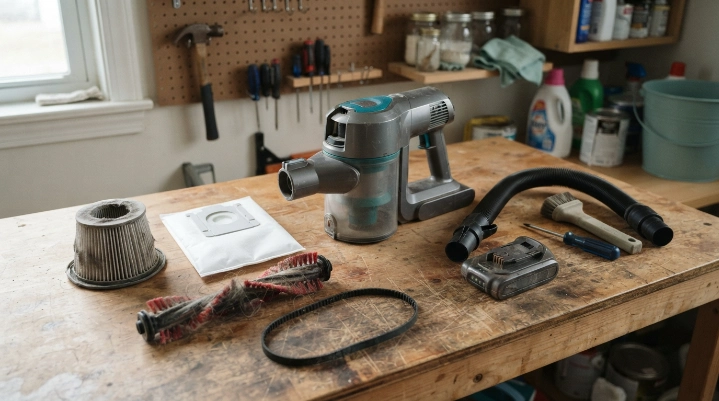
A worn consumable doesn’t always mean you need a new vacuum. Filters, bags, belts, rollers, hoses, batteries, and attachments may be replaceable depending on the model.
Replace consumable parts when they stop doing their job
- Filters: Replace non-washable or damaged filters according to the manual.
- Bags: Use the correct size and type rather than forcing an incompatible bag into place.
- Brush rolls: Consider replacement when bristles are badly worn, bearings seize, or the roller is physically damaged.
- Belts: Replace stretched, cracked, slipping, or broken belts with the specified part.
- Hoses: Repair or replace split hoses that leak air.
- Batteries: Use manufacturer-approved replacement procedures for cordless machines.
Know when repair stops making sense
A simple hose, belt, roller, filter, or latch problem can be worth fixing. A failed motor, damaged electronics, or proprietary battery system may cost much more.
Compare the repair estimate with the vacuum’s age, condition, replacement cost, and parts availability. Don’t discard a machine before checking whether the problem is a normal service part.
Does Maintenance Change by Vacuum Type?
Yes. The same basic goals apply, but different vacuum designs concentrate dirt and wear in different places.
Upright vacuums
Watch the brush roll, belt or drive system, floor-head airway, hose, filters, and bag or bin. Hair buildup under the floor head is especially easy to miss.
Canister vacuums
Inspect the long hose, wand connections, power-head wiring, bag or bin, and filters. Avoid dragging or sharply bending the hose around furniture.
Stick and cordless vacuums
Small bins and compact filters can need frequent attention. Also protect the battery from physical damage and use the recommended charger.
Don’t block cooling openings during use or charging. Follow the manufacturer’s temperature and long-term storage instructions.
Robot vacuums
Robot vacuums need more than an emptied bin. Check the main roller, side brush, wheels, charging contacts, cliff sensors, and dock area.
Hair around wheel axles can create resistance even when the main roller looks clean. Small inspections matter here.
What Habits Can Damage a Vacuum Cleaner?
Using the vacuum for the wrong debris can shorten its life faster than normal household cleaning. A standard dry vacuum isn’t a universal cleanup machine.
- Vacuuming liquids: Keep water and wet spills away unless the vacuum is specifically designed for wet pickup.
- Picking up hot ash: Fireplace and grill debris can retain heat and contain extremely fine particles.
- Cleaning construction dust: Drywall, plaster, masonry, and renovation dust can overwhelm ordinary household filtration.
- Running over cords: Cables, shoelaces, tassels, and fabric can wrap around a brush roll instantly.
- Forcing large debris: Coins, stones, toy parts, and hard fragments can jam or damage internal parts.
- Using damp filters: Reinstall washed components only after they are completely dry and the manual permits washing.
- Ignoring overheating: Repeated shutdowns are a warning, not a feature to work around.
I also avoid yanking a cord from the wall or wrapping it tightly around sharp corners. Small habits like these protect plugs, cord reels, hoses, and strain-relief points.
Proper vacuuming can support broader dust-control efforts, but filtration claims need context. A HEPA filter alone doesn’t guarantee that an entire vacuum is perfectly sealed or appropriate for every allergen-sensitive household.
Frequently Asked Questions
How many years should a vacuum cleaner last?
There isn’t one guaranteed lifespan for every vacuum. Longevity depends on construction, usage, maintenance, repairability, floor type, household debris, and how heavily the motor and brush system are used.
Does emptying a vacuum more often make it last longer?
It can help protect airflow. Empty a bagless bin before debris passes its marked fill level, and replace bags according to the vacuum’s indicator or manufacturer guidance rather than waiting until they’re packed solid.
Can a dirty vacuum filter damage the motor?
A heavily loaded filter can restrict airflow and reduce performance. Some filters also protect the motor from dirt, so maintaining them according to the manufacturer’s instructions is an important part of vacuum care.
How often should I remove hair from the brush roll?
Inspect it every few weeks in an average home and more often with long hair, shedding pets, or fiber-heavy carpets. Remove buildup whenever hair starts wrapping around the roller or its ends.
Should I wash my vacuum’s HEPA filter?
Only if the manufacturer identifies that exact filter as washable. HEPA-style filters vary by design, and putting water on a non-washable filter may damage its material or reduce performance.
Why does my vacuum get hot?
Warm operation can be normal, but unusual heat may point to restricted airflow, a clogged filter, a jammed brush, blocked cooling passages, or an internal fault. Stop and inspect the vacuum if it becomes abnormally hot or repeatedly shuts down.
Is it better to repair an old vacuum or replace it?
Repair is often sensible for affordable service parts such as hoses, rollers, belts, filters, or switches. Replacement becomes more attractive when major electrical or motor repairs approach the cost of a dependable new vacuum.
The Bottom Line
The best way to extend the life of a vacuum cleaner is simple: don’t make it fight against dirt inside its own system. Keep the collection chamber, filtration system, brush roll, and airflow path under regular observation.
Respond early when suction, temperature, noise, smell, or brush movement changes. Those warning signs often give you a chance to fix a small maintenance issue before it becomes a major failure.
Most importantly, treat the owner’s manual as the final authority for your specific machine. A few minutes of preventive care can save a lot of frustration and help keep your vacuum ready for the next cleaning day.
“`