
Can a Dirty Filter Damage a Vacuum?

Quick Answer
Yes, a dirty vacuum filter can contribute to vacuum damage if you keep using the machine with restricted airflow. It can reduce suction, make the motor run hotter, trigger overheating protection, and potentially shorten motor life; Consumer Reports also recommends cleaning or replacing vacuum filters periodically.
Warning Signs to Watch For
- Weak suction: A loaded filter can restrict the air moving through the vacuum.
- Extra heat: Restricted airflow may make the motor and surrounding housing run hotter.
- Sudden shutdown: Some vacuums use a thermal protector that switches the motor off when it overheats.
- Strained sound: A change in motor pitch or unusually loud operation can accompany airflow problems.
- Dusty exhaust: A damaged, badly seated, or overloaded filter may reduce the vacuum’s intended filtration performance.
Best First Move
- Turn the vacuum off, inspect the filter, bin or bag, and airflow path, then clean or replace the filter exactly as your owner’s manual directs.
A dirty filter can look like a small maintenance problem, but I don’t ignore it. The filter sits directly in the vacuum’s airflow system, so neglect can affect suction, motor temperature, dust control, and everyday cleaning performance.
The good news is that most filter-related problems are simple to catch early. This guide explains what can happen, what warning signs matter, and what to do before a minor airflow restriction becomes an expensive repair.
In This Guide
Can a Dirty Filter Damage a Vacuum?
Yes. A dirty filter can damage some vacuums when the restriction becomes severe and the machine continues running under those conditions.
Definition: A dirty vacuum filter is a filter loaded with enough dust, hair, lint, or fine debris to interfere with normal airflow, filtration, or both.
Your vacuum depends on a continuous air path. Air enters through the floorhead or attachment, carries debris into the collection system, passes through filtration stages, and exits the machine.
If the filter becomes heavily loaded, air has more difficulty moving through that path. The immediate symptom is often weaker suction.
- Less airflow: The vacuum may pick up less dirt even though the motor still sounds active.
- Higher operating temperature: Restricted airflow can contribute to heat buildup in affected designs.
- Thermal shutdown: Some machines automatically shut the motor off before overheating becomes more serious.
- Extra motor stress: Long-term operation with poor airflow may shorten component life.
BISSELL’s support guidance for some vacuum models specifically warns that poor filter maintenance can damage the motor. Its troubleshooting information also connects dirty filters with unusually loud operation.
That doesn’t mean one dusty filter will instantly destroy every vacuum. The risk depends on the machine, how restricted the filter becomes, and how long you continue using it.
Many modern vacuums also include thermal protection. For example, BISSELL’s filter troubleshooting guidance warns about motor damage and tells owners to maintain filters correctly.
Section Takeaway: A dirty filter is more than a suction problem. Severe restriction can create heat and motor stress, so maintenance should happen before the vacuum starts struggling.
What Damage Can a Dirty Vacuum Filter Cause?
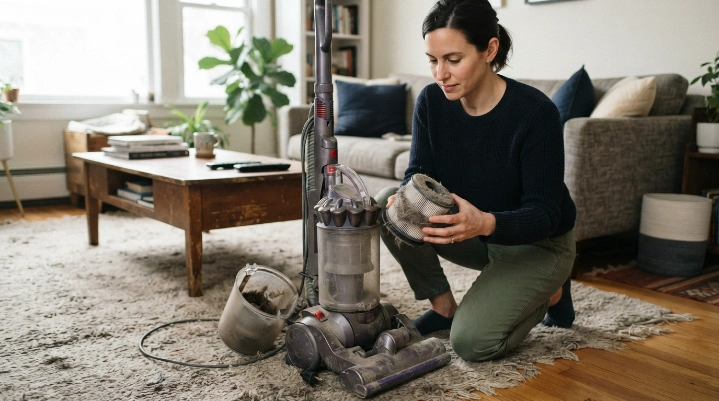
The most important risk is restricted airflow. That restriction can create a chain of performance problems if it isn’t corrected.
Can a dirty filter make a vacuum overheat?
Yes, it can contribute to overheating in some machines. A vacuum motor generates heat while running, and normal airflow helps the system operate within its designed temperature range.
When a filter becomes heavily clogged, airflow may fall. Some vacuums respond by shutting down through a thermal protector.
- The vacuum may feel unusually hot.
- The motor may suddenly stop.
- The machine may restart after cooling.
- The problem may return until the airflow restriction is removed.
Don’t repeatedly restart a vacuum that keeps overheating. Find the restriction first.
Can a dirty filter damage the motor?
Potentially, yes. Manufacturer guidance for certain models explicitly warns that dirty filters can cause motor damage.
Heat isn’t the only concern. On machines with a pre-motor filter, that filter also helps keep fine debris away from sensitive motor components.
If the filter becomes damaged, is installed incorrectly, or is missing, the protection may no longer work as designed. That can allow more contamination into areas where you don’t want it.
Can it reduce suction?
This is often the first problem you’ll notice. A loaded filter restricts the air the vacuum needs to move dirt effectively.
I check filters early whenever a bagless vacuum suddenly feels weak. It’s faster than assuming the motor has failed, and a filter inspection costs nothing.
Can it affect indoor dust control?
It can affect the vacuum’s intended filtration performance, especially if the filter is damaged or poorly seated. The EPA explains that HEPA filtration is designed to capture at least 99.97% of particles at 0.3 microns under the applicable definition.
That number describes HEPA filter performance, not the performance of every entire vacuum. A vacuum’s seals, filter condition, installation, and overall design also matter.
Section Takeaway: A neglected filter can cause weak suction, heat buildup, shutdowns, and possible motor stress. A damaged or misplaced filter can also undermine the machine’s intended filtration system.
How Do You Know Your Vacuum Filter Is Too Dirty?
A filter doesn’t need to be completely packed with dust before it causes trouble. Look at how the vacuum behaves as well as how the filter looks.
Common symptoms of a dirty vacuum filter
- Suction drops: The vacuum stops lifting debris as well as it normally does.
- Motor sounds strained: You notice a higher pitch, louder hum, or unusual operating sound.
- Vacuum feels hotter: The body or exhaust area becomes noticeably hotter than usual.
- Thermal shutdown occurs: The vacuum switches itself off during normal use.
- Dust smell appears: Exhaust develops a stale or dusty odor.
- Filter looks loaded: Dust is packed into foam, pleats, mesh, or other filter material.
A single symptom doesn’t prove the filter is responsible. A clogged hose, full bag, packed dust bin, tangled brush roll, or blocked floorhead can create similar problems.
Does indoor dust make filters dirty faster?
Yes. Homes with shedding pets, carpeting, fine dust, tracked-in soil, or frequent vacuuming can load filters faster.
The EPA notes that household dust can contain soil, pollen, mold spores, pet dander, dust-mite material, hair, skin flakes, and other particles. Much of that material eventually enters your vacuum.
That’s why a fixed calendar isn’t always enough. Condition matters.
Section Takeaway: Weak suction, extra heat, strange noise, shutdowns, and visible buildup are the main clues. Check the whole airflow path before blaming the filter alone.
Is It the Filter, a Clog, or a Full Bin?
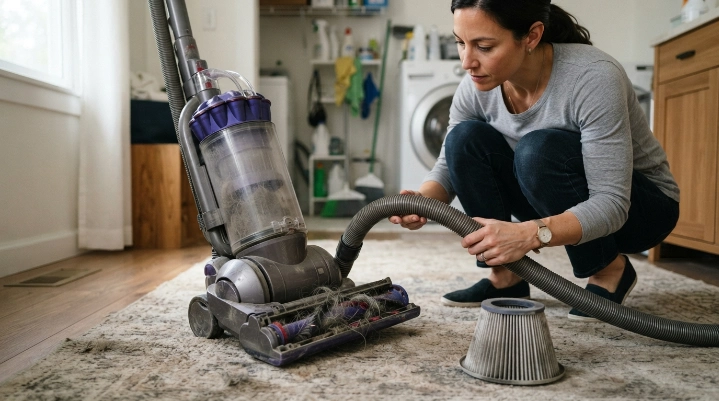
These problems overlap, so I troubleshoot them in a simple order. Start with the easiest airflow restrictions before assuming there is an electrical or motor fault.
| Problem | Typical Clue | First Check | Best Action |
|---|---|---|---|
| Dirty filter | Weak suction, heat, dusty filter | Pre-motor and exhaust filters | Clean or replace as the manual directs |
| Full bin or bag | Performance drops as debris level rises | Fill line or bag condition | Empty the bin or replace the bag |
| Hose or airway clog | Sudden suction loss | Hose, wand, inlet, floorhead neck | Remove blockage with power disconnected |
| Brush-roll tangle | Poor carpet pickup or brush resistance | Hair and thread around brush | Remove wrapped debris safely |
If the vacuum improves after you remove the filter, don’t operate it that way unless the manufacturer specifically permits filter-free use. The test may identify a restriction, but the required filter still needs to be installed during normal operation.
Section Takeaway: Filter problems can mimic clogs and full bins. Check the collection container, filters, hose, air passages, and brush roll before assuming the vacuum needs repair.
Which Vacuum Filter Types Need Different Care?
Not every dirty filter should be washed. Filter material and manufacturer instructions determine the correct maintenance method.
| Filter Type | Main Role | Can You Wash It? | Important Detail |
|---|---|---|---|
| Foam pre-motor filter | Helps protect the motor from debris | Often washable, model-dependent | Never assume water is safe without checking the manual |
| Pleated filter | Captures fine debris | Washable or disposable | Avoid crushing or damaging pleats |
| HEPA filter | High-efficiency particle filtration | Model-dependent | HEPA definition includes 99.97% capture at 0.3 µm under the applicable test definition |
| Post-motor filter | Filters exhaust leaving the motor area | Model-dependent | May have different care rules than the pre-motor filter |
The word HEPA describes filtration performance. It does not tell you whether the filter can be rinsed.
That distinction prevents an expensive mistake. Washing a non-washable filter may damage its material, seals, or structure.
Section Takeaway: Identify the exact filter before cleaning it. Foam, pleated, HEPA, pre-motor, and exhaust filters can all have different maintenance requirements.
What Should You Do When the Vacuum Filter Is Dirty?
Stop using the vacuum if it is overheating, shutting down, or making an abnormal motor sound. Then inspect the machine with the power disconnected.
Use this safe troubleshooting order
- Switch off the vacuum. Unplug a corded machine or follow the shutdown procedure for your cordless model.
- Empty the collection system. Empty the bin or replace a full bag.
- Inspect the filter. Look for heavy dust, embedded debris, tears, warping, or damaged seals.
- Check the manual. Confirm whether the filter is washable, dry-clean-only, or replaceable.
- Clear obvious clogs. Inspect the hose, wand, intake, and floorhead.
- Clean the brush roll. Remove wrapped hair and fibers after disconnecting power.
- Reassemble carefully. Make sure filters, seals, bins, and covers seat correctly.
Should you wash a dirty vacuum filter?
Only if the manufacturer says that exact filter is washable. Don’t rinse a filter simply because another filter from the same vacuum can get wet.
If you wash an approved reusable filter, let it dry completely before reinstalling it. Moisture inside a vacuum can create a separate appliance problem.
Should you clean or replace it?
Clean reusable filters according to their instructions. Replace disposable filters, torn filters, warped filters, and filters that no longer recover after approved maintenance.
As of 2026, there still isn’t one universal replacement interval that fits every vacuum. The model-specific owner’s manual should override generic schedules.
What if someone in the home has asthma or allergies?
Filtration and careful dust handling matter more in sensitive households. The CDC recommends regular vacuuming with a HEPA-equipped vacuum as one step for controlling common household asthma triggers such as dust mites.
Try to avoid creating a dust cloud while emptying a bagless bin. Sensitive household members may also prefer to stay away from the immediate area while vacuuming or emptying collected debris.
Expert Alert: If the vacuum repeatedly overheats after you have cleaned the approved filters and cleared the airflow path, stop using it and contact the manufacturer or a qualified appliance technician. Don’t open or repair electrical motor components unless you are trained to do so.
Section Takeaway: Clean or replace the filter according to the manufacturer’s instructions, and never reinstall a wet filter. Persistent overheating after normal maintenance deserves professional diagnosis.
Frequently Asked Questions
Can a clogged vacuum filter burn out the motor?
A severely clogged filter can restrict airflow and contribute to overheating or motor stress. Some manufacturers specifically warn that poor filter maintenance may damage the motor, although protective shutdown systems can stop certain vacuums before serious overheating occurs.
Will a dirty filter make my vacuum lose suction?
Yes. Restricted airflow through a heavily loaded filter is a common cause of weak suction. Check the filter along with the bag or bin, hose, wand, floorhead, and other airflow passages because those areas can produce similar symptoms.
Can I use my vacuum without the filter until I buy another one?
Usually, no. If the vacuum was designed to operate with a filter, leave it installed and use the correct replacement rather than running the machine unfiltered unless the owner’s manual specifically permits that operating mode.
Can a dirty HEPA filter make a vacuum overheat?
It can contribute to restricted airflow when heavily loaded, depending on the vacuum’s design. Clean or replace the HEPA filter only as instructed because some HEPA filters are washable while others can be damaged by water.
How often should I check my vacuum filter?
There is no universal interval for every machine. I like to inspect filters during routine bin, bag, and brush-roll maintenance, then follow the manufacturer’s cleaning or replacement schedule for the exact model.
Can vacuuming make household dust airborne?
Yes, vacuuming can temporarily stir settled dust. Good filtration and proper maintenance help limit what escapes from the machine, while the EPA recommends HEPA-filter vacuums as one option for reducing dust buildup indoors.
For allergy-focused households, keeping dust under control involves more than vacuum filtration alone. Regular cleaning, moisture control, and other allergen-reduction steps also matter.
Section Takeaway: Most filter problems are preventable. Regular inspection and model-specific maintenance protect suction, filtration, and the vacuum itself.
Final Takeaway: A dirty filter can damage a vacuum when severe airflow restriction is ignored. If your machine loses suction, runs hot, sounds strained, or shuts itself off, inspect the filter and airflow path before continuing to use it.
Make filter maintenance part of your normal vacuum-care routine. A few minutes of checking and cleaning can help you avoid poor performance, unnecessary dust, and preventable repair costs.