
Can You Leave a Cordless Vacuum on the Charger?

Quick Answer
Yes, many modern cordless vacuums can stay on their charger between cleaning sessions, but you should follow the instructions for your exact model. Some manufacturers design their charging systems for docked storage, while older or different battery systems may have different rules. For example, Dyson’s cordless vacuum battery guidance explains how its modern batteries and charging systems are managed.
What I recommend
- Check the manual: Your vacuum’s instructions are more important than generic battery advice.
- Use the correct charger: Stick with the manufacturer-supplied or officially approved charger.
- Let it cool: Give a hot battery time to cool before charging after demanding cleaning.
- Avoid excess heat: Keep the vacuum and dock away from radiators, direct sun, and hot garages.
- Watch for damage: Stop charging a battery that swells, overheats, smells unusual, or has visible damage.
Simple rule
- If the manufacturer says the vacuum can remain docked, leaving it on its charger is normally the most convenient option.
I like cordless vacuums because they are ready for quick dust, crumbs, pet hair, and everyday messes. That convenience disappears fast when I grab the vacuum and find an empty battery.
Still, I would never assume every cordless vacuum should stay plugged in forever. Battery chemistry, charger design, temperature, and the manufacturer’s instructions all matter.
In This Guide
- Can you leave a cordless vacuum on the charger all the time?
- Does leaving a cordless vacuum charging damage the battery?
- When should you unplug a cordless vacuum?
- How should you charge a cordless vacuum correctly?
- What charging warning signs should you never ignore?
- Should you leave the vacuum charging during long-term storage?
- Frequently asked questions
Can You Leave a Cordless Vacuum on the Charger All the Time?
Many modern cordless vacuums are designed to remain on their charging dock between normal cleaning sessions. However, that permission comes from the vacuum manufacturer, not from a universal rule covering every battery-powered cleaner.
A cordless vacuum charging system is the combination of the rechargeable battery, charger, charging electronics, and sometimes a wall-mounted or floor-standing dock. Modern systems often manage charging automatically once the battery reaches its intended charge level.
That is why I check the owner’s manual before changing anyone’s charging routine. Two vacuums can look almost identical yet use different batteries and charging controls.
What happens after a modern battery reaches full charge?
On models designed for continuous docking, the charging system controls what happens after the battery is full. It does not simply keep forcing energy into the battery indefinitely.
For example, Dyson states on several current owner-support pages that compatible cordless vacuum batteries are designed to remain on charge. That makes the dock both a storage point and a charging station.
Why I still avoid treating every vacuum the same
Older cordless cleaners may use different battery chemistry or simpler charging systems. Their manuals may tell you to unplug the charger after a specific period.
The safest approach is simple:
- Current model: Check the charging section of the manual.
- Used vacuum: Search by the exact model number, not just the brand.
- Replacement battery: Follow the battery maker’s instructions as well as the vacuum manual.
- Unknown charger: Do not assume it is compatible because the connector fits.
I find a charging dock useful in kitchens and living areas because the vacuum stays ready for small messes. I just make sure the dock sits somewhere cool, dry, and away from direct heat.
Does Leaving a Cordless Vacuum Charging Damage the Battery?
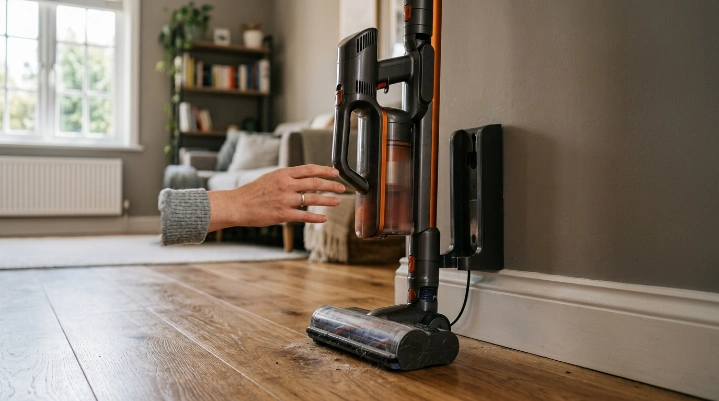
Leaving a compatible modern cordless vacuum on its charger should not automatically damage the battery. Heat, heavy use, battery age, and improper charging can matter more than simply keeping an approved vacuum docked.
Most newer cordless stick vacuums use lithium-ion batteries. These batteries are light and powerful, but their condition still changes gradually with use and age.
Heat is one of the bigger concerns
I pay more attention to battery temperature than to whether the charger stays plugged into the wall. A battery that has just worked hard in a high-power mode can be warm.
Dyson’s battery-care guidance recommends letting its machines cool after use before reconnecting them to the dock. It also advises keeping batteries away from prolonged extreme heat.
That means I would avoid placing a charging dock:
- Beside a radiator or heater
- In strong direct sunlight
- Inside a hot vehicle
- In a damp outdoor storage area
- Near equipment that produces significant heat
Charging situations compared
| Situation | Leave It Charging? | Best Approach |
|---|---|---|
| Modern vacuum whose manual allows docked storage | Usually yes | Use the approved charger and normal indoor storage conditions. |
| Manual says unplug after charging | No | Disconnect it after the specified charging period. |
| Battery is hot after heavy use | Wait first | Let the battery cool before charging. |
| Battery is swollen, damaged, or unusually hot | No | Stop using it and contact the manufacturer. |
| Unapproved replacement charger | Avoid | Use an officially compatible charger instead. |
When Should You Unplug a Cordless Vacuum?
You should unplug a cordless vacuum when its manual requires it, when you notice a charging fault, or when the machine will be stored under conditions that do not match the manufacturer’s instructions. You should also disconnect it before inspecting damaged charging equipment.
The manual tells you not to leave it connected
This is the easiest case. If your manual specifies a charging time and tells you to disconnect the charger afterward, follow that instruction.
Shark’s current battery information also shows why model-specific guidance matters. Charging time and battery arrangements vary across its cordless vacuum range, so I would check the instructions for the exact machine rather than copying another owner’s routine.
You can review Shark’s cordless vacuum battery information when identifying compatible batteries and charging equipment.
You are using the wrong charger
A plug that physically fits is not enough. Chargers can differ in output, control electronics, and battery compatibility.
I would never improvise with an unknown power adapter just to get a cordless vacuum charging again. Use the original charger or a replacement that the manufacturer specifically approves.
The charger or battery looks damaged
Disconnect the charger if the cable is split, the connector has burned marks, the battery case is damaged, or the charger behaves abnormally. Do not keep testing a visibly damaged lithium-ion battery.
Expert Alert: Do not open a lithium-ion battery pack or attempt mains-voltage charger repairs yourself. Contact the manufacturer, an authorized service center, or a qualified electrical repair professional.
How Should You Charge a Cordless Vacuum Correctly?

The best charging routine is simple: use the correct charger, keep the battery at a safe indoor temperature, and follow the model’s charging instructions. Good habits also make charging problems easier to spot.
My basic charging routine
- Finish cleaning: Switch the vacuum off normally.
- Check the battery: Look for unusual heat, damage, or warning lights.
- Let it cool: Wait if the vacuum feels unusually warm after heavy use.
- Connect the approved charger: Seat the plug or dock connection correctly.
- Check the indicator: Confirm that charging starts normally.
- Store it safely: Keep the vacuum away from moisture and major heat sources.
Do you need to drain the battery before every charge?
Usually not on modern lithium-ion cordless vacuums. I do not deliberately run a modern vacuum completely flat before every charging session unless its manufacturer specifically recommends a battery-maintenance procedure.
That makes everyday cleaning easier because I can return the vacuum to its dock after a short job. I do not have to turn a five-minute cleanup into a full battery cycle.
Keep the vacuum itself clean too
A clean vacuum does not have to work against unnecessary restrictions. I regularly check the bin, brush roll, filter, and air path instead of assuming every performance problem is battery-related.
The U.S. Environmental Protection Agency also recommends routine vacuuming as part of household particulate and dust control, including considering vacuums with HEPA filtration where appropriate. You can read the EPA’s guidance on indoor particulate matter and household cleaning.
What Charging Warning Signs Should You Never Ignore?
Stop using or charging a cordless vacuum if the battery shows physical damage, swelling, excessive heat, smoke, leaking material, or an unusual smell. Those signs are different from ordinary battery aging or a shorter runtime.
Signs that need immediate attention
- Swelling: The battery case changes shape or no longer fits normally.
- Extreme heat: The battery becomes unusually hot while idle or charging.
- Burning smell: You notice a sharp electrical or chemical odor.
- Visible damage: The battery has cracks, punctures, crushed areas, or burned contacts.
- Repeated charging faults: Warning lights return after following the manufacturer’s troubleshooting steps.
A vacuum that simply has shorter runtime may have an aging battery. That problem is inconvenient, but it is not automatically the same as a visibly damaged battery.
Do not throw lithium-ion batteries in normal household trash
When a rechargeable battery reaches the end of its life, dispose of it correctly. The EPA says lithium-ion batteries should not go into household garbage or curbside recycling because damaged batteries can create fire hazards.
The EPA’s used household battery guidance explains recycling and handling options for lithium-ion and other rechargeable batteries.
If the vacuum uses a removable battery, follow local recycling rules and the manufacturer’s handling instructions. A sealed battery may require service instead of DIY removal.
Should You Leave the Vacuum Charging During Long-Term Storage?
Long-term storage is different from leaving a vacuum docked between normal weekly cleaning sessions. If you will not use the machine for weeks or months, follow the manufacturer’s specific storage instructions.
I would not automatically leave an unused vacuum plugged in for months just because normal docked charging is allowed. Storage temperature and the manufacturer’s recommended battery condition deserve attention too.
Choose the storage location carefully
A cool, dry indoor location is usually safer than a hot garage, damp basement corner, or sun-exposed room. Extreme temperatures can be hard on batteries and charging electronics.
Before long storage, I check:
- The battery and charger for damage
- The manufacturer’s storage instructions
- Whether the battery should remain installed
- Whether the charger should stay connected
- The recommended storage temperature
Do not forget the battery completely
Rechargeable batteries can lose charge while sitting unused. If the manufacturer recommends periodic charging during storage, put a reminder on your calendar rather than guessing.
As of 2026, cordless vacuum charging systems vary too much for one storage rule to fit every Dyson, Shark, Tineco, Hoover, Bissell, or other cordless model. The exact model manual remains the final authority.
Frequently Asked Questions
Is it okay to leave a Dyson cordless vacuum charging overnight?
For compatible Dyson cordless models, yes. Dyson states that several of its modern cordless vacuum batteries are designed to remain on charge so the machine is ready for the next cleaning session.
Can I leave my Shark cordless vacuum battery on the charger?
It depends on the exact Shark model and battery system. Some current Shark charging docks are designed to hold and charge batteries, but you should check the instruction booklet for your model before leaving it connected continuously.
Should I unplug my cordless vacuum once it reaches 100%?
Not necessarily. If the manufacturer says the vacuum can remain on its charging dock, you do not need to unplug it after every full charge.
Can leaving a vacuum plugged in cause a fire?
A properly functioning approved charger and undamaged battery should be used according to the manufacturer’s instructions. Stop charging immediately if you notice swelling, smoke, unusual heat, damaged wiring, or a burning smell.
Should I charge my cordless vacuum after every use?
For many modern cordless vacuums, returning the machine to its approved charger after use is normal. You do not usually need to wait until a lithium-ion battery is completely empty first.
Why does my cordless vacuum battery get warm while charging?
Some warmth can occur during normal charging, but excessive heat deserves attention. If the battery becomes unusually hot or displays a fault warning, disconnect it and follow the manufacturer’s troubleshooting instructions.
What should I do if my cordless vacuum no longer holds a charge?
Check the charger, connectors, charging indicators, and manufacturer troubleshooting steps first. If runtime has declined significantly after years of use, the battery may be aging and could need replacement if your model supports it.
The safest takeaway: Leaving a cordless vacuum on its charger can be perfectly normal when the manufacturer designed it that way. The owner’s manual, approved charger, battery condition, and storage temperature should guide your routine.
I keep compatible cordless vacuums docked because being ready to clean is one of their biggest advantages. I just never ignore unusual heat, damaged batteries, or charging instructions specific to the machine.