
Why Is My Vacuum Cleaner Overheating?

Quick Answer
Your vacuum cleaner is usually overheating because airflow is restricted by a full bin, dirty filter, hidden clog, or blocked floor head. A tangled brush roll can also strain the machine, while repeated shutdowns, burning smells, smoke, or unusual electrical heat may point to a motor or electrical fault; Consumer Reports vacuum maintenance guidance also recommends checking filters, brush rolls, and hoses for problems that can stress the motor.
Most common causes of overheating
- Full bin or bag: Packed dirt can restrict the airflow moving through the vacuum.
- Dirty filter: Fine dust can clog the filter and make normal airflow harder to maintain.
- Hidden blockage: Hair, lint, paper, or larger debris may plug the hose, wand, or floor head.
- Tangled brush roll: Hair and thread can increase resistance around a powered roller.
- Motor or belt trouble: Worn moving parts may create extra heat, noise, or a burning odor.
- Electrical problem: Damaged wiring, batteries, plugs, or internal electronics require extra caution.
What to do first
- Switch the vacuum off, disconnect its power, let it cool completely, and inspect the airflow path before restarting it.
An overheating vacuum can turn a normal home-hygiene job into a frustrating troubleshooting session. I usually start with airflow because dirt buildup causes many of the heat problems I see during routine vacuum maintenance.
This 2026 guide explains why vacuum cleaners get hot, how to narrow down the cause, what you can safely fix yourself, and when the machine needs professional attention.
In This Guide
Why Does a Vacuum Cleaner Overheat?
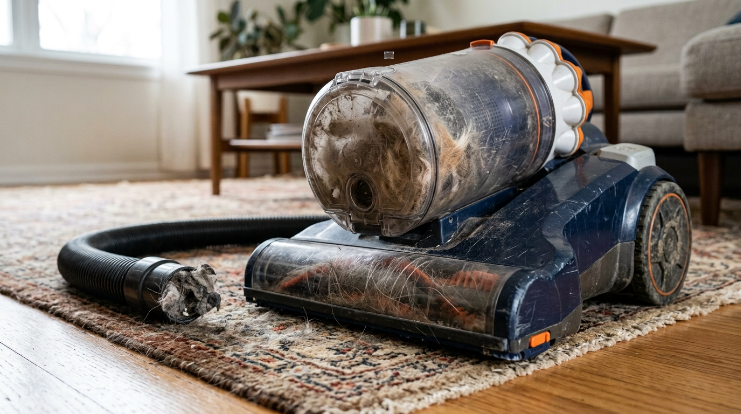
A vacuum cleaner overheats when heat builds faster than the machine can release it. Restricted airflow, excessive resistance, electrical trouble, or a failing component can all cause that imbalance.
A vacuum overheating problem is abnormal heat buildup during operation or charging that causes excessive temperatures, reduced performance, automatic shutdowns, unusual odors, or other warning signs.
Restricted airflow is the most common place to start
The motor moves air through the cleaner head, hose, dirt container, filters, and exhaust system. Anything that restricts that path can interfere with normal cooling and suction.
- Full dust bin: Packed debris may cover an inlet or restrict the cyclone area.
- Full vacuum bag: An overloaded bag can reduce the amount of air moving through the machine.
- Dirty pre-motor filter: Fine dust can coat the filter material and restrict airflow.
- Blocked hose or wand: Hair, paper, pet fur, or small objects can create a hidden plug.
- Blocked floor head: Carpet fibers and lint may collect inside narrow intake passages.
Dirty filters deserve special attention. The EPA explains that filtration relies on air moving through filter media, and overloaded filters do not perform as intended.
If your vacuum uses a HEPA filter, remember that HEPA means high-efficiency particulate air. Never assume that a HEPA filter is washable just because another filter in the machine can be rinsed.
A tangled brush roll creates extra resistance
Long hair, thread, carpet fibers, and pet fur can wrap tightly around the brush roll. The roller may slow down while the belt, brush motor, or main motor works harder.
Consumer Reports recommends clearing tangled fibers from motorized brushes because they can stress the machine. Check the roller whenever the vacuum sounds strained or the brush stops spinning normally.
The vacuum may be protecting itself
Many modern vacuums include thermal protection that shuts the motor down when temperatures rise too far. That shutdown can be a safety feature rather than proof that the motor has failed.
For example, Shark’s maintenance guidance says some models use a motor-protective thermostat and recommends checking for clogs when overheating causes an automatic shutdown.
Section Takeaway: Restricted airflow, tangled moving parts, and thermal protection explain many overheating complaints. Start with the airflow path before assuming the motor is ruined.
How Can You Tell If Your Vacuum Is Overheating?
An overheating vacuum often gives several warnings at once. Unusual heat becomes more concerning when it appears with weaker suction, changed motor noise, odors, or automatic shutdowns.
| What you notice | Possible cause | First check |
|---|---|---|
| Hot housing plus weak suction | Restricted airflow | Bin, bag, filter, hose, and floor head |
| Hot rubber smell | Brush or belt resistance | Brush roll, belt, and roller bearings |
| Vacuum shuts off while cleaning | Thermal protection may have activated | Airflow restrictions before restarting |
| Electrical burning smell or sparks | Electrical or motor fault | Stop using the machine |
| Cordless battery becomes abnormally hot | Battery or charging problem | Power off and inspect for swelling or damage |
A vacuum naturally becomes warm during use, so temperature alone does not prove there is a fault. Look for a clear change from the machine’s normal behavior.
A strong electrical smell, smoke, sparks, melted plastic, or battery swelling is different. Those signs call for immediate shutdown.
Expert Alert: Stop troubleshooting and contact a qualified appliance technician if you see smoke, sparks, melted wiring, battery swelling, or repeated electrical burning smells.
What Should You Do When a Vacuum Overheats?
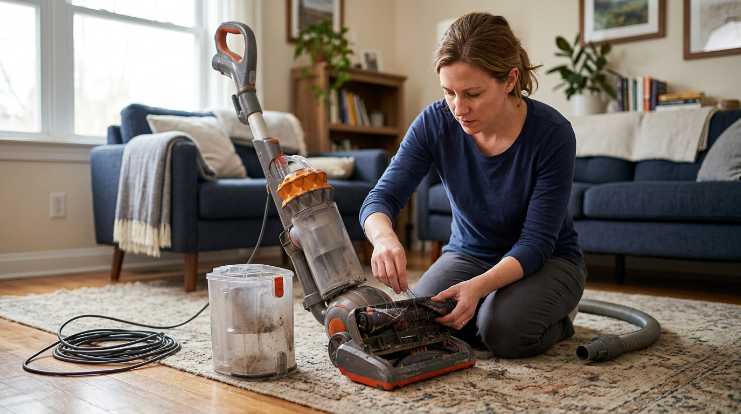
Turn it off and disconnect the power first. Do not repeatedly restart a hot vacuum to see whether it will keep running.
- Stop vacuuming: Switch the machine off as soon as you notice abnormal heat or smell.
- Disconnect power: Unplug a corded model or switch off the cordless vacuum.
- Let it cool: Follow the cooling period in your model’s manual or official support instructions.
- Empty collected dirt: Empty the bin or replace a packed disposable bag.
- Inspect airflow: Check the filter, hose, wand, cleaner head, and intake openings.
- Check the brush: Remove wrapped hair or fibers after the machine is safely powered down.
- Restart cautiously: Test it only after cooling and correct reassembly.
Cooling times vary by manufacturer and model. There is no single universal waiting period for every vacuum cleaner.
| Manufacturer support example | Overheating guidance |
|---|---|
| Shark upright support | Some models instruct users to wait about 60 minutes while checking for clogs. |
| Dyson troubleshooting examples | Depending on the model, support instructions may call for at least one or two hours of cooling. |
The important point is to follow your exact model’s instructions. Thermal protection systems and reset procedures differ.
How Do You Find What Is Making Your Vacuum Overheat?
Work from the easiest airflow checks toward the parts that require more caution. You can diagnose many household overheating problems without opening the motor housing.
Start with the dirt container and filters
Empty the bin even if it does not look completely full. Fine dust can pack tightly around screens, cyclone openings, and filter surfaces.
Remove each accessible filter and inspect it under good light. Clean or replace it only according to the instructions for that exact filter.
Trace the entire air path
Disconnect removable hoses, wands, and attachments. Look through each section for compacted hair, paper, lint, or larger debris.
- Cleaner-head inlet
- Brush-roll chamber
- Lower hose
- Main hose or wand
- Dust-container inlet
- Filter openings
- Exhaust vents
A partial blockage can be harder to notice than a complete clog. Falling suction combined with increasing heat is a useful clue.
Inspect the brush roll and belt area
Rotate the brush by hand only when the machine is disconnected and your model allows access. It should not be bound tightly by hair or string.
If the brush is jammed, the drive belt may slip or heat up. A hot rubber smell often makes this problem easier to distinguish from ordinary dust odors.
My own troubleshooting order is simple: bin, filter, hose, floor head, then brush. That sequence finds the obvious airflow problems before I consider an internal fault.
Section Takeaway: Diagnose from outside the machine inward. If normal airflow is restored but overheating continues, the problem may be deeper than routine cleaning can fix.
How Do You Fix an Overheating Vacuum Cleaner?
The correct fix depends on what caused the heat. Most safe DIY fixes involve cleaning and restoring normal airflow rather than opening electrical components.
If the bin or bag is full
- Empty a bagless bin completely.
- Remove compacted debris around accessible inlet screens.
- Replace a disposable bag when it is packed or your manufacturer indicates replacement.
- Reinstall every seal and latch correctly.
If the filter is clogged
Check the manufacturer’s instructions before adding water. Foam, felt, pleated, HEPA, pre-motor, and post-motor filters can have different cleaning requirements.
If a filter is washable, let it dry completely before reinstalling it. A damp filter should not go back into a powered vacuum.
If the hose or floor head is blocked
Remove visible debris without puncturing the hose or damaging internal wiring. Check bends and narrow connectors because clogs often lodge there.
If the brush roll is tangled
Cut away hair and fibers carefully while the vacuum is disconnected. Avoid cutting the brush bristles, belt, or nearby wiring.
Consumer Reports also recommends regularly clearing motorized brushes and checking hoses for clogs as part of vacuum maintenance.
If the vacuum keeps overheating after cleaning
Repeated overheating after the airflow path is clear can point to a worn motor, damaged bearing, failing belt system, electronic fault, or another internal problem. Continuing to run it may make the fault worse.
The U.S. Consumer Product Safety Commission advises stopping use of appliances that show electrical warning signs such as shocks, repeated breaker problems, overheated plugs, smoke, or sparks. Its electrical safety guidance supports having unsafe appliances repaired or replaced instead of repeatedly testing them.
Expert Alert: Motor housings, mains wiring, circuit boards, and damaged lithium-ion batteries are not routine DIY cleaning jobs. Use a qualified repair technician when the fault is internal or electrical.
How Can You Prevent Vacuum Overheating?
Prevention mostly comes down to protecting airflow and reducing unnecessary resistance. Small maintenance checks are easier than diagnosing a vacuum that repeatedly shuts down.
- Empty dirt early: Do not wait until a bin or bag is tightly packed.
- Check filters: Clean or replace them according to your model’s schedule.
- Remove hair: Clear brush-roll tangles before they become dense.
- Watch suction: A sudden drop can warn you about a developing blockage.
- Inspect hoses: Check them when the vacuum starts sounding different.
- Use the correct setting: Match brush height or floor mode to the surface when your vacuum provides those controls.
- Avoid unsuitable debris: Do not vacuum liquids, fireplace ash, renovation dust, or large objects unless the machine is specifically designed for them.
- React to heat early: Stop and inspect the machine instead of waiting for a thermal shutdown.
Filters also matter to home hygiene because they control particles moving through the machine. Regular filter maintenance helps the vacuum operate as its manufacturer intended.
For a corded vacuum, periodically inspect the plug and visible power cord for damage. For a cordless vacuum, watch the battery and charger for unusual heat, swelling, cracking, or other physical changes.
Section Takeaway: Keep air moving freely, reduce brush resistance, and treat unusual heat as an early warning. Consistent maintenance prevents many repeat overheating problems.
Vacuum Cleaner Overheating FAQ
Is it normal for a vacuum cleaner to get hot?
Some warmth is normal because the motor produces heat while running. It becomes a concern when the vacuum feels much hotter than usual, loses suction, smells burnt, changes sound, or shuts itself off.
Can a dirty vacuum filter cause overheating?
Yes. A dust-loaded filter can restrict airflow through the vacuum, which can contribute to excess heat and reduced suction. Clean or replace the filter only as your model’s manufacturer recommends.
Why does my vacuum overheat and shut off?
The vacuum may be activating a thermal protection system because the motor has become too hot. Check the bin, filters, hose, wand, floor head, and brush roll before restarting it after the recommended cooling period.
How long should I let an overheated vacuum cool?
Use the cooling period specified for your exact model. Manufacturer guidance varies; some Shark support instructions use about 60 minutes, while some Dyson troubleshooting instructions specify one or two hours.
Can a tangled brush roll make a vacuum overheat?
Yes. Hair, thread, and fibers can increase resistance around a powered brush roll and put extra load on the belt or motor. Disconnect power before removing the tangled material.
Does a hot vacuum mean the motor is failing?
Not necessarily. Full dirt containers, clogged filters, blocked hoses, and tangled brushes are common problems worth checking first. Persistent overheating after those issues are corrected can indicate a deeper motor or electrical fault.
Should I keep using a vacuum that smells like it is burning?
No. Switch it off and disconnect the power while you identify whether the smell comes from a jammed brush or belt. Do not restart the vacuum if you notice smoke, sparks, melted plastic, damaged wiring, or a strong electrical burning odor.
The main takeaway: When your vacuum cleaner starts overheating, protect the airflow first. Empty the dirt, inspect the filters, clear the hose and floor head, and remove brush-roll tangles before testing it again.
If the vacuum still becomes abnormally hot after those checks, stop using it and arrange a professional inspection. A repeated thermal shutdown or electrical smell deserves more than another restart.