
How Do You Know When to Replace a Vacuum?

Quick Answer
You should replace a vacuum when it no longer cleans reliably after basic troubleshooting, develops unsafe electrical or motor problems, or needs several costly parts at once. Age alone isn’t enough; first rule out filters, clogs, brush-roll tangles, bags, and other routine vacuum maintenance problems.
Signs replacement may make sense
- Persistent weak suction: Cleaning the filters and clearing the airflow path no longer restores useful pickup.
- Motor trouble: Grinding, repeated overheating, smoke, or a persistent burning smell points beyond normal maintenance.
- Repeated failures: Belts, batteries, switches, brushes, hoses, or electronics keep causing new problems.
- Unavailable parts: A necessary replacement component is discontinued or impractical to obtain.
- Poor overall condition: Cracked housings, damaged wiring, worn seals, and declining cleaning performance appear together.
- Repair no longer pays: Several major repairs would cost enough that a newer machine offers better value.
Check before replacing
- Empty the bin or replace the bag, inspect the filters, clear the hose and wand, and remove hair from the brush roll.
I’ve seen vacuums look completely worn out when the real problem was a packed filter or a brush roll wrapped tightly with hair. That is why I never judge a vacuum from one symptom.
This guide explains how to know when to replace a vacuum, when a repair still makes sense, and what to check before spending money on another machine.
In This Guide
- What Are the Clearest Signs Your Vacuum Needs Replacing?
- Should You Repair a Vacuum or Replace It?
- How Old Is Too Old for a Vacuum Cleaner?
- How Do You Tell a Worn-Out Vacuum From a Maintenance Problem?
- Does Replacement Timing Change by Vacuum Type?
- What Should You Check Before Buying a New Vacuum?
- Frequently Asked Questions
What Are the Clearest Signs Your Vacuum Needs Replacing?
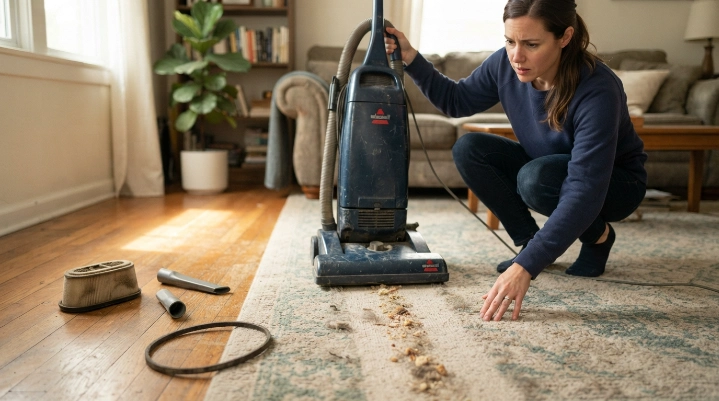
A vacuum is usually ready for replacement when several serious problems appear together and normal maintenance cannot restore dependable cleaning. One isolated symptom rarely proves the whole machine is finished.
A vacuum replacement decision is the point where normal maintenance or sensible component repair no longer restores safe, useful cleaning performance.
Suction stays weak after you clear everything
Weak suction alone doesn’t mean you need a new vacuum. A full bag, dirty filter, blocked hose, leaking connection, or packed cleaner head can cause the same symptom.
Replacement becomes more reasonable when you have checked the full airflow path and performance remains poor. A worn motor or damaged internal seal may be involved.
The vacuum repeatedly overheats or shuts itself off
A blocked airflow path can make some vacuums run hotter, so check maintenance items first. Repeated overheating after those checks deserves more attention.
Stop using a machine that becomes abnormally hot, smokes, or produces a persistent electrical smell. Continuing to run it can make the problem worse.
Expert Alert: Don’t open a motor housing or attempt electrical wiring repairs unless you’re qualified. Have electrical or motor faults inspected by an appliance technician.
New mechanical problems keep appearing
Replacing one worn belt or hose can be sensible. Replacing a battery, brush assembly, switch, cracked housing, and other parts within the same period is different.
Multiple failures often signal that the machine has reached a stage where keeping it running requires too much money or effort.
The vacuum leaves debris behind despite proper setup
Floor pickup should improve when the correct height, power setting, clean filter, clear brush roll, and suitable attachment are used. Persistent poor pickup deserves investigation.
- Carpet performance: The brush may no longer agitate carpet effectively.
- Hard-floor performance: A damaged cleaner head or weak airflow may leave crumbs behind.
- Edge cleaning: Worn brushes or damaged seals can reduce pickup near walls.
- Pet hair: Hair may remain even after the roller has been fully cleaned.
Important parts are no longer available
A vacuum may still be repairable in theory but impossible to maintain practically. Discontinued filters, batteries, hoses, brush rolls, and electrical parts can end its useful life.
Check the manufacturer’s official parts channel before giving up. Compatible third-party parts should match the model and required specifications.
Section Takeaway: Replace the vacuum when serious problems remain after basic maintenance, especially when safety issues, weak performance, and multiple failing components appear together.
Should You Repair a Vacuum or Replace It?
Repair makes the most sense when one replaceable component is causing the problem and the rest of the vacuum works well. Replacement becomes more attractive as failures spread across several systems.
| Situation | First Action | Usually Favors |
|---|---|---|
| Full bin, dirty filter, or hose clog | Clean and retest airflow | Maintenance |
| Hair-wrapped or worn brush roll | Clean or replace the serviceable roller | Repair |
| Cracked removable hose | Check replacement-part availability | Repair |
| Cordless runtime has declined | Rule out clogs, filters, and brush resistance | Battery replacement if supported |
| Motor, controls, housing, and cleaner head all have faults | Compare professional repair with a new machine | Whole-vacuum replacement |
| Burning electrical smell, smoke, or damaged wiring | Stop using the machine | Professional assessment or replacement |
I usually ask one simple question: if I fix this part, will I trust the rest of the machine for normal cleaning? If the answer is yes, repair deserves consideration.
If another major failure already seems likely, replacement may provide better value. Parts availability and labor cost can change that calculation quickly.
Don’t replace a whole vacuum for a service item
Filters, bags, brush rolls, belts, batteries, and hoses are serviceable on many models. Check the manual and official parts list before treating their failure as a dead machine.
Consumer Reports also emphasizes maintenance when discussing vacuum longevity and reports roller-brush hair tangles as a common vacuum problem in its vacuum testing and reliability coverage.
How Old Is Too Old for a Vacuum Cleaner?
There is no universal age when every vacuum should be replaced. Design, usage, maintenance, floor type, debris load, parts quality, and battery condition all affect useful life.
That makes performance more useful than a birthday. A well-maintained older machine can remain practical while a heavily used newer vacuum may already need major repairs.
Use age as context, not the verdict
Age matters most when you combine it with repair history. An older vacuum with declining performance and several unavailable parts is a stronger replacement candidate.
A similar-age machine with strong suction and easy-to-find service parts may have useful life remaining.
Cordless vacuums have another aging component
Rechargeable batteries lose usable capacity with time and charge cycles. That can make a cordless vacuum feel worn out even while its motor and cleaner head remain functional.
If your model accepts a user-replaceable battery, compare battery replacement with whole-machine replacement. Never use a swollen, leaking, cracked, or unusually hot battery.
How Do You Tell a Worn-Out Vacuum From a Maintenance Problem?
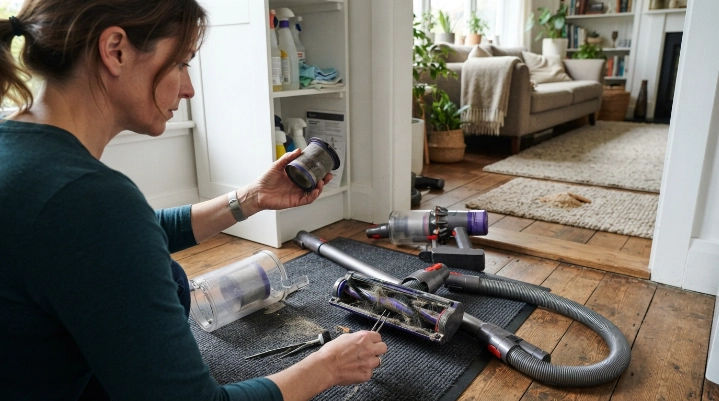
Start with the simplest causes before assuming the vacuum is worn out. Most checks take only a few minutes and don’t require opening the motor housing.
Run this basic troubleshooting check
- Empty the dirt: Empty the dustbin or replace a loaded bag according to the manufacturer’s instructions.
- Inspect the filters: Clean only filters marked washable and replace filters when the manual calls for it.
- Check the hose and wand: Disconnect removable sections and inspect them for compacted debris.
- Clean the brush roll: Remove hair, thread, carpet fibers, and string that restrict rotation.
- Inspect connections: Make sure the bin, hose, wand, filter covers, and cleaner head seat correctly.
- Retest pickup: Try a normal cleaning area after reassembly and compare performance.
If performance returns, you probably had a maintenance problem rather than a worn-out machine. Keep monitoring the same area for recurring clogs or damage.
Watch what comes from the exhaust
Dust leaking from a vacuum can involve filter installation, damaged seals, an overfilled container, or other faults. It matters more in homes where dust and allergens are concerns.
The EPA notes that indoor dust can include pollen, mold spores, pet dander, dust mites, and other particles. Its indoor particulate matter guidance recommends frequent cleaning and says HEPA-filter vacuums can help limit some vacuumed dust escaping back into the air.
The Asthma and Allergy Foundation of America also recommends regular vacuuming and discusses suitable vacuums in its indoor allergen guidance.
A worn filter alone doesn’t mean the whole vacuum needs replacement. Damaged filter housings or seals that cannot be repaired are more significant.
Section Takeaway: Always separate maintenance symptoms from permanent failure. A clean airflow path, correctly installed filters, and a free-moving brush roll give you a much fairer test of the vacuum’s condition.
Does Replacement Timing Change by Vacuum Type?
Yes. Different vacuum designs have different wear points, so the same symptom can mean something different on an upright, cordless stick, canister, or robot vacuum.
Upright vacuums
Check belts, brush rolls, hoses, height adjustment, cleaner-head wear, and motor performance. A replaceable belt or hose usually isn’t a reason to discard the machine.
Canister vacuums
Inspect the hose, wand connections, floor head, cord reel, filters, and canister seals. Power-head problems may be separate from the main suction motor.
Cordless stick vacuums
Battery decline deserves special attention. Test the machine after cleaning the filter and brush because restricted airflow or roller resistance can shorten apparent runtime.
If a fresh compatible battery restores normal operation, replacing the entire vacuum may be unnecessary.
Robot vacuums
Robot vacuums have more navigation and sensor components than basic manual models. Brushes, wheels, filters, batteries, sensors, charging contacts, and docks can cause separate failures.
Replacement becomes more reasonable when navigation, charging, battery performance, and cleaning hardware all deteriorate together.
Bagged and bagless vacuums
Bagged machines depend on the correct bag fit and airflow through the bag material. Bagless machines need clean bins, cyclones, seals, and filters.
Neither design should be replaced merely because its normal consumable needs service.
What Should You Check Before Buying a New Vacuum?
Before shopping, give your existing vacuum one final structured inspection. This prevents a cheap maintenance problem from turning into an unnecessary appliance purchase.
- Performance: Does suction remain poor after every accessible airflow restriction is cleared?
- Safety: Are there electrical smells, smoke, exposed wiring, battery damage, or repeated overheating?
- Reliability: Has the vacuum started failing repeatedly rather than experiencing one isolated fault?
- Parts: Are the required filters, batteries, hoses, brush rolls, and service components still available?
- Repair practicality: Can one reasonable repair restore dependable operation?
- Cleaning needs: Does the machine still suit your carpet, hard floors, pets, stairs, or allergy-control routine?
If the vacuum passes most of those checks, maintenance or a targeted repair may still be worthwhile. If it fails several, replacement becomes easier to justify.
Think about filtration as well as pickup
A replacement vacuum should fit the hygiene needs of your home, not just collect visible crumbs. Good filtration and proper sealing become especially important when fine dust or allergens are a concern.
HEPA stands for high-efficiency particulate air. When comparing replacements, check the complete filtration design rather than assuming a filter label describes the performance of the entire machine.
As of 2026, the safest buying approach is still straightforward: match the vacuum to your floors, debris load, maintenance tolerance, and available replacement parts. Don’t replace a repairable machine simply to chase a larger marketing number.
Section Takeaway: A new vacuum makes the most sense when your old one fails both the performance test and the practicality test. Check safety, reliability, parts availability, and your actual cleaning needs together.
Frequently Asked Questions
How do you know if your vacuum motor is going bad?
Possible signs include persistent loss of performance, abnormal grinding or whining, repeated overheating, electrical odors, or a motor that stops unexpectedly. Rule out a full bin, blocked hose, dirty filter, and jammed brush first, and use a qualified technician for internal electrical diagnosis.
Should I replace my vacuum if it has lost suction?
Not immediately. Empty the bin or change the bag, check filters, clear the hose and wand, inspect seals, and clean the brush roll first. If suction remains poor after those checks, professional diagnosis or replacement may be reasonable.
Is it worth repairing an old vacuum cleaner?
It can be worth repairing when one affordable, available part will restore a machine that otherwise works well. Replacement makes more sense when several major components are failing, parts are unavailable, or the vacuum has safety problems.
Can a dirty filter make a vacuum seem broken?
Yes. A dirty or incorrectly installed filter can restrict airflow and reduce cleaning performance. Follow your model’s instructions because some filters are washable while others must be replaced or kept completely dry.
When should I replace a cordless vacuum instead of its battery?
Consider replacing only the battery when the vacuum still has good suction, controls, charging hardware, and cleaner-head performance. A whole-machine replacement becomes more reasonable when battery decline appears alongside motor, electronics, structural, or repeated mechanical failures.
Should I replace a vacuum that smells like it’s burning?
Stop using it first. Hair around a brush roll or a slipping belt can create heat, but an electrical burning smell may indicate a more serious fault. Don’t keep running the vacuum until the cause has been identified safely.
Can an old vacuum make indoor dust problems worse?
A damaged filter, poor seal, overfilled container, or badly maintained vacuum may allow more collected dust to escape. If cleaning the filtration system and correcting seals doesn’t solve the problem, replacement with a suitable well-sealed vacuum may be worth considering.
Final Takeaway: Don’t replace a vacuum because of age or one weak-cleaning day. Replace it when proper maintenance no longer restores safe, dependable performance and repair no longer makes practical sense.
Before you shop, clean the filters correctly, clear the airflow path, inspect the brush roll, and check available parts. That final check can either save your current vacuum or confirm that it’s time to move on.