
When Should You Replace a Vacuum Battery?

Quick Answer
You should replace a vacuum battery when a full charge gives much less runtime than before, the vacuum repeatedly shuts down under normal use, or the battery can no longer charge properly after other causes have been ruled out. There is no universal replacement age, so I judge the battery by performance, condition, and the manufacturer’s guidance, including proper cordless vacuum battery care.
Signs I would check first
- Short runtime: The vacuum runs for far less time than it did when the battery was healthy.
- Sudden shutdowns: The machine stops even though the battery appeared charged.
- Charging problems: The battery will not reach or maintain a normal charge.
- Power loss: Performance drops under a normal cleaning load despite clear airflow.
- Physical damage: Swelling, cracking, leaking, unusual heat, or an abnormal smell means you should stop using the battery.
Before buying a replacement
- Fully charge the vacuum, clean its filters and airflow path, and retest it in the same power mode.
When a cordless vacuum starts dying halfway through a room, it is easy to blame the battery immediately. I prefer to test a few simple things first because clogged filters, blocked airways, and charger problems can imitate battery failure.
This guide explains when to replace a vacuum battery, how to confirm the diagnosis, and when replacing the whole vacuum makes more sense. I will also cover battery safety and disposal.
In This Guide
- What does replacing a vacuum battery mean?
- When should you replace a vacuum battery?
- How do you confirm the battery is actually the problem?
- How long should a vacuum battery last?
- Should you replace the battery or the whole vacuum?
- How do you replace and dispose of a vacuum battery safely?
- Frequently asked questions
What Does Replacing a Vacuum Battery Mean?
A vacuum battery replacement means removing or professionally servicing a rechargeable battery that can no longer power the vacuum normally. It is most relevant to cordless stick, handheld, and robot vacuums.
Many newer cordless models use lithium-ion batteries. However, battery design, chemistry, charging controls, and replacement procedures differ between models.
Removable vs. built-in vacuum batteries
Some batteries click out with a release button. Others are attached with screws, while sealed designs may require authorized service.
- Click-in battery: Usually the simplest type for an owner to replace.
- Screw-mounted battery: May be user-replaceable when the manual provides instructions.
- Built-in battery: May require a manufacturer or qualified repair service.
I always check the model number before ordering anything. Batteries that look similar may use different connectors, voltage requirements, or battery-management electronics.
The owner’s manual should therefore override general advice. Never force a battery from a housing that was not designed for routine removal.
When Should You Replace a Vacuum Battery?
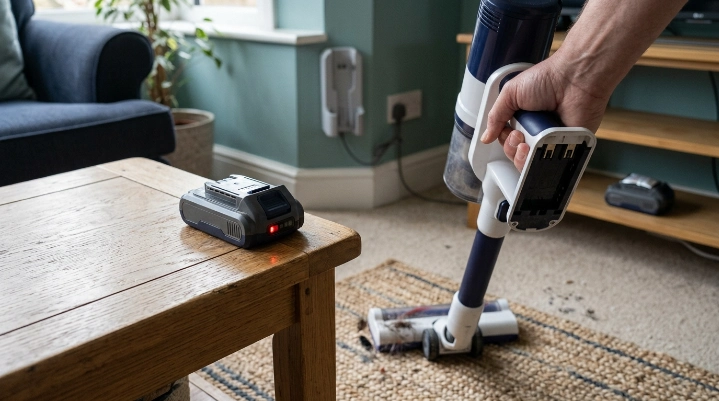
You should consider replacement when the battery’s usable performance has clearly declined and basic troubleshooting does not restore it. A single short cleaning session is not enough evidence by itself.
Your runtime has dropped sharply
This is the sign I find easiest to track. Compare the vacuum with its own earlier performance rather than an advertised maximum runtime.
For example, imagine your vacuum normally handled your kitchen and living room in one charge. If it now stops halfway through the kitchen under the same conditions, that change matters.
The vacuum shuts off despite being charged
An aging battery may struggle when the motor demands more power. The vacuum can then stop even though the charge indicator did not appear empty.
Do not assume every shutdown means battery failure. A blocked airway, dirty filter, overheated motor, or jammed brush roll can also trigger stopping or pulsing.
The battery no longer charges normally
A battery that never completes charging, rapidly loses its charge while unused, or works only for a brief period may be failing. Check the charger and electrical connection before replacing it.
The battery is physically damaged
Swelling, cracking, leaking, excessive heat, or an unusual odor changes the situation from routine troubleshooting to a safety issue. Stop using and charging the battery.
Expert Alert: Do not open, puncture, crush, rebuild, or attempt an internal repair on a damaged lithium-ion battery. Follow the manufacturer or qualified battery-handling guidance instead.
How Do You Confirm the Battery Is Actually the Problem?

Before buying a battery, I run a controlled test. This avoids spending money when a filter, clog, charger, or brush roll is causing the symptoms.
Use the same conditions for your runtime test
- Charge fully: Charge the vacuum according to its manual.
- Clean the filters: Service only filters the manufacturer says can be cleaned.
- Clear blockages: Inspect the floor head, wand, hose, and intake path.
- Check the brush roll: Remove wrapped hair, fibers, and thread.
- Select one mode: Avoid comparing Eco mode one day with Boost mode the next.
- Time the run: Use the same floor head and similar flooring during each test.
This simple process gives me a useful baseline. If runtime remains dramatically shorter under repeatable conditions, battery degradation becomes a stronger possibility.
Compare battery symptoms with other vacuum problems
| Symptom | Battery More Likely? | Other Cause to Check | Useful Next Step |
|---|---|---|---|
| Runtime keeps getting shorter | Yes | High-power mode or heavy floor load | Retest in the same normal mode |
| Vacuum pulses or cuts out | Possibly | Clog, dirty filter, or overheating | Clear airflow and allow cooling |
| No charging indication | Possibly | Charger, dock, outlet, or connection | Follow model-specific charging checks |
| Weak suction | Not necessarily | Filter, full bin, clog, or air leak | Inspect the airflow system first |
| Swollen or damaged pack | Replacement required | Physical battery damage | Stop using it and seek safe disposal guidance |
For brand-specific error lights and charging behavior, use the manufacturer’s troubleshooting instructions. Dyson, for example, provides a dedicated cordless vacuum support section for individual models.
How Long Should a Vacuum Battery Last?
There is no reliable number of years that applies to every cordless vacuum battery. As of 2026, manufacturers still use different battery packs, power-management systems, charging strategies, and operating modes.
I would be cautious with any rule claiming that every vacuum battery must be replaced after a fixed number of years. Battery condition matters more than the calendar alone.
What causes vacuum batteries to wear faster?
- Repeated high-power use: Maximum or boost modes demand more energy from the battery.
- High temperatures: Prolonged heat can accelerate lithium-ion battery aging.
- Heavy cleaning loads: Thick carpet and powered accessories may require more energy.
- Long storage periods: Storage conditions should follow the vacuum manufacturer’s instructions.
- Normal aging: Rechargeable batteries gradually lose usable capacity through repeated use.
I focus on the trend instead of one disappointing cleaning session. A steady decline across several properly charged tests tells me more.
Keep a simple runtime baseline
You do not need laboratory equipment. Note roughly how much of your normal cleaning route the vacuum completes after a full charge.
If your routine, power setting, attachment, and floor type stay similar, changes become easier to spot. That makes future battery decisions much less subjective.
Should You Replace the Battery or the Whole Vacuum?
A battery replacement usually makes sense when the vacuum itself still cleans well and the correct battery is available. Replacing the whole machine may make more sense when several expensive problems appear together.
Replace only the battery when:
- The motor still sounds and performs normally.
- The brush roll and cleaner head remain in good condition.
- The dustbin, seals, wand, and attachments are usable.
- The manufacturer supports battery replacement for your model.
- The replacement battery cost is reasonable compared with a new vacuum.
Consider replacing the vacuum when:
- The motor is also failing or making abnormal noises.
- The main body, electronics, or charging system has significant damage.
- Several major parts need replacement at the same time.
- The correct battery is discontinued or unavailable.
- A sealed battery requires a repair that exceeds the machine’s practical value.
I also consider how well the vacuum still fits the household. Spending money on a battery is less appealing if the machine already struggles with your flooring, pet hair, or cleaning area.
Do not base the decision on battery age alone. Compare the battery price, repair needs, vacuum condition, and realistic cost of a suitable replacement machine.
How Do You Replace and Dispose of a Vacuum Battery Safely?
Replacement should follow the instructions for the exact model. Do not assume a video for a similar-looking vacuum uses the same procedure.
Before replacing the battery
- Switch the vacuum off completely.
- Disconnect it from the charger or charging dock.
- Confirm the exact model and battery part number.
- Inspect the old battery for swelling, cracks, leaks, or abnormal heat.
- Use a manufacturer-approved replacement when required by the vacuum’s instructions or warranty terms.
A click-in battery may need only a release button. Screw-mounted packs require more care, while sealed batteries may need professional service.
Expert Alert: If the vacuum has exposed wiring, scorched electrical parts, a burning smell, or suspected internal electrical damage, stop using it. Have the machine inspected by a qualified repair professional.
Do not put a lithium-ion vacuum battery in household trash
The U.S. Environmental Protection Agency says lithium-ion batteries should not go into household garbage or municipal recycling bins. They should go to an appropriate battery recycler or household hazardous-waste collection point.
The EPA also recommends protecting battery terminals from contact during disposal or recycling. You can review its current used lithium-ion battery guidance before handling an old pack.
Local rules can differ, especially outside the United States. Check your local waste authority or the vacuum manufacturer’s recycling instructions.
Frequently Asked Questions About Vacuum Battery Replacement
Can a cordless vacuum battery be replaced?
Often, yes. Some cordless vacuums use click-in or screw-mounted batteries, while others have built-in packs that require servicing. Check the exact model’s manual before buying or removing a battery.
How do I know if my vacuum battery is going bad?
Common warning signs include much shorter runtime, repeated shutdowns, poor charge retention, and charging problems. Confirm that filters, airflow paths, brush rolls, chargers, and electrical connections are working before blaming the battery.
Should I replace a vacuum battery just because it is old?
No. Battery age can provide context, but there is no universal replacement age for every vacuum. I would replace it when measurable performance loss or physical condition shows that the battery is no longer doing its job safely.
Why does my cordless vacuum battery die so quickly?
The battery may be aging, but high-power mode, thick carpets, motorized attachments, airflow restrictions, and charging issues can also reduce apparent runtime. Retest after basic maintenance using the same cleaning mode and attachment.
Can a dirty filter make the battery seem bad?
Yes. Restricted airflow can make the vacuum work poorly and may contribute to overheating or shutdown behavior on some models. Clean or replace filters only according to the manufacturer’s instructions, then test the vacuum again.
Can I use a third-party replacement vacuum battery?
Compatibility and safety requirements vary by manufacturer and model. Check the vacuum maker’s instructions, warranty terms, required specifications, and approved replacement options before using a non-original battery.
What should I do with a swollen vacuum battery?
Stop using and charging it. Do not puncture, crush, open, or place it in normal household trash; contact the manufacturer, a qualified battery recycler, or your local hazardous-waste program for safe handling instructions.
The main takeaway is simple: replace a vacuum battery because its performance or physical condition shows that replacement is needed, not because a generic calendar says so.
Start with a full charge, clean airflow system, and repeatable runtime test. If the battery still performs poorly while the rest of the vacuum remains healthy, replacing the battery can give the machine useful life again.