
How Often Should You Empty a Vacuum Dustbin?

Quick Answer
For most bagless vacuums, empty the dustbin after each cleaning session or whenever debris reaches the manufacturer’s maximum-fill line, whichever happens first. Empty it sooner when cleaning heavy pet hair, fine dust, or large amounts of debris, since household dust can contain pollen, mold spores, pet dander, and other particles described in the EPA’s guidance on indoor particulate matter.
When should you empty it?
- After each use: This is a simple routine for most stick, upright, handheld, and robot vacuums.
- At the max line: Stop and empty the bin if debris reaches the marked fill limit.
- During heavy cleaning: Pet hair, carpet fluff, and large debris can fill a small bin before you finish.
- When pickup drops: Check the bin, filter, brush roll, and air path rather than assuming the motor is failing.
- After messy jobs: Empty collected food crumbs, damp-looking debris, or odor-producing dirt promptly.
Best habit
- Check the transparent dustbin before and after every cleaning session instead of relying only on a calendar.
I treat an empty dustbin as part of finishing the vacuuming job, not as a separate maintenance chore. That habit keeps me from starting the next cleaning session with yesterday’s debris already taking up space.
The exact schedule still depends on your vacuum, home, pets, and cleaning load. Here’s how to tell when your machine needs attention and how to empty it without creating another dusty mess.
In This Guide
How Often Should You Empty a Vacuum Dustbin?
Empty a bagless vacuum dustbin after each cleaning session or before debris passes the manufacturer’s maximum-fill mark. If the bin fills during cleaning, stop and empty it before continuing.
A vacuum dustbin is the removable container that stores dirt, hair, crumbs, and other debris in a bagless vacuum cleaner. Unlike a vacuum bag, you empty and reuse the container.
Is emptying after every use necessary?
For many households, emptying after every use is the easiest maintenance schedule. It takes only a short time and removes the guesswork about how full the bin was during your last session.
Manufacturers sometimes recommend this schedule directly. For example, Shark’s upright vacuum maintenance guidance advises users to empty the dust cup after each use.
- Light cleaning: Check the fill line when you’re done.
- Whole-home cleaning: Expect to empty small bins more frequently.
- Pet households: Watch the bin closely because bulky hair consumes space quickly.
- Fine-dust cleaning: Inspect the bin and filters after the job.
I find the visual check more useful than trying to follow a fixed weekly schedule. One carpet-heavy session can collect more material than several quick hard-floor cleanups.
Should you wait until the bin looks completely full?
No. A transparent dustbin may have unused space above its marked maximum-fill level, but that doesn’t mean you should pack debris into that space.
The fill line exists for a reason. Follow the marking and your model’s manual rather than trying to squeeze one more room into the bin.
Why Does an Overfilled Vacuum Dustbin Matter?
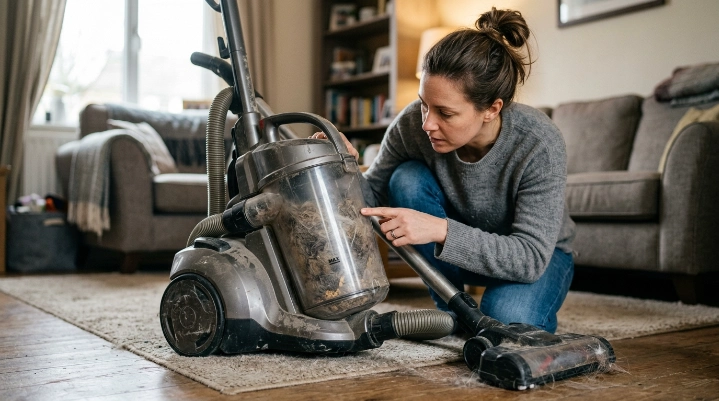
An overfilled dustbin can interfere with normal debris collection and may contribute to poor pickup on some vacuum designs. It can also make emptying messier because compressed hair and dust may stick inside the container.
Bagless vacuums need a clear path for moving air and separating dirt. Maintenance problems become harder to diagnose when the bin, filters, brush roll, or hose are already clogged with debris.
Can a full dustbin reduce suction?
It can contribute to poor cleaning performance, although a full bin isn’t the only possible cause. Filters, hoses, floor heads, and brush rolls can also become restricted.
If your vacuum suddenly stops picking up well, check these items first:
- Dustbin: Empty it if it is at or above the recommended fill level.
- Filters: Inspect them according to the manufacturer’s maintenance instructions.
- Hose and wand: Look for trapped paper, hair, toys, or compacted debris.
- Brush roll: Remove wrapped hair and thread where the manual allows.
- Air passages: Check accessible openings for visible blockages.
Don’t assume weak pickup automatically means you need a new vacuum. Routine maintenance often deserves the first look.
What does dustbin maintenance have to do with indoor dust?
Your vacuum collects material that you wanted removed from floors and furniture. Opening that collection container carelessly can release some loose dust again.
The EPA notes that household dust can contain pollen, mold spores, pet dander, dust-mite material, skin flakes, and other particles. Vacuuming and cleaning can also stir settled material into the air.
Filtration matters as well. The EPA defines HEPA filtration as high-efficiency particulate air filtration and explains how these mechanical filters capture airborne particles.
A HEPA filter doesn’t make careless dustbin emptying irrelevant. The collected material still has to leave the machine sometime.
What Signs Tell You the Dustbin Needs Emptying?
The clearest sign is debris reaching the vacuum’s maximum-fill line. You should also empty the bin whenever the machine displays a full-bin warning.
Don’t wait for several symptoms to appear at once. A quick visual inspection is faster than troubleshooting a vacuum after performance drops.
Look for these common warning signs
- Max line reached: Dirt or hair has reached the manufacturer’s fill indicator.
- Full-bin alert: Your robot vacuum or smart vacuum displays a bin warning.
- Poor pickup: Debris remains behind even though the vacuum previously handled it well.
- Hair packed inside: Pet hair or carpet fibers form a dense mass in the container.
- Debris circulation: Dirt appears to move poorly inside a cyclonic chamber.
- Unpleasant odor: Collected crumbs, pet debris, or dusty material starts smelling stale.
Can the bin look full before it really is?
Yes. Lightweight pet hair can expand and make a bin appear packed even when its actual mass is low.
That distinction doesn’t give you a reason to compress the hair by hand. Emptying the bin is safer and simpler than forcing more debris around the internal separator.
What if the bin still looks full after emptying?
Hair and fine dust can cling to plastic surfaces because of shape, moisture, or static. Remove only the parts your manual says are removable.
Don’t insert sharp tools into cyclones, seals, or inaccessible air passages. A soft brush or dry cloth is usually a safer starting point when the manufacturer permits it.
How Often Should Different Vacuum Types Be Emptied?
The best interval changes with bin size and vacuum design. Small cordless and robot bins generally need attention sooner than large full-size canisters.
As of 2026, manufacturer instructions still vary by model. Your manual and fill indicator should therefore take priority over any universal schedule.
| Vacuum type | Practical emptying rule | Empty sooner when |
|---|---|---|
| Bagless upright | After each use or at the max-fill line | Cleaning pet hair, thick carpet, or large rooms |
| Cordless stick | After each session; check during larger jobs | The compact bin fills with bulky hair or fluff |
| Bagless canister | At the marked limit or after a major cleaning session | Fine debris accumulates around the separator |
| Handheld vacuum | After most substantial cleanups | Cleaning crumbs, vehicle debris, or pet hair |
| Robot vacuum | Often after every run unless the model self-empties | A full-bin alert appears during a cleaning job |
| Self-emptying robot | Let the dock evacuate the robot bin as designed | The app or dock reports an evacuation problem |
How often should you empty a robot vacuum?
Many conventional robot vacuums benefit from an empty bin after every cleaning run. Their collection chambers are compact and can fill quickly with hair.
For example, iRobot’s Roomba care guidance specifies after-each-use bin care for several Roomba series. Newer models can differ, so check the instructions for your exact robot.
What about a self-emptying robot vacuum?
A self-emptying dock changes the routine because the robot transfers debris into a larger dock container or bag. You still need to inspect the robot bin, sensors, dock, and collection bag according to the model’s prompts.
Self-emptying doesn’t mean maintenance-free. Hair, dust, or obstructions can still interfere with the evacuation path.
How Do You Empty a Vacuum Dustbin Safely?
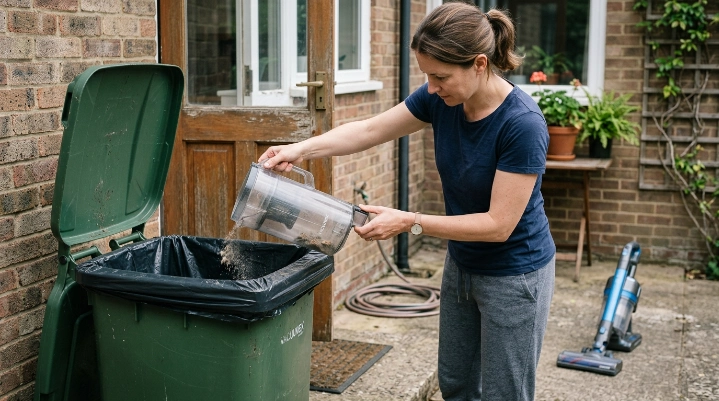
Empty the container gently and avoid shaking a cloud of dust into your living space. People who are sensitive to dust or allergens may prefer to empty a bagless bin outdoors when practical.
The Asthma and Allergy Foundation of America provides asthma and allergy friendly product guidance for consumers looking at products designed around allergen reduction. Your own vacuum’s instructions still determine how its bin and filters should be handled.
Use this simple emptying routine
- Turn the vacuum off. Unplug a corded model before opening or removing maintenance components.
- Remove the dustbin. Follow the release method shown in your manual.
- Move to the disposal area. Use an outdoor bin when dust exposure is a concern and conditions allow.
- Lower the bin toward the trash. Avoid holding it high above the container.
- Release the bottom or lid slowly. Let debris fall instead of aggressively shaking the bin.
- Remove stuck hair carefully. Use only manufacturer-approved access points or tools.
- Close the bin securely. Confirm all doors and seals are seated before reinstalling it.
Should you wash the dustbin every time?
No. Emptying and washing are separate maintenance tasks.
Some dustbins are washable, while others contain electrical parts, sensors, filters, or components that shouldn’t get wet. Follow the manual before rinsing any vacuum part.
If the bin is washable, let it dry completely before reinstalling it. Moisture inside a vacuum can create new problems rather than solving an old one.
Should you empty the vacuum indoors?
You can, but emptying outside can reduce the chance of loose collected dust spreading through the room. This is especially useful after cleaning fine dust or large amounts of pet debris.
Keep the bin close to the trash opening and release the contents gently. Avoid blowing into the container or using compressed air indoors.
Frequently Asked Questions
Should I empty my vacuum after every use?
For most bagless vacuums, emptying after every use is a sensible routine. It prevents you from starting the next session with an already-filled bin and aligns with maintenance guidance for many upright and robot vacuum models.
Is it bad to let a vacuum dustbin get completely full?
Don’t intentionally fill a dustbin beyond its marked maximum level. Excess debris can interfere with normal operation, make emptying harder, and complicate troubleshooting if the vacuum starts losing pickup.
How often should I empty a cordless stick vacuum?
Check a cordless stick vacuum after every cleaning session. Small bins can fill quickly, so you may need to empty one midway through a whole-home cleaning job, especially when collecting pet hair.
How often should I empty a robot vacuum dustbin?
Many robot vacuums should have their bins emptied after each cleaning run, although individual models differ. Self-emptying robots transfer debris to a dock, so follow the app, dock indicators, and manufacturer maintenance schedule instead.
Does emptying the dustbin improve suction?
Emptying an overfilled bin can help restore normal operation when bin fullness contributes to poor pickup. If performance remains weak, inspect the filters, hose, wand, brush roll, and accessible air passages for other restrictions.
Should I empty the vacuum before or after cleaning?
Ideally, check it before cleaning and empty it after the session. The pre-cleaning check prevents you from starting with limited capacity, while the post-cleaning emptying leaves the vacuum ready for next time.
Do allergy sufferers need to empty a vacuum more often?
Frequent emptying can prevent large amounts of collected dust and debris from accumulating in a bagless bin. More important, minimize exposure while emptying and follow appropriate filtration and cleaning practices for your household’s needs.
What’s the Best Dustbin Routine?
The easiest rule is simple: check before you clean, empty after you clean, and never exceed the max-fill line. That schedule works well for most household bagless vacuums.
Adjust the routine when your cleaning load changes. A home with shedding pets, carpet, children, or frequent tracked-in dirt may fill a bin much faster than a lightly used apartment with hard floors.
- Before cleaning: Check available bin capacity.
- During cleaning: Watch the fill line on heavy jobs.
- After cleaning: Empty accumulated debris.
- Regularly: Inspect filters and brush rolls according to the manual.
- When performance changes: Check the whole airflow path rather than focusing on the bin alone.
In my own cleaning routine, this takes less effort than remembering a weekly dustbin schedule. It also makes the vacuum ready whenever I need a quick cleanup.
Your model’s manual always gets the final word. Use its fill line, maintenance instructions, and warning indicators as your primary guide, and you’ll avoid most of the guesswork around when to empty the dustbin.