
How to Charge a Cordless Vacuum: A Complete Homeowner’s Guide

Keeping your home free of pet dander, dust mites, and allergens requires consistent cleaning. A cordless stick vacuum is a homeowner’s best friend for quick daily touch-ups, but a dead battery can quickly derail your cleaning routine and allow indoor pollutants to build up. If you are wondering how to charge a cordless vacuum correctly, you are not alone.
Many homeowners struggle with battery degradation, flashing error lights, or vacuums that die after just ten minutes of use. Proper charging habits do more than just keep your vacuum running; they ensure your machine maintains the strong suction necessary to push air through its HEPA filter, trapping microscopic particles before they become airborne.
In this guide, we will walk you through the exact steps to charge your device, explain the different charging dock styles, and share practical tips to extend your battery’s lifespan. Whether you are dealing with pet hair or managing seasonal allergies, a fully powered vacuum is your first line of defense for a healthy home.
Quick Answer
To charge a cordless vacuum, first locate the charging port on the main unit or remove the detachable battery. Plug the manufacturer-provided power adapter into a standard wall outlet, then connect it to the vacuum or wall dock. Wait until the battery indicator light turns solid or turns off, indicating a full charge. This process typically takes 3 to 5 hours.
Why a Fully Charged Vacuum Matters for Home Air Quality
It is easy to think of your vacuum as just a floor-cleaning tool, but it plays a massive role in your home’s overall air quality. When a cordless vacuum is running on a low battery, the motor cannot generate maximum suction.
Without strong suction, the vacuum fails to pull dirt deep from your carpets. Worse, weak airflow prevents the vacuum from effectively pushing microscopic dust through its filtration system. According to the EPA guidelines on indoor air quality, regular vacuuming with a high-efficiency filter is an essential step in reducing indoor pollutants and airborne irritants. If your battery is dying, your vacuum might just be stirring dust around rather than trapping it.
3 Common Ways to Charge a Cordless Vacuum
Manufacturers design cordless vacuums with different charging mechanisms. Before plugging anything in, you need to identify which system your specific model uses.
1. The Direct Plug-In Method
This is the simplest method, common on budget-friendly or older models. The vacuum has a small circular port located near the handle or the base of the battery. You simply plug the power adapter directly into the vacuum and the other end into the wall.
2. The Wall-Mounted Docking Station
Many premium stick vacuums come with a wall-mounted dock. The dock is screwed into the wall and permanently connected to a power outlet. To charge the vacuum, you simply slide the machine into the dock. Metallic contact points on the vacuum align with the dock, initiating the charge automatically.
3. The Removable Battery Pack
High-end cordless vacuums often feature click-in, removable batteries. Instead of plugging in the whole vacuum, you press a release button to detach the battery block. You then place the battery onto a separate tabletop charger. This is ideal for homeowners who own multiple batteries and want to charge one while cleaning with the other.
Step-by-Step: How to Charge a Cordless Vacuum
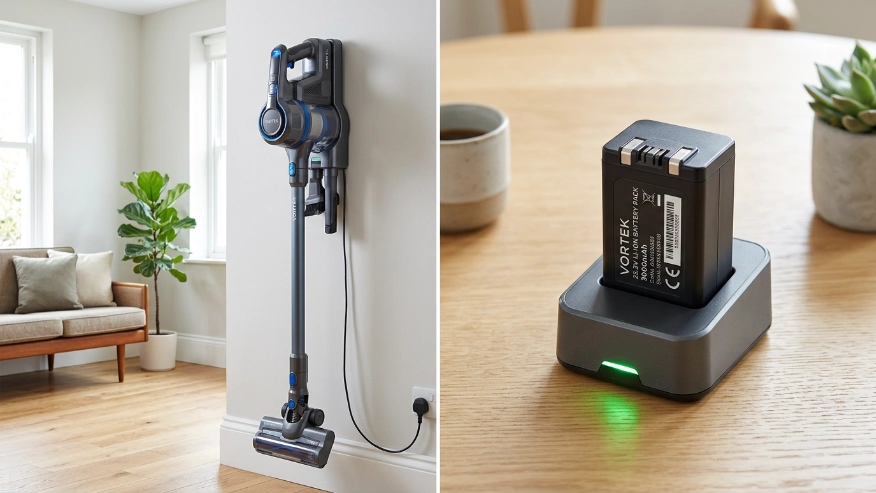
Follow these simple steps to ensure your vacuum charges safely and efficiently.
Step 1: Turn off the vacuum
Never attempt to charge a vacuum while the power switch is engaged. Ensure the trigger is released and the machine is completely powered down.
Step 2: Inspect the charging port and contacts
Dust and debris can block electrical connections. Look at the charging port on your vacuum or the metal contact plates on your wall dock. Wipe away any dust with a dry microfiber cloth.
Step 3: Connect the charger to the wall first
Plug the manufacturer-approved power adapter into a standard 120V wall outlet. Avoid using extension cords or overcrowded power strips, as high-draw batteries require a stable electrical current. If you are concerned about energy consumption, checking out ENERGY STAR guidelines for battery chargers can help you understand how modern smart chargers save electricity.
Step 4: Connect the vacuum or battery
Attach the charging cable to the vacuum port, slide the vacuum into its wall dock, or click the removable battery into its charging station.
Step 5: Verify the charging indicator
Look for a visual confirmation that the device is receiving power. Most vacuums have LED lights that pulse, blink, or display a specific color (usually blue or green) to indicate active charging.
Step 6: Wait for a complete charge
Leave the vacuum connected until the indicator lights signal a full battery. Depending on the size of the battery and the model, this can take anywhere from 2.5 to 5 hours.
Understanding Vacuum Battery Indicator Lights
Every brand has a slightly different way of communicating battery status, but the light patterns generally follow the same universal rules.
- Pulsing or Blinking Blue/Green: The battery is currently charging.
- Solid Blue/Green: The battery is 100% fully charged. (On some models, the light will simply turn off when full).
- Solid Red: The battery is completely dead and needs to be charged immediately.
- Flashing Red or Amber: This is an error code. It usually means the battery is too hot to charge, the charger is defective, or there is a blockage in the vacuum motor preventing it from accepting a charge safely.
Expert Tip: If your vacuum feels hot to the touch after a long cleaning session, wait 15 to 30 minutes before plugging it in. Charging a hot lithium-ion battery degrades its chemical cells much faster than charging a cool one.
Maximizing Your Vacuum’s Battery Life
Most modern cordless vacuums use Lithium-ion (Li-ion) batteries. These batteries are incredibly powerful and lightweight, but they require specific care to prevent them from losing their charging capacity over time.
To protect your investment and maintain the suction power needed to pull allergens out of your carpets, follow these best practices:
- Avoid deep discharges: Do not run your vacuum until it completely dies. Try to place it back on the charger when it drops to around 15% or 20% power.
- Store at room temperature: Extreme heat and freezing temperatures destroy battery cells. Never store your cordless vacuum in an unheated garage or a hot attic. Keep it in a temperature-controlled closet.
- Unplug if storing long-term: If you are going on vacation for a month, charge the vacuum to about 50%, then unplug the charger from the wall. Leaving a battery at 100% on a charger for months unused can cause it to swell.
- Clean the filters regularly: A clogged HEPA filter forces the vacuum motor to work twice as hard. This drains the battery significantly faster and generates excess heat.
The Asthma and Allergy Foundation of America (AAFA) strongly recommends using vacuums with well-maintained HEPA filters to effectively trap allergens, meaning regular filter maintenance protects both your lungs and your battery life.
Typical Charging Times by Vacuum Type
To help you plan your cleaning routine, here is a general breakdown of what to expect regarding charge times and runtimes for different tiers of cordless vacuums.
| Vacuum Category | Average Charge Time | Average Runtime (Low Power) | Average Runtime (Max Suction) |
|---|---|---|---|
| Budget / Entry-Level | 4 to 5 Hours | 30 to 40 Minutes | 8 to 12 Minutes |
| Mid-Range / Standard | 3.5 to 4 Hours | 45 to 50 Minutes | 10 to 15 Minutes |
| Premium / High-End | 2.5 to 3.5 Hours | 60+ Minutes | 15 to 20 Minutes |
| Removable Battery Packs | 2.5 Hours per pack | Varies by size | Varies by size |
Note: Using motorized attachments like heavy-duty carpet brush rolls will drain the battery faster than using a simple crevice tool.
Common Mistakes Homeowners Should Avoid
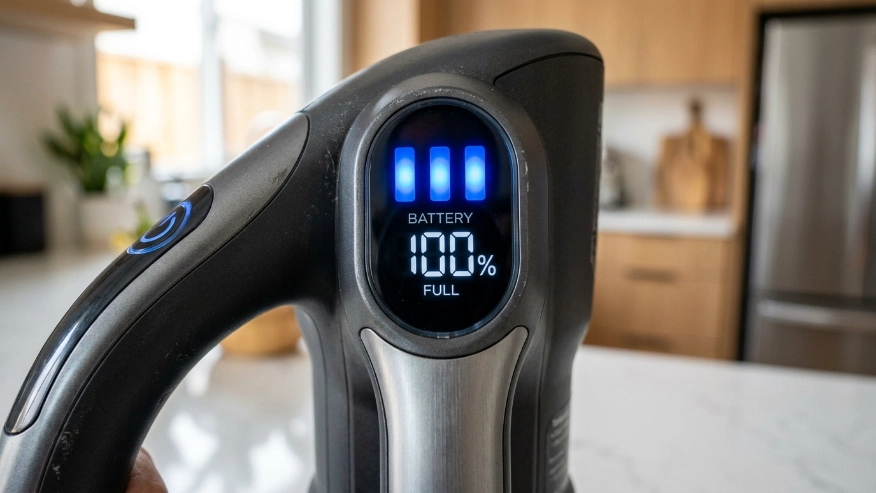
Even well-intentioned homeowners can accidentally ruin their cordless vacuum’s battery. Avoid these common pitfalls to keep your machine running at peak performance:
- Using third-party chargers: Always use the OEM (Original Equipment Manufacturer) charger. Cheap, off-brand chargers may deliver the wrong voltage, which can fry the battery or create a fire hazard.
- Ignoring blockages: If your vacuum brush roll is tangled with hair, the motor pulls more electrical current to spin it. This rapidly drains and degrades the battery.
- Leaving it in direct sunlight: Installing your wall dock next to a bright, south-facing window can overheat the battery during the day.
- Vacuuming wet messes: Most standard cordless stick vacuums are strictly for dry debris. Sucking up water can short-circuit the battery and ruin the internal HEPA filter.
When to Consult an Air Quality or HVAC Professional
Your cordless vacuum is an excellent tool for managing settled dust, pet dander, and tracked-in dirt. However, a vacuum can only clean what has already fallen to the floor.
If you find that your vacuum is constantly filling up with abnormal amounts of dust, or if you are charging your vacuum daily but still suffering from severe indoor allergies, the problem might not be your cleaning habits. Excessive dust settling on your floors is often a major warning sign of a broader indoor air quality issue.
You should consult a certified HVAC professional or an indoor air quality specialist if:
- Your home is excessively dusty within 24 hours of vacuuming.
- You notice dark dust rings around your HVAC supply vents.
- Your family is experiencing unexplained respiratory irritation, coughing, or sinus congestion indoors.
- Your home constantly smells stale or musty, despite regular vacuuming.
An expert can assess if your home requires a whole-house air purifier, duct cleaning, or an upgraded MERV-rated filter in your furnace. A vacuum handles the floor, but proper HVAC filtration handles the air you breathe.
FAQs
Can I leave my cordless vacuum plugged in all the time?
Yes, for most modern lithium-ion vacuums. Manufacturers design modern wall docks with smart chargers that stop drawing current once the battery reaches 100%. However, if you are leaving for several weeks, it is best to unplug it.
Why is my cordless vacuum flashing red while charging?
A flashing red light is typically a warning indicator. It usually means the battery is too hot, there is a physical blockage in the vacuum motor, or the battery has failed and needs to be replaced. Check your user manual for the specific error code.
How long does it take to charge a cordless vacuum?
On average, it takes between 3 to 5 hours to fully charge a cordless stick vacuum from 0% to 100%. Premium models with fast-charging technology can sometimes finish in under 3 hours.
Should I drain the battery completely before recharging?
No. Modern lithium-ion batteries do not have “battery memory” like older NiMH batteries did. In fact, completely draining a lithium-ion battery frequently can damage its lifespan. It is best to recharge it when it drops to around 20%.
Why does my vacuum battery die so quickly?
If your vacuum dies in just a few minutes, you may be using the “Max” or “Boost” suction setting, which drains power rapidly. Alternatively, a clogged filter, a tangled brush roll, or a chemically degraded battery could be the culprit.
Can I use a different charger for my vacuum?
You should only use the charger provided by the manufacturer or an exact OEM replacement. Using a charger with the wrong voltage or amperage can permanently damage the battery or cause it to overheat.
Conclusion
Understanding how to charge a cordless vacuum properly is a simple but vital part of maintaining a clean, healthy home. By using the correct charging method, allowing the device to cool before plugging it in, and keeping the filters clean, you can dramatically extend the life of your battery.
A fully powered vacuum ensures maximum suction, allowing the HEPA filtration system to effectively capture the pet dander, dust mites, and allergens lurking in your carpets. Take a moment today to check your vacuum’s charging station—ensure the contacts are clean, the dock is out of direct sunlight, and the filters are free of debris. A well-maintained vacuum is one of the easiest ways to protect your family’s indoor air quality.