
Why Is My Cordless Vacuum Losing Power?

Quick Answer
A cordless vacuum usually loses power because the battery is low or aging, airflow is restricted, the filter is dirty, the bin is packed, or the brush roll is jammed. I check airflow before blaming the battery because several simple problems can make a healthy vacuum feel weak. Consumer Reports vacuum testing also identifies battery deterioration and tangled brush rolls as common cordless-vacuum problems.
Check these first
- Charge level: Fully charge the battery with the correct charger before diagnosing a power problem.
- Dust bin: Empty it even if it is not completely packed.
- Filter: Check for heavy dust buildup and clean it exactly as the manual directs.
- Air path: Inspect the wand, intake, and cleaner head for hidden blockages.
- Brush roll: Remove wrapped hair, thread, and fibers that create extra resistance.
- Battery condition: Suspect battery wear if runtime remains much shorter after the vacuum is clean and fully charged.
Stop using it if
- The battery is swollen, cracked, leaking, unusually hot, or producing an abnormal odor.
If you’re asking, “Why is my cordless vacuum losing power?” the word power can mean two different problems. Your vacuum might be losing electrical runtime, or its cleaning suction may be getting weaker.
I troubleshoot those problems separately. That simple distinction can keep you from buying a new battery when the real problem is a dusty filter or packed brush head.
In This Guide
- What does losing power mean on a cordless vacuum?
- Why does my cordless vacuum battery lose power so fast?
- Can a dirty filter or clog make a cordless vacuum feel weak?
- How do I troubleshoot a cordless vacuum that is losing power?
- Is it the battery, airflow, brush roll, or motor?
- How can I stop my cordless vacuum from losing power?
- Frequently asked questions
What Does Losing Power Mean on a Cordless Vacuum?
A cordless vacuum can lose battery power without losing suction efficiency, or it can lose cleaning power while the battery remains healthy. Identifying which symptom you have is the fastest route to a useful diagnosis.
Definition: Cordless vacuum power loss is a noticeable decline in runtime, suction, brush performance, or the machine’s ability to stay running compared with its normal operation.
Electrical power loss
Electrical power loss usually appears as shorter runtime, sudden shutdowns, inconsistent charging, or failure to start. The rechargeable battery and charging system become the main suspects.
- Runtime has dropped noticeably from what you normally get.
- The vacuum shuts down despite showing charge.
- High-power mode lasts much less time than before.
- The battery will not charge normally.
- The vacuum starts, then quickly stops under load.
Cleaning-power loss
Cleaning-power loss feels different. The machine continues running, but crumbs, dust, or pet hair need repeated passes.
- Suction at the cleaner head feels weak.
- Debris remains behind after several passes.
- The motor sounds strained or begins pulsing.
- The brush roll slows or stops.
- Performance improves after removing the wand or floorhead.
In my own troubleshooting, this distinction saves the most time. If runtime is normal but pickup is poor, I start with airflow rather than the battery.
Why Does My Cordless Vacuum Battery Lose Power So Fast?
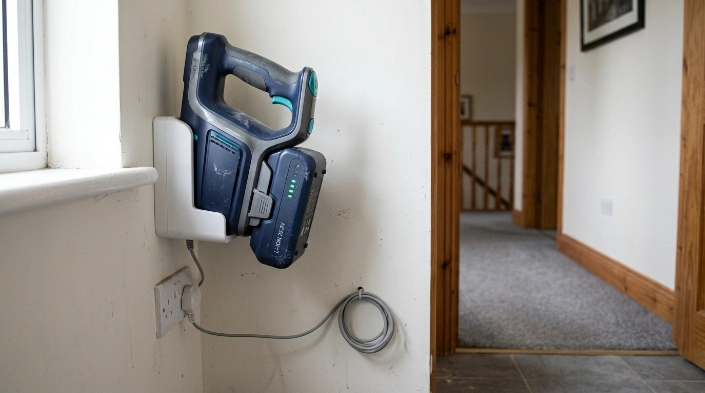
An aging or poorly charged battery can make a cordless vacuum run for less time, shut down early, or struggle under demanding cleaning modes. Battery trouble becomes more likely when the airflow path is already clean.
The rechargeable battery is aging
Most modern cordless vacuums use rechargeable lithium-ion batteries. Like other rechargeable batteries, their usable capacity can decline with age and use.
A worn battery may still reach a “full” indication. It simply may not store as much usable energy as it once did.
- Compare today’s runtime with the vacuum’s earlier normal runtime.
- Test after a complete charge using the approved charger.
- Use the same cleaning head and power mode for comparison.
- Rule out blockages before ordering a replacement battery.
You’re using maximum power mode
Boost, turbo, or maximum modes ask the motor for more energy. That normally reduces runtime compared with standard or eco operation.
If the vacuum lasts longer in standard mode, that alone does not prove the battery is defective. Check your model’s manual for its expected behavior in each setting.
Temperature is affecting the battery
Extreme heat or cold can be hard on lithium-ion batteries. I avoid storing cordless vacuums in hot cars, exposed garages, or other areas with large temperature swings.
The EPA’s lithium-ion battery guidance recommends storing these batteries around room temperature and avoiding long periods of extreme heat or cold.
The battery may be damaged
A battery problem becomes a safety issue if the pack is swollen, cracked, leaking, unusually hot, or smells abnormal. Stop using and charging it.
Expert Alert: Do not open, puncture, rebuild, or attempt electrical repairs on a lithium-ion battery pack. Follow the manufacturer’s instructions and use an appropriate battery recycling or service option.
Can a Dirty Filter or Clog Make a Cordless Vacuum Feel Weak?
Yes. Restricted airflow is one of the first things I check when a cordless vacuum runs but no longer cleans well.
A vacuum needs air to move freely from the floorhead through the dirt path and filtration system. Restrict that path, and useful suction at the floor can fall.
A dirty filter restricts airflow
Fine dust can load a filter until air has difficulty passing through it. The vacuum may sound normal while pickup becomes disappointing.
Consumer Reports’ vacuum buying guide also notes that vacuum filters require periodic cleaning or replacement. Always follow your model’s instructions because not every filter is washable.
A packed bin can interfere with normal airflow
Don’t wait until the dust container is compressed solid. Emptying it earlier also gives you a chance to inspect the inlet for clumps of hair or debris.
- Empty the bin.
- Check the cyclone or upper inlet area for packed dust.
- Make sure the bin is installed and latched correctly.
- Inspect seals for dirt, damage, or poor seating.
A hidden clog can mimic battery failure
Small socks, paper, hair, pet debris, and compacted dust can become lodged inside a wand or floorhead. The motor may keep running even though little useful airflow reaches the floor.
I like to disconnect the wand and inspect each removable section separately. Never force a sharp object through a hose or electrical floorhead.
The brush roll may be overloaded
Hair and thread wrapped tightly around a powered roller create mechanical resistance. Pickup may fall even when suction from the handheld unit still feels strong.
Switch the vacuum off before touching the roller. Remove only parts the manufacturer’s instructions identify as user-serviceable.
How Do I Troubleshoot a Cordless Vacuum That Is Losing Power?
Start with the easiest reversible checks, then move toward the battery and internal components. This order prevents unnecessary parts replacement.
1. Fully charge the vacuum
Use the charger, dock, and charging method specified for your model. Check that the battery and charging contacts are seated correctly where user access is allowed.
After charging, note how long the machine runs in its normal cleaning mode. A repeatable runtime drop is more useful than judging the battery from one unusually hard cleaning session.
2. Empty and reseat the dust bin
Remove collected debris before your next test. Check that the bin clicks back into its proper position and that no dirt is trapped around a sealing surface.
- Empty loose debris.
- Remove packed dust near the inlet.
- Inspect visible seals.
- Reinstall the bin securely.
3. Inspect the filter
Look for a dense coating of fine dust or fibers. Clean or replace the filter only according to the manufacturer’s directions.
If you wash an approved washable filter, let it dry for the full period stated in the manual. Installing a damp filter can create new problems.
4. Check the wand and cleaner head
Disconnect removable sections with the vacuum switched off. Look through the wand and intake path for anything blocking normal airflow.
- Wand or tube
- Cleaner-head inlet
- Bin inlet
- Accessible air channels
- Crevice and upholstery attachments
5. Clean the brush roll
Cut away wrapped hair only where the manual allows. Pay attention to the roller ends because tightly wound fibers can hide near bearings or end caps.
6. Test again in standard mode
Reassemble the vacuum and repeat the test on a familiar floor. Use standard power first so maximum mode does not confuse the battery comparison.
7. Consider the battery or internal electronics
If airflow is clear, the brush moves freely, and runtime remains far below normal, the battery becomes a stronger suspect. A model with a manufacturer-approved removable pack may be easier to diagnose by replacement.
If the problem involves the motor housing, wiring, charging circuitry, or internal battery connections, stop the DIY diagnosis.
Expert Alert: Opening the motor housing, charger, battery pack, or internal wiring can expose you to electrical and battery hazards. Use manufacturer support or a qualified appliance technician for internal electrical faults.
Section Takeaway: Clear the airflow system before condemning the battery. If a clean, fully charged vacuum still has abnormally short runtime, battery wear becomes much more likely.
Is It the Battery, Airflow, Brush Roll, or Motor?
The pattern of the problem often tells you where to look. I use the following comparison before buying replacement parts.
| What you notice | Most likely area to check | Useful first test |
|---|---|---|
| Runtime is much shorter after a full charge | Battery or charging system | Retest after cleaning airflow and charging normally |
| Vacuum runs normally but suction is weak | Bin, filter, wand, seals, or floorhead | Empty bin and inspect each airflow section |
| Brush stops while handheld suction remains strong | Brush roll or powered floorhead | Check for hair, thread, or a jammed roller |
| Vacuum stops after becoming unusually hot | Airflow restriction or internal fault | Switch off, let it cool, then inspect airflow |
| Power remains poor after battery and airflow checks | Motor, electronics, seals, or other internal component | Contact manufacturer support or a technician |
| Battery is swollen, damaged, or abnormally hot | Battery safety issue | Stop using and charging it |
A failing battery and a clogged vacuum can produce similar symptoms. That’s why one symptom alone should not decide the diagnosis.
As of 2026, battery reliability remains a meaningful consideration with cordless stick vacuums. Battery condition should still be evaluated alongside airflow, maintenance, and cleaner-head resistance rather than in isolation.
How Can I Stop My Cordless Vacuum From Losing Power?
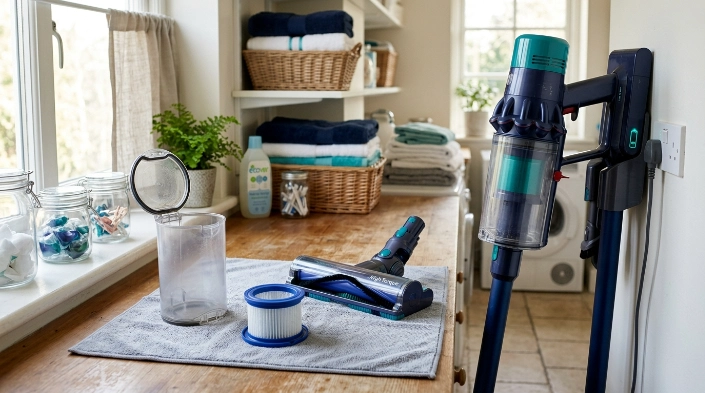
You cannot prevent normal battery aging, but routine maintenance can stop avoidable performance loss. Keeping the airflow path clear also helps you notice genuine battery decline sooner.
- Empty the bin regularly: Do not keep cleaning with debris packed tightly inside it.
- Maintain the filter: Follow your model’s cleaning and replacement schedule.
- Clear hair early: Remove wrapped fibers before the brush roll becomes difficult to turn.
- Inspect the airflow path: Deal with blockages when performance first changes.
- Use suitable power modes: Save maximum output for messes that need it.
- Use approved charging equipment: Follow the manufacturer’s battery and charging instructions.
- Avoid temperature extremes: Store the vacuum and battery in an appropriate indoor environment.
- Watch for battery damage: Stop using a swollen, leaking, cracked, or unusually hot battery.
When a lithium-ion battery reaches the end of its useful life, do not automatically put it in household trash or curbside recycling. The EPA’s used lithium-ion battery guidance recommends appropriate battery collection or recycling routes.
If household allergens are also a concern, filtration matters as much as pickup performance. The Asthma and Allergy Foundation of America certification program provides information about independently tested household products designed with asthma and allergy considerations in mind.
Frequently Asked Questions About Cordless Vacuum Power Loss
Why is my cordless vacuum losing suction even with a full battery?
A full battery does not guarantee strong suction. Check the bin, filter, wand, cleaner-head intake, brush roll, and visible seals because restricted or leaking airflow can reduce pickup while the motor continues running normally.
How do I know if my cordless vacuum battery is going bad?
A battery becomes more suspect when a full charge provides much less runtime than before, shutdowns occur repeatedly, or charging becomes unreliable. Rule out clogged airflow and brush resistance before replacing it.
Can a clogged filter cause a cordless vacuum to shut off?
A heavily restricted filter can reduce airflow and may contribute to excess heat or poor performance. Switch the vacuum off, inspect the filter, and follow the manufacturer’s cleaning or replacement instructions before testing again.
Why does my cordless vacuum work for a few minutes and then stop?
Possible causes include low usable battery capacity, overheating, a blocked airflow path, or excessive resistance at the brush roll. Let the machine cool if it feels unusually warm, then check the user-serviceable parts before retesting.
Why is my cordless vacuum weaker on carpet?
Carpet can place more demand on the cleaner head and brush roll than a smooth hard floor. Check for wrapped hair, use the correct floor setting, and make sure the vacuum’s air path is clear.
Should I replace the battery or buy a new cordless vacuum?
A battery replacement often makes sense when the rest of the vacuum works correctly and an approved replacement pack is available. A new vacuum may make more sense when the motor, controls, cleaner head, and battery all need costly repairs.
Can I run a cordless vacuum without its filter to test the suction?
Do not operate the vacuum without required filters unless the manufacturer explicitly instructs you to do so for a diagnostic procedure. Running it incorrectly can expose internal parts to dust or allow debris to escape through the exhaust.
Final takeaway: When a cordless vacuum loses power, don’t assume the battery is finished. Fully charge it, empty the bin, clean the approved filter, clear the airflow path, remove brush-roll tangles, and test again before buying parts.
If those checks do not restore normal performance, compare the remaining symptoms with your manufacturer’s troubleshooting guidance. Battery replacement or professional service is the safer next step when the problem points to internal electrical components.
