
How to Stop a Vacuum From Overheating

Quick Answer
To stop a vacuum from overheating, switch it off, unplug it, and let it cool completely. Then empty the bin or bag, clean the filters, remove hose and brush-roll clogs, and restore unrestricted airflow before restarting it. Keeping that airflow clear also supports cleaner household vacuuming, which fits with EPA guidance on indoor dust and particulate matter.
Quick steps to cool and fix the vacuum
- Stop immediately: Turn the vacuum off if it feels unusually hot, smells hot, or shuts itself down.
- Disconnect power: Unplug a corded model or switch off a cordless vacuum before inspecting it.
- Empty debris: Empty the dust bin or replace a full vacuum bag.
- Check airflow: Inspect the filter, hose, wand, floor head, and air passages for restrictions.
- Free the brush: Remove hair, thread, and fibers wrapped around the brush roll.
- Restart carefully: Test the vacuum only after it has cooled and every removed part is correctly reinstalled.
Stop troubleshooting if you notice this
- Burning or electrical smell: Leave the vacuum unplugged and arrange qualified repair instead of repeatedly restarting it.
I’ve had vacuums get hot enough that the handle and exhaust air made me stop mid-room. In home hygiene, overheating is more than an annoying shutdown because restricted airflow can also hurt cleaning performance.
The good news is that clogs, dirty filters, full bins, and tangled brush rolls cause many heat problems. I’ll show you how I check each one without opening the motor housing.
In This Guide
Why Does a Vacuum Cleaner Overheat?
A vacuum usually overheats when heat builds faster than the machine can release it. Restricted airflow and excess mechanical load are two common reasons.
A vacuum overheating problem is excessive heat buildup around the motor, battery, or airflow system during normal use. Some models respond by reducing power or shutting down.
Blocked airflow makes the motor struggle
A vacuum motor moves air through the cleaning head, hose, filter, and exhaust path. A restriction anywhere along that route can reduce normal airflow.
I usually inspect these areas first:
- Dust bin or bag: Debris has reached the fill line or packed tightly around an inlet.
- Pre-filter: Fine dust has coated the filter surface and restricted air movement.
- HEPA filter: A dirty or incorrectly installed filter may restrict the exhaust path.
- Hose or wand: Paper, hair, pet fur, or larger debris has created a clog.
- Floor head: The intake has become packed with lint or carpet fibers.
HEPA means high-efficiency particulate air. Not every vacuum uses the same filter design, so follow your model’s cleaning instructions.
A jammed brush roll can add extra load
A brush roll needs to rotate freely. Long hair and thread can wrap around its shaft and end caps.
I once found a brush that looked clean from above but barely turned by hand. Hair had formed tight rings underneath both ends.
- Check for hair wrapped around the roller.
- Inspect both roller ends for hidden fibers.
- Remove string caught near belts or drive areas.
- Confirm the roller turns as the manufacturer describes.
Heat does not always mean a clog
Aging motors, damaged electrical parts, and battery faults can also produce abnormal heat. Those problems need a different response.
A cordless stick vacuum may develop heat around its battery or motor housing. Upright and canister machines may become hottest near their motor exhaust.
Section Takeaway: Restricted airflow and brush-roll resistance are practical first checks, but unusual electrical heat needs professional attention.
What Should You Do When a Vacuum Starts Overheating?
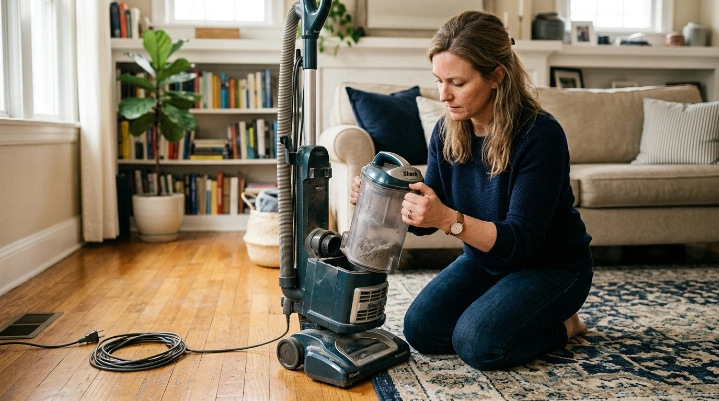
Stop using it first. Repeatedly restarting an overheating vacuum can hide the cause without fixing it.
1. Switch it off and remove power
Unplug a corded vacuum before touching the brush head, hose, or filters. For cordless models, switch the machine off and follow its battery safety instructions.
Place the vacuum on a hard, open surface. Avoid covering its air vents while it cools.
2. Let the machine cool fully
Cooling time varies by model. Some manufacturers specify a particular reset period after thermal protection activates.
I don’t guess at that number. I check the manual and wait until the housing no longer feels unusually hot.
3. Empty the bin or check the bag
Do not judge a bagless vacuum only by how much empty space you see. Fine dust can pack around internal screens before the cup looks completely full.
- Empty a bagless bin outdoors when practical.
- Keep debris below the manufacturer’s maximum fill line.
- Replace disposable bags according to the model instructions.
- Check the bin inlet for compacted debris.
If allergies are a concern, avoid shaking dusty filters indoors. The CDC recommends HEPA-filtered vacuuming as one measure for reducing dust-mite exposure in homes affected by asthma triggers.
4. Check every airflow passage
Remove the hose, wand, and floor head where the design allows. Look through each passage instead of checking only the visible opening.
A clog often forms at bends and connection points. Those areas catch hair and larger debris easily.
5. Test only after fixing the restriction
Reassemble every filter, seal, bin, and attachment correctly. Then run a short test and watch for another rapid temperature rise.
If it becomes excessively hot again with clear airflow, stop. The problem may be inside the motor, electronics, or battery system.
Expert Alert: Do not open motor housings, rewire switches, bypass thermal protection, or repair lithium-ion battery packs yourself. Have electrical or battery faults inspected by a qualified appliance technician.
Section Takeaway: Cooling alone is not the repair. Find and remove the airflow, brush, battery, or electrical problem before returning to normal use.
How Can You Find What Is Making Your Vacuum Overheat?
Match the heat problem with the other symptoms you notice. Suction loss, brush noise, shutdowns, and odors can point in different directions.
| What you notice | Likely area to check | First safe action |
|---|---|---|
| Heat plus weak suction | Filter, bin, bag, hose, or wand restriction | Empty debris and inspect the full airflow path |
| Heat plus loud brush noise | Brush roll, bearings, hair, thread, or belt area | Disconnect power and clear the roller |
| Vacuum runs, then shuts off | Possible thermal protection, clog, dirty filter, or battery load | Stop, cool, then inspect airflow before restarting |
| Cordless battery becomes unusually hot | Battery pack, charger, contacts, or heavy operating load | Stop using and follow manufacturer battery guidance |
| Burning smell or smoke | Electrical, motor, belt, or internal component failure | Disconnect power and do not restart |
Check suction before blaming the motor
Loss of suction and overheating often appear together when airflow is restricted. That makes the airflow path my first troubleshooting route.
The route changes slightly by vacuum type:
- Upright vacuum: Check the floor nozzle, lower hose, main hose, bin or bag, and filters.
- Canister vacuum: Inspect the floor tool, telescoping wand, hose, bag or bin, and exhaust filter.
- Stick vacuum: Check the cleaner head, narrow wand, bin cyclone area, and washable filters.
- Robot vacuum: Inspect the main brush, side brush, bin, filter, wheels, and intake opening.
Different brands such as Dyson and Shark use different filter and airflow layouts. Never assume one brand’s filter-washing method applies to another.
The same applies to robot vacuums and their batteries. Model-specific instructions matter more than generic schedules.
Pay attention to the smell
Warm exhaust air can be normal during operation. A sharp burning, melting-plastic, or electrical odor is different.
Stop using the machine if that smell appears. Do not keep testing it to see whether the smell disappears.
How Do You Clean a Vacuum to Prevent Overheating?
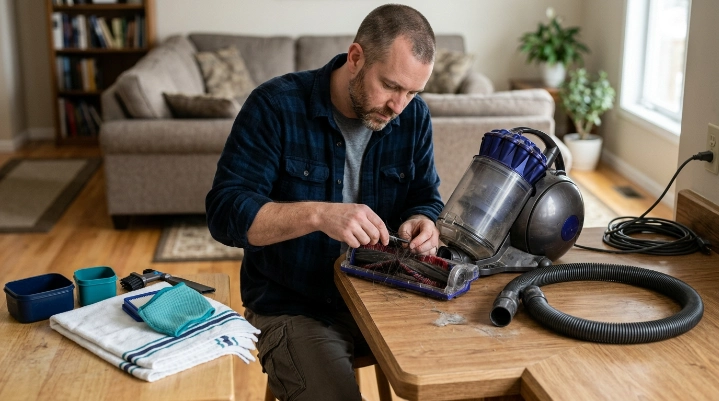
Clean the parts that control airflow and mechanical resistance. You usually do not need to dismantle the motor.
Clean the filter the right way
First determine whether the filter is washable. Some vacuum filters must stay dry and require replacement instead.
- Remove loose dust without damaging the filter media.
- Wash only filters the manufacturer labels as washable.
- Use the cleaning method stated in the manual.
- Allow washable filters to dry completely before reinstalling them.
- Replace torn, distorted, or permanently blocked filters.
Never reinstall a damp filter just because the surface feels dry. Moisture trapped inside filter material can create another problem.
Remove a hose clog without damaging the hose
Disconnect removable sections and inspect them under good light. Check bends, couplings, and narrow transitions first.
Avoid sharp tools that can puncture flexible hoses. Do not force a solid object through powered or wired hose assemblies.
Clean the brush roll and intake
Cut wrapped hair carefully without cutting bristles or nearby parts. Pull debris away from the roller rather than deeper into the housing.
- Check the full roller length.
- Inspect the end caps.
- Clear the floor-head intake.
- Remove hair from wheels where accessible.
- Check removable belts only as the manual permits.
For homes with dust mites or other allergens, careful dirt disposal matters too. The Asthma and Allergy Foundation of America discusses HEPA vacuuming and dust-mite control as parts of household allergen management.
Do not add fragrance or liquid to the motor path
I avoid spraying deodorizer into filters, vents, or hoses. Added liquid can damage filters or reach parts that were designed to stay dry.
Standard dry vacuums should never pick up liquid unless the manufacturer specifically approves wet pickup. A wet/dry vacuum is built differently.
Section Takeaway: Restore airflow with correct filter care, clear hoses, and a free-moving brush roll. Keep water and improvised cleaners away from dry-vacuum electrical areas.
How Can You Keep a Vacuum From Overheating Again?
Prevention comes down to airflow, debris control, and noticing changes early. I prefer small checks over waiting for another shutdown.
Use a simple maintenance routine
- Before cleaning: Check the bin or bag and look at the floor head.
- After heavy cleaning: Inspect the brush roll for hair and thread.
- When suction drops: Stop and look for restrictions instead of increasing cleaning time.
- For filters: Follow the model’s cleaning and replacement schedule.
- For cordless models: Watch for abnormal battery heat, swelling, odor, or damage.
Fine debris deserves extra attention. Renovation dust, fireplace ash, plaster dust, and similar material may overwhelm filters not designed for it.
Use the right vacuum for the job
An upright, canister, cordless stick, robot, and wet/dry vacuum are not interchangeable. Their motors, filtration systems, bins, and intended debris differ.
The Consumer Reports vacuum buying guide compares common vacuum categories and their household uses. That is useful when one machine is being pushed beyond its practical role.
Don’t ignore a change in sound
A vacuum often tells me something is wrong before it becomes extremely hot. Suction may change, the pitch may rise, or the brush may sound strained.
Those are reasons to stop and inspect it. Continuing until a thermal shutdown happens makes troubleshooting harder.
Protect indoor cleanliness while maintaining the vacuum
A dirty vacuum can release dust while you empty or service it. I handle dusty filters gently and avoid shaking them around living spaces.
That matters in homes dealing with pet dander, pollen, mold spores, and dust mites. A vacuum is one part of household allergen control, not a complete solution.
Section Takeaway: Prevent repeat overheating by keeping airflow open, using the correct machine for the debris, and responding early to changing suction, noise, or heat.
Vacuum Overheating FAQ
Why does my vacuum get hot after only a few minutes?
A fast temperature rise often points to restricted airflow, a clogged filter, a blocked hose, or brush-roll resistance. Turn it off, let it cool, and check those areas before restarting it.
Can a dirty filter make a vacuum overheat?
Yes. A heavily clogged filter can restrict airflow through the machine. Clean or replace it only according to the manufacturer’s instructions because filter designs differ.
Why does my vacuum shut off when it gets hot?
Some vacuums use thermal protection that interrupts operation when internal temperatures become excessive. A shutdown still needs investigation because blocked airflow or another fault may have triggered it.
Can a full vacuum bag cause overheating?
A full or heavily packed bag can restrict airflow in a bagged vacuum. Replace the bag according to the manufacturer’s fill guidance and inspect the hose for additional blockages.
Why is my cordless vacuum overheating?
A cordless vacuum may run hot because of blocked airflow, a dirty filter, a jammed cleaner head, heavy load, or a battery problem. Stop using any battery that becomes abnormally hot, swollen, damaged, or unusually smelly.
How long should I let an overheated vacuum cool?
Use the cooling or thermal-reset period stated in your vacuum’s manual. There is no single safe time that applies to every Dyson, Shark, canister, upright, stick, or robot vacuum.
Should I replace a vacuum that keeps overheating?
Not automatically. A clog or dirty filter may be easy to correct, but repeated overheating with clear airflow can indicate motor, electrical, or battery trouble that deserves professional assessment.
Final Takeaway
The best way to stop a vacuum from overheating is to restore normal airflow and remove unnecessary mechanical strain. Start with the bin, bag, filters, hose, wand, intake, and brush roll.
If the vacuum still overheats after those checks, stop using it. Burning smells, smoke, damaged wiring, swollen batteries, or repeated shutdowns are not problems I would troubleshoot by repeatedly restarting the machine.
A few minutes of routine inspection can prevent many common heat problems. It also keeps the vacuum ready for the dust, allergens, pet hair, and everyday debris you bought it to remove.