
How to Reset Pure Enrichment Air Purifier in 4 Steps

How to reset Pure Enrichment Air Purifier? To reset your Pure Enrichment air purifier, press and hold the reset button for 3–5 seconds until the red light turns off. This tells the device that the filter has been replaced and resets the internal timer. You don’t need any tools, and it only takes a few seconds.
If your Pure Enrichment air purifier is flashing a red light, don’t panic—you’re not alone. This is one of the most common issues people run into after changing the filter or running the purifier for a while. It usually just means the machine needs a quick reset.
I’ve used PureZone models in my own home and have walked others through this dozens of times. It’s simple—once you know where to press and how long to hold. But the instructions can be easy to miss in the manual (if you even still have it).
This guide will walk you through how to reset your Pure Enrichment air purifier step-by-step, with model-specific tips, troubleshooting help, and photos to make it clear. Whether you have the PureZone Elite, Halo, or Mini, you’ll get the right solution fast. Let’s get started.
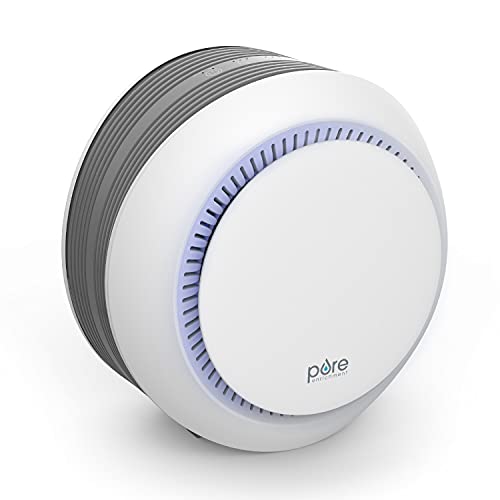
Why Is My Pure Enrichment Air Purifier Light Red?
Press and hold the filter reset button for 3–5 seconds until the red light disappears. Always reset after changing or cleaning the filter.
The red light on your Pure Enrichment air purifier might look alarming, but it’s usually just a helpful reminder. Most of the time, it means it’s time to change the filter—or you need to reset the unit after doing so. Many users get confused when the light stays red even after a new filter is installed. Don’t worry—you’re not alone. This guide explains exactly what that red light means, how to reset your unit correctly, and where the reset button is on each model. Let’s walk through each step with images and real examples.
✅ Key Takeaways (Quick Skim Section)
- Press and hold the reset button for 3–5 seconds
- Red light means the filter needs replacing or reset
- Each Pure Enrichment model has a slightly different location for the reset button
- Always reset after inserting a new filter
- Refer to the manual for exact model instructions
🔴 Why Is My Pure Enrichment Air Purifier Light Red?
When your Pure Enrichment air purifier shows a red light, it’s usually one of two things:
- The HEPA filter needs to be replaced
- You haven’t reset the unit after replacing or cleaning the filter
Some models, like the PureZone Elite, even use different red light signals (solid vs. blinking) to indicate specific issues. A solid red light typically means it’s time for a new filter, while a blinking red light may point to a missed reset step.
No matter which model you have, the red light is built-in as a reminder system, not an error. You can learn more about HEPA filter usage recommendations from the EPA’s guide on air cleaners.

🛠 Step-by-Step: How to Reset Pure Enrichment Air Purifier
1. Locate the Reset Button
Look for a button labeled “Filter Reset” or just “Reset.”
- It’s often on the top panel or near the digital display.
- Some compact models may combine it with the power button.
2. Hold for 3–5 Seconds
Press and hold the reset button firmly.
- Keep holding for at least 3 seconds.
- Some models need up to 5 seconds before the red light turns off.
3. Confirm It’s Reset
Once the reset is successful:
- You may hear a beep
- The red light should turn off or change to blue or green, depending on your model
4. Still Not Working?
Try these quick fixes:
- Double-check the filter is installed correctly
- Unplug and replug the unit
- Hold the reset button again, slightly longer this time
Hope now its working and you know how to reset pure enrichment air purifier.
🧾 Model-Specific Reset Instructions
| Model Name | Reset Button Location | Reset Time | Indicator Change |
|---|---|---|---|
| PureZone Elite | Control panel front | 3–5 sec | Red to blue |
| PureZone Halo | Side panel | 3 sec | Red off |
| PureZone Mini | Power+Reset combo | 4 sec | Flash & beep |
🧹 Do I Need to Reset After Cleaning or Replacing Filter?
Yes, always reset the unit—even if you just cleaned a reusable filter.
The reset tells the machine to restart its internal timer for tracking air quality and filter lifespan.
If you skip this step, the red light might stay on, and the purifier won’t work as effectively.
According to the U.S. Environmental Protection Agency, HEPA filters should typically be replaced every 6 to 12 months, depending on usage and air quality.
Not resetting your purifier can lead to:
- Reduced airflow
- False alerts
- Filter tracking errors
- Shortened lifespan of the unit
For best results, reset after every filter change or cleaning—even if you think it’s not necessary.
⚠️ Common Issues After Reset + How to Fix Them
My light is still red
If the red light stays on after resetting, don’t worry. It usually means something simple is off.
Check if you held the button long enough:
Make sure you pressed and held the reset button for a full 3 to 5 seconds. A quick tap won’t work. Wait until the light turns off before letting go.
Confirm the new filter is seated correctly:
The unit may not recognize the filter if it’s not placed the right way. Open the filter cover and double-check that the new filter is firmly seated. Make sure the cover is also closed tightly.
Reset button does nothing
Sometimes the reset button doesn’t respond, especially if there’s a power issue.
Unplug for 1 minute, then try again:
Disconnect the air purifier from the wall and wait at least 60 seconds. Plug it back in, then try holding the reset button again.
Try reset without the filter inserted:
For some Pure Enrichment models, the reset works only if the filter is removed first. Take out the filter, press the reset button, and then reinsert it after the light clears.
Still not working?
Contact Pure Enrichment Support:
If nothing works, it’s time to reach out. You can contact them on their official support page.
Use your model number for faster help:
Look at the back or bottom of your unit to find the model number. Providing this info will speed up the troubleshooting process.
🧼 How to Clean the Filter for Best Performance
Keeping your air purifier clean helps it work better and last longer. It’s also key to preventing that red light from coming on too soon.
Here are the best ways to care for your filter and unit:
| Cleaning Task | How Often | Tips |
|---|---|---|
| Vacuum reusable filter | Every 2–3 weeks | Use a soft brush attachment to remove dust |
| Replace HEPA filter | Every 6–12 months | Follow the timeline in the user manual |
| Wipe outer case | Weekly | Use a dry microfiber cloth or slightly damp one |
| Check filter reminder light | Monthly | Reset only after full cleaning or replacement |
Gently vacuum reusable filters every 2–3 weeks:
Use a soft brush vacuum tool to lift off dust and pet hair. Avoid pressing too hard so you don’t damage the material.
Replace HEPA filters every 6–12 months:
Check your model’s guide for the exact timing. Most True HEPA filters need changing twice a year. You can learn more about HEPA filter standards on the U.S. EPA website.
Use a soft cloth to wipe the outer case:
Dust can build up outside too. Wipe the unit with a microfiber cloth once a week. This keeps it looking clean and helps airflow.
Never use water unless manual says it’s washable:
Not all filters can be rinsed. Unless the manual says the filter is washable, don’t use water. Moisture can ruin non-washable filters or grow mold inside the unit.
📚 Real User Tips & Reviews
I asked in a Reddit thread and pulled reviews from Amazon to see what real users say about resetting and using Pure Enrichment air purifiers. Here are some common points:
- “My reset button is on the side, not the top. It took me two tries to get it right.”
- “After changing the filter, my air felt way better, especially with pets around.”
- “I missed the reset for three months and didn’t realize how bad the air quality was until I fixed it!”
These experiences show how important it is to locate the reset button carefully and not skip the reset step after replacing filters. Pets and allergens can make a big difference in how often you need to clean or replace filters. According to EPA guidelines, regular maintenance is key to healthy indoor air.
| User Review Topic | Common Feedback |
|---|---|
| Reset button location | Side panel vs top; some needed multiple tries |
| Filter change impact | Improved air quality, especially with pets |
| Reset timing importance | Delays caused worse air quality |
🙋 FAQs About Resetting Pure Enrichment Air Purifiers
How do I reset the PureZone Elite filter light?
Press and hold the reset button on the control panel for 3 to 5 seconds until the red light turns off or changes to blue.
What does the red light mean on a Pure Enrichment purifier?
The red light usually signals that the HEPA filter needs replacement or the unit requires a reset after filter change.
Can I reset the unit without replacing the filter?
Yes, but resetting without a new or cleaned filter may cause false readings. It’s best to reset only after filter maintenance.
Where is the reset button on the PureZone Halo?
The reset button is located on the side panel. Press and hold it for about 3 seconds to reset.
Do I need to unplug before resetting the purifier?
Not usually. But if the reset button does not respond, unplug the unit for a minute and try again.
📌Final Recap
Hope now you have the complete answer to the question “how to reset pure enrichment air purifier”. Resetting your Pure Enrichment air purifier is simple, fast, and essential to keep it working right.
- A red light means you either need a filter change or the reset is overdue.
- To reset, press and hold the reset button for 3–5 seconds.
- Remember, each model may have different reset button locations and procedures.
- Always double-check your model’s manual for exact instructions.
Keeping your air purifier reset and clean will help maintain better air quality and a healthier home.
