
Can a Clogged Filter Cause Overheating?

Quick Answer
Yes. A clogged filter can cause overheating, especially in a vacuum cleaner, because packed dust restricts airflow that helps the machine move heat away from the motor. Some vacuums even shut themselves off through thermal protection when filters or air passages become restricted, as explained in Dyson’s vacuum troubleshooting guidance.
Common warning signs
- Unusual heat: The motor housing or exhaust area becomes hotter than normal.
- Weak suction: Restricted airflow reduces the amount of air moving through the vacuum.
- Automatic shutdown: Thermal protection may switch the motor off until it cools.
- Hot smell: Dust, belts, motors, or electrical parts may produce an unusual odor.
- Changed motor sound: The vacuum may sound strained, pulse, or operate differently.
What to do first
- Switch the appliance off, disconnect power, let it cool, and inspect the filter and airflow path before restarting it.
I usually check the filter early whenever a vacuum starts getting unusually hot. It is one of the easiest restrictions to miss because a filter can look only slightly gray while fine dust has already filled much of its surface.
The same airflow principle matters in other fan-driven cleaning appliances, including air purifiers. However, the exact overheating protection and filter-maintenance procedure depends on the appliance and model.
In This Guide
- Can a Clogged Filter Really Make a Vacuum Overheat?
- What Are the Signs a Clogged Filter Is Causing Overheating?
- What Should You Do When a Vacuum Overheats?
- How Do You Clean a Clogged Vacuum Filter Safely?
- How Can You Tell a Clogged Filter From Other Overheating Causes?
- How Can You Prevent Filter-Related Overheating?
- Frequently Asked Questions
Can a Clogged Filter Really Make a Vacuum Overheat?
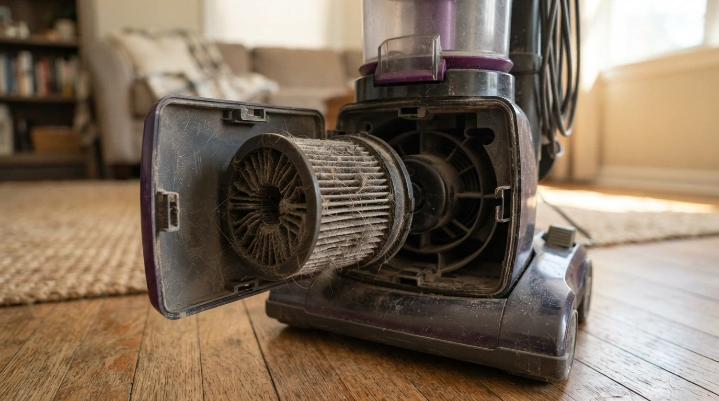
Yes, a clogged vacuum filter can contribute directly to overheating. The filter restriction reduces normal airflow through the machine, so heat can build around the motor and other components.
Definition: A clogged vacuum filter is a filter whose pores or surface have become heavily loaded with dust, hair, fibers, or fine particles, restricting the air that normally passes through it.
Why airflow matters
A vacuum depends on continuous airflow to create suction. Air enters through the cleaning head and travels through the hose or air passages before reaching filtration and exhaust components.
When dust fills the filter, that pathway becomes more restrictive. Less air can move through the system even though the motor is still trying to maintain cleaning performance.
- The filter loads with dust: Fine debris fills spaces that normally allow air through.
- Airflow falls: The machine moves less air through its normal path.
- Suction may weaken: Cleaning performance often drops as restriction increases.
- Heat can rise: Reduced airflow can make normal motor cooling less effective.
- Protection may activate: Some machines shut down when internal temperatures become excessive.
This is not just a theoretical possibility. Bissell states that some of its vacuums can activate a thermal protector when they become too hot because of a clog or dirty filters.
I treat that automatic shutdown as a warning rather than an inconvenience. Repeatedly switching the vacuum back on without finding the restriction does not solve the underlying problem.
Does the same thing happen to air purifiers?
A heavily loaded air-purifier filter also restricts airflow. The EPA notes that overloaded filters do not work well and recommends regular replacement according to manufacturer instructions.
That does not mean every dirty air purifier will overheat. Fan design, filter monitoring, temperature protection, and motor construction vary between products.
For portable air cleaners, I would treat falling airflow or a filter warning as a maintenance signal instead of waiting for abnormal heat. The EPA’s guide to home air cleaners and filters also stresses regular filter replacement and proper system compatibility.
What Are the Signs a Clogged Filter Is Causing Overheating?
A hot vacuum alone does not prove the filter is clogged. The strongest clue is heat combined with another airflow-related symptom.
Watch for these symptoms together
- Reduced suction: The vacuum picks up less dirt even with the same power setting.
- Hotter exhaust: Air leaving the vacuum feels noticeably warmer than usual.
- Short run time: The machine stops after several minutes but works again after cooling.
- Filter discoloration: The filter surface is packed with fine gray dust or debris.
- Motor pulsing: Some electronically controlled vacuums pulse when airflow becomes restricted.
- Filter warning: Models with sensors may display a cleaning or blockage alert.
Weak suction is particularly useful because it points toward an airflow problem. Consumer Reports notes that neglected vacuum filters can cause suction loss and recommends following the individual model’s filter-maintenance instructions.
You can review its broader household filter maintenance guidance for the same reason: filter schedules vary by product.
When heat may not be caused by the filter
Not every overheating vacuum has a dirty filter. A full bag, packed dustbin, clogged hose, jammed brush roll, failing motor, damaged battery, or electrical fault can produce similar symptoms.
That is why I check the entire airflow path instead of cleaning the filter and assuming the job is finished.
- Dustbin or disposable bag
- Pre-motor filter
- Exhaust or HEPA filter
- Hose and wand
- Floor-head inlet
- Brush roll and roller ends
- Cooling or exhaust openings
Expert Alert: Stop using the appliance if you see smoke, sparks, melted plastic, a swollen battery, exposed wiring, or a strong electrical-burning smell. Have a qualified appliance technician inspect it rather than opening powered components yourself.
What Should You Do When a Vacuum Overheats?
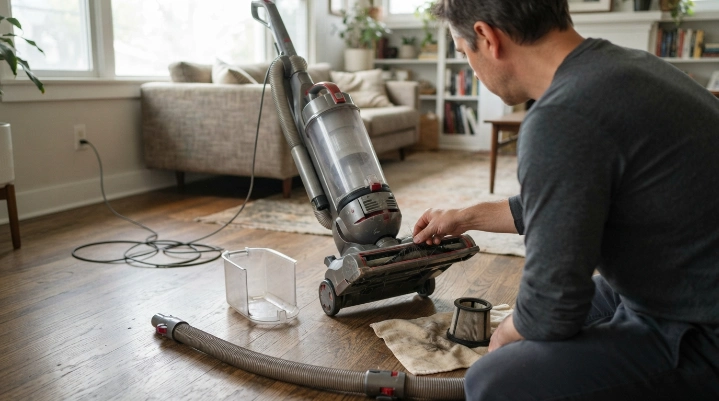
Turn the vacuum off first. Do not keep restarting it while the housing is unusually hot.
- Disconnect power. Unplug a corded vacuum or follow the shutdown procedure for your cordless model.
- Let it cool. Use the cooling or thermal-reset time stated in your owner’s manual.
- Empty the debris. Empty the dustbin or replace a full disposable bag.
- Inspect the filters. Look for packed dust, damage, incorrect installation, or a maintenance warning.
- Check for blockages. Inspect the hose, wand, floorhead, intake ports, and exhaust path.
- Free the brush roll. Remove hair and string that keep the roller from turning normally.
- Reassemble carefully. Make sure every filter, seal, cover, and hose is installed correctly.
- Test briefly. Restart only after the appliance has cooled and the suspected restriction is removed.
Cooling periods are not universal. One manufacturer may specify substantially more cooling time than another.
| Manufacturer example | Documented trigger | Example cooling guidance |
|---|---|---|
| Dyson vacuum support | Filters needing washing or machine blockage | Some models specify at least 2 hours |
| Bissell Healthy Home/Heavy Duty support | Clog or dirty filters activating the thermal protector | 30 minutes for the cited models |
Those numbers are examples, not a universal rule. Your exact model’s manual should always override a general troubleshooting guide.
How Do You Clean a Clogged Vacuum Filter Safely?
Clean the filter only by the method approved for that filter. Some filters can be rinsed, while others must stay dry or be replaced.
Start by identifying the filter
- Foam pre-filter: Often washable, but confirm this in the manual.
- Washable cartridge: May be rinsed when the manufacturer specifically permits it.
- Disposable filter: Replace rather than wash unless instructions say otherwise.
- HEPA filter: Some are washable and some are not, so the label or manual matters.
HEPA means high-efficiency particulate air. The term describes a filtration standard, but it does not automatically tell you whether a particular vacuum filter can be washed.
Safe cleaning process
- Switch the vacuum off and disconnect it from power.
- Remove the filter according to the owner’s manual.
- Tap loose dust away gently if the manufacturer permits it.
- Rinse only filters specifically labeled as washable.
- Avoid detergent unless the manufacturer allows it.
- Let a washed filter dry completely before reinstalling it.
- Replace damaged, warped, torn, or permanently clogged filters.
Never reinstall a filter while it is still damp unless the appliance is specifically designed for that condition. Moisture near a dry-vacuum motor or electrical components can create a separate problem.
I also check the filter seal before closing the machine. A clean filter that sits crooked or leaves a gap can undermine filtration and may change the intended airflow path.
How Can You Tell a Clogged Filter From Other Overheating Causes?
Match the heat with the other symptom you can observe. This is faster than replacing parts at random.
| What you notice | Likely area to inspect | Safe first action |
|---|---|---|
| Hot vacuum plus weak suction | Filter, bin, bag, hose, or airflow restriction | Disconnect power and inspect the complete air path |
| Hot vacuum plus packed filter | Clogged filter | Clean or replace it as the manual directs |
| Heat plus loud brush noise | Brush roll, hair buildup, roller ends, or belt area | Remove tangled material with power disconnected |
| Heat plus frequent shutdown | Thermal protection, airflow restriction, motor, or battery | Cool fully and troubleshoot before restarting |
| Strong electrical smell or smoke | Electrical, motor, battery, or wiring fault | Stop using the appliance and arrange professional service |
A full dustbin can mimic a filter problem because it also interferes with normal airflow. Check the fill line even if there still appears to be empty space in the container.
A hose blockage often causes a sudden suction change. Filters usually load more gradually unless you have vacuumed a large amount of fine dust.
Renovation dust deserves special attention because extremely fine particles can load filters quickly. Household vacuums should not be used for hazardous or specialized dust unless the manufacturer specifically approves that use.
How Can You Prevent Filter-Related Overheating?
The simplest prevention strategy is to keep airflow unrestricted. Regular inspection works better than waiting for the vacuum to shut down.
- Empty debris early: Do not let the bin or disposable bag become tightly packed.
- Inspect filters regularly: Look for dust loading whenever suction starts changing.
- Follow the manual: Cleaning and replacement schedules vary widely between filters.
- Clear the brush: Remove hair and fibers before they restrict roller movement.
- Check the hose: Investigate sudden suction loss before continuing a long cleaning session.
- Keep vents open: Do not cover exhaust or cooling openings while using the machine.
- Use the right appliance: Avoid debris the vacuum was not designed to collect.
As of 2026, there still is no useful one-size-fits-all vacuum-filter replacement interval. The condition of the filter, household dust load, pets, flooring, and the manufacturer’s instructions matter more than an arbitrary calendar rule.
Regular filter care can also help the vacuum maintain its intended filtration performance. That matters because filters are supposed to capture particles rather than allow collected dust to return through the exhaust.
If you use an air purifier as well, keep its filters within their recommended service life. Clean household filtration works best alongside source control and ventilation rather than as a substitute for them.
Frequently Asked Questions
Can a dirty vacuum filter make the motor burn out?
A dirty filter can restrict airflow and contribute to excessive heat or thermal shutdown. That does not mean every clogged filter will destroy a motor, but repeatedly operating an overheating vacuum can expose it to conditions it was not designed to handle.
Will a vacuum shut off if the filter is clogged?
Some vacuums will. Manufacturers including Dyson and Bissell document thermal-protection systems on certain models that can stop the motor when overheating occurs because of dirty filters, clogs, or restricted airflow.
How long should I let an overheated vacuum cool?
Follow the instructions for your exact model. Manufacturer examples vary from about 30 minutes on some Bissell vacuums to at least two hours on certain Dyson models, so one cooling time should not be applied to every machine.
Can I run my vacuum without the filter while it cools?
Usually no. If the vacuum was designed to operate with a filter installed, wait until the correct clean and completely dry filter is ready before using the machine again unless the manufacturer specifically states otherwise.
Can washing a filter fix vacuum overheating?
It can help when a washable clogged filter is causing the airflow restriction. Washing will not fix a blocked hose, full bag, jammed brush roll, electrical fault, damaged motor, or battery problem.
Why is my vacuum still overheating after I cleaned the filter?
Inspect the remaining airflow path, including the bin, bag, hose, wand, intake, floorhead, brush roll, and exhaust openings. If the vacuum remains unusually hot after those checks, stop using it and have the machine professionally inspected.
Can a clogged air purifier filter cause overheating?
A clogged air-purifier filter can reduce airflow and increase resistance through the unit, but overheating behavior varies by design. Replace or clean the filter as instructed when you see a filter alert, reduced airflow, abnormal noise, or unusual heat.
The key takeaway is simple: a clogged filter can cause or contribute to overheating because it restricts the airflow a vacuum depends on. If your machine is running hot, disconnect it, let it cool, restore the airflow path, and do not ignore persistent heat or electrical smells.
Regular filter checks take only a few minutes and can prevent a small airflow problem from becoming a repeated shutdown. Make filter inspection part of your normal vacuum maintenance rather than waiting for the machine to overheat.
