
Why Is My Vacuum Switch Not Working? Causes and Safe Fixes

Quick Answer
If your vacuum switch is not working, the switch itself may not be the problem. A dead outlet, damaged cord, thermal shutdown, blockage, loose connection, or failed internal component can produce the same symptom. Start with external checks before opening the machine, and follow basic electrical safety guidance whenever you troubleshoot a powered appliance.
Most likely causes
- No outlet power: A tripped breaker, GFCI, switched outlet, or bad receptacle can make the vacuum appear dead.
- Damaged cord: Broken internal conductors can interrupt power before electricity reaches the switch.
- Thermal shutdown: A clogged or overheated vacuum may stop until it cools.
- Broken actuator: The button or pedal may move without operating the electrical switch underneath.
- Failed switch: Worn internal contacts can prevent the circuit from closing.
- Internal electrical fault: Wiring, a thermal fuse, control board, or motor fault can mimic switch failure.
First thing to try
- Unplug the vacuum, inspect the cord and plug, clear obvious blockages, let an overheated machine cool, then test it in a known-working outlet.
When a vacuum cleaner refuses to respond to its power switch, it is easy to assume the switch has failed. In my experience troubleshooting home-hygiene appliances, the actual fault is often somewhere else in the power path.
This guide shows how I narrow the problem down safely. We’ll start with simple household checks before moving toward the switch, wiring, and other internal parts.
In This Guide
What Does a Vacuum Switch Problem Actually Mean?
A vacuum power switch is the control that tells the vacuum’s electrical system to start or stop. On a simple corded vacuum, it normally forms part of the electrical path between the incoming power supply and motor.
That does not mean a vacuum that stays silent has a bad switch. Electricity must reach the switch before the switch can do anything.
Depending on the vacuum design, the startup path may involve several parts:
- Wall outlet: Supplies electricity to a corded vacuum.
- Plug and power cord: Carry electricity into the machine.
- On/off switch: Opens or closes the operating circuit.
- Safety devices: May interrupt operation during overheating or another fault.
- Wiring or electronics: Carry the switch command toward the motor.
- Motor: Creates the airflow that produces suction.
Cordless vacuums can be more complicated. Their trigger may operate a small microswitch that sends a signal to an electronic control board instead of switching the motor’s full electrical load directly.
This distinction matters. Replacing a visible button will not fix a failed battery, control board, wire, or thermal protection circuit.
Why Is My Vacuum Switch Not Working?
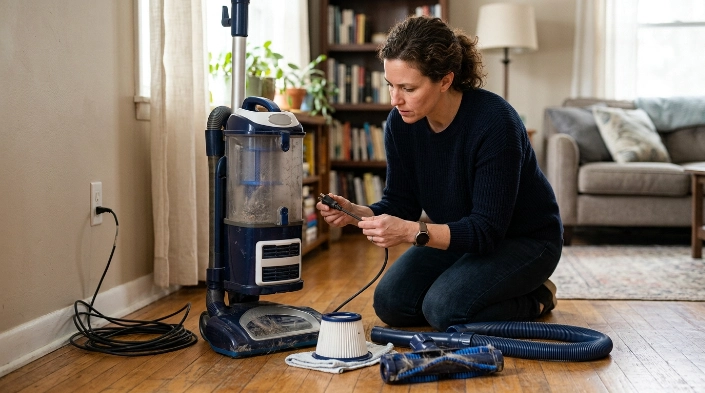
The most common causes fall into two groups: problems before the switch and problems inside the vacuum. Checking them in that order avoids unnecessary disassembly.
1. The wall outlet has no power
This is the first thing I check. A tripped circuit breaker, GFCI outlet, wall-controlled receptacle, or failed outlet can make a perfectly good vacuum look completely dead.
Plug a small known-working appliance into the same receptacle. If that device also fails, the vacuum probably is not your first problem.
2. The power cord or plug is damaged
A vacuum cord gets twisted, stretched, stepped on, and wrapped around the machine repeatedly. Damage often appears near the plug or where the cord enters the vacuum.
With the vacuum unplugged, examine the cord for:
- Cracked or split insulation
- Exposed conductors
- Burn or scorch marks
- A loose or damaged plug
- Severe kinks near the strain relief
Do not continue using a visibly damaged cord. The Electrical Safety Foundation International advises taking damaged electrical appliances out of service rather than continuing to operate them; its appliance safety guidance also recommends checking cords, plugs, and connectors for damage.
3. The vacuum has overheated
A vacuum can shut down when airflow becomes restricted and motor temperature rises. The switch may then appear useless even though it still works.
Common airflow problems include:
- A full bag or dust bin
- A heavily loaded filter
- A clogged hose
- Debris around the brush roll
- A blocked intake passage
Unplug the vacuum and clear obvious restrictions. Let the machine cool completely before testing it again.
4. The external button or pedal is broken
The plastic control you touch is not always the electrical switch. Many uprights use a pedal or lever that mechanically presses a smaller switch inside the body.
A cracked actuator can therefore feel unusually loose or fail to produce its normal click. The electrical switch underneath may still be functional.
5. The electrical switch has failed
Mechanical switches wear with repeated use. Internal contacts can eventually stop closing consistently.
A failing switch may first become intermittent. You may notice several presses are needed before the machine starts, followed eventually by complete failure.
Technical troubleshooting resources also identify a faulty switch as one possible cause after outlet, cord, overheating, and blockage issues have been eliminated. The broader vacuum no-power troubleshooting sequence follows that same general logic.
6. An internal component has failed
The switch can be working while another part prevents startup. Possibilities include internal wiring, a connection, thermal fuse, electronic control, battery system, or motor.
This is where diagnosis becomes model-specific. A cordless stick vacuum can have a completely different startup circuit from a basic corded upright.
How Do I Troubleshoot a Vacuum That Will Not Switch On?
Use a simple outside-to-inside approach. I prefer this because each step eliminates a whole group of possible faults without immediately opening an electrical appliance.
- Unplug the vacuum. Do this before inspecting the cord, brush roll, hose, filters, or other components.
- Check the outlet. Test it with another working device and check the associated breaker or GFCI if necessary.
- Inspect the plug and cord. Stop if you find cuts, exposed wiring, heat damage, or a badly damaged connector.
- Empty the vacuum. Empty a full bin or replace a full bag according to the manufacturer’s instructions.
- Check airflow paths. Look for clogs in the hose, intake, wand, and accessible passages.
- Inspect accessible filters. Clean or replace them only as your model’s manual specifies.
- Check the brush roll. Remove wrapped hair or debris while the vacuum remains unplugged.
- Allow a hot vacuum to cool. A thermal protection system may need time before operation returns.
- Test in a known-working outlet. If the machine remains completely dead, switch or internal electrical diagnosis becomes more likely.
Routine cleaning matters here because restricted airflow increases the strain on a vacuum. Consumer Reports also recommends unplugging a vacuum before maintenance in its vacuum maintenance guidance.
One pattern I watch closely is a vacuum that worked normally, became hot, stopped suddenly, and later starts again. That sequence points me toward heat or airflow before I blame the switch.
By contrast, a switch that became increasingly unreliable over weeks deserves more attention. Repeated presses, a changed mechanical feel, or an inconsistent click can support that suspicion.
Expert Alert: If troubleshooting requires opening the mains-voltage wiring, repairing a damaged cord, bypassing a safety device, or working on energized components, stop and use a qualified appliance repair technician or electrician. Never test live internal wiring casually.
How Can I Tell Whether the Switch Is Actually Bad?
The symptoms can help you narrow the fault, but they are not proof by themselves. Use the following comparison as a diagnostic guide rather than a final electrical test.
| Symptom | More likely area | First safe check |
|---|---|---|
| Nothing happens at all | Outlet, cord, switch, wiring, electronics, or motor | Confirm the outlet works |
| Stopped after running hot | Overheating or airflow restriction | Unplug, clear restrictions, and cool |
| Switch feels loose or has no normal click | Actuator or switch mechanism | Inspect external mechanism unplugged |
| Needed repeated presses before failure | Possible worn switch or loose connection | Rule out outlet and cord first |
| Breaker repeatedly trips | Electrical fault or overloaded circuit | Stop using the vacuum |
| Burning smell, heat, sparks, or buzzing | Potential electrical or motor fault | Unplug immediately |
A repeatedly tripping breaker deserves extra caution. ESFI notes that an appliance which repeatedly trips a breaker or blows a fuse may have a defect presenting electrical or fire risk.
Do not keep resetting the breaker and retrying the machine. Repeated operation can turn a troubleshooting clue into a safety problem.
Can I Test or Replace a Vacuum Power Switch?
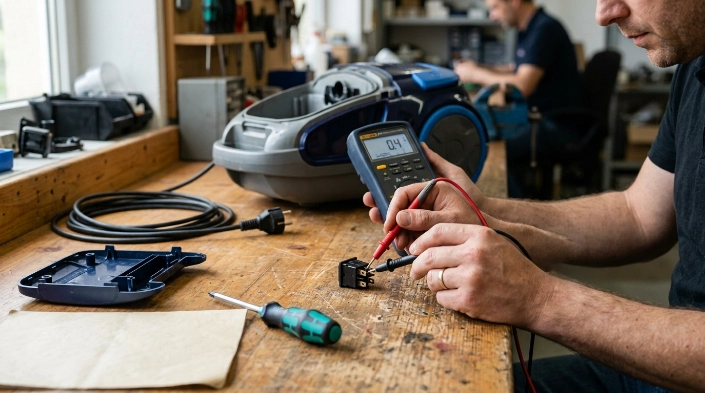
A switch can often be tested for electrical continuity, but only after the vacuum is disconnected from all power. For cordless models, that also means removing or disconnecting the battery when the design allows it.
What is a continuity test?
A continuity test checks whether electricity could pass through a circuit path. A multimeter can perform this test on an isolated switch without powering the vacuum.
In a basic two-terminal mechanical switch, the expected pattern is normally:
- Switch off: The circuit remains open.
- Switch on: The circuit closes.
The exact terminals and expected readings depend on the switch design. Multi-terminal switches, electronic triggers, and control-board systems require model-specific service information.
I would not identify a switch as defective solely because the vacuum will not start. The switch must be electrically isolated and tested correctly before that conclusion becomes useful.
Should you replace the switch yourself?
That depends on the vacuum and your electrical repair skills. Some switches are modular parts with simple connectors, while others sit deep inside housings next to mains-voltage wiring.
Before considering replacement, confirm:
- The exact vacuum model number
- The correct switch part number
- The terminal arrangement
- The manufacturer’s disassembly procedure
- Whether opening the appliance affects its warranty
Never substitute a random switch because it physically fits. Electrical ratings and switching configuration matter.
As of 2026, many cordless vacuums also rely on electronic controls rather than a simple mechanical power path. A trigger problem can therefore involve a microswitch, battery connection, wiring harness, or circuit board.
When should you repair instead of replace the vacuum?
A switch replacement can make sense when the vacuum otherwise performs well and the correct part is available. A simple mechanical failure does not automatically justify replacing the entire appliance.
Replacement becomes more reasonable when several expensive components are failing together. A damaged motor, unavailable electronics, battery deterioration, cracked housing, and switch problem can make repairs less practical.
Expert Alert: Stop using the vacuum and arrange professional service if you find scorched wiring, melted connectors, exposed conductors, recurring breaker trips, smoke, sparks, or a persistent electrical burning smell.
Vacuum Switch FAQ
Why does my vacuum only turn on after pressing the switch several times?
An intermittent switch, loose connection, damaged actuator, or another power-path fault could cause this behavior. If the problem is becoming more frequent, stop repeatedly forcing the switch and have the power path inspected.
Can overheating make it look like the vacuum switch is broken?
Yes. Some vacuums use thermal protection that stops operation when the machine gets too hot. A full bin, dirty filter, obstructed hose, or other airflow restriction can contribute to overheating.
Why did my vacuum suddenly stop and then work again later?
A temporary thermal shutdown is one possibility, especially if the machine felt hot before stopping. Unplug it, check the airflow path and filters, and follow the manufacturer’s cooling and maintenance instructions.
Can a damaged cord cause the power switch to stop working?
Yes. If a conductor inside the cord is broken, electricity may never reach the switch. Inspect the unplugged cord for visible damage, especially near the plug and the point where the cord enters the vacuum.
Is it safe to bypass a bad vacuum switch?
No. Do not bypass the switch, thermal protection, fuse, interlock, or other safety component to keep the vacuum running. Replace the correct faulty part or have the appliance professionally repaired.
How do I know whether the motor or switch is bad?
Symptoms alone may not distinguish them. First verify the outlet, cord, airflow, cooling condition, and accessible safety features. Proper switch continuity testing and model-specific electrical diagnosis can then separate switch failure from downstream faults.
My main takeaway: When a vacuum switch stops responding, do not replace the switch first. Confirm power, inspect the cord, clear airflow restrictions, and rule out overheating before moving inside the appliance.
If those checks do not restore operation, use your vacuum’s exact model number to find the manufacturer’s service information or take it to a qualified appliance technician. That is safer than guessing at live electrical components.
