
What Causes a Vacuum Brush to Stop Spinning?

Quick Answer
A vacuum brush usually stops spinning because hair or string has jammed the roller, the drive belt has slipped or broken, the brush-roll setting is off, or the powered floorhead has a mechanical or electrical fault. Disconnect the vacuum from power before touching the roller, then start with visible debris and simple settings before replacing parts; Consumer Reports’ vacuum belt guide explains how a failed belt can leave suction working while the brush stops.
Check These Causes First
- Wrapped hair: Hair, thread, pet fur, and carpet fibers can lock the roller or its ends.
- Broken belt: A snapped, stretched, or displaced belt cannot drive a belt-powered brush roll correctly.
- Wrong setting: Some vacuums deliberately stop the brush in hard-floor mode.
- Jammed bearings: Debris hidden around the roller ends can create enough resistance to stop rotation.
- Floorhead problem: Motorized heads may develop connector, wiring, gear, or brush-motor faults.
- Protection shutdown: Some models stop the roller after detecting excessive resistance or another fault.
Before You Restart It
- Remove the obstruction, check that accessible parts move normally, reassemble the floorhead correctly, and test it only after your hands and tools are clear.
Few vacuum problems are as frustrating as hearing normal suction while the floor brush sits still. I usually find that the cause is much simpler than a dead vacuum motor.
In this 2026 troubleshooting guide, I’ll show you how I narrow down a stopped vacuum brush safely. We’ll cover tangles, belts, settings, bearings, powered floorheads, carpet-related problems, and warning signs that deserve professional repair.
In This Guide
- What Does a Vacuum Brush Roll Do?
- Why Does a Vacuum Brush Stop Spinning?
- How Do You Troubleshoot a Vacuum Brush That Won’t Spin?
- How Can You Tell Whether the Belt, Brush Roll, or Motor Is Bad?
- Why Does the Vacuum Brush Stop Only on Carpet?
- How Can You Keep the Vacuum Brush From Stopping Again?
- Vacuum Brush Not Spinning FAQ
What Does a Vacuum Brush Roll Do?
A vacuum brush roll is the rotating cylinder inside many vacuum floorheads. Its bristles, fins, or similar agitators disturb carpet fibers and move debris toward the suction opening.
Definition: The vacuum brush roll may also be called a roller brush, agitator, beater bar, or powered roller. The exact design varies between upright, canister, stick, and robot vacuums.
The roller and the suction system perform different jobs. That distinction explains why a vacuum can still pull air when its brush has stopped.
- Suction system: Moves air and loose debris through the vacuum.
- Brush roll: Agitates flooring and loosens debris for pickup.
- Drive system: Turns the roller through a belt, gears, or dedicated motor.
- Floor controls: May switch the brush on or off for different surfaces.
Consumer Reports notes that some vacuums include an on/off brush-roll switch for changing between bare floors and carpets. Its vacuum cleaner buying guide also explains how floorhead features differ among vacuum designs.
This is why I always check the controls before opening the floorhead. A brush that is intentionally switched off does not need a repair.
Why Does a Vacuum Brush Stop Spinning?
A vacuum brush stops when something prevents the roller from moving or the drive system can no longer turn it. Hair buildup, belt problems, incorrect settings, and resistance around the roller ends are common places to start.
Hair, thread, or pet fur is wrapped around the roller
Long flexible material can wind tightly around a spinning brush roll. The buildup becomes especially troublesome near the ends of the roller.
I’ve opened floorheads where the middle of the brush looked almost clean. A hard ring of hair hidden beside the end cap was enough to keep the roller from moving freely.
- Long human hair
- Pet fur
- Thread and yarn
- Carpet fibers
- String or dental floss
- Rug fringe
The drive belt has failed
Many traditional upright vacuums use a rubber belt to transfer movement to the brush roll. A broken belt leaves the roller motionless even though the vacuum may still produce suction.
A belt does not need to snap completely to cause trouble. Stretching, glazing, slipping, or incorrect installation can also reduce brush rotation.
The brush-roll setting is off
Check the simple controls next. Some models stop brush rotation on hard floors to reduce scattering or protect certain surfaces.
- Look for a carpet or rug mode.
- Check for a separate brush-roll button.
- Move the handle into its normal cleaning position.
- Make sure a detachable floorhead is fully connected.
The roller ends are binding
Debris can hide behind end caps, bushings, or bearing areas. The brush may look clean while remaining difficult to turn.
With the vacuum safely disconnected, check the roller only as your manual permits. Severe resistance after cleaning can indicate a damaged roller-end component.
A motorized floorhead has developed a fault
Many cordless and canister vacuums use a dedicated motor inside the floorhead. These designs may not have the traditional user-replaceable belt you expect.
A dirty electrical connector, damaged gear, loose connection, or failed floorhead motor can stop the brush. Those faults require model-specific troubleshooting.
Section Takeaway: Most stopped brushes come down to a blockage, drive problem, setting, or floorhead fault. Start with the visible and accessible causes before assuming the main vacuum motor has failed.
How Do You Troubleshoot a Vacuum Brush That Won’t Spin?
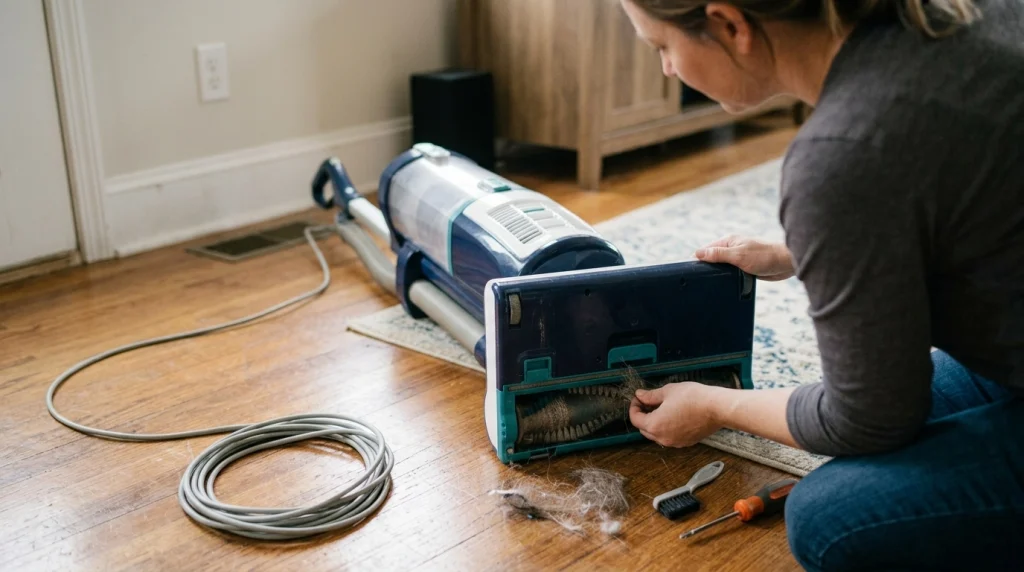
Troubleshoot from the safest and simplest checks toward the more mechanical ones. This approach reduces unnecessary disassembly and helps prevent accidental damage.
1. Disconnect the vacuum from power
Unplug a corded vacuum before touching the floorhead. For a cordless model, switch it off and remove the battery when the manufacturer designed it to be removable.
Don’t rely only on the trigger or power button. Your fingers will be close to a component designed to spin quickly.
2. Inspect the entire brush roll
Turn the floorhead over and use good lighting. Look at the full roller, both ends, and the gap between the brush and housing.
- Remove visible hair and thread.
- Check for coins, clips, stones, or toy pieces.
- Inspect the ends for tightly packed fibers.
- Look for cracked or warped roller parts.
- Check the intake opening for lodged debris.
3. Remove tangles carefully
Use your vacuum’s supplied cleaning tool when available. Small scissors or a seam ripper may help, but keep sharp edges away from belts, wiring, and soft floorhead parts.
Cut across the wrapped material and pull it away in sections. Avoid digging a blade into the roller itself.
4. Inspect the belt if your model has one
Follow the owner’s manual before removing a baseplate. Look for a belt that is broken, displaced, badly stretched, cracked, frayed, or polished from slipping.
Use the replacement belt specified for your exact model. A similar-looking belt can still have the wrong dimensions or tension.
5. Reassemble and run a short test
Reinstall the roller, end caps, belt, cover, and fasteners exactly as directed. Then test the machine briefly on a suitable floor surface.
Stop immediately if you smell burning, see smoke or sparks, hear harsh grinding, or notice melted components.
Expert Alert: Damaged wiring, repeated electrical failures, sparking, overheating, or an inaccessible floorhead motor should be handled by a qualified appliance technician rather than opened as a DIY electrical repair.
The U.S. Consumer Product Safety Commission maintains a vacuum cleaner recall section. It is worth checking if your problem involves unusual overheating, battery behavior, smoke, or another possible product-safety issue.
How Can You Tell Whether the Belt, Brush Roll, or Motor Is Bad?
The symptoms can help narrow the fault before you buy replacement parts. No single symptom proves a diagnosis, so confirm it against your model’s manual.
| What You Notice | Likely Area to Check | Useful Next Check |
|---|---|---|
| Suction works but brush never turns | Belt, brush setting, jam, or powered head | Check controls, tangles, and drive system |
| Brush turns in the air but stops on carpet | Weak belt, heavy resistance, height setting | Inspect belt and carpet-height setting |
| Roller is hard to move when power is disconnected | Hair, end caps, bearings, physical damage | Clean roller ends and inspect for damage |
| Brush starts and then repeatedly stops | Recurring jam, overload, connection, protection system | Remove resistance and follow model reset instructions |
| Grinding, rattling, or uneven rotation | Roller ends, gears, debris, damaged brush | Stop testing and inspect mechanical parts |
| Burning smell or visible melting | Seized roller, slipping belt, electrical fault | Switch off immediately and investigate safely |
A broken belt is often easier to diagnose than a motor fault. The vacuum may sound normal and maintain airflow while the roller stays still.
A damaged brush roll often gives more mechanical clues. It may bind, wobble, scrape, or remain stiff even after all visible debris is removed.
Motorized floorhead problems can be harder to isolate. If the mechanical parts are clean and properly seated, follow the manufacturer’s electrical troubleshooting procedure instead of guessing.
Why Does the Vacuum Brush Stop Only on Carpet?
A brush that spins on hard flooring but stops on carpet is often encountering too much resistance. The cause may be carpet height, a weak belt, a restricted roller, or a floorhead protection feature.
The floorhead is sitting too low
Some upright vacuums have manual carpet-height adjustment. A head set too low can press the brush deeply into thick pile.
Raise the setting one step and test again if your manufacturer recommends that adjustment. Don’t raise it more than needed, because excessive clearance can reduce carpet agitation.
The belt slips under load
A worn belt may still turn an unloaded brush. Once the roller contacts carpet, the extra resistance can expose the problem.
Look for obvious looseness, cracking, glazing, or other damage. Replace it only with the correct part for your machine.
The carpet or rug itself creates resistance
Thick pile, loose fibers, rug fringe, and lightweight rugs can interfere with some powered brushes. Never let fringe or cords feed into a rotating roller.
If the brush works normally on other carpets, check the vacuum manufacturer’s guidance for that particular surface. Some delicate rugs are better cleaned with the rotating brush disabled.
The vacuum is protecting itself
Some modern cleaners can stop a brush after detecting a blockage or heavy resistance. Reset procedures differ, so use the instructions for your exact model.
Section Takeaway: A brush that stops only when it touches carpet usually points toward increased mechanical resistance rather than a complete loss of power.
How Can You Keep the Vacuum Brush From Stopping Again?

Regular inspection prevents many brush-roll problems. I prefer a quick visual check over waiting until hair has formed a thick layer around the roller.
- Remove hair early: Clear long strands before they tighten around the roller ends.
- Avoid loose cords: Pick up charging cables, thread, ribbon, and similar objects before vacuuming.
- Watch rug fringe: Keep tassels away from powered brushes unless your manual says the surface is suitable.
- Check the belt: Inspect accessible belts when you already have the floorhead open for maintenance.
- Use the right floor mode: Match the brush and height settings to the surface.
- Follow the manual: Different brush rolls, filters, belts, and floorheads have different maintenance requirements.
Brush-roll maintenance is only one part of vacuum care. Keeping the airflow path, dust bin or bag, and filters maintained according to the manufacturer also helps the machine operate normally.
The EPA notes that household dust can contain particles such as pollen, pet dander, mold spores, and dust-mite material. Its indoor particulate matter guidance recommends regular cleaning and discusses HEPA-filtered vacuums as one way to reduce some dust escaping back into indoor air.
That doesn’t mean fixing a spinning brush is a medical treatment or guarantees cleaner air. It simply keeps an important mechanical part of your normal floor-cleaning system working as intended.
Vacuum Brush Not Spinning FAQ
Can a vacuum still have suction if the brush is not spinning?
Yes. The suction motor and brush-roll drive can be separate systems, so airflow may continue even when the roller stops. Check for tangles, an incorrect brush setting, a damaged belt, or a powered-floorhead problem.
Why does my vacuum brush spin and then stop?
A roller that starts and stops may be encountering excessive resistance, a recurring obstruction, a slipping belt, or a protection system. Disconnect power, clear the roller and end areas, then follow your model’s reset instructions before testing again.
Why isn’t my vacuum brush spinning after I cleaned it?
Check whether the brush roll was seated correctly during reassembly. Also inspect the end caps, belt position, brush-roll switch, floor mode, and any powered-head connectors that were disconnected during cleaning.
Can hair stop a vacuum brush from spinning?
Yes. Long hair, pet fur, thread, and similar fibers can wrap tightly around the roller and its ends. Enough buildup can increase friction until the brush slows down or becomes completely jammed.
How do I know if my vacuum belt is broken?
A belt-driven brush may stop completely while suction remains. Inspect the accessible belt according to your manual and look for breakage, displacement, cracking, stretching, fraying, or obvious loss of tension.
Should I replace the entire vacuum if the brush stops spinning?
Usually not before troubleshooting it. A tangle, belt, floor setting, or replaceable roller can cause the same symptom, so identify the failed component before deciding whether replacing the whole vacuum makes sense.
When should I stop troubleshooting the vacuum myself?
Stop if you find damaged wiring, melted electrical parts, sparks, smoke, repeated overheating, or an inaccessible motor fault. A qualified repair technician can diagnose those problems without exposing you to unnecessary electrical or fire risk.
What Should You Do First When a Vacuum Brush Stops?
Start by disconnecting power and checking the roller for hair, string, and trapped debris. Then confirm the floor setting and inspect the drive belt or powered floorhead according to your vacuum’s manual.
In my experience, working from simple mechanical causes toward more complex ones saves both time and unnecessary parts. If cleaning, correct settings, and approved maintenance don’t restore the brush, professional diagnosis is safer than opening electrical components blindly.
