
Why Is My Robot Vacuum Side Brush Not Spinning?

Quick Answer
A robot vacuum side brush usually stops spinning because hair is wrapped under the hub, debris is blocking the mounting post, the brush is installed incorrectly, or the brush or drive module is damaged. Power the robot off first, remove the side brush as your manual directs, and clean underneath it. Consumer Reports’ robot vacuum cleaning guidance also notes that hair can wrap around side brushes and stop them from spinning properly.
Check these causes first
- Wrapped hair: Hair and thread can tighten around the hidden shaft beneath the brush.
- Trapped debris: Grit, fibers, or string can jam the small gap around the brush hub.
- Loose installation: A brush that is not seated or screwed in correctly may slip or bind.
- Worn brush: A cracked center hub may fail to engage the drive post correctly.
- Wrong replacement: A similar-looking brush may not fit your exact robot model.
- Drive fault: If the brush and mounting area are clean, the side-brush motor or gear assembly may need service.
Best first move
- Turn the robot off, remove the side brush, clean the brush and post, reinstall it correctly, then run a short test on an open floor.
If your robot vacuum is still cleaning the middle of the room but leaving crumbs beside walls, I would check the side brush first. That little spinning brush does much of the work around edges, furniture legs, and corners.
I have found that the visible bristles are rarely the whole story. The trouble is often hidden under the center hub, where hair can wind tightly around the mounting post.
In This Guide
- Why does a robot vacuum side brush stop spinning?
- How do you fix a robot vacuum side brush that is not spinning?
- Should you clean, replace, or repair the side brush?
- Why does the side brush turn by hand but not during cleaning?
- How can you stop the side brush from jamming again?
- Frequently asked questions
- Final takeaway
Why Does a Robot Vacuum Side Brush Stop Spinning?
A robot vacuum side brush normally stops because something is physically restricting it or the drive system can no longer turn it. Hair around the hub is one of the first things I check.
A robot vacuum side brush is a small rotating brush near the outer edge of the robot. It sweeps debris away from walls and toward the machine’s main cleaning path.
Hair or thread is wrapped underneath the brush
Long hair, pet fur, sewing thread, and carpet fibers can work underneath the visible brush arms. They then wind around the mounting post like string around a spool.
The brush may slow down before stopping completely. You may also hear clicking as the motor tries to move the jammed hub.
- Long human hair can wrap tightly around the post.
- Pet fur can combine with dust into a dense ring.
- Thread can cut deeply into the gap around the hub.
- Carpet fibers may be difficult to see without removing the brush.
Official iRobot edge-sweeping brush care guidance tells owners to remove debris from both the brush and its mounting post.
The brush is installed incorrectly
A recently cleaned or replaced brush can fail if it is not seated correctly. Screw-mounted brushes should sit flat against the mounting area.
A loose screw can let the brush wobble. Overtightening can also damage a small plastic hub, so follow your model’s instructions.
The center hub is cracked or stripped
The motor may be turning while the brush itself remains still. This can happen when the plastic center of the brush no longer grips its drive point.
Remove the brush and inspect its center opening. Cracks, rounding, or obvious looseness usually point toward replacement rather than more cleaning.
The brush is rubbing against the robot body
Badly bent brush arms sometimes drag against the underside of the machine. An incorrect replacement brush can do the same thing.
Look for scuff marks or a brush that sits noticeably higher or lower than the original. Stop using it if it binds.
The drive mechanism has failed
If the removable brush is clean and correctly installed, the fault may be below it. The small motor, gears, wiring, or connector can fail.
This is more likely when several known-good brushes refuse to spin. It is also possible when the drive post itself does not move during a model-approved diagnostic.
Section Takeaway: Most side-brush problems start with hair, debris, installation, or wear. A clean, correctly fitted brush that still will not operate points toward a deeper drive-system problem.
How Do You Fix a Robot Vacuum Side Brush That Is Not Spinning?
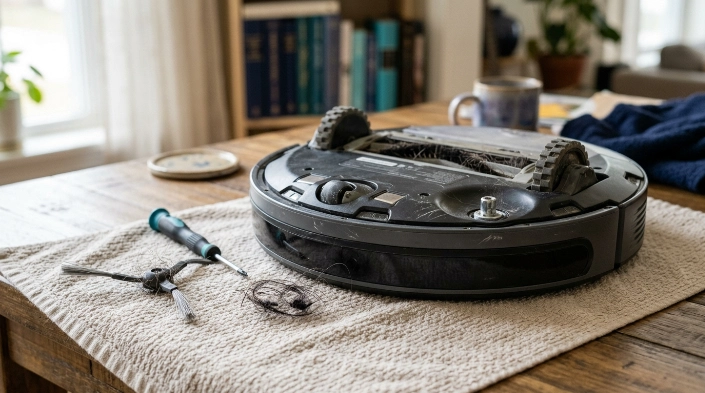
Start with the simplest and safest checks. Do not open the robot’s electrical assemblies just because the brush stopped moving.
1. Turn the robot vacuum off
Stop the cleaning cycle and remove the robot from its charging dock. Power it down according to the owner’s manual.
Place a towel on a stable surface. Turn the robot upside down carefully.
2. Check the side brush before removing it
Look for hair, string, a loose screw, broken arms, and obvious debris. Note whether the brush sits flat.
Gently check for obvious binding while the robot is powered off. Do not force a brush that refuses to move.
3. Remove the side brush correctly
Attachment methods vary. Some brushes use a small screw, while other designs pull or release in a different way.
Never pry aggressively at an unfamiliar brush. Check your owner’s manual when the removal method is unclear.
4. Clean underneath the hub
This is the step I consider most important. A brush that looks clean from above can still have a tight hair ring underneath.
- Pull away loose hair with your fingers or tweezers.
- Cut tightly wrapped thread carefully if necessary.
- Clean debris from the center of the removable brush.
- Inspect the mounting post and the narrow surrounding gap.
- Remove grit without pushing it deeper into the robot.
Roborock’s S4 maintenance instructions, for example, direct owners to unscrew the side brush, clear trapped hair, reinstall it, and tighten the screw.
5. Inspect the brush for damage
Cleaning cannot repair a split center hub. It also cannot restore missing brush arms.
Compare the brush with a compatible new one when possible. Pay particular attention to the center mounting shape.
6. Reinstall it securely
Place the brush back in its correct position. Confirm that it sits flat before tightening any retaining screw.
Do not force an incompatible replacement onto the post. Similar appearance does not guarantee compatibility.
7. Run a short floor test
Return the robot to an open section of floor and start a brief cleaning cycle. Watch the side brush rather than sending the robot away unattended.
- Check whether rotation starts.
- Listen for clicking or grinding.
- Watch for wobbling.
- Confirm the brush reaches the floor normally.
- Stop the test if the brush repeatedly jams.
Some robots provide model-specific error messages. Eufy’s L70 Hybrid Error 3/S3 troubleshooting, for example, identifies improper side-brush rotation and recommends cleaning the brush and connector area before testing again.
Expert Alert: If diagnosis requires opening a powered motor assembly, testing internal wiring, or repairing a circuit, stop DIY troubleshooting and contact the manufacturer or a qualified appliance repair technician.
Section Takeaway: Power off, remove, clean, inspect, reinstall, and test. If that sequence does not restore normal rotation, move from brush maintenance to model-specific service guidance.
Should You Clean, Replace, or Repair the Side Brush?
Cleaning is best when debris causes the problem. Replacement makes more sense when the removable brush itself is worn or damaged.
Repair or manufacturer support becomes the safer choice when the drive mechanism appears faulty.
| What you notice | Likely issue | Best first action |
|---|---|---|
| Hair packed around the hub | Mechanical obstruction | Remove and clean the brush and mounting post |
| Brush wobbles after reinstalling | Loose fitting or damaged hub | Reseat it and inspect the center hub |
| Cracked center or missing bristles | Worn consumable brush | Install a compatible replacement |
| New brush still will not spin | Mounting or drive problem | Recheck compatibility, seating, and drive post |
| Several compatible brushes fail | Possible motor, gear, or electrical fault | Use manufacturer service guidance |
How often do side brushes need maintenance?
There is no universal interval because manufacturers use different designs. As of 2026, model-specific maintenance schedules still vary.
For example, iRobot currently recommends cleaning its edge-sweeping brush about weekly or as needed on the models covered by its general guidance. It recommends replacement about every three months or as needed.
Some Roborock manuals use a different schedule. Certain models call for monthly side-brush cleaning and replacement around every three to six months.
Those numbers are examples, not rules for every robot vacuum. Your exact model’s instructions should take priority.
Why Does the Side Brush Turn by Hand but Not During Cleaning?
A brush that moves by hand but does not rotate under power may not be receiving usable drive force. It can also be slipping on the mounting post.
The brush hub may be slipping
Your fingers can turn a damaged brush even when its hub cannot grip the motor’s drive point. Inspect the center closely for wear.
A new compatible brush is a useful check when the original hub looks damaged. Avoid forcing a mismatched part.
The robot may have detected excessive resistance
Some powered brush systems use protection logic when a brush becomes jammed or overloaded. Exact behavior depends on the manufacturer and model.
Remove any obstruction and let the robot return to normal operating condition before retesting. Follow any app or voice-error instructions first.
The drive post may not be turning
If your manufacturer provides a safe diagnostic procedure, use that procedure rather than improvising one. Testing methods differ because robots use cliff sensors, bumpers, and other safety systems.
Do not bypass sensors or run an upside-down robot unless the manufacturer specifically instructs you to do so for that model.
How Can You Stop the Side Brush From Jamming Again?
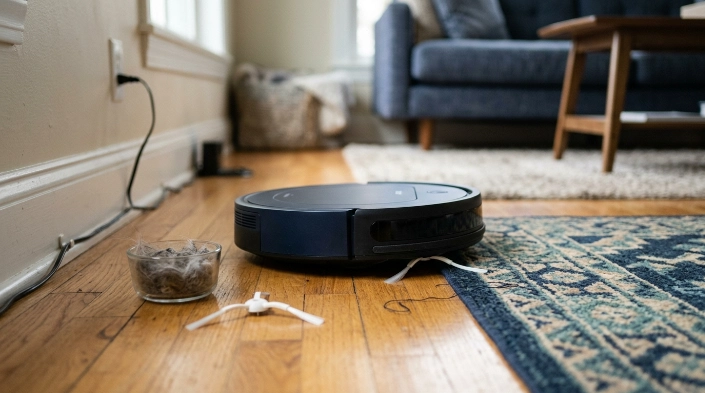
Regular inspection prevents many side-brush problems. Homes with long hair, pets, rugs, and loose fibers usually need more frequent checks.
- Check underneath: Inspect the hidden hub instead of looking only at the bristle tips.
- Remove string: Pick up thread, charging cables, ribbon, and similar items before cleaning.
- Inspect after tangles: Check the brush after the robot encounters loose rug fibers or long hair.
- Use compatible parts: Match replacements to the exact robot model.
- Watch brush shape: Replace a cracked hub or severely worn brush instead of repeatedly forcing it back into service.
- Follow the manual: Manufacturer schedules are more reliable than a universal replacement calendar.
I also avoid waiting for edge cleaning to become poor. A 30-second inspection of the hub can reveal a hair wrap before it becomes dense enough to stop rotation.
If your robot repeatedly develops the same problem, inspect the floor environment too. Loose threads, pet hair clumps, and fraying rugs can continually feed material into the side-brush hub.
Frequently Asked Questions
Can I run my robot vacuum without the side brush?
Some robots may operate without a removable side brush, but edge-cleaning performance will usually suffer. Do not assume your model is designed for normal operation without it; follow the manufacturer instructions for your exact robot.
Why is only one side brush spinning?
If your robot has two powered side brushes and only one works, inspect the stopped brush for hair, incorrect installation, or damage. Some robot designs use only one side brush, so first confirm how your model is supposed to operate.
Should a robot vacuum side brush spin all the time?
Not necessarily. Side-brush behavior can vary with cleaning mode, navigation logic, floor type, edge-cleaning routines, and manufacturer programming. Compare what you see with the normal behavior described in your model’s manual.
Can hair permanently damage a robot vacuum side brush?
Hair usually causes a removable obstruction first, but a severe tangle can put extra stress on the brush hub or drive mechanism. Remove wrapped hair promptly and inspect the hub for cracking or deformation before reinstalling it.
Why did my new side brush stop spinning?
A new brush can fail to turn if it is incompatible, installed incorrectly, overtightened, or sitting over debris left on the mounting post. Remove it, compare it with the original, clean underneath, and reinstall it according to the manual.
Do I need to replace the motor if cleaning does not work?
Not automatically. First rule out a damaged brush, incompatible replacement, incorrect seating, hidden debris, and any model-specific error condition. A motor or drive-module problem becomes more likely only after those simpler causes have been eliminated.
Can I spray lubricant under the side brush?
Do not add oil, silicone spray, or another lubricant unless the manufacturer specifically instructs you to use it there. Lubricants can attract dust or reach materials and electrical components that were not designed for them.
Get the Side Brush Moving Again
When a robot vacuum side brush stops spinning, start underneath the brush. Hair around the hidden hub, a dirty mounting post, poor installation, and a worn brush are easier to fix than an internal drive failure.
Clean and inspect the removable parts first, then run a short controlled test. If a clean, compatible brush still refuses to work, use your manufacturer’s model-specific service instructions instead of opening electrical assemblies yourself.
