
Why Does My Cordless Vacuum Stop After a Few Minutes?

Quick Answer
A cordless vacuum that stops after a few minutes usually has a restricted airflow path, dirty filter, overheating protection, weak battery, or unusually high power demand. Battery problems are also common in cordless stick vacuums, according to Consumer Reports’ vacuum reliability research.
What to check first
- Check the charge: Fully charge the battery with the correct charger before troubleshooting further.
- Empty the bin: A packed dustbin can restrict airflow and increase the load on the vacuum.
- Inspect the filter: Clean or replace it only as your model’s manual allows.
- Look for clogs: Check the floorhead, wand, air inlet, and accessible airflow passages.
- Check for heat: If the vacuum is unusually hot, switch it off and allow it to cool.
- Consider the battery: A worn battery may show full charge but lose voltage quickly under load.
One important warning
- Stop using the vacuum if the battery is swollen, damaged, smoking, leaking, or becoming abnormally hot.
A cordless vacuum that suddenly dies five or ten minutes into cleaning can be frustrating. I approach this problem in a fixed order because random part swapping often wastes time and money.
This guide covers overheating, filters, blockages, battery wear, power modes, chargers, brush rolls, and warning signs that need professional attention.
In This Guide
Why Does a Cordless Vacuum Keep Shutting Off?
The most likely causes are restricted airflow, overheating, battery trouble, a clogged brush head, or normal battery depletion in a high-power mode. The shutdown pattern often tells you where to look first.
A cordless vacuum depends on both airflow and battery power. Problems on either side can make an otherwise functional machine stop unexpectedly.
| Possible Cause | Typical Clue | First Check |
|---|---|---|
| Dirty filter | Weak suction, heat, or repeated cutoffs | Inspect filter condition |
| Airway blockage | Pulsing, strange sound, reduced airflow | Check wand, inlet, and floorhead |
| Overheating | Machine stops after warming up | Switch off and inspect airflow |
| Aging battery | Runtime has gradually become shorter | Compare runtime after a full charge |
| High-power mode | Short runtime only on Max or Boost | Test a normal power setting |
| Brush obstruction | Stops mainly when using the floorhead | Inspect the roller for hair and fibers |
Definition: A thermal cutoff is a protective system that shuts down equipment when operating temperature becomes too high. Some vacuum manufacturers use this protection to reduce the risk of heat-related damage.
For example, Dyson lists blockages, dirty filters, and excessive temperature among possible causes of intermittent shutoffs on supported cordless models. Its cordless vacuum support guidance also shows why warning messages matter during diagnosis.
Section Takeaway: The timing of the shutdown matters. A vacuum that becomes hot before stopping points you in a different direction from one whose runtime has slowly declined for months.
How Can I Tell If the Vacuum Is Overheating or Blocked?
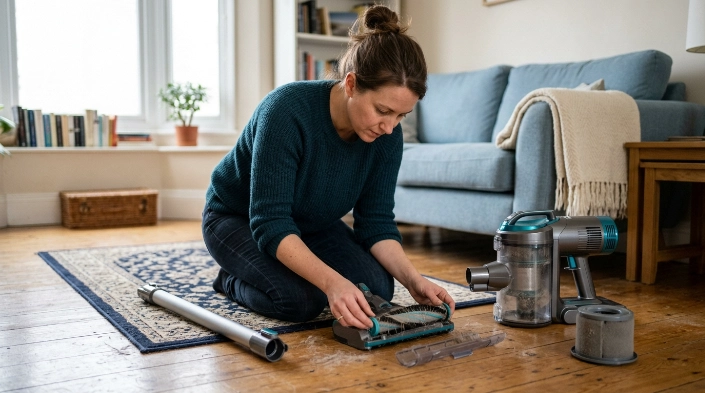
Suspect overheating or restricted airflow when the vacuum runs normally while cool, then stops after several minutes and works again after resting. Weak suction or pulsing strengthens that suspicion.
The motor relies on an open airflow path. Dust, pet hair, fibers, and packed debris can restrict that path.
Signs of an airflow problem
- Suction suddenly drops: Debris may be restricting the intake, wand, or filter.
- The motor pulses: Some machines react to airflow restrictions by repeatedly changing power.
- The body feels hotter: Restricted airflow may increase operating temperature.
- The floorhead sounds strained: Hair or thread may be limiting brush movement.
- The vacuum restarts later: A thermal protection system may have reset after cooling.
Where should you look for a blockage?
Switch the machine off first. Remove the battery if your manufacturer’s instructions recommend doing so before maintenance.
- Floorhead inlet
- Brush-roll channel
- Wand or extension tube
- Dustbin inlet
- Accessible cyclone passages
- Pre-motor and exhaust filters
Don’t push sharp tools into hidden passages. You can damage seals, wiring, plastic ducts, or internal components.
If a filter is washable, follow the exact drying instructions in your manual. Never assume every filter can be washed.
Section Takeaway: If the vacuum gets hot, loses suction, and works again after cooling, check airflow and maintenance items before blaming the battery.
Could the Battery Make My Cordless Vacuum Stop Early?
Yes. Battery deterioration is one of the most important causes of shortening cordless-vacuum runtime. A battery can appear charged yet deliver much less usable energy under load.
Lithium-ion batteries gradually lose usable capacity with age and cycling. Heat and demanding power settings can also affect how long a charge lasts during cleaning.
Signs the battery may be wearing out
- Runtime declined gradually: The vacuum once cleaned much longer on the same setting.
- Boost mode fails first: High demand may expose a weak battery sooner.
- Charging seems abnormal: The indicator never behaves as the manual describes.
- A full charge changes little: Runtime remains unusually short after proper charging.
- The vacuum dies under heavy load: Carpet or a powered head causes faster shutdowns.
Don’t compare your runtime with an advertisement without checking the test conditions. Runtime can change with power mode, attachment, floor type, battery age, and cleaning resistance.
Is a short Boost-mode runtime always a fault?
No. Higher power normally consumes battery energy faster, so shorter runtime in a maximum-power mode can be expected.
The useful comparison is with your vacuum’s previous behavior. A major unexplained decline under the same conditions deserves investigation.
Battery temperature matters too. Let the battery return to a normal temperature before charging if your manual instructs you to do so.
Never open or rebuild a sealed lithium-ion battery pack yourself. Replace it only with an approved compatible battery and follow the manufacturer’s instructions.
What Should I Check First?
Use a simple sequence so you change only one variable at a time. That makes the cause easier to identify.
- Fully charge the vacuum. Use the correct charger and confirm the indicator behaves normally.
- Empty the dustbin. Don’t continue with debris packed above the recommended fill level.
- Inspect the filter. Clean or replace it only according to the manufacturer’s instructions.
- Check the airflow path. Look through accessible openings, the wand, and the floorhead.
- Clear the brush roll. Remove wrapped hair, thread, and fibers with the machine switched off.
- Let an overheated machine cool. Don’t repeatedly restart a vacuum that keeps becoming unusually hot.
- Test normal power mode. Compare it with Max or Boost mode.
- Test without the powered floorhead if your manual permits it. If the problem disappears, investigate the cleaner head.
I prefer this order because the first checks cost nothing and cover several common problems. Replacing a battery before checking a clogged filter can turn a simple maintenance issue into an unnecessary purchase.
What if the vacuum works after cleaning the filter?
That strongly suggests airflow was involved, although it doesn’t prove the filter was the only restriction. Keep watching for another cutoff during normal use.
A filter that clogs unusually quickly may also point to heavy fine-dust use, an overfilled bin, incorrect filter installation, or another airflow problem.
What if it shuts off only with the floorhead attached?
Inspect the floorhead for tangled hair, thread, packed debris, or a jammed roller. A powered cleaner head adds mechanical and electrical load.
Stop the test if the head smells burnt, becomes abnormally hot, sparks, or produces unusual electrical noises.
When Does the Problem Need Repair?
Move beyond basic cleaning when the vacuum keeps cutting out despite a clear airflow path, clean filters, correct charging, and a healthy-looking battery. Charger, motor, battery-management, sensor, wiring, or control-board faults may require proper diagnosis.
Expert Alert: Stop DIY troubleshooting if you find exposed wiring, melted plastic, electrical arcing, smoke, a burning smell, liquid inside powered components, or battery damage. Contact the manufacturer or a qualified appliance technician.
Battery safety needs extra attention
Lithium-ion battery failures shouldn’t be treated as ordinary maintenance problems. The U.S. Consumer Product Safety Commission has documented vacuum recalls and warnings involving batteries that overheated or ignited.
If your battery shows dangerous heat, swelling, smoke, or physical damage, stop using the machine. You can also check the CPSC vacuum recall listings for relevant safety notices.
- Don’t puncture a battery.
- Don’t attempt to open a sealed pack.
- Don’t keep charging a visibly damaged battery.
- Don’t continue using a machine that repeatedly smells burnt.
A replacement battery can make sense when the vacuum is otherwise in good condition and the manufacturer still supplies the correct pack. An older machine with several faults may be less economical to repair.
How Can I Prevent Random Shutoffs?
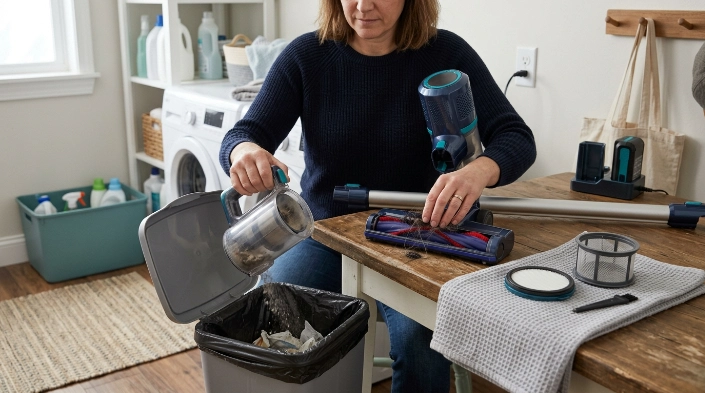
The best prevention is simple maintenance that protects airflow and reduces unnecessary load. Your vacuum’s manual should decide the exact cleaning and replacement schedule.
- Empty the bin regularly: Don’t wait until debris is tightly compacted.
- Inspect the roller: Remove hair and thread before the brush becomes heavily wrapped.
- Maintain filters correctly: Wash only washable filters and reinstall them completely dry.
- Check the air path: Investigate sudden suction loss instead of continuing to run the machine.
- Use Boost selectively: Save maximum power for areas that need it.
- Store the vacuum sensibly: Avoid conditions outside the temperature guidance in your manual.
- Watch battery behavior: Investigate swelling, unusual heat, or rapidly changing runtime early.
A clean vacuum also matters for household dust control. The EPA’s indoor particulate matter guidance notes that HEPA-filtered vacuuming can help keep some collected dust from escaping back into indoor air.
HEPA stands for high-efficiency particulate air. Filtration does not fix a failing battery, but keeping the vacuum assembled and maintained as designed supports cleaner operation.
Section Takeaway: Protect airflow, keep moving parts clear, and treat sudden battery or heat changes as warning signs rather than normal behavior.
Frequently Asked Questions
Why does my cordless vacuum run for five minutes and stop?
A five-minute shutdown can come from overheating, restricted airflow, a weak battery, or heavy use of a maximum-power setting. Fully charge it, empty the bin, inspect the filter and airflow path, then compare runtime on normal power.
Why does my vacuum work again after cooling down?
The machine may be activating temperature protection. Filters, airflow blockages, a jammed cleaner head, or another source of excess heat can contribute. Don’t repeatedly restart it without finding the cause.
Can a clogged filter make a cordless vacuum shut off?
Yes. A clogged filter can restrict airflow and reduce performance. On some vacuum designs, restricted airflow may contribute to excessive temperature or trigger protective behavior. Follow your model’s instructions for cleaning or replacing the filter.
How do I know if my cordless vacuum battery is bad?
Look for a clear decline in runtime under the same cleaning conditions, abnormal charging behavior, early shutdowns under load, or a battery that no longer holds useful charge. Physical swelling, damage, smoke, or abnormal heat requires immediate attention.
Why does my cordless vacuum stop on carpet but work on hard floors?
Carpet can place more resistance on the cleaner head and require more power. Check the roller for tangles, make sure the floorhead moves freely, and verify that your vacuum has the correct setting or attachment for that carpet.
Should I replace the battery if my vacuum keeps stopping?
Not immediately. First rule out a full bin, dirty filter, blockage, jammed brush, incorrect charging, and overheating. If runtime remains much shorter than before after those checks, battery replacement becomes a more reasonable possibility.
Can I keep using a cordless vacuum that gets very hot?
No. Stop using it if the heat seems abnormal, especially with a burning smell, smoke, battery swelling, melting, or electrical symptoms. Let ordinary overheating cool and investigate the cause before restarting the machine.
Final takeaway: When a cordless vacuum stops after a few minutes, start with airflow and maintenance before buying parts. Check the charge, bin, filter, blockages, roller, temperature, and power mode in that order, then investigate battery or electrical faults if the problem remains.
If basic maintenance doesn’t restore normal operation, check your model’s manual and manufacturer support information before replacing components. A repeatable diagnosis is safer and usually cheaper than guessing.
