
Why Is My Cordless Vacuum Battery Dying Quickly?

Quick Answer
A cordless vacuum battery usually dies quickly because the vacuum is running in a high-power mode, the battery has lost capacity with age, airflow is restricted, the powered brush is working too hard, or the battery is being exposed to poor charging or storage conditions. Runtime also varies widely between models, as shown in Consumer Reports cordless vacuum testing, so compare today’s runtime with what your own vacuum delivered when it was healthy.
Check These Causes First
- Power mode: Boost or maximum suction can drain the pack much faster than standard or eco mode.
- Battery age: Rechargeable lithium-ion batteries gradually lose usable capacity through normal aging and charge cycles.
- Restricted airflow: A full bin, dirty filter, or blockage can make the vacuum work harder.
- Brush resistance: Hair and thread wrapped around a powered roller can increase the cleaning head’s workload.
- Temperature: Excessive heat and extreme cold can affect lithium-ion battery performance and aging.
- Charging problem: Dirty contacts, the wrong charger, or a faulty dock can prevent a complete charge.
Fast Diagnostic Test
- Fully charge the vacuum, clean the bin, filter, brush roll, and airflow path, then test it in normal mode. If runtime remains dramatically shorter than it used to be, battery deterioration becomes a stronger possibility.
I have seen cordless vacuums look as if the battery suddenly failed when the real problem was a combination of max mode, wrapped hair, and a dirty filter. That is why I troubleshoot the whole machine before ordering a new battery.
This 2026 guide explains what makes a cordless vacuum battery drain quickly, how to identify the real cause, and when replacement makes more sense than further troubleshooting.
In This Guide
- Why Does a Cordless Vacuum Battery Drain So Fast?
- How Can You Tell If the Battery Is Bad or the Vacuum Is Draining It?
- Which Cleaning Habits Drain the Battery Faster?
- Can Dirty Filters and Clogs Reduce Battery Runtime?
- How Should You Charge and Store a Cordless Vacuum Battery?
- When Should You Replace the Cordless Vacuum Battery?
- Frequently Asked Questions
Why Does a Cordless Vacuum Battery Drain So Fast?
A cordless vacuum battery can drain quickly even when nothing is technically broken. Power demand changes with suction mode, floor type, attachments, airflow resistance, and the condition of the battery itself.
Definition: A cordless vacuum battery is a rechargeable energy pack that supplies electricity to the vacuum’s motor, electronics, and powered cleaning head. Many modern cordless vacuums use lithium-ion batteries because they store substantial energy in a relatively light package.
Maximum suction consumes more energy
High or boost mode asks the motor for more power. That can be useful for stubborn debris, but it usually sacrifices runtime.
I treat maximum mode as a spot-cleaning tool rather than my default setting. Standard mode is usually enough for routine hard-floor dust and light debris.
- Eco or low mode: Usually provides the longest available runtime.
- Normal mode: Balances cleaning power and battery use.
- Boost or max mode: Prioritizes suction and can use stored energy much faster.
- Powered floor head: Uses battery power for both suction and the rotating brush motor.
The battery may simply be aging
Lithium-ion batteries do not keep their original capacity forever. Repeated cycling and calendar aging gradually reduce how much useful energy a pack can store.
A battery can therefore show a full-charge indicator yet run for much less time than it did when new. The display shows the battery reached its current full charge, not that its original capacity has been restored.
Research indexed by the National Library of Medicine has also shown that elevated temperature can accelerate lithium-ion battery degradation. Heat protection matters over the long term.
Floor resistance changes the workload
A vacuum gliding across smooth flooring usually faces less resistance than the same machine working through dense carpet. Pet hair, thick rugs, and debris packed into fibers can also raise the cleaning load.
Practical check: If runtime is noticeably longer with the powered floor head removed, inspect that head for tangled hair, stiff bearings, blocked air channels, or another source of resistance.
How Can You Tell If the Battery Is Bad or the Vacuum Is Draining It?
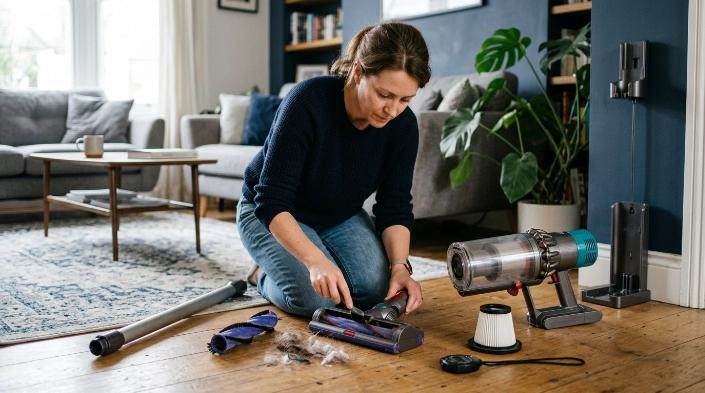
Start by comparing the vacuum with itself, not with an advertised runtime from another model. A clear drop from its previous normal performance is more useful than comparing two unrelated cordless vacuums.
Advertised and tested runtimes can vary substantially between models. Consumer Reports’ cordless stick vacuum listings, for example, show different runtimes and charging times even among vacuums from the same brand.
| Example cordless vacuum | Listed runtime | Listed charge time |
|---|---|---|
| Bissell Air Ram 1984 | 47 minutes | 5 hours |
| Bissell CleanView XR Pet 300W | 26 minutes | 5 hours |
| Bissell IconPet Turbo 31781 | 26 minutes | 4 hours |
| Bissell PowerClean 4173 | 27 minutes | 2 hours |
These Consumer Reports figures are examples of model-to-model variation, not battery-health thresholds for your vacuum.
Run a controlled test
Remove as many variables as possible before blaming the battery. I use the same basic check whenever a cordless vacuum suddenly feels short-lived.
- Charge fully: Use the correct charger or dock and allow the normal charging cycle to finish.
- Empty the bin: Do not test with a tightly packed dirt container.
- Check the filter: Clean it only as directed in the owner’s manual and reinstall it completely dry.
- Clear the airflow path: Inspect the wand, intake, floor head, and attachments.
- Clean the brush roll: Cut away hair, thread, and fibers that resist rotation.
- Select normal mode: Avoid boost mode for the comparison test.
- Time the result: Compare it with your vacuum’s earlier real-world runtime and manufacturer guidance.
Look at the pattern, not one short cleaning session
A battery problem becomes more likely when every cleaning session is dramatically shorter despite a full charge and a clean machine. Sudden shutoffs under ordinary loads can also point toward the battery or its electronics.
In contrast, a vacuum that drains quickly only on one thick carpet or only in boost mode may be experiencing high energy demand rather than a failed battery.
Section Takeaway: A repeatable runtime drop after a full charge and basic maintenance is more convincing evidence of battery wear than one unusually short cleaning session.
Which Cleaning Habits Drain the Battery Faster?
Your cleaning routine can make a healthy battery seem weak. The biggest runtime losses usually come from using maximum power longer than necessary or placing a heavy load on the powered floor head.
- Running max mode continuously: Reserve it for stubborn dirt instead of the entire room.
- Vacuuming dense carpet: Higher resistance can increase the cleaning system’s workload.
- Using powered tools constantly: Motorized attachments consume additional battery energy.
- Ignoring wrapped hair: A restricted roller has to fight unnecessary resistance.
- Cleaning with a packed bin: Poor airflow can reduce effective cleaning and encourage longer cleaning passes.
Another easy mistake is judging battery health immediately after switching cleaning conditions. A vacuum used mostly on hard flooring may appear to lose runtime after you begin cleaning thick rugs or heavy pet hair.
My approach: I start on normal power and increase suction only where the floor needs it. That makes it easier to tell the difference between normal energy use and a battery that is truly deteriorating.
Can Dirty Filters and Clogs Reduce Battery Runtime?
Yes, maintenance problems can contribute to poor cordless vacuum performance. Restricted airflow and mechanical resistance can make the machine less efficient and may cause overheating or protective shutdowns on some models.
Check the dustbin first
An overfilled bin can interfere with normal airflow. Empty it before dirt becomes tightly compressed around the cyclone, screen, or intake area.
Inspect the filter correctly
A heavily loaded filter can restrict airflow. Follow your vacuum’s instructions because some filters are washable while others must remain dry or be replaced.
Never reinstall a washable filter while damp. Moisture where the manufacturer expects a dry filter can cause performance problems and may damage the machine.
- Bin: Empty accumulated debris.
- Filter: Clean or replace it according to the manual.
- Wand: Check for paper, hair clumps, or larger objects.
- Floor head: Inspect internal air channels and the intake opening.
- Brush roll: Remove wrapped fibers and verify free movement.
Watch for thermal shutdowns
If the vacuum runs normally for several minutes, becomes unusually hot, shuts off, and works again after cooling, investigate airflow and brush resistance. Do not repeatedly restart an overheating machine without finding the cause.
Expert Alert: If the vacuum smells burnt, shows melted wiring, sparks, repeatedly overheats after cleaning, or has an electrical fault, stop using it and contact the manufacturer or a qualified appliance technician.
How Should You Charge and Store a Cordless Vacuum Battery?
Use the charger designed or approved for your exact vacuum, and follow the manufacturer’s charging instructions. Battery-management systems vary, so one universal charging routine does not fit every brand.
The U.S. Environmental Protection Agency recommends storing lithium-ion batteries around room temperature and avoiding prolonged exposure to extreme heat or cold. Its lithium-ion battery guidance also warns that long periods in extreme temperatures can damage batteries.
- Use the correct charger: Voltage and battery-management requirements differ between packs.
- Keep contacts clean: Dust or grime can interfere with the connection between the vacuum, battery, and dock.
- Avoid hot storage: Do not leave the battery for long periods in a hot vehicle or intense direct sunlight.
- Avoid extreme cold: Very cold conditions can temporarily reduce battery performance.
- Let excessive heat settle: Follow the manual if the vacuum requires cooling before charging.
- Follow long-term storage instructions: Manufacturers may specify a preferred state of charge for extended storage.
I also avoid forcing repeated charging attempts when a battery is unusually hot or refuses to charge normally. Persistent charging problems deserve troubleshooting rather than repeated resets.
Safety warning: Stop using a battery that is swollen, cracked, leaking, producing an unusual smell, or becoming abnormally hot. Do not puncture, crush, or open a lithium-ion battery pack.
When Should You Replace the Cordless Vacuum Battery?
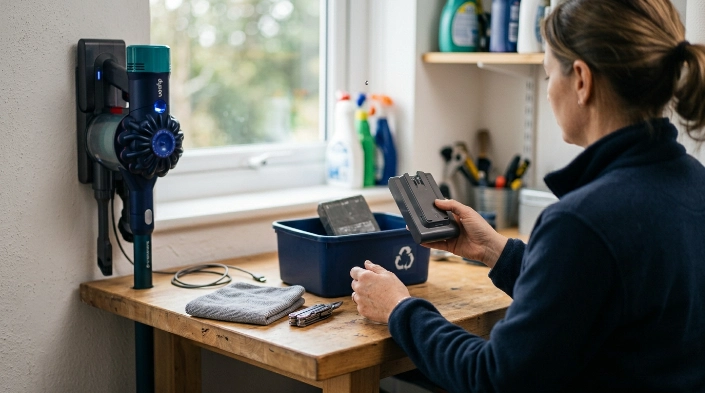
Replacement makes sense when battery performance remains poor after you have ruled out charging, airflow, brush, and operating-mode problems. A damaged battery should also be removed from service according to the manufacturer’s safety instructions.
Signs replacement may be justified
- Major runtime loss: A full charge now provides far less cleaning time than it once did.
- Repeated shutdowns: The vacuum stops during normal use despite a clean airflow path.
- Charging failure: The pack no longer reaches or maintains a normal charge.
- Abnormal heat: The battery becomes unusually hot under ordinary conditions.
- Physical damage: Swelling, cracks, leakage, or deformation mean you should stop using the pack.
If your vacuum has a removable battery, check the model number before ordering a replacement. Similar-looking packs can have different voltages, connectors, electronics, and compatibility requirements.
A sealed internal battery may require manufacturer service rather than a home repair. Do not open a lithium-ion battery pack to replace individual cells unless you are professionally qualified to do that work.
Dispose of the old battery safely
Do not place a lithium-ion vacuum battery in ordinary household trash or curbside recycling. The EPA’s used lithium-ion battery guidance recommends taking these batteries to appropriate battery or electronics recycling collection points.
The EPA also recommends protecting battery terminals during transport, such as with non-conductive tape, or individually bagging batteries. Follow local recycling rules as well.
Section Takeaway: Replace a cordless vacuum battery when persistent performance loss remains after basic troubleshooting, and remove any visibly damaged battery from service immediately.
Frequently Asked Questions
Why does my cordless vacuum battery die after only a few minutes?
Check whether you are using maximum suction, a powered attachment, or cleaning dense carpet. If the vacuum still lasts only a few minutes in normal mode after a full charge and complete maintenance check, battery deterioration or a charging fault becomes more likely.
Does max mode damage a cordless vacuum battery?
Using max mode does not automatically mean you are damaging the battery, but it demands much more power and shortens runtime per charge. Follow your manufacturer’s operating guidance and use maximum power when the cleaning job needs it.
Can a dirty filter make my cordless vacuum battery drain faster?
A dirty filter can restrict airflow and reduce cleaning performance. That may make the machine work under a less favorable load and cause you to clean longer, so filter maintenance should be part of any battery-runtime diagnosis.
Why does my vacuum say fully charged but die quickly?
The indicator can show that the battery reached its present full-charge level even if the aging pack no longer stores as much energy as it once did. First rule out max mode, clogs, charging problems, and brush resistance before replacing it.
Can cold weather make a cordless vacuum battery die faster?
Low temperatures can temporarily reduce lithium-ion battery performance, while prolonged extreme temperatures are not good storage conditions. Keep the vacuum and battery in the indoor temperature range recommended by its manufacturer.
Should I leave my cordless vacuum on the charger all the time?
Follow the instructions for your specific model because charging systems differ. Many modern vacuums manage charging electronically, but manufacturer guidance should take priority over a universal rule found online.
How do I know if my cordless vacuum needs a new battery?
A new battery becomes reasonable when runtime has dropped sharply, shutdowns keep happening, or charging remains unreliable after the vacuum has been cleaned and tested properly. Physical swelling, leakage, cracking, or abnormal heat requires immediate attention.
Final takeaway: When a cordless vacuum battery starts dying quickly, do not replace it immediately. Clean the vacuum, remove brush resistance, test normal mode after a full charge, protect the battery from temperature extremes, and compare its current runtime with its own past performance before deciding whether the pack has reached the end of its useful life.
