
Can You Use Winix Air Purifier Without Wifi: Essential Guide

Yes, you can absolutely use your Winix air purifier without Wi-Fi. Most Winix models are designed to function perfectly using their manual controls, offering effective air purification even without an internet connection. This guide will walk you through how to operate your Winix purifier manually and explore its capabilities when Wi-Fi isn’t an option.
Can You Use Winix Air Purifier Without Wifi? Your Essential Guide
Many modern appliances come with smart features, and air purifiers are no exception. This can lead to a common question: “Can you use Winix air purifier without Wi-Fi?” The good news is that the core function of an air purifier – cleaning your air – doesn’t require an internet connection. Winix understands this, and their devices are built with robust manual controls. This guide will demystify how to get the most out of your Winix air purifier, whether you’re connected or not. We’ll cover everything from basic operation to understanding its features, ensuring you breathe cleaner air with confidence.
Understanding Your Winix Air Purifier’s Core Functionality
Your Winix air purifier’s primary purpose is to remove airborne pollutants like dust, pollen, pet dander, and smoke. This is achieved through its multi-stage filtration system, which typically includes a pre-filter, an activated carbon filter, and a True HEPA filter. These filters work tirelessly to trap particles, regardless of whether the unit is connected to your home network. The effectiveness of these filters is paramount to clean air.

Manual Controls: Your Gateway to Clean Air
Every Winix air purifier comes equipped with intuitive manual controls directly on the unit. These buttons allow you to power the device on and off, adjust fan speeds, and activate special modes like PlasmaWave. You can easily select your desired settings to match your immediate air quality needs. Learning these controls is the first step to using your purifier effectively without Wi-Fi.
Powering On and Off
Locate the power button, usually a prominent icon on the control panel. A single press will turn your Winix air purifier on, and another press will shut it down. This straightforward operation ensures you have complete control over when your purifier is running. It’s a simple yet crucial function for daily use.
Adjusting Fan Speeds
Most Winix models offer several fan speed settings, often indicated by fan icons or speed levels (e.g., Low, Medium, High, Turbo). Cycle through these options using the dedicated fan speed button to find the perfect balance between purification power and noise level. Lower speeds are quieter for sleeping, while higher speeds tackle tougher air quality issues faster.
Utilizing Special Modes Manually
Special modes, like the often-discussed PlasmaWave feature, can typically be activated or deactivated directly from the control panel. This technology helps break down airborne pollutants at a molecular level. You can choose to enable or disable it based on your preference for its operation. Consult your specific model’s manual for exact button placement and functionality.
The Role of Filters in Wi-Fi-Independent Operation
The physical filters are the heart of your Winix air purifier’s performance, and their operation is entirely independent of Wi-Fi connectivity. The pre-filter captures larger particles, the activated carbon filter tackles odors and VOCs, and the True HEPA filter removes 99.97% of microscopic allergens and pollutants. Ensuring these filters are clean and replaced on schedule is vital for optimal air purification. For detailed filter information, visit the Winix Official Website.
Understanding Indicator Lights and Alerts
Even without Wi-Fi, your Winix air purifier communicates its status through various indicator lights. These lights can signal when it’s time to clean or replace filters, indicate the current air quality level (on some models), or show which mode is active. Pay attention to these visual cues; they are essential for maintaining your purifier’s performance and longevity.
Filter Replacement Indicators
A dedicated filter indicator light will illuminate when it’s time to replace your filters. This is a critical reminder to ensure your purifier continues to operate at peak efficiency. Ignoring these indicators can lead to reduced air purification effectiveness. Replacing filters promptly is a key part of maintenance.
Air Quality Indicators
Some advanced Winix models feature an air quality sensor and corresponding indicator lights that display the current level of pollutants in your room. These lights often use a color-coded system (e.g., blue for good, amber for fair, red for poor) to give you an immediate visual assessment of your air. This feature works perfectly without any Wi-Fi connection.
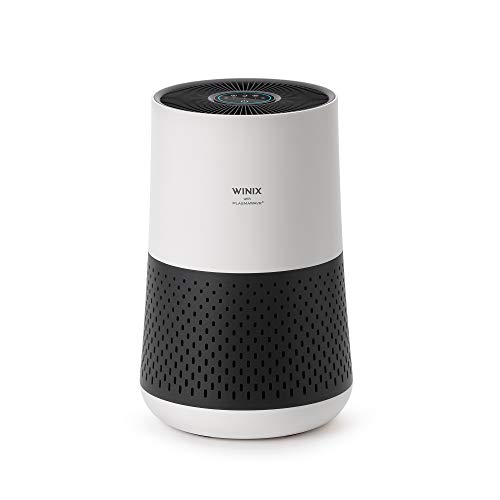
Can You Use Winix Air Purifier Without Wifi for Smart Features?
While you can use your Winix air purifier without Wi-Fi for its core purification functions, you will miss out on the remote control and advanced monitoring capabilities offered by the Winix SMART app. These smart features allow you to control settings, check air quality, and receive notifications from anywhere. However, they are entirely optional for the device to work effectively.
Troubleshooting Common Issues Without Wi-Fi
If you encounter any issues, troubleshooting without Wi-Fi is often simpler. Most problems can be resolved by checking the power source, ensuring filters are correctly installed, or performing a basic reset. Always refer to your specific model’s user manual for detailed troubleshooting steps. A well-maintained unit usually runs smoothly.
Power and Connectivity Problems
Ensure the unit is plugged into a working electrical outlet. Check the power cord for any visible damage. If the unit doesn’t turn on, try a different outlet to rule out a power supply issue. Simple checks can often resolve basic operational hiccups.
Filter Installation and Maintenance
Incorrectly installed filters can hinder performance or cause the unit to malfunction. Double-check that all filters are properly seated according to the instructions in your manual. Regular cleaning of the pre-filter and timely replacement of the HEPA and carbon filters are crucial.
When to Consider Wi-Fi Connectivity
Wi-Fi connectivity unlocks the full potential of your Winix air purifier, offering convenience and enhanced control. If you value the ability to adjust settings remotely, monitor air quality from afar, or integrate your purifier into a smart home ecosystem, then connecting to Wi-Fi is beneficial. It provides a layer of convenience for busy households.
Benefits of the Winix SMART App
The Winix SMART app provides a user-friendly interface for managing your air purifier. You can schedule operation times, monitor filter life, track historical air quality data, and even set up custom modes. These features are designed to enhance your user experience and ensure optimal air quality management. The app is available for both iOS and Android.
Smart Home Integration
For those with existing smart home setups, connecting your Winix air purifier can be a seamless addition. This allows for voice control through virtual assistants like Amazon Alexa or Google Assistant, and integration into automated routines. It’s a step towards a more connected and responsive living environment.
Can You Use Winix Air Purifier Without Wifi: A Comparative Look
| 🌀 Feature | 🚫 Without Wi-Fi | 🌐 With Wi-Fi (via Winix SMART App) |
|---|---|---|
| Basic Operation | ✅ Fully functional via manual controls | ✅ Fully functional via manual controls + app |
| Fan Speed Control | 🎛️ Adjust manually on the unit | 🎛️ Adjust manually or through the app |
| Mode Selection | 🔘 Select modes directly on the unit | 🔘 Select modes on unit + via app |
| Air Quality Monitoring | 🌡️ Visual indicators (on some models) | 📈 Real-time data, historical trends & alerts via app |
| Filter Life Tracking | 🔍 Manual checks or filter-change lights | 🔔 Live status + replacement reminders via app |
| Remote Control | 🚫 Not available | 📱 Control from anywhere |
| Scheduling | 🚫 Not available | ⏰ Create & manage schedules via app |
| Voice Control | 🚫 Not available | 🎙️ Works with Alexa/Google Home (smart integration) |
As the table illustrates, the core air purification capabilities remain intact whether you connect to Wi-Fi or not. The difference lies in the added convenience and advanced monitoring features.
Frequently Asked Questions About Using Winix Purifiers Without Wi-Fi
Do I need Wi-Fi for my Winix air purifier to clean the air?
No, you do not need Wi-Fi for your Winix air purifier to clean the air. Its primary function relies on its physical filters and fan, which operate perfectly using the manual controls on the unit.
Can I still change fan speeds without Wi-Fi?
Yes, you can absolutely change fan speeds without Wi-Fi. All Winix air purifiers have manual buttons on the control panel to adjust fan speed settings like Low, Medium, and High.
What happens if my Wi-Fi goes down? Will my Winix still work?
Yes, your Winix air purifier will continue to work. It will revert to operating solely on its manual controls, ensuring continuous air purification.
How do I know when to change filters if I don’t use Wi-Fi?
Your Winix air purifier has indicator lights on the unit that will alert you when it’s time to replace the filters. Always check your specific model’s manual for details on these indicators.
Is the PlasmaWave feature usable without Wi-Fi?
Yes, the PlasmaWave feature can be turned on or off using the manual controls on the air purifier itself, independent of Wi-Fi connectivity.
Can I still use voice commands if I don’t connect to Wi-Fi?
No, voice commands are only available when your Winix air purifier is connected to Wi-Fi and integrated with a compatible smart home assistant.
Conclusion: Breathe Easy, Connected or Not
In conclusion, the answer to “Can you use Winix air purifier without Wi-Fi?” is a resounding yes. Your Winix air purifier is a highly effective appliance that delivers clean air through its robust filtration system, all controllable via its intuitive manual interface. While Wi-Fi connectivity offers added convenience and smart features, it is by no means a prerequisite for achieving better air quality in your home. Whether you choose to connect or not, your Winix purifier is designed to serve you well, ensuring a healthier living environment. Focus on keeping those filters clean and enjoying the purified air you deserve.
