
Why Is My Robot Vacuum Spinning in Circles?

Quick Answer
A robot vacuum usually spins in circles because one drive wheel is restricted, a cliff or infrared sensor is dirty, the robot is misreading the floor, or its navigation system has become confused. Start by stopping the vacuum, checking both drive wheels, cleaning accessible sensors, and restarting it on a clear hard floor; Xiaomi’s robot-vacuum troubleshooting guidance recommends similar checks.
Most common causes
- Stuck drive wheel: Hair, thread, or grit can make one wheel turn slower than the other.
- Dirty sensors: Dust on cliff or navigation sensors can make the robot misread its surroundings.
- Difficult flooring: Dark rugs, reflective surfaces, deep carpet, or slippery flooring can confuse some models.
- Navigation glitch: A corrupted map, interrupted cleaning run, or temporary software problem can affect steering.
- Mechanical damage: A failing wheel motor, wheel module, bumper sensor, or navigation component may cause repeated circling.
Fastest test
- Clean the wheels and sensors, then test the robot in the middle of a clear, light-colored hard floor before resetting maps or replacing parts.
If your robot vacuum suddenly keeps turning around itself, the problem usually comes from movement or navigation rather than suction. I start with the simple mechanical checks because they can rule out several causes in minutes.
This 2026 guide explains why robot vacuums circle, how to identify the faulty area, and when the problem may need professional repair.
In This Guide
- Why Does My Robot Vacuum Keep Spinning in Circles?
- How Can I Tell What Is Causing the Circling?
- How Do I Fix a Robot Vacuum That Keeps Circling?
- Can Carpet or Dark Flooring Make a Robot Vacuum Spin?
- Can Mapping or Software Problems Cause Circling?
- When Does Circling Suggest a Hardware Failure?
- Robot Vacuum Spinning in Circles FAQ
Why Does My Robot Vacuum Keep Spinning in Circles?
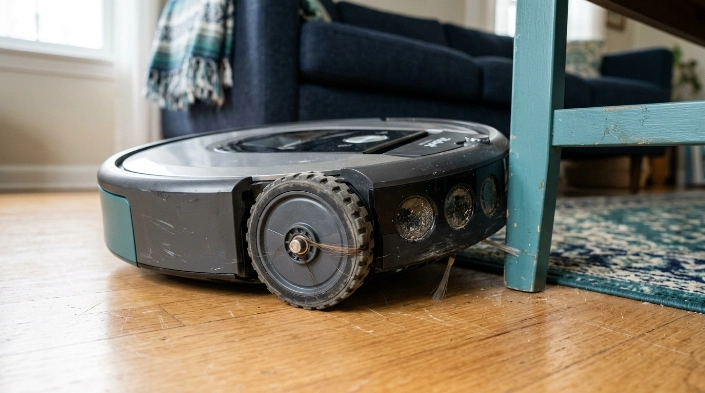
A robot vacuum keeps spinning when its two sides are no longer moving or navigating evenly. One wheel may lag behind, or the robot may incorrectly believe an obstacle or drop-off is beside it.
Definition: A robot-vacuum circling fault is repeated turning in one direction that prevents normal forward navigation or cleaning.
One drive wheel is stuck or moving slowly
Most robot vacuums steer by changing the speed or direction of their left and right drive wheels. If one wheel cannot rotate normally, the working wheel can push the machine around in a circle.
- Long hair can wind around a wheel axle.
- Thread and carpet fibers can enter narrow wheel gaps.
- Sticky residue can reduce tire grip.
- Small debris can restrict a spring-loaded wheel assembly.
iRobot’s support information also associates stuck side wheels with several movement errors and advises checking whether both wheels rotate freely. Its wheel troubleshooting guidance recommends inspecting the wheels for obstructions.
The cliff sensors are giving the wrong signal
Cliff sensors point toward the floor and help stop a robot from driving down stairs. Dirt, certain dark surfaces, or unusual floor conditions can sometimes make the robot behave as though a drop-off is nearby.
The result may look strange. The robot turns away, checks again, turns again, and appears trapped in a small circle.
- Wipe accessible cliff sensors with the method specified in your manual.
- Do not spray liquid directly into sensor openings.
- Test the robot away from stairs after cleaning.
iRobot specifically lists dirty cliff sensors, dark surfaces, and uneven flooring among possible causes of its drop-off detection error.
The bumper or obstacle system is stuck
A compressed bumper can make a robot think it is constantly touching furniture. Some models may repeatedly turn as they try to escape an obstacle that is not there.
Press the bumper gently at several points while the robot is off. It should move and return normally without feeling jammed.
Section Takeaway: Repeated circling usually means the robot is receiving uneven movement or navigation information. Wheels, cliff sensors, and the bumper are the best first checks.
How Can I Tell What Is Causing the Circling?
Watch exactly when and where the circling begins. The pattern often tells you more than the spinning itself.
| What You Notice | Likely Area to Check | Quick Test |
|---|---|---|
| Always turns toward the same side | Drive wheels | Compare wheel movement and resistance by hand |
| Circles only on a dark rug | Cliff sensors or surface detection | Test on a light, clear hard floor |
| Circles after hitting furniture | Bumper or obstacle sensor | Check that the bumper springs back freely |
| Behavior started after furniture was moved | Saved map or navigation | Run it in an open area and review the app map |
| Circles everywhere after cleaning | Wheel, sensor, or reassembly issue | Check that removed parts are seated correctly |
| Wheel sounds rough or does not spring normally | Wheel module or motor | Stop using it and inspect for damage |
I like testing on one clean, open section of hard flooring. That removes rugs, cords, chair legs, and room-map complexity from the diagnosis.
If the robot still traces the same tight circle there, concentrate on wheels, sensors, the bumper, and internal hardware.
How Do I Fix a Robot Vacuum That Keeps Circling?
Work from the easiest reversible fix toward the more disruptive steps. Do not factory-reset the vacuum before checking basic mechanical causes.
1. Stop and power down the robot
Pause the cleaning cycle and follow your model’s shutdown instructions. Remove it from the charging dock before handling the underside when the manual calls for that.
2. Inspect both drive wheels
- Turn each drive wheel by hand.
- Press each spring-loaded wheel inward and release it.
- Remove visible hair, thread, and fibers.
- Check the tread for sticky dirt.
- Compare how freely the left and right wheels move.
A major difference between the two sides is useful evidence. Do not force apart a sealed wheel module unless the manufacturer describes it as user-serviceable.
3. Check the caster or steering wheel
The small front caster should rotate and swivel without being packed with hair. iRobot’s care instructions show that debris around a caster wheel and axle should be removed as part of routine maintenance.
4. Clean the accessible sensors
Use a clean, dry microfiber cloth unless your manufacturer’s instructions specify another method. Pay particular attention to the downward-facing cliff sensors.
- Do not pour cleaner onto the robot.
- Do not push tools into optical openings.
- Do not cover cliff sensors as a permanent workaround.
5. Check the bumper and brushes
Make sure the bumper is not wedged with debris. Remove hair from side brushes that could drag against a wheel or the floor.
6. Restart and test on a simple surface
Place the robot in a clear area of level hard flooring. Start a normal cleaning cycle and watch its first minute of movement.
If it drives normally there, the vacuum itself may be fine. The original location, flooring, rug, threshold, or map may be triggering the behavior.
7. Check the app and software
Look for a wheel, cliff, bumper, navigation, or localization warning. Install manufacturer-approved firmware updates when one is available for your model.
Section Takeaway: Fix the physical causes first, then investigate maps and software. A factory reset should come late because it may erase useful maps and settings without repairing a stuck wheel.
Can Carpet or Dark Flooring Make a Robot Vacuum Spin?
Yes. Certain floor surfaces can affect traction or the information reaching a robot’s downward-facing sensors.
This does not happen to every model. Sensor design and software differ widely between manufacturers.
Dark or strongly patterned rugs
Some cliff-sensing systems can react differently to unusually dark flooring. A robot may retreat or turn repeatedly because it interprets the surface as unsafe.
Move the robot to a light-colored hard floor for comparison. If the circling disappears immediately, the rug or surface deserves closer attention.
High-pile carpet and loose fibers
- Deep fibers can increase wheel resistance.
- Loose threads may wind around axles.
- Thick transitions can lift part of the robot.
- Fringe can interfere with wheels or brushes.
A no-go zone or physical floor preparation is safer than forcing a robot through an area it repeatedly cannot navigate.
Slippery or contaminated flooring
Oil, cleaning-product residue, or a wet patch can reduce drive-wheel traction. One wheel may slip more than the other, changing the robot’s path.
Clean and dry the floor before retesting. Also wipe wheel treads according to the appliance manual.
Can Mapping or Software Problems Cause Circling?
Yes, especially when the wheels and sensors appear normal. Mapping robots must estimate where they are while reacting to walls, furniture, restricted zones, and their saved floor plan.
Test without map complexity first
Put the robot in a simple open room and start a basic cleaning run. If navigation becomes normal, review the saved map before assuming an electronic part has failed.
- Check for overlapping no-go zones.
- Look for a badly shifted room map.
- Confirm the robot is using the correct floor map.
- Check whether the dock was recently moved.
- Restart the robot and its app before deleting anything.
When should you remap?
Remapping makes sense when the displayed layout is clearly wrong or navigation changed after major furniture or dock movement. It should not be the first fix for a wheel that physically cannot turn.
A firmware restart or update can also resolve some temporary navigation errors. Xiaomi specifically includes restarting the device and updating software among its troubleshooting steps for continuous spinning.
Could the charging dock be involved?
The dock can matter when the strange behavior occurs mainly while the robot is trying to return home. Give the dock a clear approach path and keep its relevant signal or sensor surfaces clean.
Circling throughout an entire room is less likely to be explained by dock placement alone.
Section Takeaway: Mapping problems can cause repeated turns, but a consistent tight circle on every surface still points more strongly toward wheels, sensors, or related hardware.
When Does Circling Suggest a Hardware Failure?
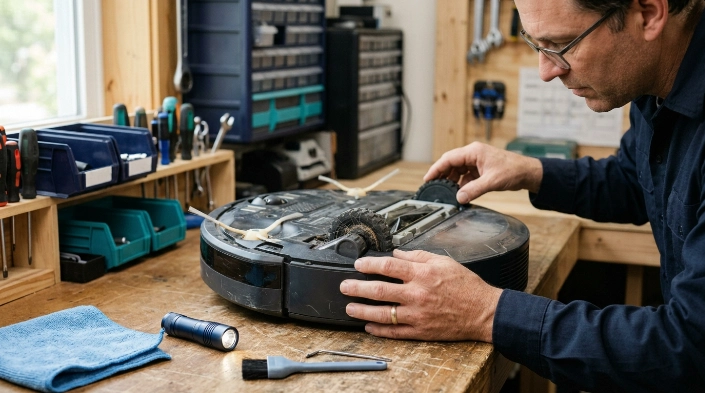
Suspect hardware when cleaning, restarting, changing surfaces, and checking the map do not change the behavior. Repeated mechanical symptoms are particularly important.
- One wheel will not turn: The wheel module or drive motor may be damaged.
- One side feels rough: A bearing, gear, axle, or internal wheel part may be restricted.
- The robot circles on every surface: Flooring becomes a less likely explanation.
- A sensor error returns immediately: Cleaning may not be enough.
- The bumper stays compressed: Its mechanism or sensor may need service.
- The vacuum was dropped or became wet: Internal inspection may be necessary.
Expert Alert: If troubleshooting requires opening a sealed wheel motor, battery compartment, control board, LiDAR module, wiring, or another electrical assembly, use the manufacturer’s service channel or a qualified appliance technician instead of attempting an unsupported repair.
Stop using the robot if the battery becomes swollen, leaks, smells unusual, or becomes abnormally hot. Those are not normal navigation faults.
For ordinary dirt handling, remember that vacuuming can disturb settled dust. The U.S. EPA’s indoor particulate matter guidance recommends regular cleaning while noting that activities such as vacuuming can temporarily stir settled dust into the air.
If the machine is still under warranty, avoid dismantling components beyond the maintenance steps approved for your model. Record the error message and a short video of the circling before contacting support.
Robot Vacuum Spinning in Circles FAQ
Why does my robot vacuum only turn in one direction?
The most likely starting point is the drive wheel on the side toward which the robot keeps turning. Compare both wheels for tangled hair, debris, restricted movement, and unequal resistance before checking sensors and electronics.
Why does my robot vacuum spin after I cleaned it?
A wheel, brush, bin, mop attachment, or other removable part may not be seated correctly. Recheck anything you removed and confirm that both drive wheels and the caster can move freely.
Can dirty sensors make a robot vacuum go in circles?
Yes. Dirty cliff, obstacle, or other navigation sensors can contribute to unusual movement on compatible models. Clean only the accessible sensor areas using the procedure recommended by the manufacturer.
Why does my robot vacuum circle only on black carpet?
Some robots can misinterpret very dark surfaces through their drop-detection system. Test the same robot on a lighter, level surface to see whether the behavior follows the carpet rather than the machine.
Should I reset my robot vacuum if it keeps spinning?
Restarting is reasonable, but a full factory reset should come later. Check wheels, sensors, bumpers, attachments, flooring, app errors, and firmware first because a reset cannot repair a mechanical obstruction.
Can a bad wheel motor cause a robot vacuum to spin?
Yes. If one drive wheel receives little or no power while the opposite wheel runs normally, the working side can drive the robot in a circle. Persistent wheel failure usually needs model-specific repair or replacement.
How do I know if my robot vacuum needs professional repair?
Seek service when one wheel remains immobile, sensor errors return after proper cleaning, the robot circles on every surface, internal parts sound damaged, or troubleshooting would require opening sealed electrical or drive components.
Final takeaway: Start with the wheels, cliff sensors, caster, and bumper before blaming the navigation computer. Test the robot on a clean, open hard floor after each change so you know which fix made the difference.
If the same tight circle continues after those checks, save the error code and contact the manufacturer’s support team with your model number and a short video of the behavior.
